Cashing out USDT or USDC in Nigeria means converting a supported stablecoin balance into naira and sending the naira payout to a Nigerian bank account. A complete off-ramp has three stages: confirm the asset and network, review the conversion quote and payout terms, then verify that the bank credit arrived.
For walllet.com, the off-ramp fee is 0.5% of the amount being cashed out. This fee is separate from the USD/NGN exchange rate shown in the cash-out quote. The final naira amount therefore depends on both the 0.5% off-ramp fee and the executable exchange rate available when you confirm the transaction. Limits and processing times may also vary by account and route.
Before you cash out
Do not begin with the rate. First confirm that the full route works from your current balance to your bank account. You need:
An account with a cash-out route currently available to Nigerian users.
USDT, USDC or another balance supported by that exact cash-out route.
The stablecoin on a blockchain network the provider accepts.
A Nigerian bank account that the provider permits you to use.
Any transaction records requested for review, such as an invoice, transaction hash or payment reference. This is separate from KYC.
Enough balance to cover the amount and every disclosed fee.
If you received the stablecoin from a client, keep the invoice, client details and transaction hash. The blockchain record proves what moved onchain; the invoice and client records explain why you received it.
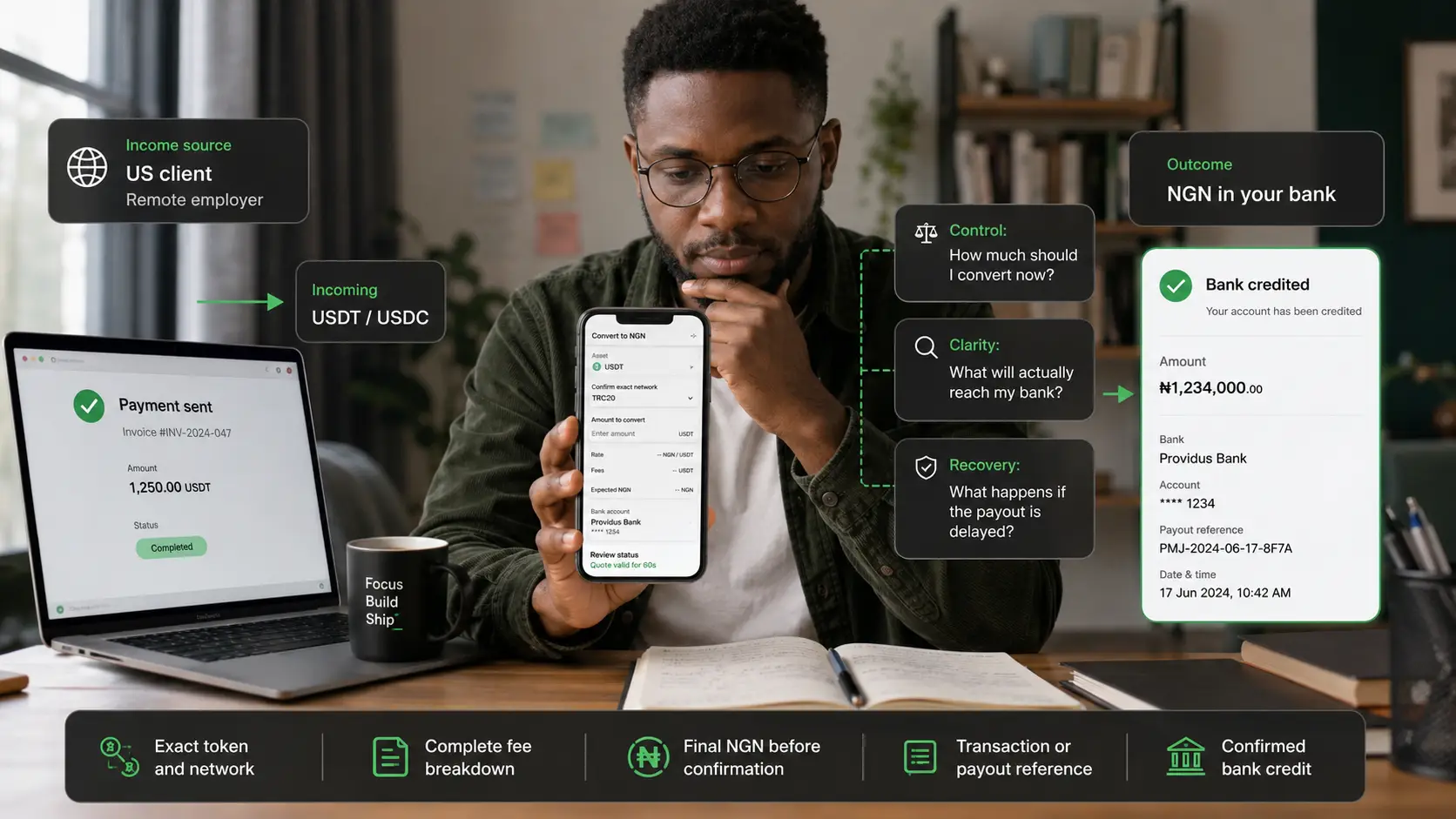
Use the walllet.com stablecoin payment checklist for freelancers if you have not yet verified the incoming payment.
What is an off-ramp?
An off-ramp is a service that converts a digital asset into fiat money that can be delivered through a normal payment route. In this guide, the route is:
USDT or USDC balance → conversion quote → NGN payout → Nigerian bank account
An off-ramp is not the same as a wallet. A self-custody wallet lets you control supported digital assets and approve transactions. The off-ramp adds a provider-managed conversion and fiat payout layer. Some providers require KYC for this service. walllet.com does not require a separate KYC step for its available off-ramp flow; KYC applies when opening an eligible walllet.com IBAN or receiving account. Limits, transaction reviews and banking availability can still affect a cash-out.
Nigeria’s Investments and Securities Act 2025 places virtual and digital assets within the country’s securities framework. This does not make every app, exchange or cash-out route approved. Check the operator, partner, eligibility and current terms before moving money.
How to cash out USDT or USDC to a Nigerian bank account
The exact button names differ by product. The checks should stay the same.
1. Confirm the token and network
“I have USDT” is not a complete route. USDT and USDC exist on multiple blockchains. Your cash-out provider must accept the exact combination you hold:
Token: USDT or USDC
Network: the exact blockchain shown in the sending wallet
Token version or contract: when the provider distinguishes native and bridged assets
Deposit minimum: if one applies
Required memo or tag: if the deposit route uses one
Do not send USDT on Tron to an Ethereum-only deposit address. Do not send USDC on Base to a route that accepts only USDC on another network. A matching token symbol does not make two networks compatible.
If the route is unclear, compare the best networks for sending USDT or USDC before moving the balance.
2. Check whether your balance is already inside the cash-out app
There are two possible starting points.
The balance is already in the app. Open the available convert, withdraw or cash-out flow. Confirm that the displayed balance is eligible for a naira payout.
The balance is in another wallet or exchange. Copy the deposit details from the current cash-out screen. Match the token and network on both sides, then send a small test amount when the route is new or the amount is meaningful.
Never copy a deposit address from an old screenshot, chat message or transaction history. Open the current deposit screen and verify the full address.
3. Add and verify the Nigerian bank account
Enter the bank name and account number exactly as requested. Check the account name returned by the provider before continuing.
Use only a bank account permitted by the provider’s terms. A name mismatch, unsupported bank, incorrect account number or third-party account can cause rejection, review or misdirected funds.
The Nigeria Inter-Bank Settlement System describes NIBSS Instant Payment as a real-time account-number-based transfer platform. That describes the bank-transfer rail, not the entire off-ramp. Conversion, compliance review, provider processing and bank availability can still affect the time between confirming a cash-out and receiving the credit.
4. Enter the amount you want to convert
Convert the amount required for local expenses rather than assuming the entire balance must move at once. For a freelancer, that decision may separate:
naira needed for rent, payroll or local bills;
dollar-linked value reserved for future business costs;
money needed for international subscriptions;
an emergency buffer;
funds that should remain untouched until records or tax treatment are clear.
This is a cash-flow decision, not a prediction about the future USD/NGN rate.
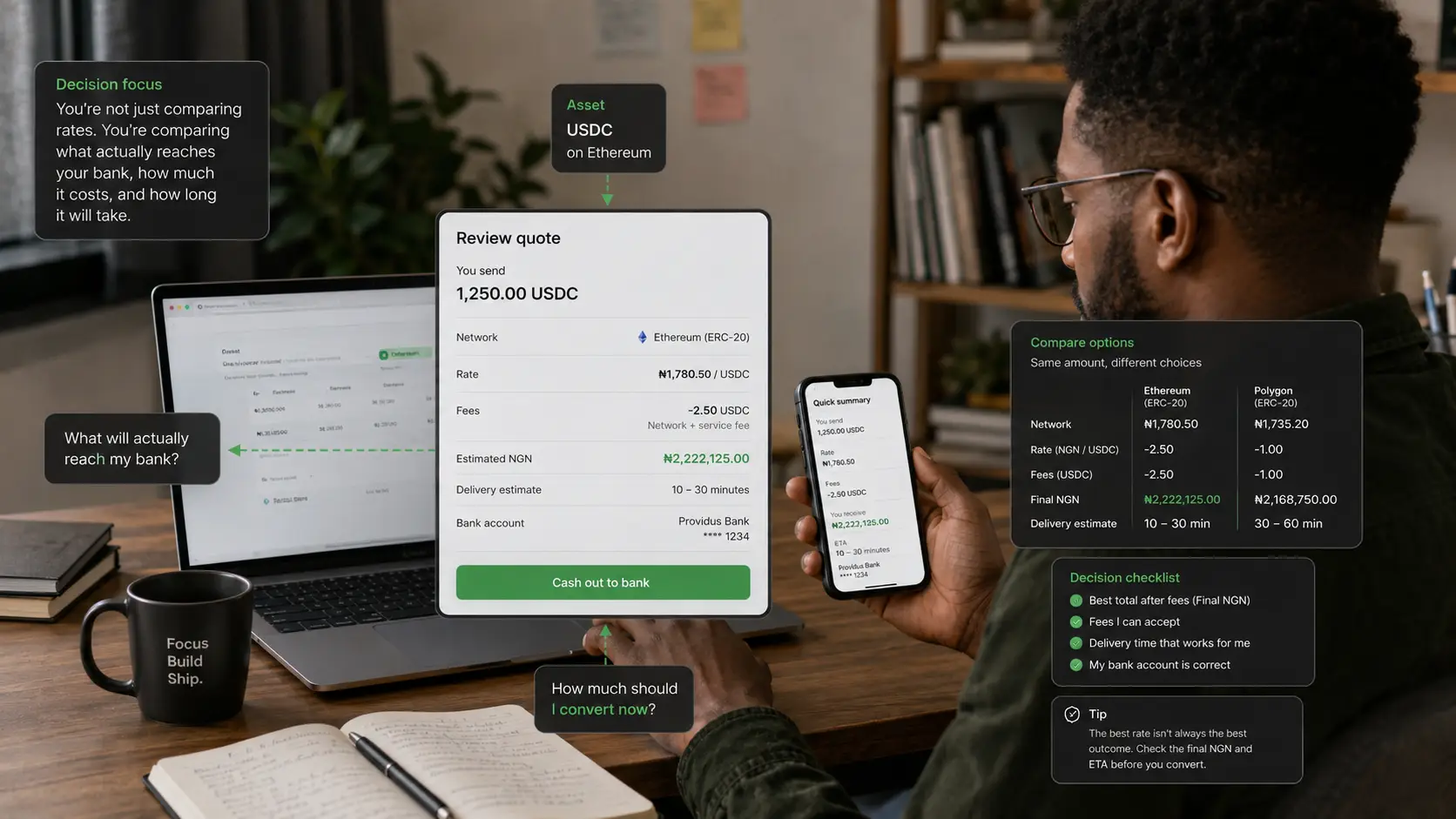
5. Review the complete quote
Do not confirm from the headline rate alone. The screen should make these fields clear:
Quote field | What to check |
|---|---|
Source amount | The exact USDT, USDC or dollar-linked amount being converted |
Executable rate | The rate applied to this transaction, not a marketing rate |
Conversion fee or spread | Any explicit fee and any difference built into the rate |
Network or service fee | Any cost for moving or processing the asset |
Bank payout fee | Any fixed or percentage charge for the NGN transfer |
Final NGN amount | The naira expected to reach the bank account |
Quote validity | How long the displayed rate remains valid |
Expected delivery | The provider’s current estimate, including any relevant conditions |
Limits | Minimum, maximum and remaining account or transaction limits |
For walllet.com, keep the two main pricing components separate:
Off-ramp fee: 0.5%
USD/NGN exchange rate: the executable rate shown in the quote
The exchange rate is not the off-ramp fee, and the 0.5% fee should not be described as an FX or conversion rate.
Use this formula:
Final usable NGN = amount eligible for conversion × executable rate − disclosed conversion, service and payout costs
walllet.com off-ramp fee = cash-out amount × 0.5%
Final NGN depends on the amount after the applicable 0.5% off-ramp fee and the executable USD/NGN exchange rate shown in the quote.
If you must first send funds from another wallet, include the withdrawal and blockchain costs in the total route:
Total route cost = sending-platform withdrawal fee + network fee + conversion cost + bank payout fee
The cheapest-looking network or highest-looking rate can still produce less usable naira after the other costs.
6. Confirm once and save the reference
Check the token, amount, rate, final naira, bank name, account number and account name one final time. Then confirm the cash-out. Save:
cash-out reference;
source amount and asset;
displayed rate;
every fee;
expected NGN amount;
bank destination;
date and time;
transaction hash, if an onchain transfer was involved;
final bank credit record.
These records help with bookkeeping, client-income reconciliation, tax work and support escalation.
7. Verify the bank credit
Do not treat “submitted” as “paid.” The provider status and the bank account should agree:
Submitted: the request exists but processing may not have started.
Processing or under review: the provider is still handling the conversion, compliance or payout.
Completed: the provider says the payout was sent.
Failed or reversed: the request did not complete and the source balance or refund needs to be checked.
Credited: the expected naira is visible and usable in the destination bank account.
If the provider says completed but the bank account has not been credited, keep the reference and contact support before starting another cash-out.
How cash-out works with walllet.com
walllet.com is designed to connect global income, dollar-linked holding and local use in one workflow. Where cash-out is available to an eligible account, the intended route is:
Receive supported income or stablecoins → choose the amount to cash out → review the 0.5% off-ramp fee, USD/NGN exchange rate, final NGN amount and delivery estimate → confirm → receive naira in a Nigerian bank account
walllet.com charges a 0.5% off-ramp fee. The USD/NGN exchange rate is separate from this fee and is shown as part of the cash-out quote. Before confirming, check both the 0.5% fee and the executable exchange rate to understand how much naira you will receive.
The stablecoin or crypto balance and the fiat payout are different layers:
You control supported self-custodial assets and approve crypto transactions from your device.
Regulated service providers handle applicable identity checks, conversion, fiat transfer and compliance processes.
Availability, supported assets, networks, exchange rates, limits and payout timing can depend on the current account and route. The walllet.com off-ramp fee is 0.5%.
Use only the cash-out option displayed in the current walllet.com account. Do not rely on an old screenshot, article or quoted rate. If the option is not shown, the route is not available to that account at that time.
The walllet.com guide to receiving international payments from US, UK and EU clients explains the step before cash-out. The walllet.com IBAN account guide explains how eligible receiving details and the self-custody wallet layer differ.
What Happens After You Request a Cash Out?
Your cash out request can move through different stages. Each status means something different:
Pending
Your request has been received and is waiting to be processed. At this stage:
Your request is registered
No further action is usually required
Processing
Your cash out is being processed through the payment route. The exact arrival time depends on:
payment provider processing
banking rails
destination bank
Completed
Your payment provider has confirmed completion. If you don't see the funds immediately, check with your bank first.
Refunded
The transfer could not be completed and the funds were returned to your walllet balance. Before trying again:
verify your bank details
confirm your account information
check whether your payment route is supported
How to verify walllet.com before your first cash-out
Trust a cash-out route by checking what you can verify, not by relying on a user count, rating, testimonial or speed claim without a clear source.
Evidence available now
walllet.com has a dated public education trail covering the main stages around a stablecoin cash-out:
guidance on checking a transaction on a block explorer, published March 29, 2026;
guidance on choosing a network for USDT or USDC, published April 13, 2026;
a stablecoin payment checklist, published June 15, 2026; and
a guide to receiving payments from US, UK and EU clients, published July 22, 2026.
This publication history shows that the receive, verification, network and cash-out journey is being documented over time. It does not, by itself, prove that a particular cash-out route is live for your account or establish transaction volume, success rate, repeat use, user satisfaction or support performance.
What the public record does not prove
This guide does not rely on a walllet.com user count, app rating, testimonial, cash-out volume, completion rate, repeat-use rate, support-response time or “instant” payout claim. Those claims require a dated source, a defined measurement method and, for customer stories, permission to publish.
For the current transaction, use the evidence visible to you: whether the cash-out control appears in your account, which token and network it accepts, the complete quote, the payout destination, the reference number, the status trail and the final bank credit.
A safer first-use test
Before relying on walllet.com for a recurring income route:
Confirm that cash-out is shown inside your current account.
Read the eligibility, supported-asset, network and bank-account conditions.
Review the final NGN amount and every disclosed cost before confirming.
Use a small test when a new external-wallet transfer is required.
Save the transaction hash, cash-out reference and bank credit.
Use only the support channel linked from the current product or official help centre.
Increase the amount only after the complete route has worked as expected.
This test proves that the route worked for that transaction. It does not guarantee that future availability, rates, fees, limits, review requirements or delivery times will remain the same.
If you want to see whether a cash-out route is currently available to your account, open walllet.com and check the supported asset, network, quote, limits and payout terms before moving funds:
Check your available cash-out route →
Which cash-out route should you use?
Choose a route by control, total cost, documentation and failure handling, not by rate alone.
Route | Stronger fit | Main checks | Main risk |
|---|---|---|---|
Integrated off-ramp | A clear app-to-bank flow with one quote and support path | Eligibility, token, network, final NGN, limits, provider | Provider availability, review or payout delay |
Centralised exchange withdrawal | Users already operating on a supported exchange | Exchange status, deposit network, NGN withdrawal support, KYC | Custody, account restriction, route changes |
P2P marketplace | Experienced users who understand escrow and counterparty controls | Platform status, escrow, verified receipt, counterparty history, bank risk | Fake alerts, disputes, tainted funds, account restrictions |
Broker or OTC desk | Larger amounts needing documented execution and support | Registration, legal entity, quote, settlement terms, source of funds | Counterparty and compliance risk |
Avoid informal WhatsApp or Telegram dealers whose identity, registration, payment source and dispute process cannot be verified. A slightly better rate does not compensate for an untraceable counterparty or a frozen bank account.
Common cash-out mistakes
Choosing the network by fee alone
A cheap transfer is expensive if the destination cannot accept it. Match the token, network and deposit instructions first.
Sending the full amount before testing a new route
Use a small test transfer when moving funds from another wallet to a new deposit route. Confirm that the deposit is credited before sending the balance.
Comparing only the displayed exchange rate
Compare the final naira amount after every cost. A better headline rate may hide a larger spread or payout fee.
Using an account with a different name
Do not assume third-party bank accounts are allowed. Follow the provider’s account-name and beneficiary rules.
Treating a screenshot as payment proof
For onchain funds, verify the transaction hash using the correct block explorer. The walllet.com guide to reading a crypto transaction on a block explorer shows what to check.
Repeating a delayed cash-out
A second request can create two payouts or lock more balance. Check the first reference and speak to support before retrying.
Ignoring source-of-funds records
Keep the contract, invoice, payer identity, transaction hash and related statement. “Freelance payment” without records may not explain a large or unusual transaction.
What to do if the naira payout is delayed
Identify the exact stage before taking action.
Check the provider status: submitted, processing, under review, completed, failed or reversed.
Confirm the bank details and expected NGN amount.
Check whether the source balance was deducted.
If an onchain transfer preceded the cash-out, verify the transaction hash, asset, network, address and status.
Compare the current time with the delivery estimate shown when you confirmed.
Open one support case with the cash-out reference, amount, asset, date, bank, account name and screenshots of the relevant statuses.
If compliance documents are requested, submit readable, consistent records through the official channel.
Do not send a second transaction until the first one is resolved or clearly reversed.
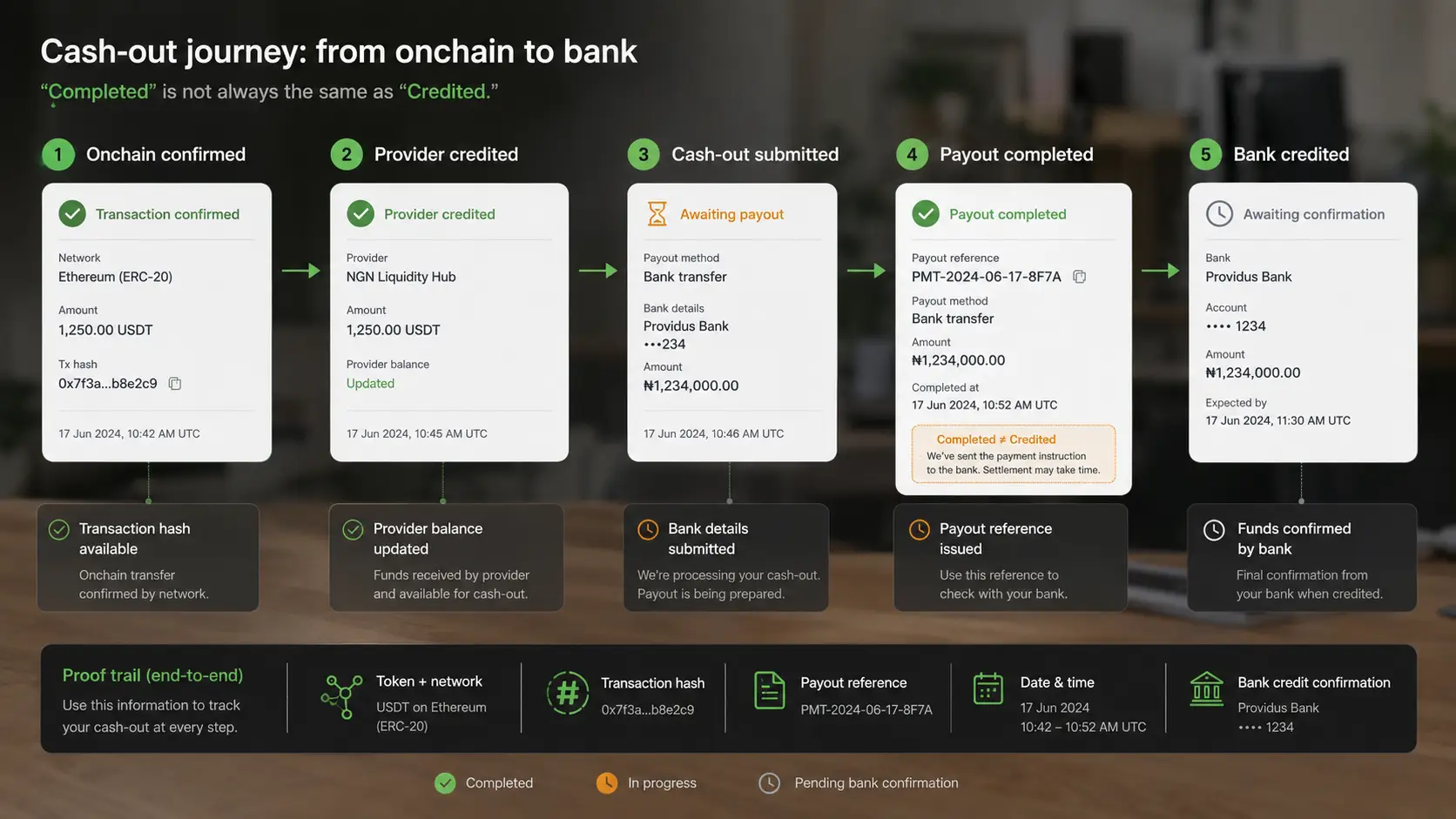
If the blockchain transaction succeeded but the app balance does not show, use the guide to fixing a crypto wallet balance that is not showing. Blockchain confirmation and provider credit are separate events.
A 60-second cash-out checklist
Before confirming, answer yes to every relevant question:
Is this the exact stablecoin and network the route supports?
Is the balance available, confirmed and above any minimum?
Is my account verified for this transaction?
Is the destination bank account permitted and correctly named?
Can I see the executable rate?
Can I see every fee or deduction?
Can I see the final NGN amount?
Can I see an expected delivery time or the factors that affect it?
Do I understand the limits and review conditions?
Have I saved the invoice and transaction record?
If this is a new route, has a small test succeeded?
Do I know the official support channel if the payout is delayed?
The transaction is ready only when the route, quote, destination and records are clear.
Open walllet.com to check your current eligibility. If cash-out is available, review the complete quote and bank destination before confirming:
Check cash-out availability in walllet.com →
Why Can Cash Outs Take Longer Sometimes?
A delay does not always mean your funds are lost. Possible reasons include: Payment provider processing time, banking delays, network issues, additional verification requirements.
walllet shows the transaction status so you know where your request stands.
