The best network for USDT or USDC is one that both endpoints explicitly support for the exact token version, with an acceptable total cost and a clear way to verify receipt. Choose from those compatible routes before comparing fees. A low advertised gas fee cannot compensate for an unsupported deposit, an unwanted bridge or a token your next service cannot use.
Network selection is separate from choosing a stablecoin. If you have not decided which asset fits the payment, the USDT, USDC and DAI comparison covers that decision. This guide starts with an agreed asset and determines which chain and token version the two endpoints can use. Once that compatible set is established, use the stablecoin transfer-cost workflow for a detailed fee comparison and sending checklist.
Explore walllet.com’s wallet information before selecting a receiving network.
Issuer documentation and technical sources checked: 20 October 2026. No universal cheapest chain, live gas quote, exchange deposit guarantee or investment return is claimed. Provider fees and supported routes must be read from the actual transaction you can execute.

Short Answer: Which Network Should You Choose?
Situation | Better decision |
|---|---|
Both sides explicitly support the same low-cost network | Usually use that direct route |
Recipient supports only one network | Use the supported network even if another network has lower gas |
Cheapest network would require a bridge after receiving | Compare the full bridge and recovery risk before choosing it |
You need USDT specifically | Verify the network against Tether’s current supported-protocol list |
You need native USDC | Verify the network against Circle’s current supported-network list |
The receiving service does not clearly list the token/network pair | Do not send until support is confirmed |
USDT on Tron, USDT on Ethereum, and USDT on Polygon move on different rails. The same is true for USDC on Base, Arbitrum, Polygon, or Ethereum. A cheap transfer is not useful if the sender cannot use that network, the destination cannot credit it, the payment is hard to verify, or you immediately need another costly move after the funds arrive.

Start at the destination
Open the recipient’s current receiving instructions before asking the sender to select a network. Record the exact asset, chain and destination. For a platform deposit, include the account’s minimum, required confirmations and any extra field the platform specifies.
Then inspect the sender’s available withdrawal methods. A common route exists only if both sides support the same combination. If the destination accepts one version and the sender offers another, resolve the mismatch before sending. Similar asset names or identical-looking addresses do not establish compatibility.
For externally owned accounts, familiar address patterns can appear across multiple EVM networks. That does not merge the network states. The same-address explanation covers why the address alone is incomplete receiving information.
Check issuer identity separately from endpoint support
Issuer documentation helps establish what token you are looking at. It does not determine what your exchange or payout provider will credit to your account.
Circle’s USDC contract directory lists native USDC identifiers by network, including Ethereum, Base, Arbitrum, Polygon PoS and Solana. Tether’s supported-protocol page identifies USD₮ implementations including Ethereum, Tron and Solana. Use the relevant issuer entry to check the exact asset; do not treat this short list as every available network.
Question | Source to inspect | What it establishes |
|---|---|---|
Is this the issuer’s token? | Issuer protocol or contract directory | Asset identity on the stated network |
Can the sender withdraw it? | Sender’s current withdrawal screen and terms | An available sending method for that account |
Can the destination credit it? | Recipient’s deposit screen and terms | The accepted token/network pair and conditions |
Can it be used afterward? | Next app, exchange or payout service | Whether another operation is necessary |
What happens if it fails? | Each provider’s official support documentation | The process for investigating that operation |
A bridged version, wrapped version or token with a familiar ticker needs its own identification check. A symbol is a label, not a complete asset specification. Never copy a token contract address into the recipient field unless the receiving instructions explicitly identify that contract as the intended destination.
Compare network choices by the job
Use the destination requirement to narrow the options. If a recipient requires native USDC on Base and the sender supports it, compare that direct transfer with any proposed alternative that needs extra operations. If a service accepts USDT only through a specified network, another cheap network is not an eligible substitute.
For a wallet-to-wallet payment, ask what the recipient intends to do next. Holding on the receiving network, using an app there and moving to an exchange can each produce different requirements. A route that deposits successfully may still leave another transfer to complete before the money serves its purpose.
This is why a static chain ranking is weak guidance. The ranking omits the account, token version, sending platform and next action. A useful route record names all of them and attaches the date checked.
If you are receiving client income, use the full How to Receive USDT or USDC Safely checklist before sharing an address. If you are setting up a Nigeria-focused freelance payment workflow, read Best Crypto Wallet for Freelancers in Nigeria before deciding which network to give a client.
And if you are still asking why stablecoins are being used for payments in the first place, read Why Stablecoins Are Becoming the Default Payment Asset in Crypto.
Which network is best for your USDT or USDC route in 2026?
There is no universal best network for USDT or USDC. The better route depends on what the sender can use, what the destination supports, how much the full route costs, and what you need to do after the funds arrive.

For routine USDT transfers, Tron is often a practical option when both sides support TRC20. For USDC, Base or Arbitrum can be strong low-cost options when the receiving wallet or app already supports those networks. Ethereum still matters when the destination explicitly requires Ethereum mainnet or when the next step happens there.
The useful question is not:
Which chain is cheapest?
It is:
Which supported route gets the right token to the right destination, gives me usable proof, and still works for my next step?
Network | Often a stronger fit for | Why people use it | Main route question |
|---|
Tron | Routine USDT transfers | Common USDT payment and transfer route | Can both sender and recipient use TRC20? |
Ethereum | Mainnet-required USDT or USDC flows | Broad Ethereum ecosystem support | Does the destination explicitly require Ethereum mainnet? |
Polygon | Low-cost stablecoin transfers where supported | Lower-cost EVM-style movement | Does the destination support this exact token on Polygon? |
Base | USDC app and onchain flows | Native USDC support and low-cost Ethereum-style apps | Does the recipient support USDC on Base, and what happens next? |
Arbitrum | USDC and DeFi-oriented routes | Strong Ethereum L2 app ecosystem | Does the app expect native USDC or another version? |
The best network is the one that works across the full route. Cheap is useless if the sender cannot use it, the recipient cannot credit it, or you immediately need another expensive move after arrival.

Count all charges once
Distinguish the network execution fee from the fee a platform charges for a withdrawal. Also identify any later receiving, swapping, bridging or payout cost. Some quotes combine costs; others deduct them separately.
The Ethereum gas documentation explains network gas and the ETH fee model. A platform’s withdrawal charge is its own product term. Do not substitute a gas tracker reading for the amount the withdrawal screen will deduct.
For a route ending in the same stablecoin, compare the amount available at the intended destination. For a route ending in bank currency, compare the final bank amount. Keep the start and endpoint identical across the options.
Check whether walllet.com’s current supported setup fits your intended token and network.
A fictional comparison that includes the next step
Suppose you begin with 1,000 units of a token. Route A deducts 1 unit for the first move but requires an additional operation costing 5 units before the destination can use the balance. Route B deducts 3 units and reaches the intended destination directly. Under these invented assumptions, A leaves 994 units and B leaves 997.
The example is arithmetic, not a current quote or a prediction that one chain is cheaper. It shows why the first fee is an incomplete comparison. If either quoted amount already includes another deduction, do not subtract it a second time.
Record the quote timestamp, expiry conditions, fees included and fees collected separately. If the final operation cannot yet be quoted, the comparison is incomplete. That does not require guessing a number; choose another route whose necessary steps you can establish.
Is Base or Arbitrum better for USDC?
Base and Arbitrum can be strong routes for USDC when the receiving app or next step already lives on those networks.
That is not because USDC is automatically better than USDT. It is because native support, app integration, liquidity, and the next action after receipt can make USDC the cleaner route.
Base can make sense when:
The recipient supports native USDC on Base.
The app or wallet already works on Base.
You want a low-cost Ethereum-compatible route.
Your next step happens inside the Base ecosystem.
Arbitrum can make sense when:
The recipient supports USDC on Arbitrum.
You are moving into an Arbitrum-based app or DeFi flow.
You have confirmed whether the destination expects native USDC or another token version.
You have checked the gas requirement before the transfer.
Do not choose Base or Arbitrum only because the fee looks low. Confirm the complete route first.
Which network is cheapest for stablecoin transfers?
The cheapest first transaction is not always the cheapest route.

For USDT, Tron is often a practical low-cost option when TRC20 is supported.
For USDC, Base, Arbitrum, or Polygon can offer low-cost routes when the receiving wallet or app supports the exact token and network.
Ethereum mainnet can cost more, but it still makes sense when the destination explicitly requires it or when moving to another network would add more friction, fees, or risk.
Before comparing fees, ask:
What will this route cost from sender to usable money?
A route with a cheap first transfer can still become expensive if you need to bridge, swap, move to another wallet, or off-ramp through a different network after the funds arrive.
Check timing at both the network and provider
A transaction being included on a blockchain is one event. A receiving platform recognizing enough confirmations and crediting your account is another. Use the destination’s stated process to decide what record demonstrates usable receipt.
Keep the network transaction hash and any platform transfer reference. Match the exact token, destination and amount in the transaction record before treating a screenshot as evidence. Ethereum’s transaction documentation explains the network-level record and lifecycle; it does not certify a third-party platform’s ledger.
For an urgent payment, include the time needed for the sender to process the withdrawal and the recipient to credit it. A claim about network speed alone leaves those stages unanswered. Avoid promising an arrival time to a client from a historical test or an unrelated provider example.
Avoid an unnecessary bridge
A bridge introduces another operation. Its output asset, supported destination, fees and trust assumptions need a separate review. The Ethereum bridge introduction explains the additional mechanisms and risks involved in moving between networks.
Do not send first and assume that bridging will fix a mismatch later. A receiving platform may not offer an outgoing route for an unsupported deposit, and a wallet may need a different fee arrangement before another transaction is possible.
Where an app asks for a token allowance as part of a swap or bridge, treat the permission as an additional decision. Inspect the named contract, amount requested and intended operation before approving. Agreement on a receiving network does not by itself justify a separate permission request.
Is USDT or USDC better for freelancer payments?
Neither is always better.
USDT may be the more practical choice when the client already sends it, the agreed network is supported, the transfer cost works, and your next step can use the funds without unnecessary conversion.
USDC may be the better route when the sender supports it and your receiving or next-step workflow already uses ecosystems such as Base, Ethereum, or other USDC-supported apps.
For freelancers, the decision should follow the full route:
Sender → stablecoin → network → receiving wallet → proof → next step
Choose the route that works end to end, not the logo that looks more familiar.
Three Practical Examples
Example 1: The Client Can Send USDT on Tron and Your Cash-Out Route Accepts USDT on Tron
A direct USDT-TRC20 transfer may be simpler than receiving on another network and bridging afterward.
The decision should still be based on the sender’s actual withdrawal quote and the receiving platform’s current support.
Example 2: The Client Can Send USDC on Base, but Your Cash-Out Provider Does Not Accept Base
The low first-hop fee is not enough to make Base the better route.
If you must bridge the USDC before cashing out, include the bridge cost, additional transaction risk and additional steps in the comparison.
Example 3: Both Sides Support USDC on Arbitrum
A direct USDC-on-Arbitrum route avoids an unnecessary bridge. Verify the native token contract and recipient support before sending.
Run a bounded test and preserve its result
For a new supported route, a small test can help you inspect the actual behavior. It must satisfy minimum-deposit and fee conditions. Verify the final credited asset, amount and availability before using the same setup for a larger payment.
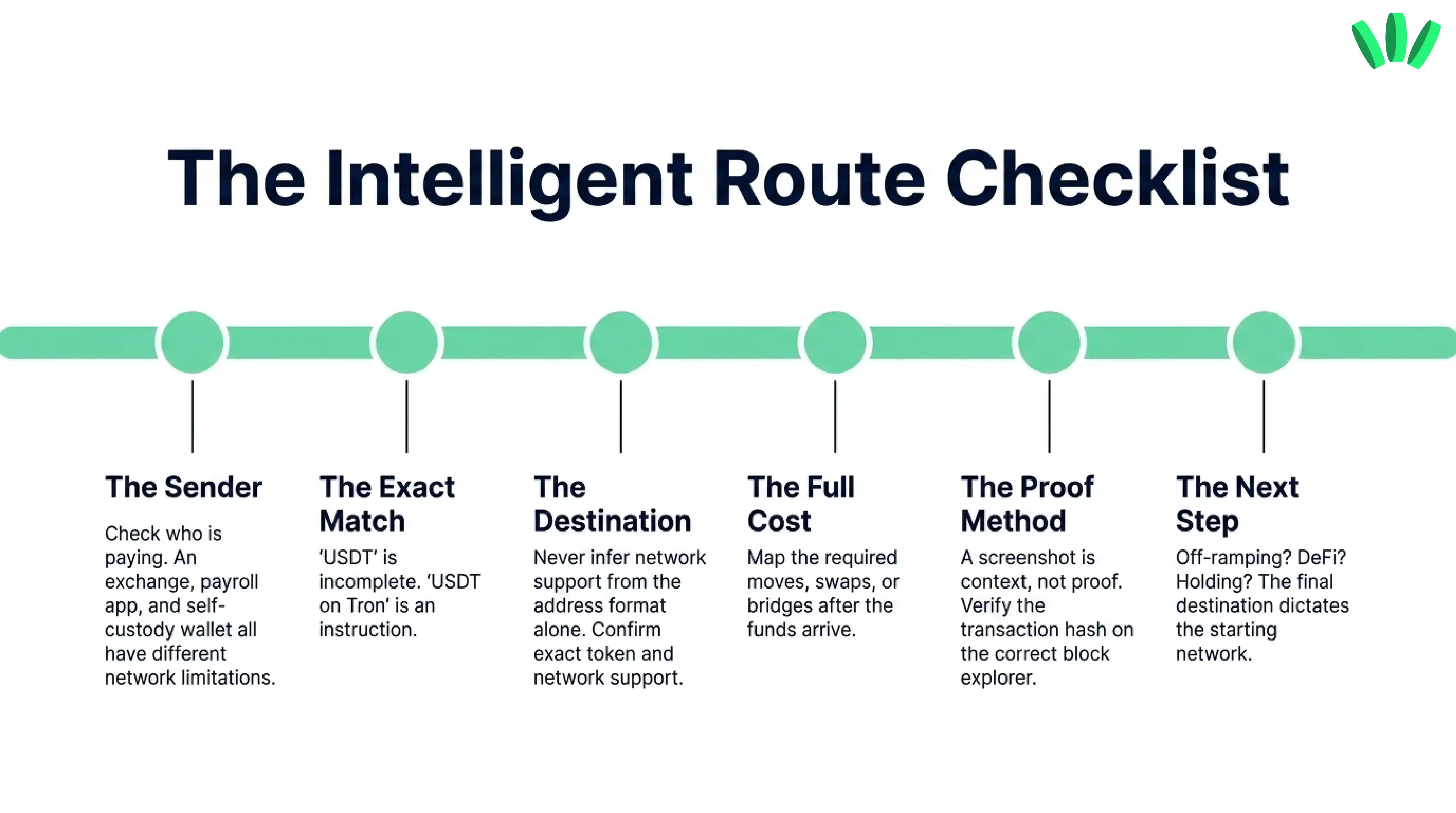
Save the conditions of the test: sender type, token version, network, destination, date, charge and receiving record. A test from your own wallet does not prove that an exchange or business payer can use the same route. A successful small transfer does not establish every account limit.
If the wallet view is empty, use the missing-balance checks to investigate the network and display state. If the wrong route was used, collect the evidence before acting. The wrong-network recovery guide explains why recovery depends on the destination and account control.
Review walllet.com’s wallet and supported route information before your next crypto transfer.

Related reading
Stablecoins and Cash Out: Receive, Convert and Withdraw Safely
Cheapest and Safest Way to Send USDT or USDC: Network, Fees, and Test Transfer Guide
How to Cash Out USDT or USDC to Naira in Nigeria
How to Receive USDT or USDC Safely: Before and After Payment Checklist
