If you searched “is walllet.com legit?” because the spelling looks unusual or because you are deciding whether to move money through the app, start with identity, not marketing claims.
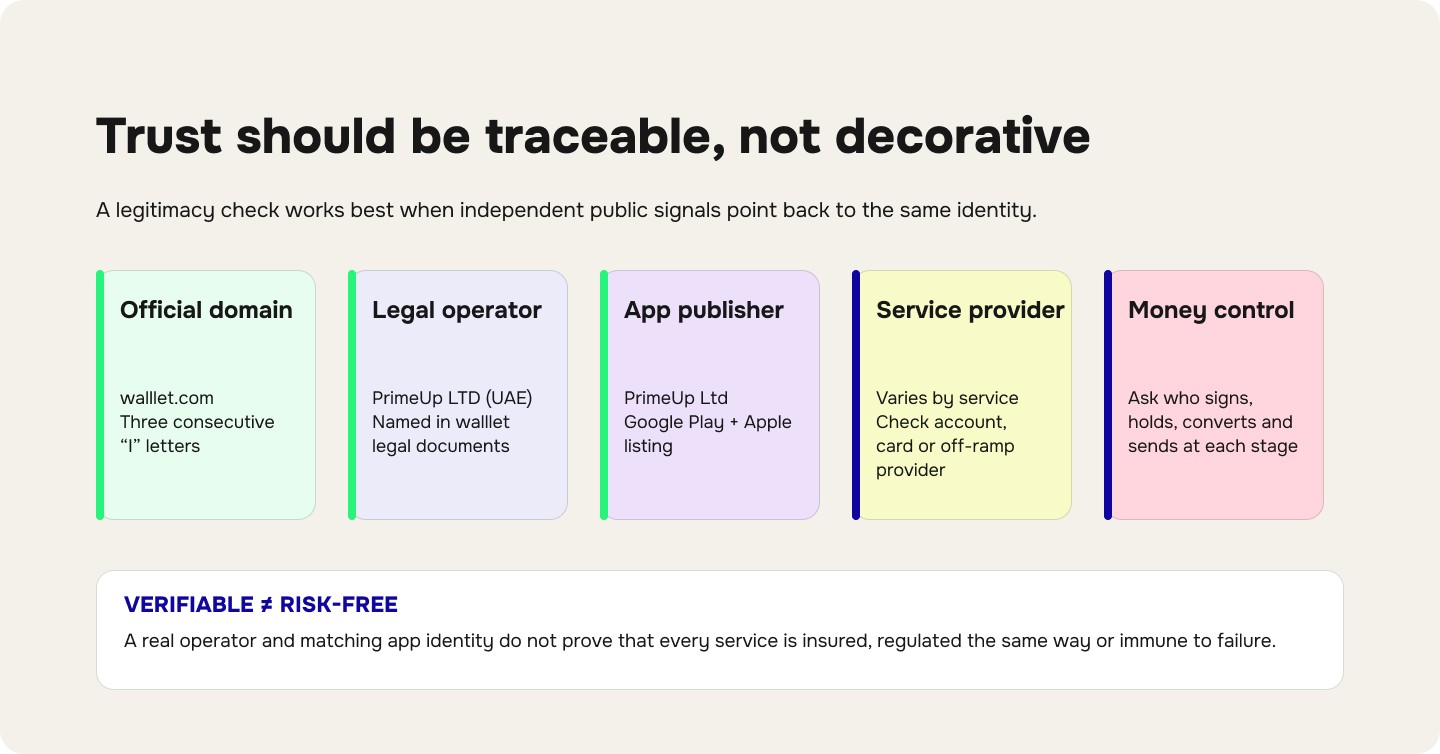
As of September 24, 2026, walllet.com’s public Terms of Service identify PrimeUp LTD (UAE) as the company providing walllet. Google Play lists PrimeUp Ltd as the Android app developer, while Apple’s App Store lists PrimeUp Ltd as the app seller. walllet’s public legal pages also state that walllet.com is a financial technology company, not a bank.
And yes, the spelling is intentional: walllet.com has three consecutive “l” letters.
That gives you a public identity trail you can check yourself. It does not mean every walllet service has the same legal structure, every balance is insured, or using any financial product is risk-free. Those are separate questions.
If the three-L spelling is what brought you here, the distinction between walllet.com and wallet.com is worth checking first. They are different products, and confusing the domains is exactly the kind of mistake you want to eliminate before moving money.
walllet.com trust facts at a glance
What you want to verify | What the public information currently shows |
Official brand/domain | walllet.com |
Brand spelling |
|
Company operating walllet | PrimeUp LTD (UAE), according to walllet’s Terms |
Android developer | PrimeUp Ltd |
iOS seller | PrimeUp Ltd |
Public company location | Ras Al Khaimah, UAE |
Is walllet a bank? | No |
Core crypto wallet model | Non-custodial |
Does walllet say it holds users’ crypto/private keys? | No |
Virtual accounts, cards and fiat services | Depend on third-party financial providers |
Are all services identical for every user? | No. Availability, provider, eligibility and terms can vary |
Last checked | September 24, 2026 |
The wider product model is explained in what walllet.com is and how it works.

Why does walllet.com have three Ls?
The three-L spelling is part of the official brand name: wa + lll + et.
That matters because financial scams often depend on tiny spelling changes, fake support accounts and lookalike domains. You should therefore verify a financial service from the address bar itself rather than trusting a logo, screenshot, search ad or link sent in a message.
For walllet, the official domain is:
walllet.com
Before signing in or moving money, check the spelling character by character. A page that looks visually identical can still be hosted somewhere else.
The same rule applies to apps. Do not identify an app by icon alone. Check the developer or seller.
Who operates walllet.com?
walllet’s Terms of Service identify the service as being provided by PrimeUp LTD in the UAE. The same legal relationship appears across walllet’s public legal pages.
There is also external corroboration through the two major mobile app stores. Google Play lists:
App: walllet.com
Developer: PrimeUp Ltd
Support email: [email protected]
Developer location: Ras Al Khaimah, United Arab Emirates
Verify walllet.com on Google Play
Apple’s App Store lists:
App: walllet.com
Seller: PrimeUp Ltd
Category: Finance
Copyright: PrimeUp LTD
Verify walllet.com on the Apple App Store
That consistency matters more than a generic “trusted” badge on a company’s own website. You can independently check whether the product name, legal entity and app publisher line up.
What does this verification prove?
It supports several specific conclusions.
walllet.com is not presenting itself as an anonymous website with no named operator. Its legal documents identify PrimeUp LTD, and the public app-store listings independently connect the walllet app to PrimeUp Ltd.
It also gives you official channels against which you can compare suspicious links, apps or messages.
What it does not prove is just as important.
A real company can still have outages. A legitimate financial product can still involve third-party risk. A self-custodial wallet can still expose users to phishing, malicious transactions or loss of access. A regulated provider can still reject a payment or request additional verification.
“Legit” should therefore mean verifiable, not “nothing can ever go wrong.”
That distinction is especially important when real money is involved.
Is walllet.com a bank?
No.
walllet’s current Terms explicitly state that walllet is not acting as a bank, financial institution, payment institution, account issuer or deposit-taking institution in connection with its Virtual Account Service. The site footer also describes walllet.com as a financial technology company rather than a bank.
This matters because words such as “USD account,” “virtual account” or “IBAN” do not automatically tell you who legally provides the account, who processes the payment or what protection applies to money moving through it.
If you plan to receive bank transfers through walllet, read how the walllet IBAN Account actually works before treating receiving details like a conventional bank account.
For any virtual USD account, the same rule applies: check who provides the service, what payment rails are supported, what fees apply, and what happens if a payment is held or returned. The 12-point virtual USD account trust checklist covers those checks in detail.
Who controls crypto held through walllet.com?
walllet’s Terms describe the crypto wallet as non-custodial.
According to those Terms, users remain in control of their digital assets, private keys and wallet credentials, while walllet does not hold or custody those assets or keys on their behalf. The Terms also state that walllet does not store users’ private keys, passkeys or recovery phrases on walllet servers.
That distinction matters.
With a custodial account, the provider controls the assets or the signing authority on your behalf.
With a non-custodial wallet, access depends on your wallet credentials and signing setup.
If you want the technical explanation rather than the marketing version, read how private keys work on walllet.com.
You should also understand the broader security model before moving meaningful funds. This crypto wallet safety checklist explains what to check in any wallet, including key control, recovery, malicious approvals and phishing.
Self-custody removes one category of risk. It does not remove every category of risk.
A user can still approve a malicious transaction, send funds to the wrong address, lose access to a recovery path or interact with a token that has issuer-level controls.
Want to inspect the wallet model before putting real money into it? Review walllet’s self-custody and passkey setup first, then test the flow with an amount that lets you verify how it works for yourself.
See how the walllet crypto wallet works
Which walllet.com services depend on third parties?
Not every service visible inside walllet has the same provider relationship.
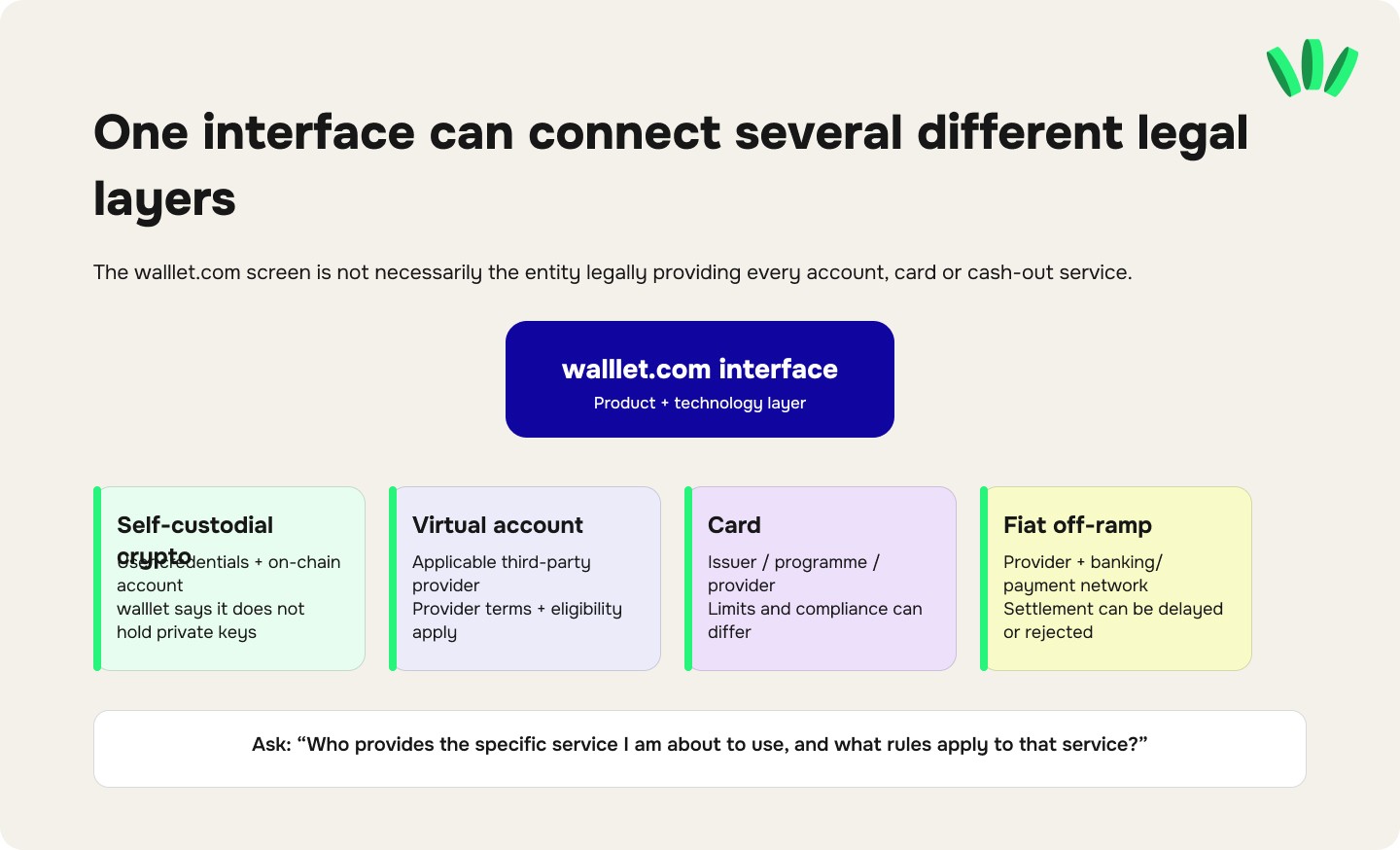
walllet’s Terms say that certain financial services, including virtual accounts, payment cards, fiat off-ramp services and some other regulated services, are provided or operated by independent third-party providers, issuing banks, payment institutions or other entities as applicable.
The Terms also say that the relevant provider’s identity, role, terms, fees, eligibility requirements and disclosures are made available before a user accesses or confirms the relevant service.
This means a careful user should ask a more precise question than: “Is walllet regulated?”
Ask:
Who provides the specific service I am about to use, and what rules apply to that service?
For example, before using a virtual account, card or cash-out route, check:
the legal name of the provider;
which institution issues or operates the service;
the provider’s jurisdiction;
whether KYC or source-of-funds checks apply;
fees and exchange rates;
payment limits;
what can cause a payment to be delayed, rejected or reviewed;
what safeguarding, insurance or other protection applies, if any;
which company handles a complaint or dispute.
This is also why the current walllet.com Nigeria availability guide treats eligibility and supported payment routes as service-specific rather than universal.
Is walllet.com “regulated”?
There is no useful one-word answer to this question.
PrimeUp LTD and a third-party financial provider do not automatically have the same regulatory status.
walllet’s public Terms describe PrimeUp LTD as the company behind the technology platform. They separately describe virtual accounts, cards, fiat off-ramps and other financial services as being provided through applicable third parties.
So if you are verifying a particular financial service, check the actual provider shown for that service. Do not take a provider’s licence and silently turn it into a claim that PrimeUp LTD holds the same licence. That distinction is easy to blur in fintech marketing and important to get right.
What should you verify before sending money to walllet.com?
For a cautious user, these checks matter more than a trust badge.
1. Check the domain yourself
The address bar should show walllet.com. Do not trust a domain because its logo looks correct.
2. Verify the app publisher
If you are installing the mobile app, check the developer or seller before installing. Current public listings identify PrimeUp Ltd on both Google Play and Apple’s App Store.
3. Check the company named in the legal documents
The current walllet.com Terms identify PrimeUp LTD (UAE).
For higher-value corporate due diligence, also verify current company-registration information through the applicable UAE registry rather than relying solely on a website footer.
4. Identify the provider behind the exact financial service
If you are about to use a virtual account, card or cash-out service, check the provider shown in the flow and read its applicable terms. The walllet.com interface is not necessarily the legal provider of every service you can access through it.
5. Understand what happens to your money at each step
For crypto, ask who controls the signing credentials.
For an incoming bank payment, ask which institution receives it.
For conversion, ask who executes the conversion.
For cash-out, ask who sends the fiat payment.
If you cannot explain the route in plain English, do not increase the amount yet.
6. Verify KYC requests before sending documents
Verification requests can be legitimate, but identity documents are valuable.
Use the official app or official support flow. The walllet.com verification guide explains why verification can be placed under review and what to check before resubmitting documents.
7. Start small enough to learn the route
A small test does not prove that every future transaction will work, but it can confirm basic details:
you used the correct app;
you selected the intended network;
the receiving address is correct;
the expected asset arrived;
you understand the status messages;
you know where support is located.
Increasing the amount before understanding the flow reverses the sensible order.
Official walllet.com vs a fake website or support account
Check | Official signal | Warning sign |
Domain | walllet.com | Extra words, changed letters, hyphens or another domain |
Android publisher | PrimeUp Ltd | An unrelated developer |
iOS seller | PrimeUp Ltd | An unrelated seller |
Support | Official in-app/help channels | Unsolicited DM claiming to be support |
Secret credentials | Legitimate support should not need your private key | Someone asks for a private key, passkey secret or recovery credential |
Money request | Normal product transaction shown in the app | A person asks you to send money to a “safe” or “verification” address |
Urgency | You have time to verify | Threats that you must act immediately or lose access |
For a deeper scam check, use the existing guide on what walllet.com will never ask you to do.
What can be verified publicly, and what still depends on the service?
This is the part worth checking before you decide how much trust to place in any financial app.
Claim | Current verification status |
walllet.com is the official brand domain | Consistent across walllet’s website and official mobile listings |
PrimeUp LTD is connected to walllet | Named in walllet legal documents; PrimeUp Ltd also appears as app developer/seller |
walllet is a bank | No. walllet explicitly says it is not a bank |
walllet’s crypto wallet is non-custodial | Stated in walllet’s Terms and app materials |
walllet holds users’ private keys | walllet’s Terms say it does not |
All financial services are operated directly by PrimeUp LTD | No. walllet says certain services depend on third-party providers |
One regulatory licence covers everything inside the app | Do not assume this |
Every balance has bank-deposit protection | Do not assume this; check the exact provider and service |
Every user receives the same account/card features | No. Availability and eligibility may differ |
Every transaction is guaranteed | No financial or blockchain service can make that claim responsibly |
That last column is not a weakness in the article. It is the information a cautious person needs before making a financial decision.
What about losing your phone?
The answer depends on the access and recovery setup associated with the wallet.
Changing phones does not move blockchain assets from one place to another. The important question is whether you can restore access to the wallet credentials controlling them.
Before putting meaningful crypto into any passkey-based wallet, understand the recovery path first. The walllet.com lost-phone and new-phone recovery guide covers that process and the conditions that matter.
Do this before you need it, not while staring at a dead phone with money on-chain.
So, is walllet.com legit?
Based on the public information that can be checked today, walllet.com has a clear and externally corroborated identity trail: its legal documents identify PrimeUp LTD (UAE) as the company behind walllet, Google Play identifies PrimeUp Ltd as the Android developer, and Apple identifies PrimeUp Ltd as the app seller. The official spelling uses three consecutive “l” letters.
walllet also publishes an important limitation clearly: walllet is not a bank. Its crypto wallet is described as non-custodial, while virtual accounts, cards, off-ramps and other financial services may depend on third-party providers whose own eligibility, compliance and service terms apply.
That is a stronger basis for deciding whether to use a product than either extreme: “Trust it because the website says it is safe.”
or:
“Distrust it because the name looks unusual.”
Verify the entity. Verify the app. Verify the exact service provider. Understand who controls the money at each step. Then decide what amount is appropriate for your own use case.
Checked the identity, custody model and official app? You can now inspect the wallet itself, set up your access carefully and test the experience before deciding whether it fits how you manage crypto.
Download walllet and verify the wallet flow yourself

