In crypto, the most expensive mistake often starts with a message that looks helpful. Worried a wallet email, DM, giveaway, or support message might be fake? Learn how crypto phishing works, what walllet.com will never ask you to do, how to verify links and support accounts, and what to do if you already clicked or signed.
TL;DR
Crypto phishing is rarely a dramatic hack. Most of the time, it is a fake support message, a fake wallet verification email, a fake giveaway, or a signature prompt that looks harmless.
Never trust unsolicited support. Never enter secret credentials into a website or form because a message told you to “verify” your wallet. Never send funds to a “safe” address. Never sign something you do not understand. And if a message creates panic or urgency, leave it and verify through the official walllet.com site or help center directly, not through the link you were sent.
General wallet safety guidance from major wallet help centers and consumer protection agencies follows the same pattern: official teams do not need your secret credentials to help you, and surprise messages that push you to act fast are a classic phishing tell.
Crypto phishing does not always look like a scam.
Sometimes it looks like support. Sometimes it looks like a reward. Sometimes it looks like a quick security check. Sometimes it looks like a harmless signature request that does not even ask you to send money.
That is why phishing keeps working.
Recent scam reporting shows that impersonation has become one of the fastest-growing parts of crypto fraud, and recent phishing pages have copied wallet branding and verification flows closely enough to fool people who thought they were just confirming wallet ownership. (Crypto scams took in at least $14 billion in 2025 and projects the total could exceed $17 billion as more scam addresses are identified. It also reports that impersonation scams surged more than 1400% year over year). In other words, the trap is no longer “send your seed phrase to a prince.” It is “click here to protect your wallet.”
This guide is about behavior. If you have just seen a suspicious email, DM, support reply, giveaway post, or wallet verification page, this is what to check before you click, connect, or sign.
Related: Address Poisoning Scams: The Copy-Paste Trap That Drains Crypto Wallets (And How to Avoid It)
Why crypto phishing works so well on beginners
It attacks emotion before it attacks your wallet
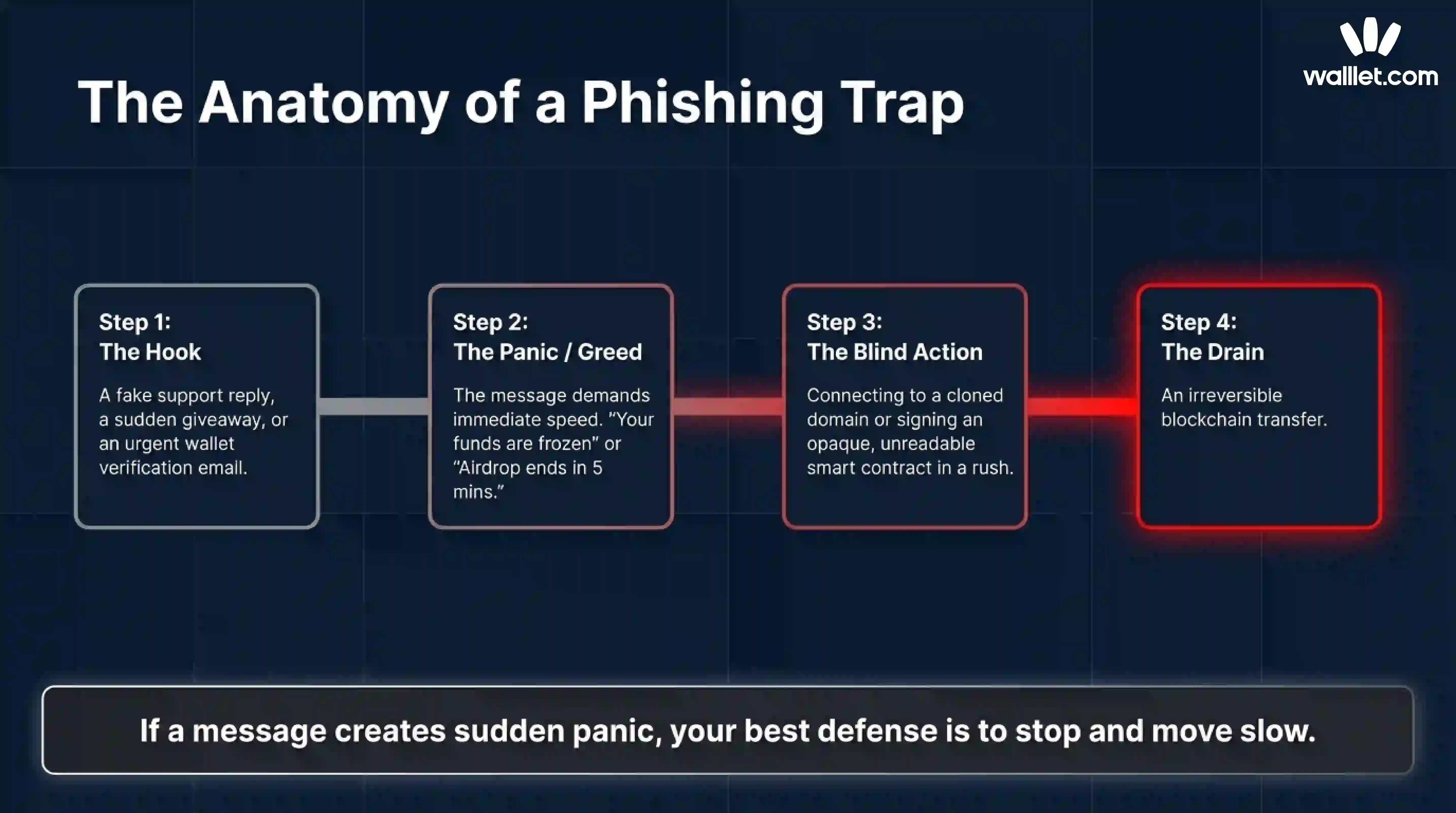
Most beginners lose money because the scam arrives in the exact tone that makes people move too fast.
The message says your wallet is compromised. Or your funds are frozen. Or your reward is about to expire. Or your transaction failed and support can fix it right now. The point is not technical brilliance. The point is to rush you past your normal skepticism. The FTC and FBI both warn that unsolicited messages that create urgency, fear, or pressure are a core scam pattern, especially when they push you toward a link, a phone number, or a “secure” wallet address provided by the sender.
“Official-looking” is not the same as official
A fake wallet site can copy a logo. A scam support account can copy a profile picture. A phishing email can copy product language. A fake pop-up can look like a real wallet prompt. None of that proves legitimacy.
Major wallet help centers tell users to verify through official domains, official app stores, and official support entry points, not through messages that arrive unexpectedly.
Unsolicited support contact is a red flag, routine requests for secret recovery information are not legitimate, and fake websites often mimic official branding closely. Phantom gives nearly the same warning in its anti-scam help content.
Crypto is unforgiving once you approve the wrong thing
A bank transfer sometimes has recourse. A card payment sometimes has a dispute flow. A blockchain transaction usually does not.
That is why scammers love crypto support scams, fake verification messages, and malicious signature requests. They do not need to break the chain. They just need you to authorize the wrong action once. walllet’s own terms remind users that when you approve a blockchain transaction, you are giving an irreversible instruction, and malicious dApps or smart contracts can have unintended consequences.
The most common wallet phishing tricks right now
Fake support and fake urgency
This is one of the oldest crypto scams because it still works.
You ask a question in a public thread or community. Minutes later, “support” messages you first. Or you receive a cold email saying your wallet was flagged for suspicious activity. Or someone tells you they can “secure” your assets before they are lost.
The FBI has warned about scammers impersonating crypto exchange employees and pushing victims toward fake problem-solving flows. Phantom’s anti-scam documentation also warns that fake support often starts with an unsolicited DM and quickly moves toward requests for wallet access, verification, or fund transfers.
The pattern is simple. They create a problem, then sell you speed as the solution.
Fake giveaway, reward, and airdrop claims
Free money is still one of the cheapest costumes in the scam theater.
Fake giveaway scams promise a reward, bonus, whitelist spot, refund, or claimable airdrop. The message may say you only need to connect your wallet, sign once, or send a small amount “to verify eligibility.” Major wallet safety articles repeatedly warn that giveaways, random airdrops, and urgent reward claims are common phishing bait, especially when they depend on speed or secrecy.
The real wallet does not hand out random assets or giveaways as part of support or verification.
Fake wallet verification emails
This scam works because “verification” sounds harmless.
The email says your wallet is inactive, at risk, outdated, or pending compliance review. It asks you to verify ownership, re-sync, reactivate, confirm activity, or validate your address. The link leads to a site that asks for secret credentials or prompts a malicious signature.
The FTC has already warned about urgent wallet-themed phishing emails that tell users to act quickly or lose access.
Fake domains and cloned apps
Sometimes the only difference is one letter.
Scammers register lookalike domains, build cloned landing pages, and imitate wallet pop-ups. On mobile, that is even easier to miss. Install only through official channels and to distrust any website that asks for secret recovery information.
This is why bookmarks still matter.
Typing the known domain or using your own saved bookmark is boring. It is also one of the best defenses you have.
Dangerous signature requests that do not look dangerous
This is the quiet part of crypto phishing.
A scammer may not ask you to send funds at all. They may ask you to connect and sign. That sounds smaller. It often is not.
Wallet safety documentations explain that a malicious token approval can grant a dApp permission to access and move your tokens, sometimes with unlimited access. Separate signature-phishing guidances also explain that offchain signatures can be harvested and later used to steal assets or list NFTs without the victim realizing what the message truly authorized.
What walllet.com will never ask you to do
Here is the practical part.
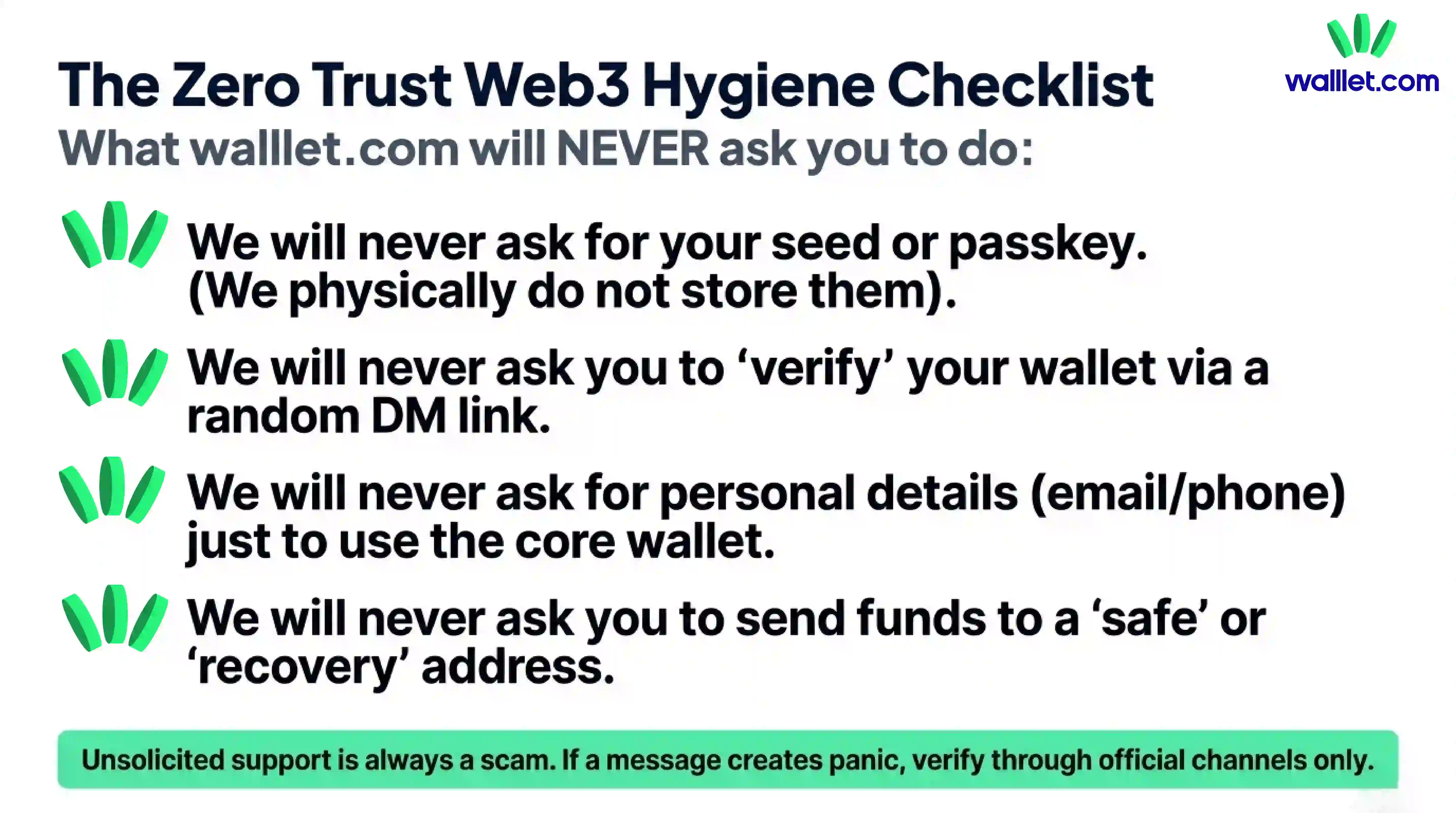
walllet.com’s privacy policy says the core wallet does not require your name, username, email address, or phone number. It also says walllet.com does not collect your seed phrases, private keys, or passkey credentials. Its terms say your keys never leave your device, are not known to walllet, and are not stored on walllet servers. The same terms also make clear that walllet cannot reset or recover your keys or passkeys for you.
So if a message claiming to be from walllet.com asks you to do any of the following, treat it as hostile until proven otherwise.
Suspicious request | Why it’s a red flag | What you should do instead |
|---|---|---|
Share your seed phrase, private key, or passkey credentials | walllet.com does not collect these credentials and does not store them on its servers | Leave immediately and never share secret credentials with any person, page, or form |
“Verify,” “sync,” or “reactivate” your wallet through a random link | Surprise verification flows are a classic phishing tactic, especially when they arrive by email, DM, or reply | Ignore the link and go to walllet.com or the official help center directly |
Send funds to a “safe,” “secure,” or “recovery” address | Real support does not need you to transfer assets into someone else’s custody | Stop immediately and verify through official channels you reach independently |
Sign a message or approval just to “prove ownership” when you do not fully understand it | A harmless-looking signature can still grant dangerous permissions or enable theft later | Do not sign anything unclear, and review the action, permissions, and destination carefully |
Provide email, phone number, or identity details just to keep basic wallet access | walllet.com’s core wallet does not require personal details like name, email, or phone number | Treat the request as suspicious and verify whether it is actually necessary through official documentation |
Expect walllet.com to recover or reset your private credentials for you | walllet.com states that it cannot reset or recover your keys or passkeys | Assume anyone promising recovery of secret credentials is lying or running a recovery scam |
1. Share your seed phrase, private key, or passkey credentials
A real support flow does not need this. In walllet’s case, the company explicitly says it does not collect these credentials and does not store them on its servers. A page or person asking for them is not helping you. It is trying to take control of your wallet.
2. “Verify,” “sync,” or “reactivate” your wallet through a random link
Verification scams are built on vague language because vague language gives scammers room to improvise. If you are told to verify your wallet through a link from an email, DM, or reply, stop there. walllet’s core wallet features do not depend on your email or phone number, so surprise verification flows should immediately feel wrong.
3. Send funds to a “safe,” “secure,” or “recovery” address
This is a classic theft move dressed up as protection. Real support does not need you to move your assets into someone else’s custody to help you. The FBI has specifically warned about impersonation scams where victims are told to protect their accounts by transferring funds to wallets controlled by the scammer.
4. Sign a message or approval just to “prove ownership” if you do not understand what it does
A harmless-looking signature can still hand over permissions. walllet’s own legal language warns users to think carefully before approving transactions or interacting with smart contracts because malicious prompts can have unintended consequences. And in the broader wallet ecosystem, signature phishing and malicious token approvals are well-documented attack paths.
5. Give personal details just to use the core wallet
If someone says you must provide an email, phone number, or identity detail just to keep basic wallet access, that directly conflicts with walllet.com’s current privacy and terms language for core wallet use. Optional support or special programs are a different thing. Basic wallet use is not.
6. Expect walllet to recover your private credentials for you
This one matters because recovery scammers love confused users. walllet’s terms say it cannot reset or recover your keys or passkeys. So anyone promising that they can “restore” those secrets for a fee, through a form, or via a special support shortcut is selling fiction. The FBI has separately warned that fake crypto recovery services often target people who have already been scammed once.
How to check whether a message, link, or support account is real
When you are unsure, do not ask “Does this feel legit?” Ask “What can I verify without using this message?”
Start with the source, not the content
A convincing message can still come from a fake sender. A perfectly written email can still point to a fake domain. A verified-looking social profile can still be an impersonator.
So pause and check three things:
First, did you initiate this conversation? Unsolicited support is one of the strongest red flags in crypto security guidance.
Second, are you on a domain or app store page you reached independently? If not, leave and navigate there yourself. Do not continue from the provided link.
Third, is the request actually necessary for how the product works? If the wallet does not need your email or phone for core use and does not collect your secret credentials, a demand for those things is not “extra security.” It is a contradiction.
A simple safety checklist before you tap anything
Before you click, connect, or sign, run this quick test:
If the message creates panic, slow down.
If it asks for a secret, stop.
If it asks you to move funds for safety, stop.
If it asks you to sign without clear context, stop.
If it came to you first, verify elsewhere.
If the domain looks even slightly off, leave.
If the reward sounds easy, assume the hook is the product.
That checklist is basic Web3 hygiene.
Use the product itself to reduce blind decisions
The best wallet safety habit is not only skepticism. It is choosing tools that make suspicious actions easier to understand.
walllet.com’s product positioning is useful here because it focuses on human-readable transaction prompts and scam-aware warnings instead of forcing users to approve opaque blobs of text. In its public product article, walllet.com says users see plain-language summaries that include the action, asset, amount, slippage, permissions, counterparty, and network before signing. That kind of clarity does not eliminate phishing, but it does reduce the “I clicked approve because I could not tell what I was approving” problem.
What to do if you already clicked or signed something
If you only clicked a suspicious link
Close the page immediately. Do not connect your wallet. Do not download anything. Do not call any phone number shown on the page. If you typed nothing and signed nothing, you may be fine, but treat the incident as a warning shot. Clear the tab, verify the real site independently, and check your device and browser for anything unusual. General consumer guidance from the FTC and FBI is to avoid continuing through the message and verify through known official channels instead.
If you entered a seed phrase, private key, or other secret credential
Assume that wallet is compromised.
At that point, the goal is not debate. It is containment. If possible, move remaining assets to a new wallet you control, created through a verified official setup flow on a clean device. Do not keep using the exposed wallet because the attacker may sweep it later. Wallet help centers consistently warn that once secret recovery information is exposed, control is effectively gone.
If you signed an approval or suspicious message
Act fast.
Malicious approvals can sometimes be revoked before the attacker uses them. Revoking suspicious token approvals is an as soon as possible option, if you catch the problem in time. Review recent approvals, revoke anything you do not trust, and move high-value assets if the risk seems active.
If you already sent funds
Be honest with yourself about the situation. Most confirmed blockchain transfers are final. There is usually no chargeback button waiting backstage.
Still, document everything. Save the message, the address, the transaction hash, the domain, and screenshots. If a centralized service or exchange touched the flow at any point, report it quickly. Then watch out for the second scam, which is the “recovery” scam. The FBI has warned that fraudsters often target victims again by promising they can get lost funds back for an upfront fee.
Your first 15 minutes after a mistake
Do not argue with the scammer.
Do not keep clicking to “see what happens.”
Do not trust anyone who contacts you offering recovery.
Do verify your wallet state from the real product interface.
Do move remaining assets if credentials were exposed.
Do revoke suspicious approvals if that is the likely attack path.
Do document the scam thoroughly.
Do report the account, domain, or message through the relevant platform and official support channel.
Panic makes scammers faster. A checklist makes you faster.
Final thought
Crypto phishing succeeds when the attacker controls the tempo.
Your job is to take the tempo back.
That means slower clicks, cleaner verification habits, and a wallet experience that makes risky actions easier to understand. walllet.com cannot make scams disappear, and no honest wallet should pretend otherwise. But walllet’s seedless design, on-device credential model, and human-readable signing flow are all pointed in the right direction: fewer blind approvals, fewer secret-sharing traps, and less room for beginner mistakes to become expensive ones.
If a message wants you to move fast, assume your best defense is to move slow. NowUse a wallet that makes risky actions easier to understand. Explore walllet.com for seedless self-custody, human-readable transaction prompts, and a calmer way to interact with Web3.
