A crypto wallet is not safe because it looks polished. It is safe when its security model still makes sense on your worst day. Here is a practical guide to evaluating wallet safety before you download, deposit, or sign anything. In this article you will learn how to evaluate a safe crypto wallet before you use it.
TL;DR
If you want to know whether a crypto wallet is safe, stop looking at the homepage first and start with the model underneath it.
Ask who controls the keys or signing authority, how recovery works if your phone is lost, whether the wallet explains what you are signing in plain language, and whether it helps you spot risky approvals before you confirm them.
A good wallet does not just protect against hackers. It also protects against rushed decisions, unclear prompts, and fragile recovery paths.
That is why the safest wallet is usually the one that combines strong technical design with a user experience that reduces human error.
Choosing a crypto wallet is one of those decisions that feels simple until it suddenly does not.
Related: Best Crypto Wallet for Beginners: What to Look for Before You Download Anything
At first glance, most wallets sound the same. They promise security, self-custody, speed, control, and an easy way into Web3. The screenshots look clean. The landing page says all the right words. The app store description sounds reassuring. But wallet safety is not really a branding question. It is a systems question.
The real question is:
What exactly is this wallet asking me to trust, and what happens when something goes wrong?
That is the difference between a wallet that feels safe and a wallet that actually is.
This guide is for that moment before you commit. Before you download. Before you move funds. Before you sign your first approval. If you already understand the basics of crypto wallets and want a clearer way to judge which one deserves your trust, start here.
What actually makes a crypto wallet safe
A safe crypto wallet does four things well.
First, it gives you a clear and defensible control model. You should be able to understand who can authorize transactions and under what conditions.
Second, it gives you a recovery path you can explain in one calm sentence. If your phone is lost, stolen, replaced, or reset, you should already know how access is restored and what dependencies that recovery relies on.
Third, it helps you understand what you are approving. In crypto, a confusing confirmation screen is not a cosmetic flaw. It is a security weakness.
Fourth, it reduces avoidable human error. Many wallet losses do not happen because the cryptography failed. They happen because the product asked normal people to behave like security specialists.
That last point matters more than many people realize. In practice, good security is not only about what the wallet blocks. It is also about what the wallet makes easy, what it makes difficult, and what it slows you down to review.
What to evaluate | Why it matters | Good sign | Red flag |
|---|---|---|---|
Control model | You need to know who can actually authorize transactions and move funds. | The wallet clearly explains who controls the keys or signing authority and how that control works. | The wallet says “secure” or “non-custodial” but never clearly explains who controls access. |
Recovery path | A wallet is only as safe as its recovery model on your worst day. | You can explain in one calm sentence how recovery works if your phone is lost, stolen, or replaced. | Recovery is vague, buried in marketing language, or impossible to understand before funding the wallet. |
Signing clarity | Confusing confirmation screens increase the chance of costly mistakes. | The wallet shows human-readable prompts with the asset, amount, network, permissions, and destination. | The wallet shows raw hashes, technical noise, or unclear approval requests that normal users cannot interpret. |
Approval and risk warnings | Many losses happen when users unknowingly approve dangerous permissions or malicious contracts. | The wallet warns about suspicious contracts, unusual approvals, risky permissions, or scam tokens. | The wallet only shows “Approve” and “Reject” with no meaningful context or warning signals. |
Error reduction | Good wallet security should reduce human error, not depend on perfect behavior. | The default experience slows down risky actions, makes important details visible, and helps users review before signing. | The product feels easy only because important security details are hidden or skipped. |
The security model matters more than the marketing
When people compare wallets, they often start with the wrong signals. Brand popularity, social buzz, or a polished interface can be useful context, but they are not the foundation.
The foundation is the security model.
Who controls the keys or signing authority?
This is the first question to ask. If the wallet is custodial, someone else ultimately controls access on your behalf. If it is self-custodial, you control the assets, but the wallet’s design still determines how that control is created, stored, and recovered.
That is why “non-custodial” by itself is not enough. It is necessary, but it is not a complete answer.
A non-custodial wallet can still be risky if recovery is fragile, if approvals are hard to read, or if the product makes it too easy to sign something you do not understand. In other words, self-custody tells you who is in charge. It does not automatically tell you how well the system protects that control.
Convenience alone is not security
This part is easy to miss because convenience can look like safety.
A wallet that takes two taps to set up may genuinely be better designed. Or it may just be hiding complexity in ways you have not examined yet. A wallet that feels frictionless is not automatically unsafe, but it should make you curious. What was simplified, exactly? Which steps disappeared, and what replaced them?
That is why every easy wallet should come with a harder question underneath it: easy because the design got smarter, or easy because important details were pushed out of sight?
How recovery works is part of security
Most people judge security by thinking about theft. Fewer people judge it by thinking about recovery. That is a mistake.
Your recovery model is part of your security model. In some cases, it is the most important part.
Seed phrase wallets: portable, powerful, and easy to mishandle
Traditional self-custody wallets usually rely on a seed phrase. That phrase is effectively a master backup. It is portable and widely compatible across wallets, which is a real advantage. If you know what you are doing, it gives you a lot of independence.
But it also creates a sharp tradeoff. Anyone who gets that phrase can usually control the wallet. That is why seed phrases are powerful and dangerous at the same time. Even major wallet safety guides continue to treat seed phrase handling as one of the core risk points in self-custody.
Passkey or seedless wallets: different tradeoffs, not magic
Modern passkey-based systems change that model. Instead of asking you to store a secret phrase yourself, they rely on public-key cryptography, device authentication, and platform-backed credential systems. Apple, Google, and the FIDO Alliance all describe passkeys as phishing-resistant and built so that the private credential stays on the user’s device, while biometrics stay on-device rather than being shared to the service.
That can reduce a very common category of user mistakes. But it does not mean “seedless” is automatically safer in every scenario. It means the tradeoff moved.
Now the important questions become these: what happens if you lose all your devices, what account or credential system recovery depends on, and whether the wallet is transparent about those dependencies. Apple documents that passkey sync and recovery rely on protected account and keychain recovery systems, and walllet’s own disclaimer makes a similar point in product terms: if you lose access to your device and the linked Apple or Google account, access may be lost permanently.
So if you are comparing a seed phrase wallet and a passkey wallet, do not ask which one sounds more modern. Ask which recovery tradeoff you actually understand and can manage responsibly.
A beginner-friendly rule: If you cannot explain the recovery path before using the wallet, do not fund it yet.
That one rule will save many people from choosing a wallet for the wrong reason.
A safe wallet should make risky actions easier to understand
Wallet safety is not only about storing access. It is also about reviewing intent.
The wallet should help you answer: what am I approving, for which asset, on which network, for whom, and with what permission?
That matters because unreadable confirmations create security blind spots. The Ethereum ecosystem has been moving toward better “clear signing” and structured display standards for exactly this reason: better transaction formatting lowers end-user risk by making approvals more understandable. The ERC-7730 proposal explicitly frames clear display as a way to improve signing UX and reduce risk from frontend and phishing attacks.
Can the wallet explain what you are signing?
This is one of the best practical tests you can run.
If a wallet shows you raw hashes, vague prompts, or technical noise that only an experienced user could interpret, the burden is being pushed onto you. That is not ideal. A safer wallet should turn that into something human-readable.
You should be able to see, in plain language, what action is happening, what token or asset is involved, how much is moving, what permissions are being granted, and where the action is taking place.
When a wallet cannot explain this clearly, it is not just a UX issue. It is a security issue.
Does the wallet help you notice suspicious actions?
Good wallets do not stop at “Approve” and “Reject.”
They also help you see when something looks off. That could mean unusual approval scopes, suspicious contract interactions, risky token behavior, or a mismatch between what you thought you were doing and what the request actually says.
This is one reason wallet evaluation should include permission controls and review tools, not only login protection. Independent wallet security testing frameworks such as Coinspect’s methodology explicitly include features like prompting for dApp access, viewing and revoking approvals, and handling suspicious or inconsistent signing requests as part of wallet security evaluation.
Red flags to watch before you trust any wallet
You do not need a formal audit team to spot many warning signs. A few simple checks can filter out a lot of bad options.
A wallet deserves extra scrutiny if its website talks endlessly about “military-grade security” but gives almost no plain-language explanation of key control, recovery, or transaction review.
It is also a bad sign when the recovery path is vague. If the answer to “What happens if I lose my phone?” is buried, unclear, or loaded with marketing language, pause there. Real products explain that scenario clearly because it is one of the first things serious users need to know.
Another red flag is a wallet that makes transaction approvals hard to interpret. If the most important moment in the whole experience is still cryptic, the product is asking you to trust too much.
Distribution matters too. Wallet safety starts before the first transaction. Downloading from the official site or a verified app listing sounds basic, but it still matters. Even major wallet help centers warn users to verify sources and avoid relying on lookalike listings or unverified links when interacting with wallet software and dApps.
Finally, be careful with wallets that make absolute promises. No serious wallet can honestly claim that one feature makes everything safe. Real security products usually explain tradeoffs, not fairy tales.
Questions to ask before installing any wallet
Before you install any crypto wallet, ask these seven questions.
Who controls the keys or signing authority?
How do I recover access if this phone is lost, broken, or replaced?
Can I understand what I am signing without needing a blockchain dictionary?
Does the wallet help me spot unusual approvals or suspicious actions?
Can I view and manage connected apps, permissions, or approvals?
Is the wallet clear about what it does not protect me from?
Is the product easier because it is better designed, or easier because important security details are hidden?
If a wallet gives strong answers to most of these, you are probably looking at something worth deeper consideration.
What beginners should care about most
Beginners often get pushed toward advanced checklists too early.
In reality, the best first filter is simpler than that.
You want a wallet where the recovery path is understandable, the approval screens are readable, and the default experience reduces common mistakes instead of multiplying them. That matters more for most people than obsessing over edge-case features they may never use.
Security should not require you to become paranoid on day one. It should make good habits easier to follow.
That is also why ease of use and security are not enemies. In wallet design, they can reinforce each other. A product that removes fragile steps, reduces ambiguous prompts, and gives you a clearer picture of what is happening can be both easier and safer.
How walllet.com approaches wallet safety
walllet.com’s approach is useful to understand because it starts from a different premise than the older seed phrase model.
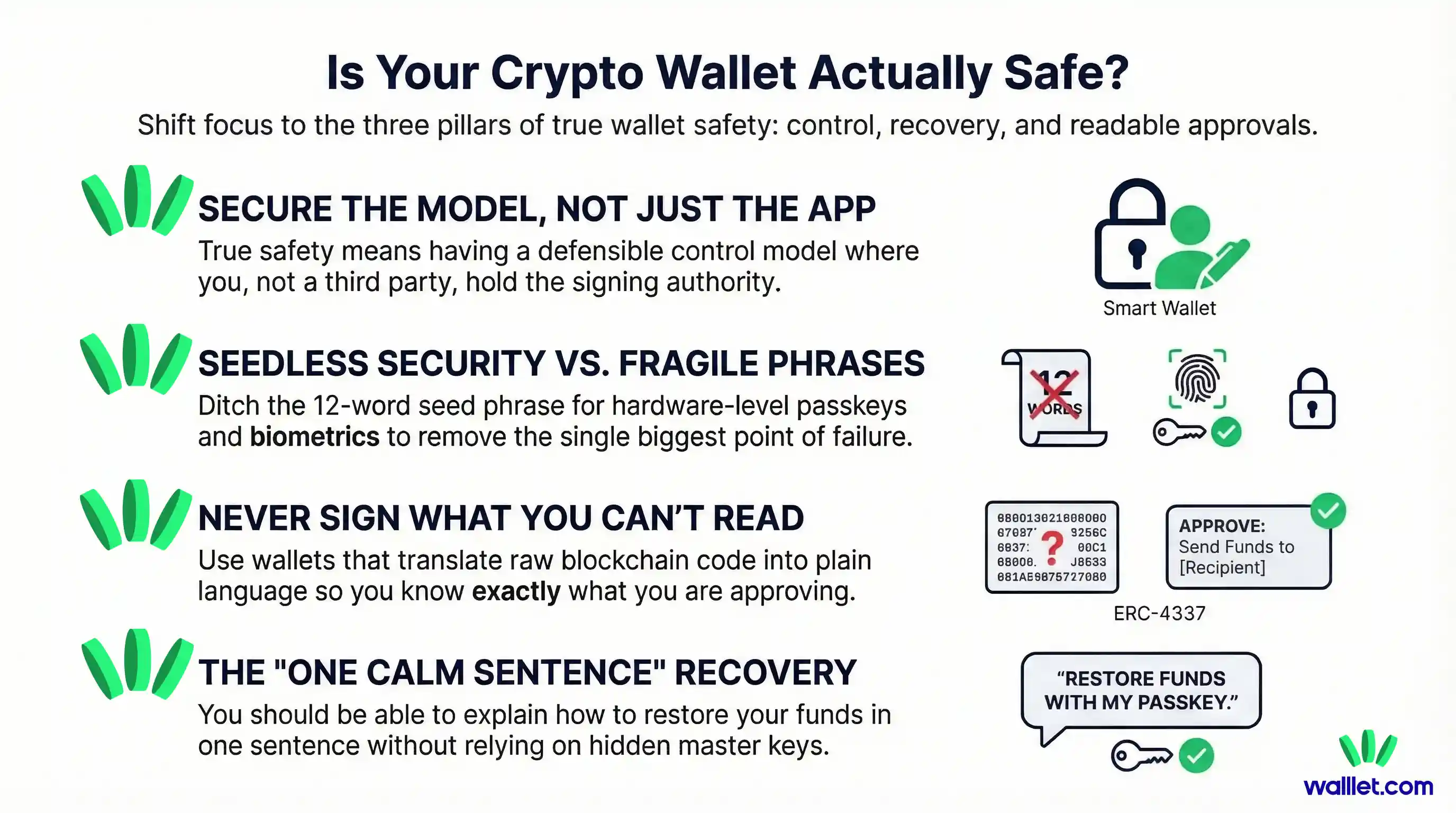
According to walllet’s own product materials, it is a self-custodial wallet that uses passkeys and biometric authentication, keeps the private key on the user’s device hardware, and does not expose the private key to the user or to walllet itself. Its App Store listing and official articles also emphasize human-readable transaction prompts, multi-chain support, and warnings around suspicious contracts, scam tokens, and unusual approvals.
That combination matters for two reasons.
First, it aims to remove one of the biggest historical points of failure in self-custody: manual seed phrase handling. walllet’s existing content positions this as a way to reduce exposure and human error around private key management.
Second, it tries to improve safety at the moment of action, not only at the moment of setup. Human-readable transaction summaries and in-context warnings can help users understand what they are about to approve before a mistake becomes irreversible. That aligns with the broader industry push toward clearer signing and more understandable transaction review.
That said, walllet.com also makes its recovery dependencies explicit. walllet.com’s disclaimer notes that because there is no seed phrase and no central recovery mechanism, users need to maintain access to the relevant device and linked Apple or Google account. That is a different tradeoff, not an absent one.
And that is exactly how a wallet should be judged: not by whether it has tradeoffs, but by whether those tradeoffs are clear, coherent, and manageable for the user it is designed for.
The simplest way to choose well
Here is the shortest version.
Do not choose a wallet because it looks secure. Choose it because you understand its control model, recovery model, and signing model.
Do not ask only whether it is non-custodial. Ask whether it helps you make safer decisions.
Do not judge the setup flow in isolation. Judge what happens on a bad day, on a rushed day, and on a confusing day.
That is where wallet safety becomes real.
And if a wallet can give you strong self-custody, clear transaction language, and a recovery story you actually understand, you are already looking in the right direction. Explore how walllet.com approaches self-custody with passkeys, human-readable approvals, and built-in risk signals at walllet.com.
