walllet is built for people who want real self-custody without the old seed phrase circus.
walllet is a self-custodial, seedless smart wallet that uses passkeys, biometrics, and account abstraction to make crypto easier to use. It is designed to remove seed phrase friction, explain transactions more clearly, and support crypto use across major chains, while still leaving control of funds with the user.
TL;DR
walllet.com is trying to solve a very specific crypto problem: too many wallets still expect normal people to behave like part-time security engineers.
Instead of starting with a 12-word recovery phrase and a pile of confusing prompts, walllet uses passkeys, biometrics, and a smart wallet model to make self-custody feel closer to a modern app.
It is not risk-free, and it does not magically remove responsibility, but it does remove a lot of the friction that makes crypto feel hostile in the first place.
Compared with MetaMask and Trust Wallet, walllet stands out most for its seedless access model, mobile-first simplicity, and emphasis on readable, lower-friction onchain use.
If you search “What is walllet?”, you are probably not looking for a vague brand story. You want the practical answer. Is it a normal crypto wallet? Is it safe? Does it still count as self-custody if there is no seed phrase? Will it work on the chains you care about? And if you already know MetaMask or Trust Wallet, where does walllet actually fit?
Related: Best Crypto Wallet for Beginners: What to Look for Before You Download Anything
That is the right way to approach it, because the wallet market is noisy. Plenty of products promise simplicity. Fewer actually redesign the painful parts. walllet.com’s core bet is that crypto does not need more ritual. It needs less friction, less ambiguity, and fewer chances for users to lose access or sign something they never really understood. That positioning shows up across the current homepage, help documents, and related explainer content.
Before we go deeper, here is the fast comparison most readers want near the top. The table below compresses the current product picture from walllet.com, MetaMask’s support docs, and Trust Wallet’s support center.
Wallet | Best fit | Access model | Recovery style | Network posture | What stands out most |
walllet | Users who want self-custody with less setup friction | Passkeys + biometrics + smart wallet model | Seedless, tied to device and credential manager | Major chains, with current site highlights including Ethereum, BNB Chain, Arbitrum, Polygon, Optimism, Base, Avalanche, Solana, TON, and Sui | Human-friendly self-custody |
MetaMask | Users who live in browser-based dapps and Ethereum-style workflows | Extension and mobile wallet | Traditionally Secret Recovery Phrase, with newer Google/Apple-based access in some flows | Broad and expanding network support, plus custom network setup | Classic dapp wallet muscle |
Trust Wallet | Users who want broad multi-chain asset coverage in one wallet | Mobile and extension | 12-word recovery phrase in classic wallet flows | 100+ blockchains and 10M+ assets per support docs | Wide chain and asset coverage |
What is walllet, really?
walllet is not just a place to “store crypto.” The current walllet.com site describes it as a non-custodial smart Web3 wallet with hardware-level security, built for sending, receiving, storing, swapping, and using assets across major chains and DeFi. Its legal and support pages make the custody model even clearer: the company says users remain in control of their assets, keys, and wallet credentials, and that walllet does not hold or control those assets on the user’s behalf.
Related: How to Migrate to walllet.com - Without Losing Funds or Your Mind
That matters because “wallet” can mean very different things in crypto. Some products are custodial accounts dressed up as wallets. Some are classic self-custody tools built around a private key and seed phrase. walllet sits in a newer category: a self-custodial smart wallet that tries to preserve user control while replacing the old onboarding pain with passkeys, biometrics, and account abstraction. Its own product language frames that shift as seedless, self-custodial, and designed to feel more natural for real people.
So the shortest honest definition is this: walllet is a self-custodial smart wallet built to make crypto ownership less brittle. It tries to keep the control of self-custody while removing two of the things users hate most, seed phrase anxiety and unreadable onchain UX.
How does walllet.com actually work?
Under the hood, walllet combines three ideas that matter more than most people realize.

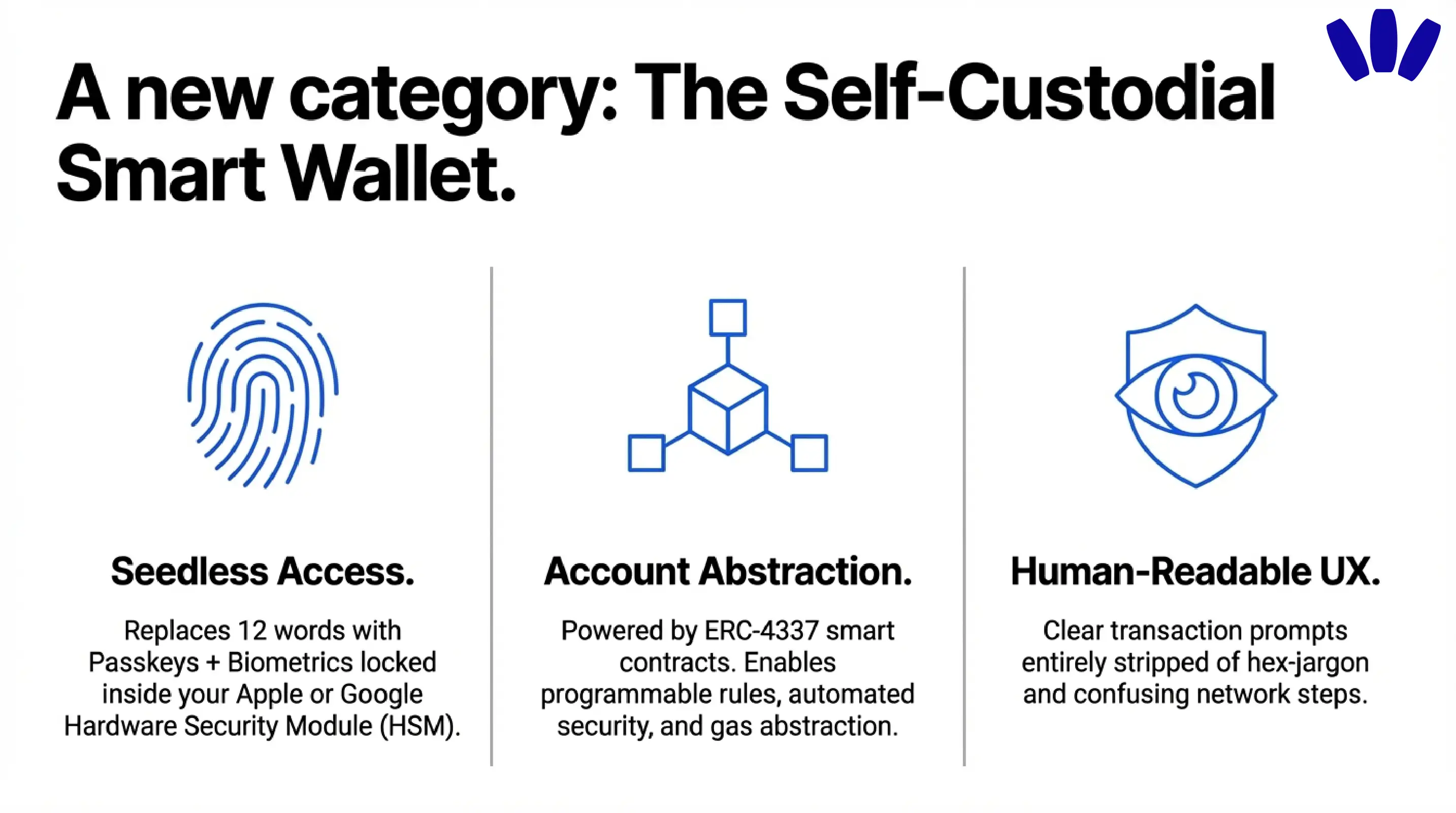
First, it uses passkey-based access rather than the classic “write down 12 words and never lose them” flow. walllet’s terms say it uses passkeys, including hardware-backed credentials through services such as Apple iCloud Keychain or Google Password Manager, instead of seed phrases. The homepage goes further and says the cryptographic key is generated and locked inside the device’s Hardware Security Module, and that neither walllet nor an attacker can read or export it directly.
Second, it is built around a smart contract wallet model. walllet’s homepage describes the product as a smart contract wallet using ERC-4337 account abstraction, which allows more flexible rules than a simple externally owned account. Ethereum’s own documentation explains why that matters: account abstraction can enable programmable security, recovery logic, batched actions, and better gas handling, including the ability for apps or systems to sponsor fees or let users pay in tokens rather than only ETH. The ERC-4337 spec itself calls out paying fees with ERC-20 tokens and easier onboarding as core goals.
Third, walllet tries to make transactions easier to understand, not just easier to initiate. Across walllet’s existing brand and product messaging, the wallet is positioned around human-readable transaction flows, clearer prompts, and reduced friction around gas and network headaches. That is not cosmetic. In crypto, clarity is part of security. A cleaner signing experience can prevent the most human kind of loss: agreeing to something you did not actually understand.
Related: How to Tell if a Crypto Wallet Is Safe Before You Use It
Put all of that together and the product logic becomes clear. walllet is not trying to win by adding more jargon. It is trying to hide the wrong complexity and expose the useful parts.
Why are passkeys such a big deal for walllet?
Because the seed phrase model asks too much from ordinary behavior.
FIDO Alliance defines a passkey as a FIDO credential that lets a user sign in with the same process they already use to unlock a device, such as biometrics, a PIN, or a pattern. Passkeys are phishing-resistant by design, reduce credential theft risks, and keep biometric processing on the device rather than sending biometric data to a remote server.
That maps cleanly onto what walllet is trying to improve. Traditional wallet onboarding often begins with a seed phrase, which is powerful but fragile in the real world. Users screenshot it, miswrite it, store it in a cloud note, forget where they put it, or get tricked into typing it into a fake support page. walllet’s passkey-first model tries to cut away those failure points by making access feel more like unlocking your phone and less like handling a vault code written on paper.
That does not mean passkeys are magic. The trade-off changes. Passkeys can be synced across devices through a passkey provider, and walllet’s own disclaimer makes the practical consequence explicit: if you lose access to your device and the linked Apple or Google account that carries the credential path, you could lose access permanently. In other words, the burden moves. It does not vanish.
For many users, that is still a better trade. A device-backed recovery path tied to systems people already use can be far more humane than asking them to become their own seed phrase archivist on day one.
Is walllet.com really self-custodial if there is no seed phrase?
Yes, but you need to understand what “self-custodial” means here.
Self-custodial means the provider does not control the assets or the keys on your behalf. In walllet.com users remain in full control of their digital assets, private keys, and wallet credentials, and that walllet does not hold, custody, or control any assets or keys for the user. The same documents say the cryptographic credentials never leave the device and are not known to the company.
Related: Custodial vs Non-Custodial Wallets Explained: Which One Should You Actually Use?
That is the similarity walllet shares with the best-known self-custody wallets. MetaMask’s docs say users retain power over their crypto identity and funds. Trust Wallet describes itself as a decentralized wallet where only the user can access funds and says the platform does not hold user funds.
The difference is the access and recovery model. In classic MetaMask and Trust Wallet flows, recovery usually revolves around a Secret Recovery Phrase or 12-word recovery phrase. MetaMask’s support docs say that if you did not create the wallet through Google or Apple, you need the Secret Recovery Phrase to access it, and that backing it up is essential. Trust Wallet’s support docs say its classic recovery process uses a 12-word phrase that acts as the master key. walllet, by contrast, is designed around passkeys and a seedless flow.
So yes, walllet is self-custodial. It is just self-custody with a different front door.
Which blockchains does walllet support?
The safest answer is: walllet clearly positions itself as multi-chain, and its current site visibly highlights support across a mix of major EVM and non-EVM ecosystems.
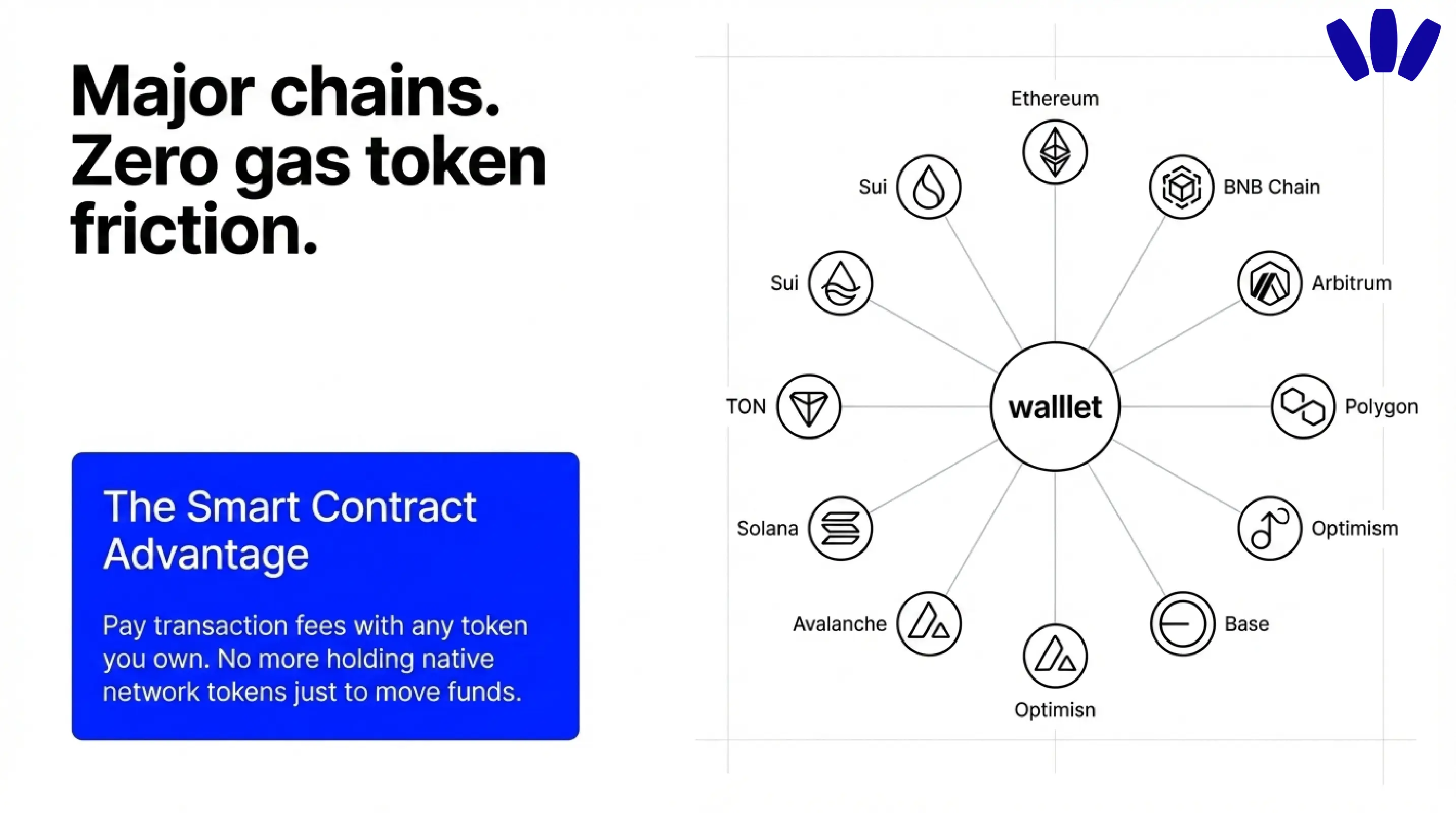
On the homepage today, walllet shows logos for Ethereum, BNB Chain, Arbitrum, Polygon, Optimism, Base, Avalanche, Solana, TON, and Sui. Its broader messaging describes support for crypto and stablecoins across major chains and DeFi. That is enough to say walllet is not built for a single-chain experience.
For readers coming from Ethereum-style usage, walllet’s own EVM guide is helpful context. The article explains that an EVM wallet typically works across Ethereum, Polygon, Arbitrum, Optimism, Base, Avalanche C-Chain, and BNB Smart Chain, while also making clear that Solana is not natively EVM. That matches the broader picture walllet presents on its homepage: one wallet experience, but not one chain family only.
There is one important caution here. A homepage logo strip is not the same thing as a complete support matrix for every token, network, feature, and dapp flow. Before sending funds, users should still verify the exact asset and chain inside the app.
How is walllet different from MetaMask and Trust Wallet?
This is where the real buying logic lives.
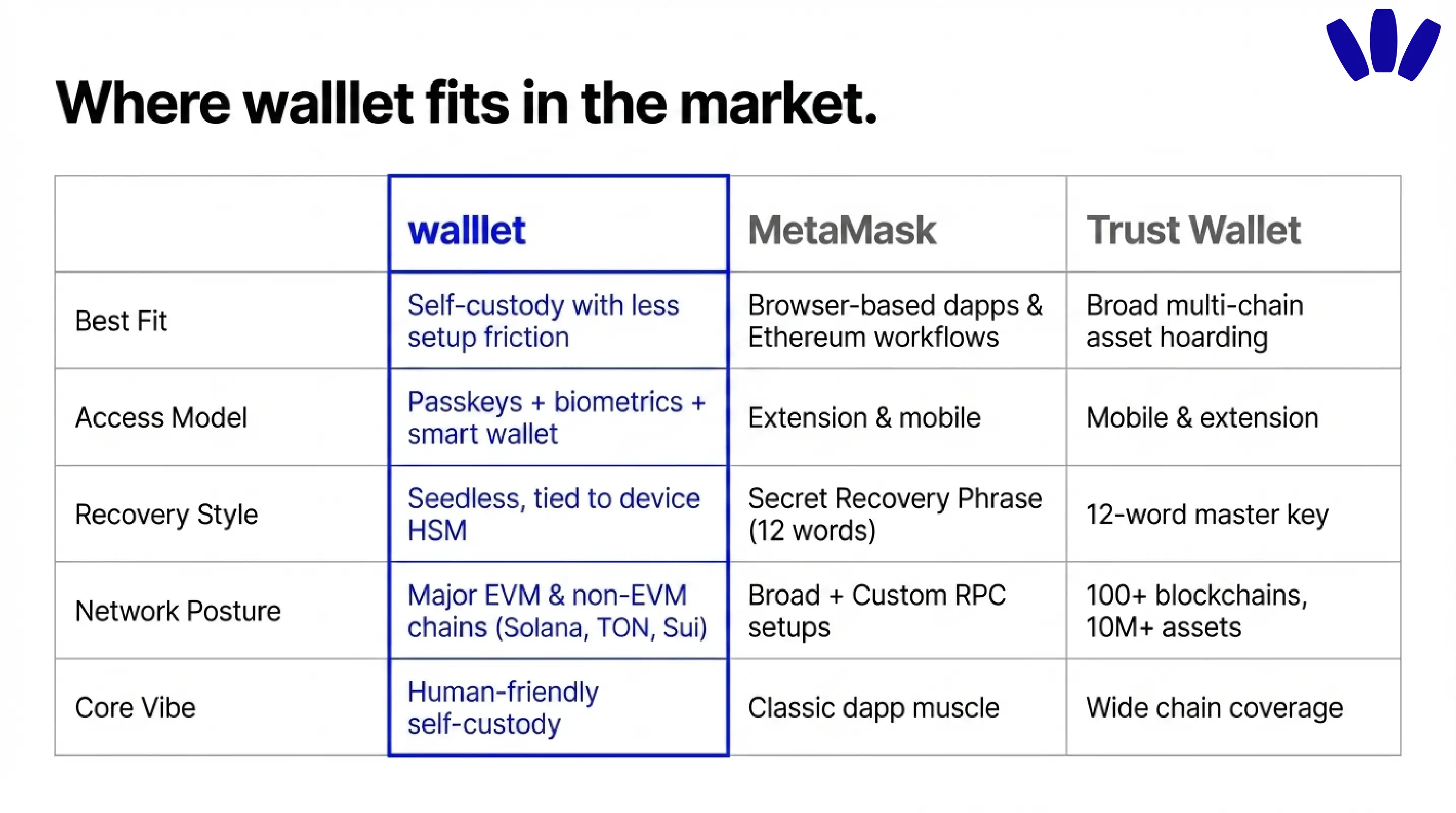
MetaMask, Trust Wallet, and walllet all sit on the self-custody side of the map. They are not exchange accounts. They are tools for holding your own keys and interacting with crypto directly. But they are shaped by very different product instincts.
MetaMask help docs present it as a browser extension and mobile app for managing keys and interacting with decentralized applications. That makes it especially strong for users who spend a lot of time in browser-based Web3, connect to dapps constantly, and do not mind a more traditional wallet mental model. Its network support has also broadened significantly, with current docs listing default networks that now extend beyond Ethereum into chains such as Bitcoin, Solana, Tron, Base, Polygon, BNB Chain, Arbitrum, OP, Avalanche, and more.
Related: walllet vs MetaMask: Which Wallet Is Better for Real Self-Custody in 2026?
Trust Wallet’s support docs describe the classic wallet as a private-key-based EOA and say it offers access to over 10 million assets across more than 100 blockchains. If your main priority is broad chain coverage in a familiar mobile wallet style, that is a powerful proposition. The trade-off is that classic recovery still revolves around the 12-word phrase model.
walllet is different in a more structural way. It is trying to modernize the self-custody experience itself. Instead of leading with a recovery phrase, it leads with passkeys and device-native authentication. Instead of assuming users are comfortable with gas token friction, it leans on account abstraction and smart wallet logic. Instead of treating signing clarity as a secondary UX layer, it makes clear prompts part of the value proposition.
That does not make walllet universally “better.” It makes it better suited to a certain kind of user.
If you want the classic browser-to-dapp workhorse, MetaMask still makes immediate sense. If you want very wide multi-chain asset support in one familiar wallet, Trust Wallet stays compelling. If you want seedless self-custody that feels closer to a modern consumer app, walllet is the most differentiated of the three.
Who is walllet best for?
walllet looks strongest for four groups.
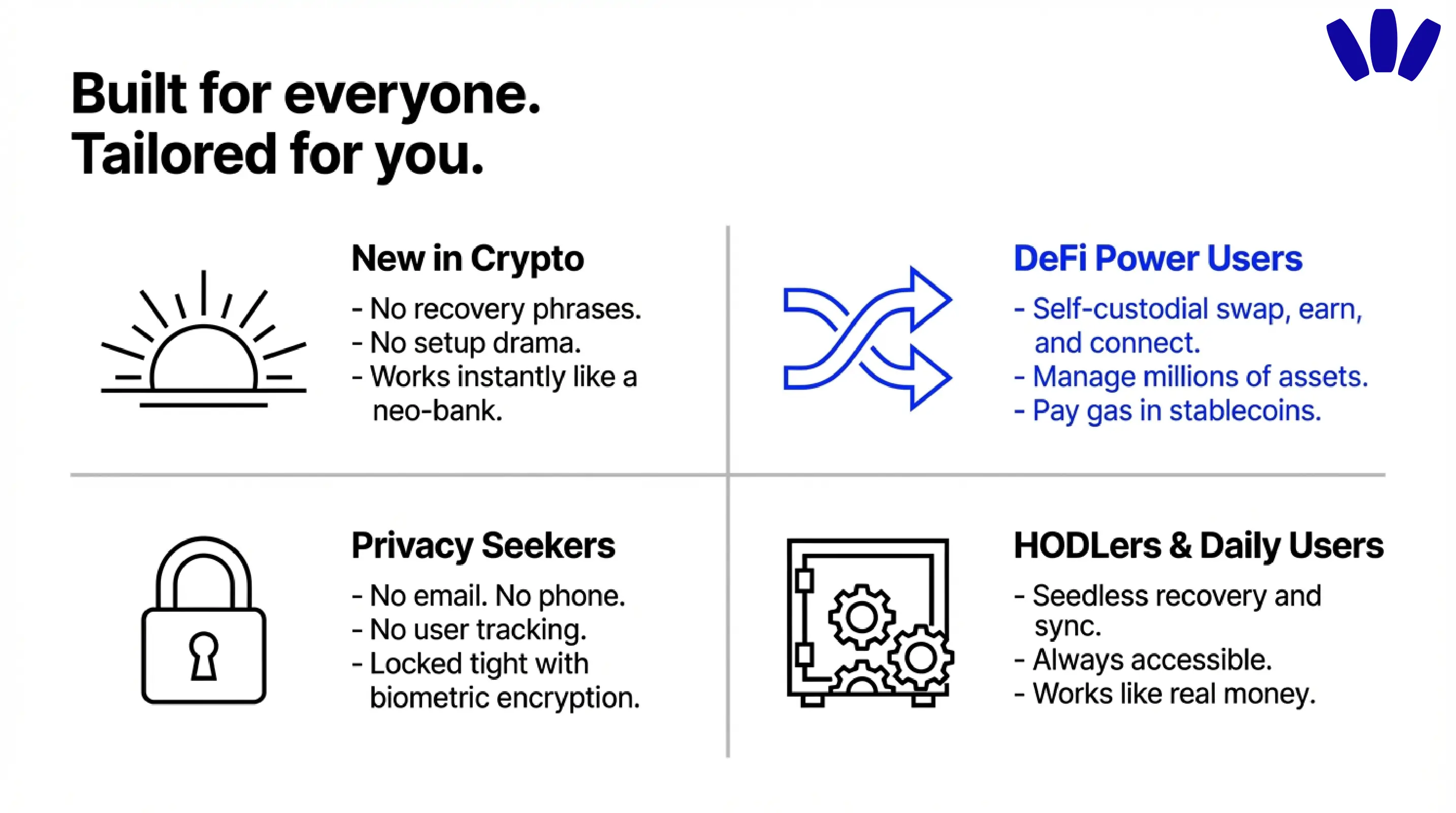
The first is the person who wants self-custody but hates seed phrase anxiety. The homepage speaks directly to “new in crypto” users with “no recovery phrases, no setup drama,” which is not subtle, and that is probably wise. For a huge number of users, the hardest part of self-custody is not buying crypto. It is surviving the setup without losing confidence.
The second is the user who wants to use crypto, not just warehouse it. walllet positions itself for sending, receiving, storing, swapping, and interacting with apps. Its smart wallet and gas abstraction framing suggest it is designed for actual movement and participation, not just static holding.
The third is the privacy-minded user. walllet’s homepage explicitly says “No email. No phone. No tracking,” and frames that as part of the product’s protection and data-minimization story. For people who want a wallet that does not immediately drag them into an account-creation funnel, that is a meaningful part of the appeal.
The fourth is the user who wants less cognitive load when signing. If you have ever stared at a hex-heavy approval request and felt your brain quietly leave the room, walllet’s “clearer prompts and less setup friction” angle is not marketing fluff. It addresses a real pain point that older wallet designs often leave untreated.
How do you create a walllet.com wallet?
The exact setup depends on your device, but the logic is simple.

You install walllet, make sure your phone already has the right security basics in place, and create the wallet using the biometric or passkey flow your device supports. walllet’s current setup guides say Android users need a supported Android version, screen lock, fingerprint authentication, and Google account support for passkeys. On iPhone, walllet’s guide points users toward iOS 16 or later, Face ID or Touch ID, iCloud Keychain, Apple ID two-factor authentication, and ideally iCloud Backup.
In practical terms, the setup checklist looks like this:
Download walllet from the official source.
Make sure your phone’s lock screen, biometrics, and passkey environment are already configured.
Create the wallet with Face ID, fingerprint, or the equivalent passkey prompt.
Confirm that your device backup and Apple or Google account recovery path are healthy before moving serious funds.
That last step matters more than people think. In a seedless wallet, your “backup discipline” shifts from a piece of paper to your device security and credential ecosystem. Ignore that, and the convenience story can turn sour fast.
What should you understand before moving serious funds into walllet?
Start small, test recovery assumptions, and respect the fact that self-custody still means responsibility.
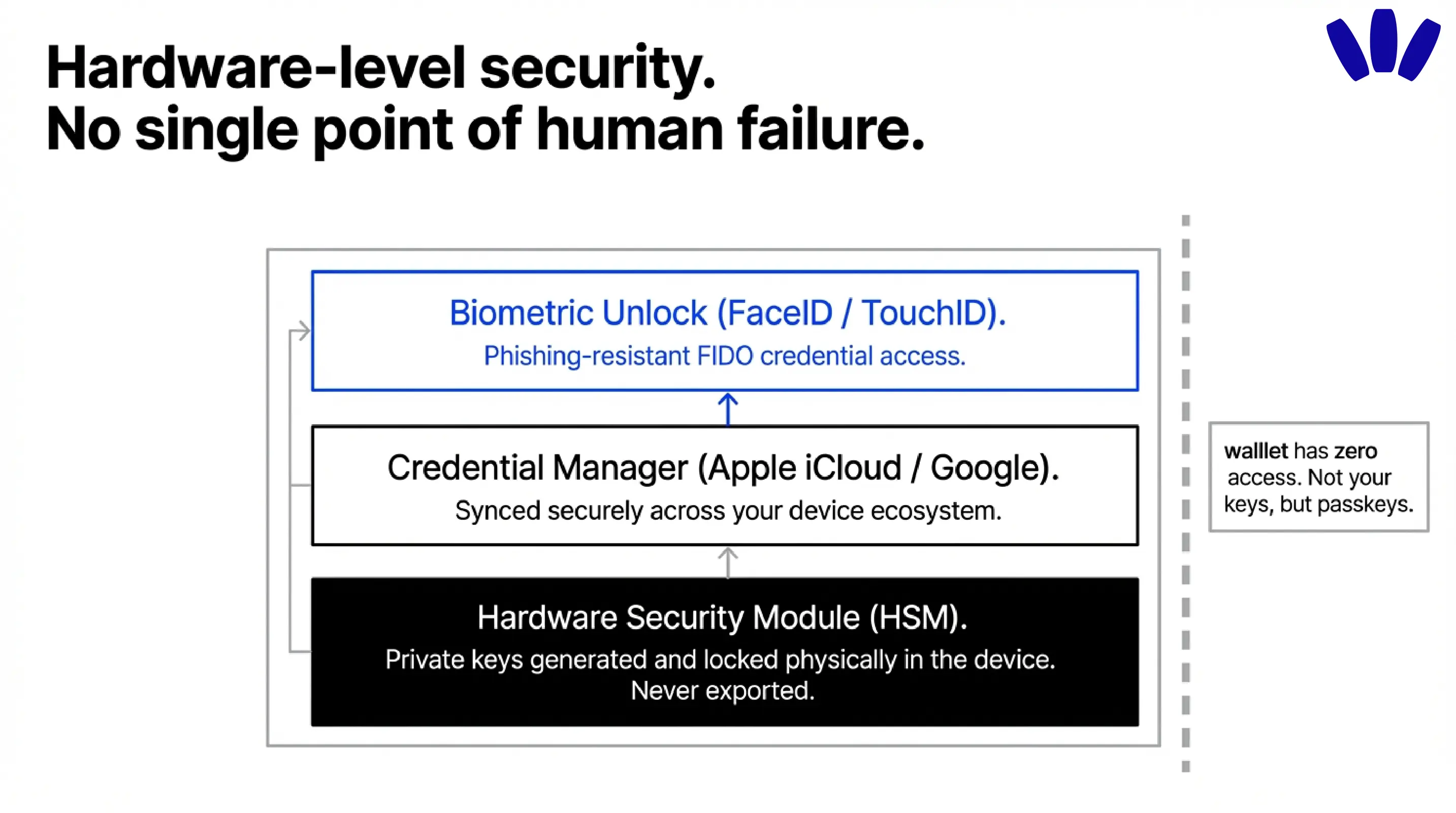
walllet’s disclaimer is very clear that it cannot freeze, reverse, or restore transactions, and that it cannot reset or recover your keys for you. It also warns that losing access to the device and linked credential ecosystem can mean permanent loss of access. That is not a flaw unique to walllet. It is what real self-custody sounds like when nobody is pretending there is a helpdesk reset button behind the curtain.
There is also the smart wallet reality. walllet’s legal documents explicitly describe the product as an emerging smart contract wallet model and note that smart contracts and supporting infrastructure can still carry technical risk. If you are moving meaningful funds, the sensible path is not bravado. It is a test transaction, a recovery check, and a slow ramp.
That is the mature way to read walllet’s promise. It is not “crypto without responsibility.” It is “self-custody without the unnecessary punishment.”
If that is what you have been waiting for, walllet.com starts to make a lot of sense. It is one of the clearest attempts to make Web3 feel less like an obstacle course and more like a product a normal person might actually keep using.
