
Yes. walllet.com currently has a Nigeria-focused product for freelancers and remote workers, with foreign-currency receiving routes, dollar-linked holding, a virtual USD card and naira cash-out. But availability in Nigeria does not mean every feature is automatically available to every user. Accounts, cards and fiat services can depend on eligibility, verification and the third-party provider behind that service.
An app can work in Nigeria while the one feature you need inside it does not work for your account.
That distinction matters when the feature in question is where a $1,000 client payment or your monthly remote salary is supposed to land.
As of August 25, 2026, walllet.com has a Nigeria-focused product for freelancers and remote workers. Its current public pages describe receiving USD, EUR and GBP, keeping dollar-linked value, using a virtual USD Mastercard and converting supported balances to naira for payout to a Nigerian bank account.
But there is an important second part to that answer.

The receiving account, card and fiat cash-out layers are provided through third-party financial providers. Eligibility, verification, supported routes, limits and transaction approval can therefore differ between users. Completing KYC does not automatically guarantee access to every service.
So the useful question is:
Which part of walllet.com can I use for the way I get paid, and what do I need to verify before I depend on it?
walllet.com Nigeria availability at a glance
Feature | What is currently documented | What can still vary |
Nigeria access | walllet.com currently targets Nigerian freelancers and remote workers | Individual account status and service eligibility |
USD, EUR and GBP receiving | Current product pages describe receiving details in the user’s own name | Currency, payment rail, payer type, limits and approval |
Holding dollar-linked value | Income can remain dollar-linked until the user chooses to convert | The underlying receiving and settlement structure |
Virtual dollar card | A virtual USD Mastercard is currently documented for eligible Nigerian users | KYC, approval, limits and merchant acceptance |
Naira cash-out | Supported balances can be converted for payout to a Nigerian bank where the route is available | Provider, quote, limits, review and payout timing |
Fees and exchange rates | Relevant conversion information is shown before confirmation | Amount, provider, route, market conditions and third-party charges |
That last column is the part worth reading before you move a real client or payroll payment.
Is walllet.com available to Nigerian residents?
Yes. walllet.com currently markets the product directly to freelancers and remote workers in Nigeria, and its Android listing describes USD, EUR and GBP receiving, a virtual dollar card and naira withdrawal for that audience.
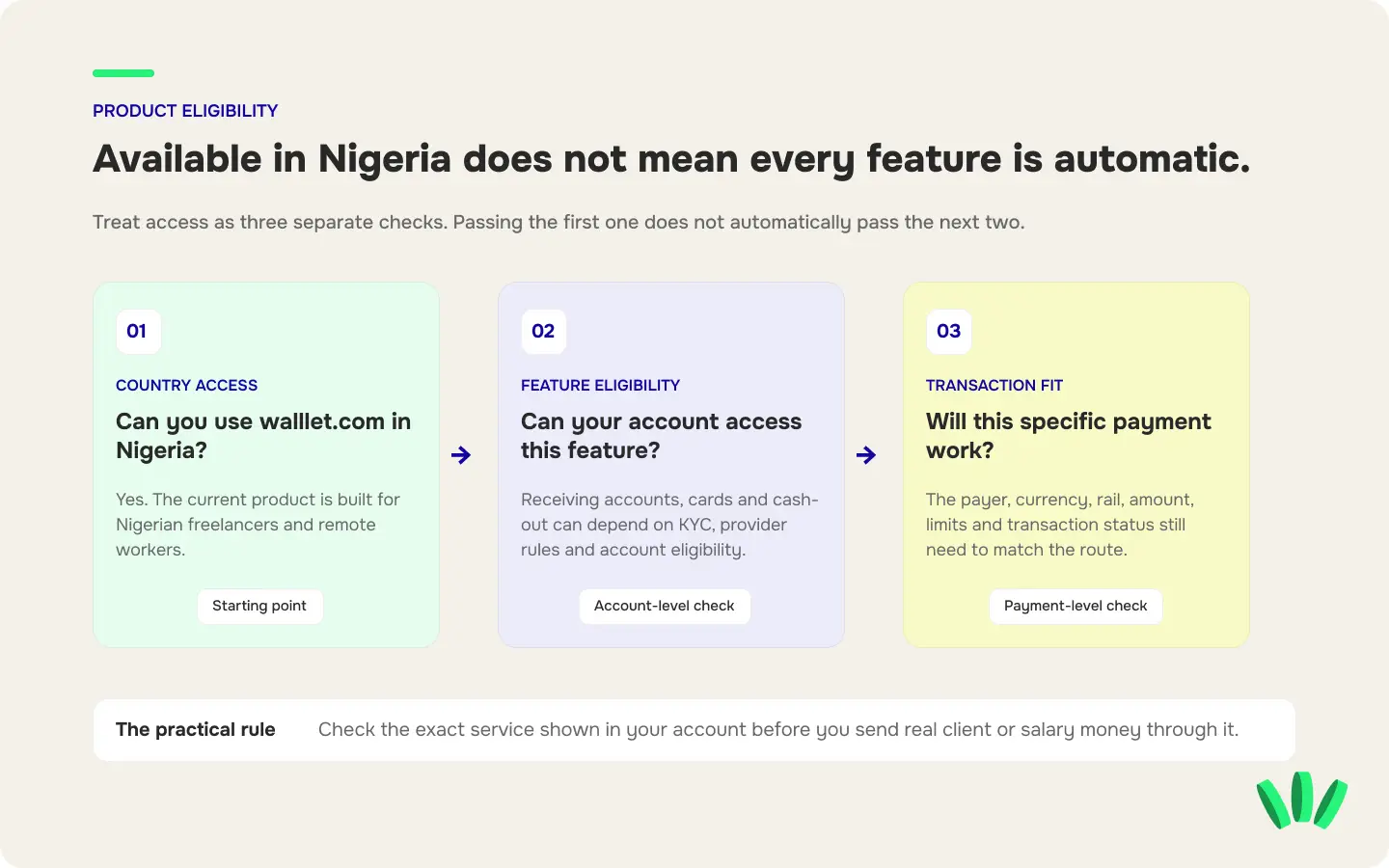
But “available in Nigeria” and “approved for every walllet.com financial service” are different statements.
A Nigerian user may be able to open walllet.com but still need separate verification or eligibility approval for a receiving account or card. A particular cash-out route may also depend on what the current account and provider support.
This distinction becomes especially important if you are choosing an account before sending payment instructions to a client.
What kind of dollar account does walllet.com provide?
For eligible users, walllet.com provides access to foreign-currency receiving details through third-party financial providers.
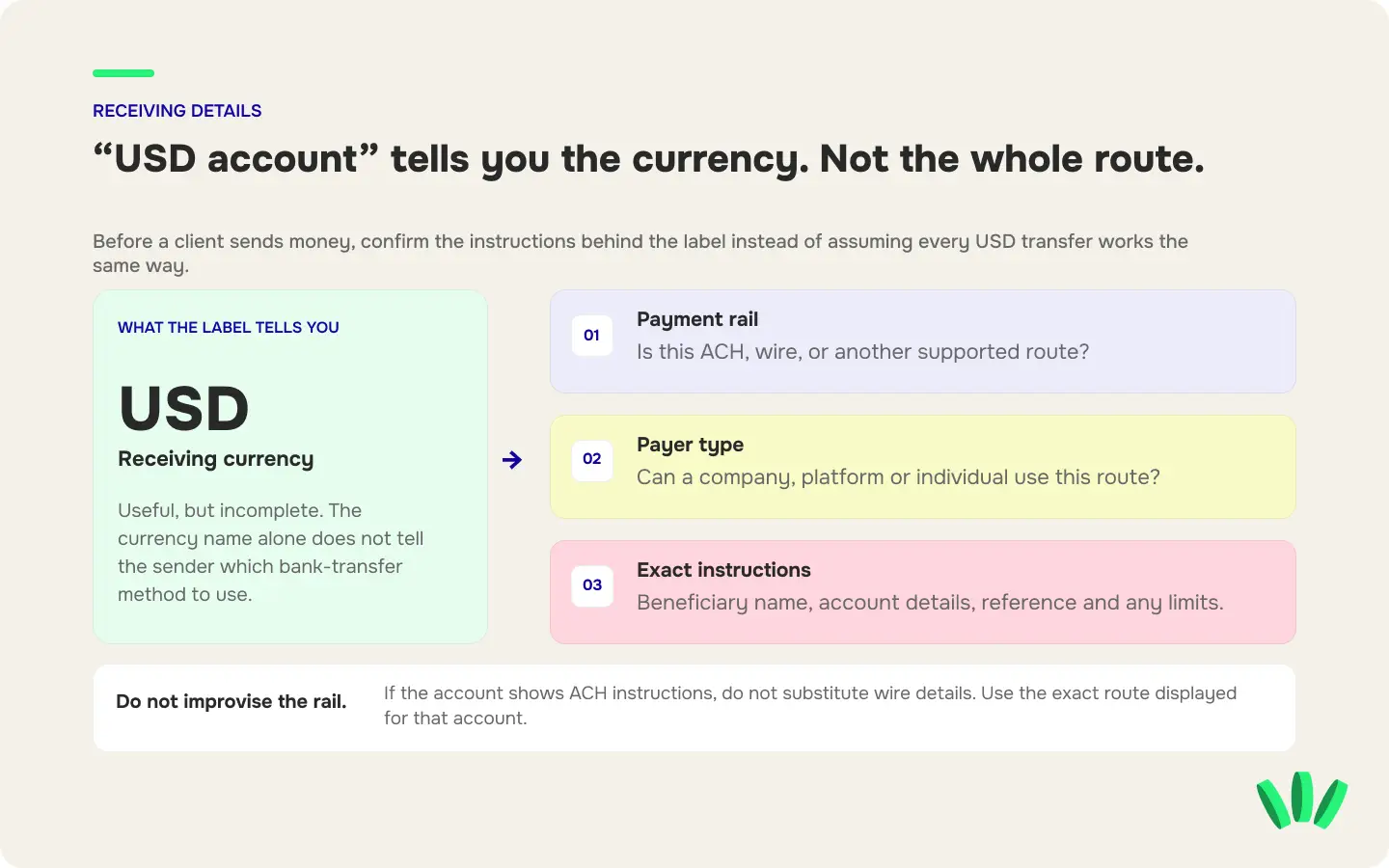
The current product pages describe USD, EUR and GBP account details in the user’s own name, which can be used for supported payments from employers, clients and platforms. The exact receiving route shown in your account is what matters.
A “USD account” label alone does not tell you whether a client should send ACH, wire or another type of transfer.
The same applies to an IBAN. An IBAN identifies an account for compatible bank transfers. It does not, by itself, prove that every currency, SEPA payment, SWIFT transfer or payer type is supported.
The walllet.com IBAN Account guide explains this distinction in more detail. walllet.com’s current IBAN documentation says the currency, rail, eligibility, fees, limits and review rules depend on what is available for the user’s account.
Before sending details to a client, also check the guide to receiving payments from US, UK and EU clients. The payer’s country is only one part of the route. The receiving account also needs to support the payment rail and the payer type the client intends to use.
A walllet.com receiving account is not a normal all-purpose bank account
This is one of the most important distinctions in the product.
walllet.com is a fintech product, not a bank. The receiving service should not be treated as a general-purpose bank account unless the current product screen and provider terms specifically give it those functions.
For example, do not assume that receiving details automatically let you:
send outbound bank transfers;
withdraw cash;
obtain credit;
use every transfer rail;
receive from every sender type;
keep conventional fiat deposits in the same way as a normal bank account.
Check what the actual route does before putting it on an invoice.
If your main problem is receiving dollars from a client rather than understanding walllet.com itself, the guide to receiving USD in Nigeria without PayPal compares the wider route options.
What happens after a client pays your walllet.com account?
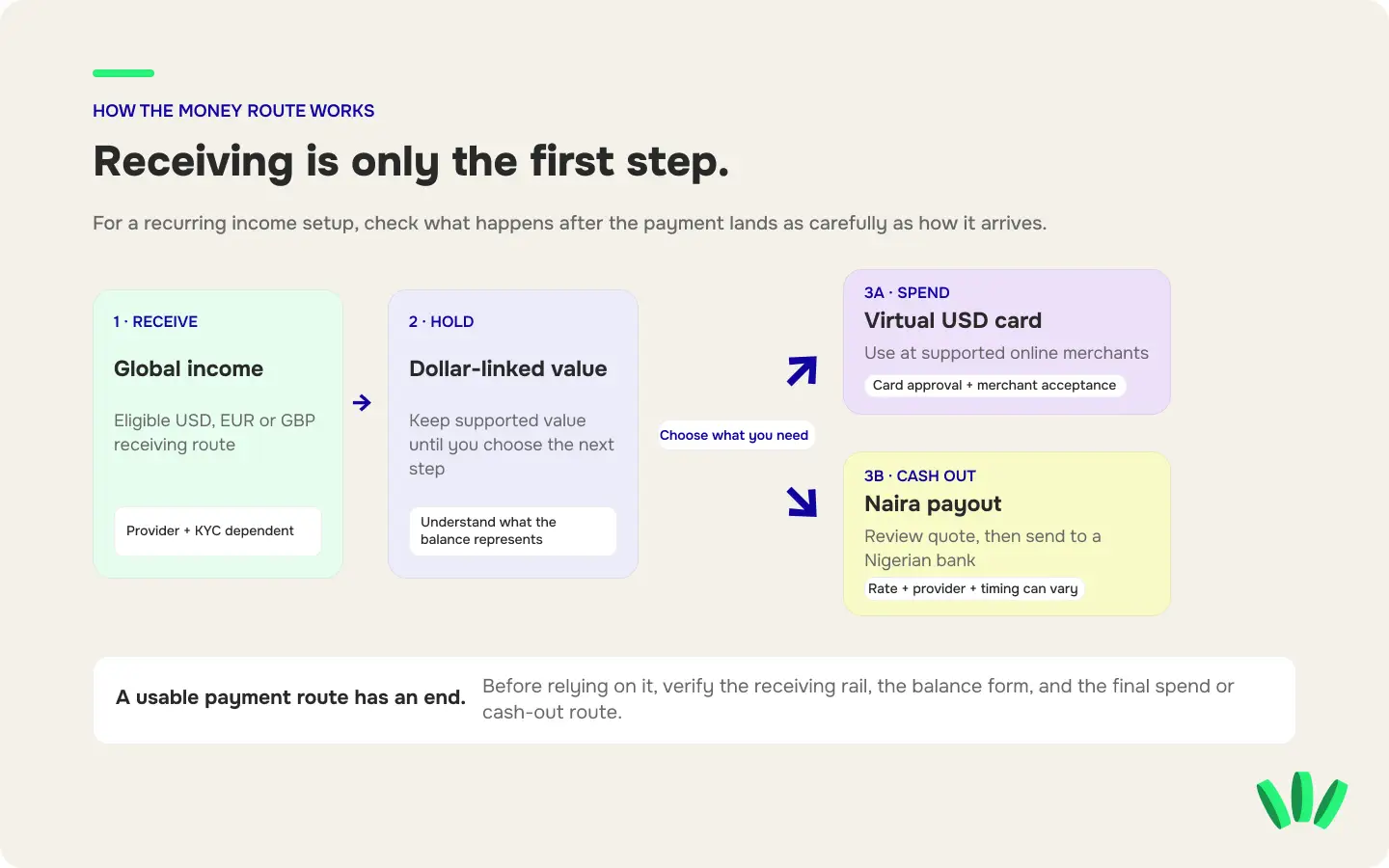
The useful way to think about walllet.com is as a route, not a collection of isolated features:
Receive → hold → spend or convert → cash out
Each stage can have its own conditions.
1. Receive the payment
You first need an eligible receiving route for the currency and payment method your client, employer or platform plans to use.
Before sharing the details, confirm:
beneficiary name;
receiving currency;
payment rail;
accepted payer type;
payment reference;
any incoming limit or fee.
A successful payment starts with matching the sender to the receiving route. A US client having dollars does not automatically mean every USD account will accept the method their finance team wants to use.
2. Hold the dollar-linked value
walllet.com describes the user experience as keeping income in dollars until you choose to convert it.
There is an important infrastructure detail behind that wording. The current Terms explain that fiat received through the Virtual Account Service can be converted by the applicable provider into a supported stablecoin before being credited to the wallet. In plain English, the user may manage dollar-linked value while the underlying settlement is not the same as keeping a conventional USD deposit at a bank.
That difference matters when you compare walllet.com with a Nigerian domiciliary account or another foreign-currency account.
3. Spend with the virtual dollar card
walllet.com currently documents a virtual USD Mastercard for eligible Nigerian users.
As of August 25, 2026, the dedicated card guide lists a $5 issuance fee and says there is currently no monthly card fee. It also makes clear that verification and account eligibility apply, and submitting a card application does not guarantee approval.
The card is intended for supported online payments such as software, subscriptions and other international purchases.
“Mastercard” still does not mean “works at every merchant.”
A merchant, issuer or payment processor can reject a virtual card because of billing information, merchant rules, limits, geography, risk checks or other authorization conditions. The virtual dollar card decline checklist covers those failure points in detail.
If the card will pay for a tool you need to work, test that specific merchant before making it your only payment route.
4. Convert and cash out to naira
Where cash-out is available for the account, the route is designed to let you review the conversion and send the resulting naira to a Nigerian bank account.
The current walllet.com cash-out documentation describes the flow as:
supported balance → conversion quote → NGN payout → Nigerian bank account
Before confirmation, check the executable rate, fees, expected NGN amount, payout destination and current delivery estimate. Rates, fees, limits and timing can depend on the provider and the route available to the account.
The detailed guide to cashing out USDT or USDC to naira is useful if your starting balance is a supported stablecoin.
One rule is especially useful: if the cash-out option is not currently shown for your account, do not assume another user’s screenshot proves that the same route is available to you.
Does every Nigerian walllet.com user get every account, card and cash-out route?
No.
Financial-service access can depend on the particular product, provider, verification result and account status.
For the current virtual card flow, walllet.com says the verification route may ask for information such as a BVN, NIN, Nigerian driver’s licence or international passport, alongside a selfie, address or source-of-funds information. The exact request can differ by verification route.
Other services can have different requirements.
That means there are three separate questions to answer:
Question | What to check |
Can I open walllet.com? | Current country/app availability |
Can I access this feature? | KYC, provider and account eligibility |
Will this specific transaction work? | Payer, rail, amount, limits, review rules and transaction status |
Passing the first check does not automatically pass the other two.
This is why “my friend has the card” or “I saw someone receive ACH” is weak evidence for your own account.
Which walllet.com fees and limits can change?
Do not build your payment plan around an old screenshot or a fee quoted in a social post.
For provider-backed receiving and cash-out services, current rates, fees and transaction limits can vary by route, amount, currency, market conditions and provider. The confirmation screen is the point where the transaction-specific numbers matter.
For the walllet.com Card, the current published issuance price is $5. That is a dated product fact, not a permanent promise. Check the amount displayed before ordering the card.
For a conversion to naira, compare the number you can use after the whole route, not one attractive fee.
A useful calculation is:
Final usable naira = executable conversion value − applicable service and payout costs
If another bank, network or intermediary can deduct a separate charge, include that too. The meaningful number is what reaches the destination, not the smallest fee in the marketing copy.
How to check walllet.com before sending a real client payment
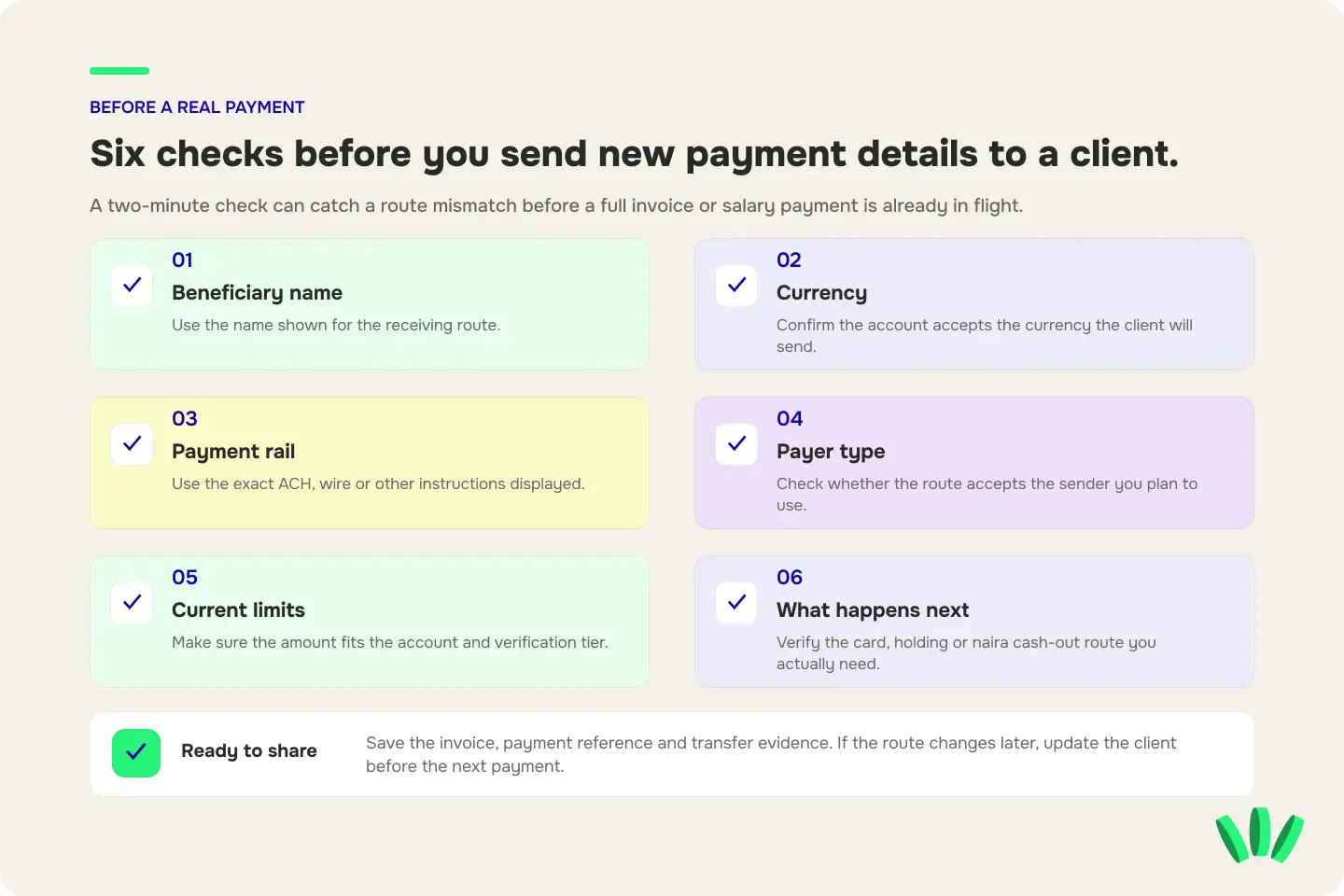
Do this before putting new receiving details on an invoice or giving them to payroll.
1. Open the current account, not an old screenshot
Check which receiving, card and cash-out services are visible now.
Product availability can change. Details copied from an old article, Telegram message or previous transaction may no longer describe the current route.
2. Confirm the exact receiving method
Do not send your client “my walllet dollar account” and stop there. Give them the exact instructions shown for that account:
beneficiary name;
currency;
account details;
transfer method;
payment reference.
If the route says ACH, do not tell the client to send a wire instead.
3. Check who is allowed to pay it
A receiving route can distinguish between employers, companies, platforms, individuals or other third parties. Confirm the accepted payer type before the sender starts the transfer.
4. Check your current limits
A route that works for a $100 test may not automatically fit a $5,000 contract payment. Look at any transaction, account or verification-tier limit that applies to the route you intend to use.
5. Check what happens after receipt
Receiving the money is only useful if the next step works.
If you need naira for rent, confirm the cash-out route.
If you need the money for Figma, Claude, cloud hosting or another foreign service, check the card and merchant route.
If part of the income needs to remain dollar-linked, understand what form that balance takes.
6. Test a new route before it becomes payroll infrastructure
For a new client, a changed receiving account or an unfamiliar payout route, a small test can expose a name mismatch, unsupported rail or other problem before the full invoice is in flight.
Keep the invoice, payment reference and transfer evidence.
7. Keep one independent fallback
Payment routes change. A provider can require another review. A client’s finance team may reject a method it cannot use.
Your backup does not need to be identical to your main route. It needs to be tested before you need it.
What if a payment is pending or under review?
A status such as “sent,” “pending” or “received” does not always mean the payment has reached final settlement and become usable. A bank, payment network or provider can still be processing the transaction. Compliance review can also require more information. Do not ask the client to pay a second time because the first transfer looks slow. First save:
the amount and currency;
sender name;
date and time;
payment or transfer reference;
invoice number;
any status shown in the app;
any supporting bank or platform receipt.
Then check the official support route with that evidence. A duplicate payment is a much worse troubleshooting tool than a good reference number.
Who is walllet.com a good fit for in Nigeria?
walllet.com is most relevant when your problem continues after the client clicks “send.” For example, you may want to:
receive income from international clients or employers;
keep part of that income dollar-linked;
use part of it for foreign work tools;
convert only what you need to naira;
move the naira to your Nigerian bank;
manage those steps without stitching together several unrelated apps.
It is a weaker fit if the payment rail your client requires is not supported, the service you need is not visible for your account, or your critical merchant has not been tested with the card.
A financial product does not become reliable because one feature exists. The full route has to work for the money you are trying to move.
Before you rely on walllet.com for your next payment
Check the exact service shown in your account, then match it to the real job.
If a US client needs a specific bank-transfer rail, verify that rail before sending the account details.
If you need a virtual card for a recurring work subscription, verify the card and test that merchant.
If you need naira at the end of the month, check the cash-out route and the final quote before the income arrives.
The safest product description is also the most useful one: walllet.com works in Nigeria, but the exact receiving, card and cash-out options available to you depend on the route and your eligibility.
Before your next client or salary payment, check the receiving route, card and cash-out options currently available to your account. Match the exact route to the way your payer sends money, review the conditions, and test a new setup before making it your recurring income route.
