Your client says the wire was sent three days ago. They send a screenshot marked “completed.” Your balance still shows nothing.
At that point, another screenshot rarely helps.
To trace an international wire transfer, you need to identify the exact payment, give the same identifiers to both sides of the route, and make sure the institution that can investigate the missing leg is the one taking action.
For a SWIFT payment, the most useful identifier is usually the UETR, a 36-character Unique End-to-end Transaction Reference attached to payment instructions carried over Swift. It works like a tracking number for the payment and stays with it as it moves through the chain.
There is one important 2026 update: people still commonly ask for an “MT103,” but the underlying cross-border messaging system has changed. The coexistence period between legacy MT payment instructions and ISO 20022 ended on 22 November 2025. ISO 20022 is now the standard for cross-border payment instructions between financial institutions, and pacs.008 is the ISO 20022 message used for a financial-institution-to-financial-institution customer credit transfer. If the bigger problem is choosing a reliable way to get paid before a transfer ever goes missing, see how Nigerian freelancers receive payments from US, UK, and EU clients across ACH, wire, SEPA, IBAN and other routes.
So if your client’s bank cannot give you something literally called an MT103, do not get stuck on the document name. Ask for:
A bank-issued payment confirmation showing the UETR and the full payment details, including the pacs.008 or equivalent SWIFT payment information where available.
That gives the banks something they can investigate.
Want fewer moving parts between getting paid and accessing your income? See how walllet.com is built around receiving global income, holding dollar value, spending and cashing out to naira.

What changed for SWIFT payment tracking in 2026?
The terminology freelancers use has not caught up with the infrastructure.
Until November 2025, MT103 was the familiar SWIFT message associated with a single customer credit transfer. After the ISO 20022 migration, cross-border financial institutions use richer ISO 20022 payment messages. Swift says MT payment instructions are no longer supported by FIN for financial-institution-to-financial-institution cross-border flows, apart from temporary contingency processing in which eligible MT messages are converted into their ISO 20022 equivalents.
That means a useful 2026 vocabulary looks like this:
Term | What it means | What you use it for |
Payment receipt | Customer-facing evidence that a transfer was created, submitted or processed | First check, but weak tracing evidence on its own |
MT103 | Legacy SWIFT customer credit-transfer message that remains widely used as a search and support term | Historical or bank-generated payment detail; some institutions may still expose MT103-style records |
pacs.008 | ISO 20022 FI-to-FI Customer Credit Transfer message | Current structured payment instruction for relevant cross-border flows |
UETR | Unique 36-character tracking reference attached to a SWIFT payment | Identifying the same payment across the payment chain |
Bank trace / investigation | Formal investigation opened by an institution | Finding where a delayed payment is, why it stopped, or whether it was rejected or returned |
The useful question is no longer “Do I have an MT103?” It is:
Do I have enough bank-issued information, especially the UETR, to identify this payment and start a trace?
Before tracing the wire, check whether it was actually a wire
Do this first. A client may use “wire,” “bank transfer,” and “international transfer” as if they mean the same thing. They do not.
The payment could have travelled through SWIFT, ACH, SEPA, a domestic bank network, an internal platform transfer or another payment route. A UETR is relevant to payments carried over Swift. It is not a universal tracking number for every bank payment in the world. Ask the sender to confirm:
payment method or rail
amount
currency
date initiated
value date, if shown
beneficiary name
beneficiary account number or IBAN
receiving institution
SWIFT/BIC, if applicable
sender name
sender’s bank
payment reference or invoice number
bank transaction reference
UETR, if it was sent over Swift
If the sender chose the wrong rail for the receiving details you supplied, the investigation changes immediately.
A USD receiving route that accepts ACH, for example, should not automatically be assumed to accept a domestic wire, international SWIFT wire or every payer type. Before sharing receiving details with a client, verify the supported route for that account.
If your client is paying you through international account details, this practical guide to the walllet.com IBAN account explains how receiving details, IBAN payments and international client payments fit together.
A payment receipt is not the same as proof that you received the money
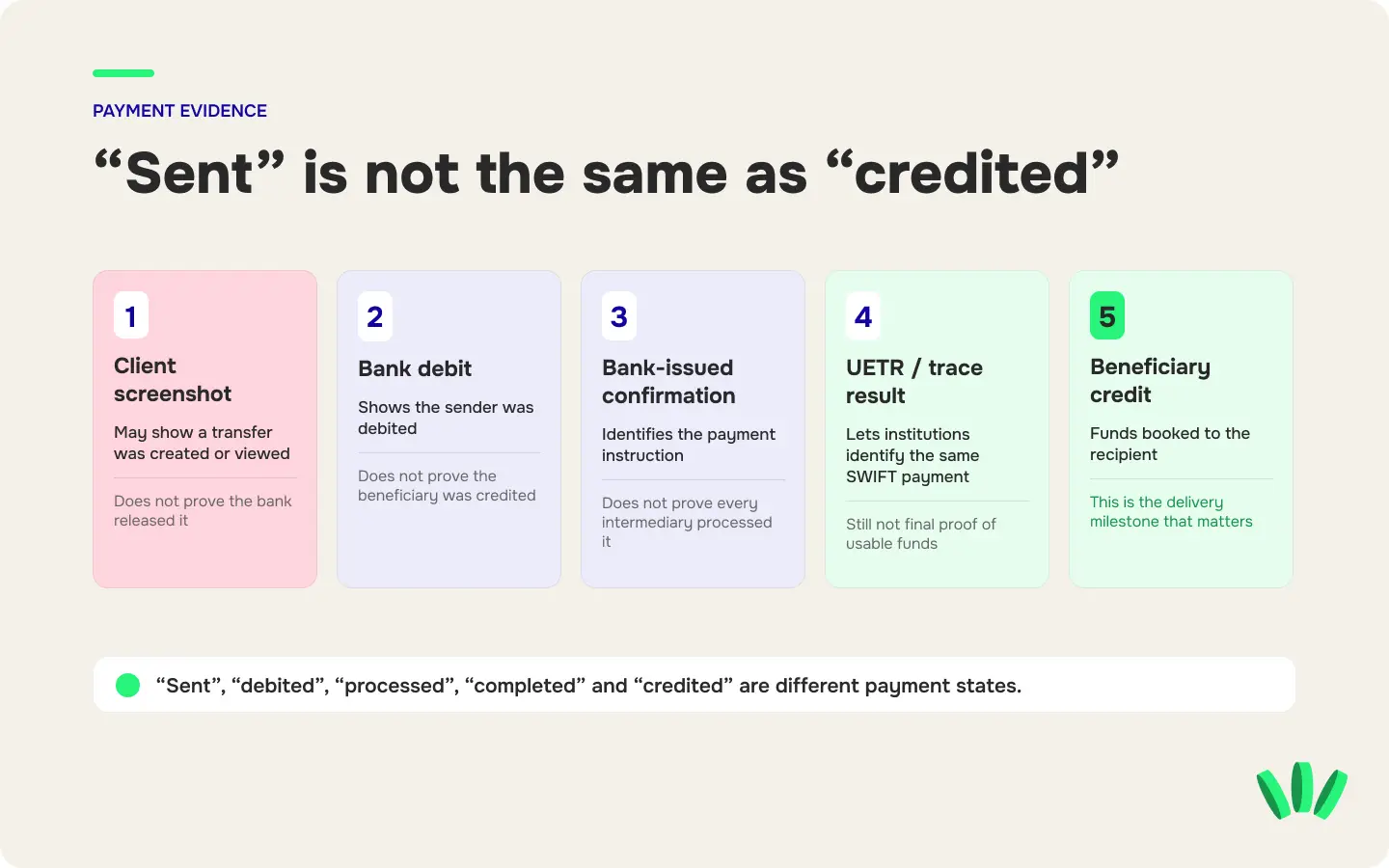
This distinction causes a large share of payment arguments. A sender’s screenshot can be completely genuine while your payment is still missing. Different records prove different stages:
Evidence | What it may prove | What it does not prove |
Client screenshot | The client created or viewed a transfer | That the bank released it or you received it |
Bank debit notification | The sender’s account was debited | That the beneficiary was credited |
Bank-issued transfer confirmation | The bank recorded specific payment instructions | That every intermediary processed the payment successfully |
MT103 or pacs.008-related payment detail | Structured information identifies the transfer | That the beneficiary can already use the money |
UETR | Banks can identify the same SWIFT payment through its route | That the payment was successfully credited |
Trace result | An institution reports the payment’s investigated status | That the issue is resolved unless the result confirms credit, rejection or return |
Credit in beneficiary account | The receiving institution booked the funds to the beneficiary | That the funds are necessarily unrestricted if a review is still pending |
Swift’s tracking system specifically distinguishes payment status from final confirmation of credit. Swift requires relevant institutions receiving MT103 or pacs.008 payments to provide status confirmation on their outcome.
This is why “sent,” “debited,” “processed,” “completed” and “credited” should not be treated as interchangeable words.
A wire can also be visible in the payment chain without being available to you. If that is what happened, the guide to freelance payments that are held, reviewed or delayed explains the difference between a route delay and a review that needs action.
What is an MT103?
An MT103 is the legacy SWIFT message format traditionally used for a single customer credit transfer.
It can contain information such as the sending and receiving institutions, ordering customer, beneficiary, currency, amount, charges, references and other payment details.
For years, asking a sender for the “MT103” became shorthand for asking for serious bank-level evidence of an international wire.
That shorthand still appears in customer support conversations and Google searches. The infrastructure underneath it is different in 2026.
Swift’s cross-border ISO 20022 migration ended the MT/ISO coexistence period on 22 November 2025. For cross-border FI-to-FI payment instructions, MT instructions are no longer normally delivered through FIN. Swift identifies pacs.008 as the ISO 20022 customer credit-transfer message that corresponds to this payment use case. So a bank may now provide:
an ISO 20022 payment confirmation
pacs.008-derived information
a customer-readable SWIFT confirmation
an MT103-style document generated from its systems
another bank-issued payment record containing the UETR and necessary transaction details
The document label matters less than the information inside it.
Does an MT103 prove the beneficiary received the money?
No.
An MT103 or equivalent detailed payment instruction is strong evidence that a specific payment was instructed through the banking chain. It is useful for tracing because it identifies the transaction and its parties.
It is not the same thing as confirmation that the beneficiary account was credited.
A payment can be correctly instructed and still be delayed, held, rejected, returned or waiting for action elsewhere in the route.
What is a UETR?
The UETR, or Unique End-to-end Transaction Reference, is the identifier you want when a SWIFT payment disappears between “sent” and “received.”
Swift defines it as a string of 36 unique characters included in payment instruction messages carried over Swift. The originating institution creates the reference, and institutions farther along the route preserve it rather than creating a new tracking number for each leg.
A UETR may look similar to this:
eb6305c9-1f7f-49de-aed0-16487c27b42d
Treat that only as a format example. It is not a real payment.
The UETR can help institutions identify where the payment moved, whether its status changed and whether it was ultimately credited or rejected. Swift compares the concept to a parcel tracking number.
A UETR is not your invoice number
Do not confuse the UETR with:
invoice number
payment memo
bank customer reference
transaction ID generated by a fintech app
beneficiary account number
internal support ticket number
Keep all of those records, but label them correctly.
MT103 vs UETR vs pacs.008: which one do you need?
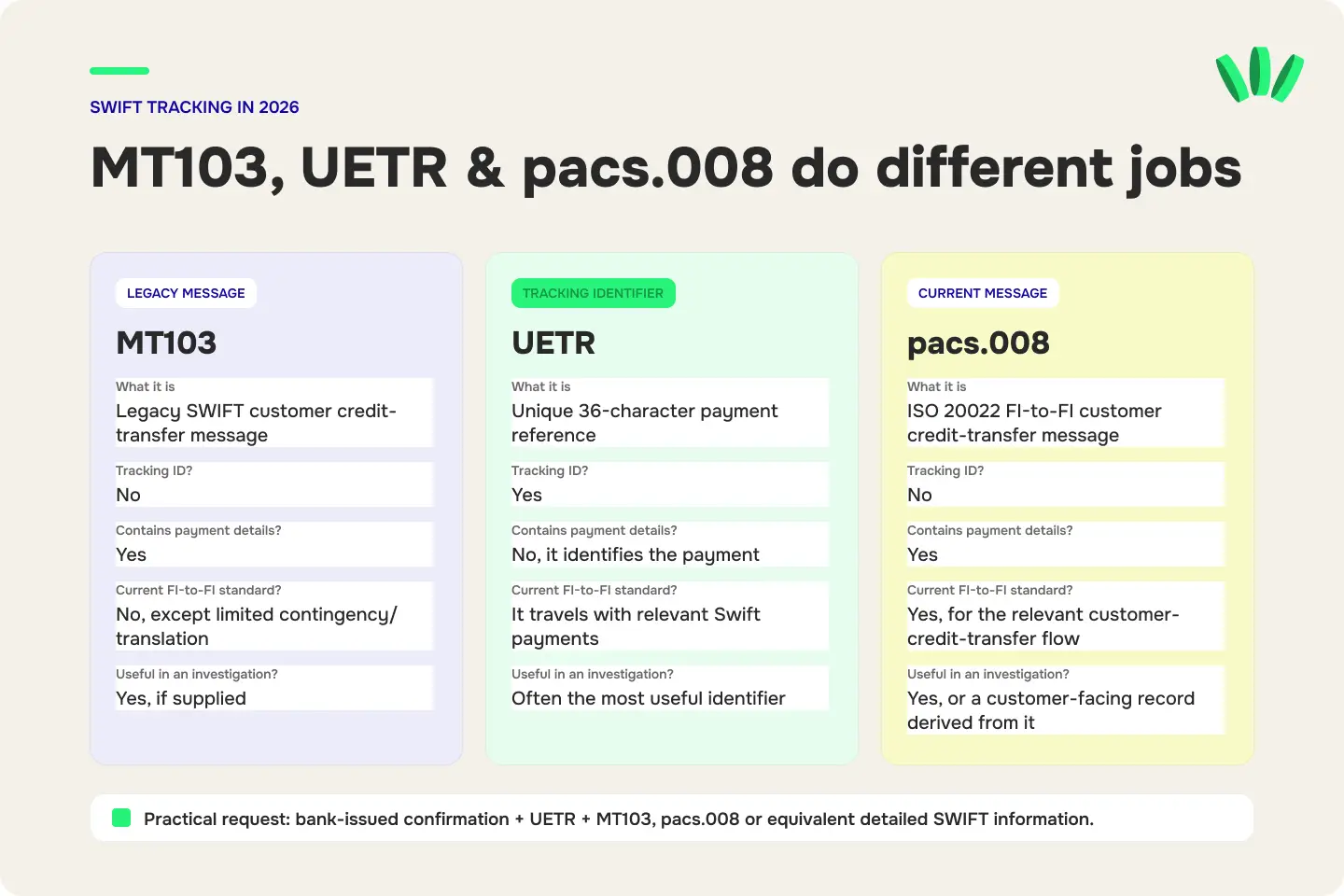
They do different jobs.
MT103 | UETR | pacs.008 | |
What is it? | Legacy SWIFT payment-message format | Unique payment tracking reference | ISO 20022 customer credit-transfer message |
Is it the payment’s tracking ID? | No | Yes | No |
Does it contain payment details? | Yes | No, it identifies the payment | Yes |
Is it the current standard cross-border FI-to-FI instruction? | No, except limited contingency/translation scenarios | Used to identify and track relevant Swift payments | Yes for the relevant customer-credit-transfer flow |
Can it prove final beneficiary credit by itself? | No | No | No |
Useful when investigating a missing payment? | Yes, if supplied | Yes, often the most useful identifier | Yes, or a customer-facing record derived from it |
Swift explicitly documents the translation of MT103 into pacs.008 and describes pacs.008 as an ISO 20022 cross-border payment instruction.
For a freelancer, the practical request is:
“Please send me the bank-issued payment confirmation, the UETR, and the MT103, pacs.008 or equivalent detailed SWIFT payment information available for this transaction.”
That wording survives changes in bank systems and terminology.
Can you track an international wire yourself with the UETR?
Sometimes you may get customer-facing tracking visibility from a bank or payment provider. Do not assume every UETR can be pasted into a public website to reveal the full payment route.
Swift’s Basic Tracker and gpi tracking infrastructure are primarily services used by financial institutions. Swift says its Basic Tracker enables financial institutions to track payments end to end, while UETR allows the institutions involved in the chain to locate the payment consistently.
For a freelancer trying to recover a missing client payment, the dependable workflow is:
Get the UETR → give it to the receiving institution → have the sender ask the sending institution to open a formal trace if necessary.
Do not post the full UETR, payment document or beneficiary details publicly while trying to find someone who can “track” it.
How to trace an international wire transfer step by step
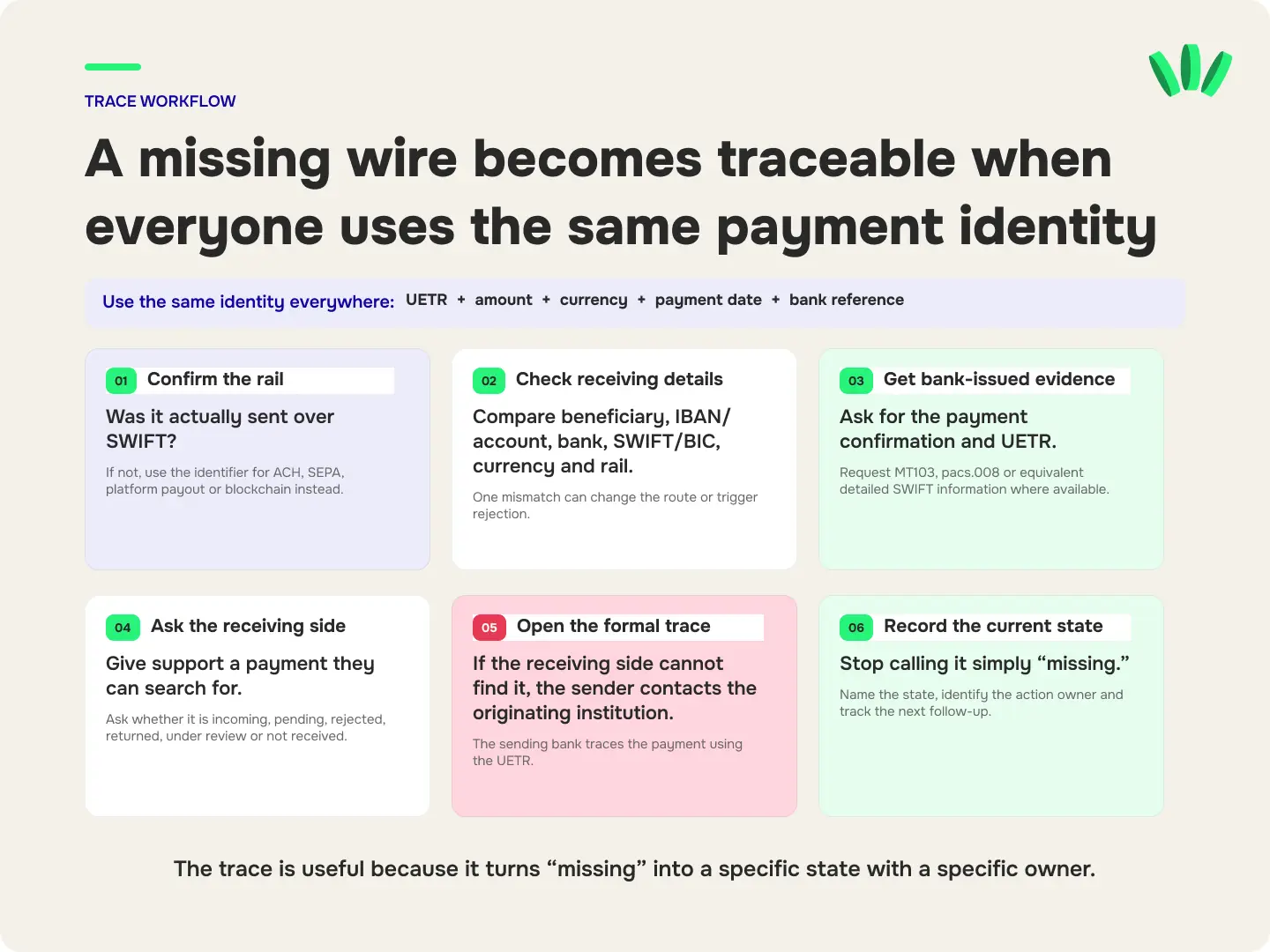
Step 1: Confirm the payment route
Ask whether the transfer was actually sent through SWIFT.
If it was ACH, SEPA, a local transfer, a platform payout or a stablecoin transaction, use the identifier and investigation process for that route instead.
Trying to find an MT103 for a payment that never went over SWIFT wastes time.
For example, when an ACH payment fails, the investigation revolves around the return reason rather than a UETR. These ACH return codes explain what R01, R02, R03, R04 and other common failures mean.
Step 2: Compare the payment instructions with your actual receiving details
Check every important field.
Pay particular attention to:
Beneficiary name: Does it match the name attached to the receiving account?
Account number or IBAN: Was every digit copied correctly?
Receiving institution: Did the client use the correct bank or payment institution?
SWIFT/BIC: If required for this route, is it correct?
Currency: Was the payment sent in a currency the route can receive?
Payment rail: Was the client told to use the correct type of transfer?
Payment reference: Does it match the invoice or reference you expected?
A single mismatch can change the route, trigger a review or lead to rejection.
Step 3: Ask for bank-issued evidence, not another screenshot
A client portal screenshot is useful as a starting point.
For a missing international wire, ask for a document or record issued by the sending bank containing as many of these fields as possible:
amount and currency
date sent
value date
sender name
beneficiary name
receiving account or IBAN
sending institution
receiving institution
payment reference
bank transaction reference
UETR
detailed SWIFT payment information
MT103, pacs.008 or equivalent record where available
If the client works for a company, the person who hired you may not have access to this information. Their finance, treasury or accounts-payable team may need to obtain it.
Step 4: Give the UETR to your receiving bank or payment provider
Do not send support a message that says only:
My client paid me. Where is my money?
Give them a transaction they can search for.
A useful first message includes:
I am expecting an incoming international payment that has not been credited.
Amount: [amount]
Currency: [currency]
Sender: [legal sender name]
Sending institution: [institution]
Date initiated: [date]
Value date: [date, if available]
UETR: [UETR]
Payment reference: [reference]
Please check whether this payment is visible as incoming, pending, rejected, returned, under review or not received by your institution. I can provide the bank-issued payment confirmation through your secure support channel.
This gives the receiving side a narrow question to answer.
Step 5: Have the sender ask their bank to open the formal trace
The sender normally has the strongest relationship with the institution that originated the payment.
If your receiving institution cannot locate the incoming payment, ask the client to contact their bank and request a formal investigation or trace using the UETR.
The sender can say:
The beneficiary has not received this international payment. Please trace the payment using the UETR and confirm its current status, including whether it was credited, rejected, returned, held at an intermediary institution or requires further action.
Do not rely on “our system says completed” as the final answer. Ask what completed means in that system. Does it mean:
the client submitted the instruction?
the client’s account was debited?
the sending bank released the payment?
an intermediary received it?
the beneficiary institution received it?
the beneficiary account was credited?
Those are different events.
Step 6: Record the payment’s current state
Once someone identifies the transaction, stop treating it as simply “missing.”
Give it a state.
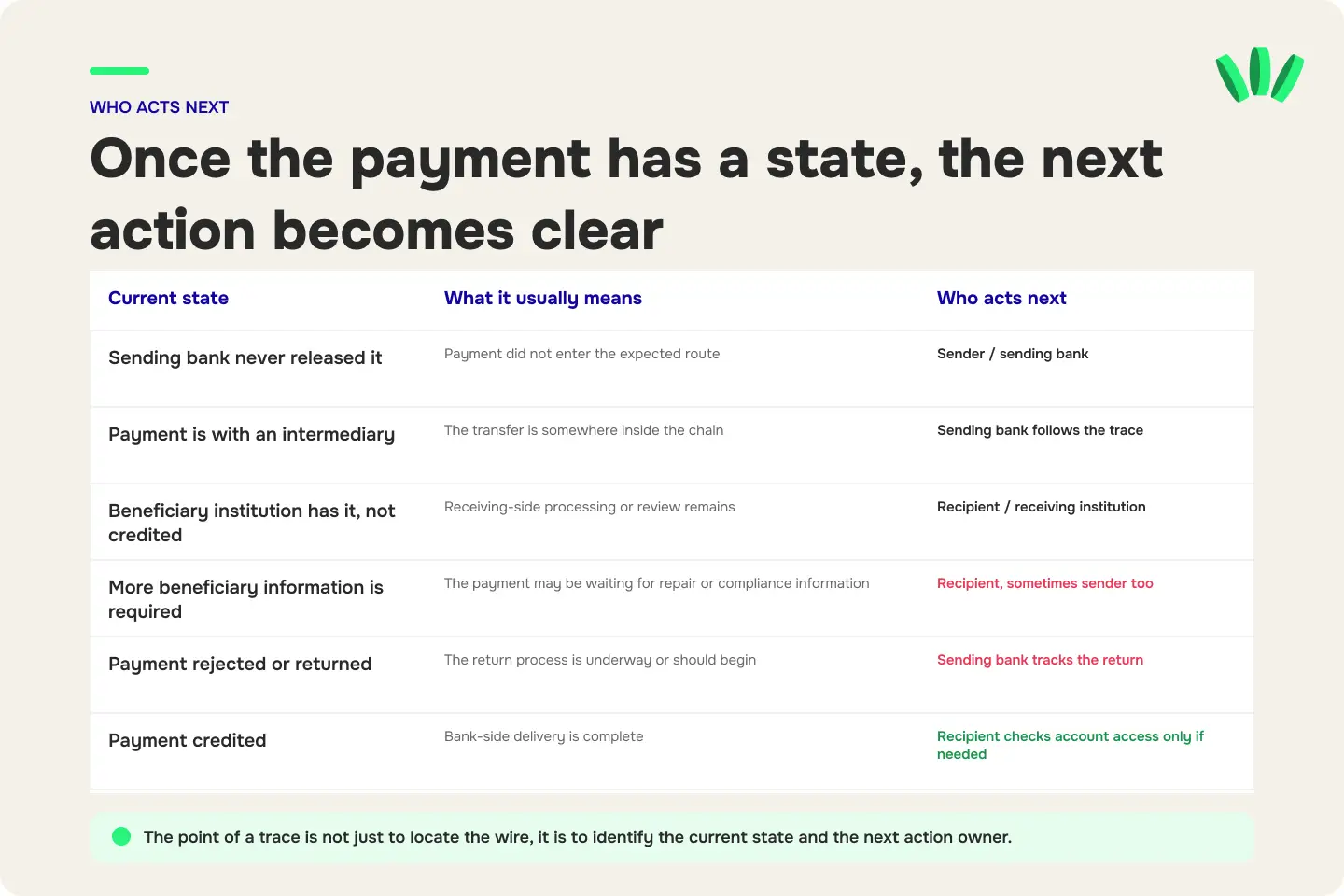
What you learn | What it usually means | Who should act next |
Sending bank never released it | Payment did not enter the expected route | Sender / sending bank |
Payment rejected before leaving | Instruction failed or was rejected | Sender / sending bank |
Payment sent and intermediary has it | Payment is somewhere inside the chain | Sending bank follows the trace |
Beneficiary institution received it but has not credited it | Receiving-side processing or review remains | Recipient / receiving institution |
More beneficiary information is required | Payment may be waiting for repair or compliance information | Recipient, sometimes sender too |
Payment rejected by receiving side | Return process may follow | Receiving institution + sending bank |
Payment returned | Funds should move back toward sender | Sender / sending bank tracks return |
Payment credited | Bank-side delivery is complete | Recipient investigates account access if balance is still unavailable |
The value of the trace is not merely locating the transfer. It tells you who owns the next action.
Who should trace the wire: sender or recipient?
Both sides may need to investigate, but their jobs are different.
The recipient should:
Check that the receiving details were correct, give the receiving institution the UETR and payment details, ask whether the payment is visible, and supply any documents requested through a verified support channel.
The sender should:
Obtain bank-issued payment evidence, provide the UETR, contact the originating institution and request a formal trace when the beneficiary has not received the funds.
The sending institution should:
Investigate the payment it originated and communicate with other institutions in the chain when interbank follow-up is required.
The receiving institution should:
Check whether it received or can identify the incoming payment and explain whether the payment is credited, pending, rejected, returned or waiting for additional action.
Do not spend five days repeatedly asking the wrong party to do something they cannot do.
When should you start escalating a missing international wire?
There is no universal number of days that applies to every international wire.
Transfer time can depend on currencies, time zones, bank cut-off times, weekends, holidays, intermediary institutions, compliance reviews, beneficiary details and the exact payment route.
Use the expected delivery window for that specific route rather than a generic internet estimate.
A practical escalation timeline looks like this:
Point in the process | What to do |
Client says “sent” | Confirm the rail, payment details and initiation date |
Payment is still within the normal route window | Save evidence and monitor rather than creating multiple investigations |
Expected window or stated value date has passed | Ask for bank-issued confirmation and UETR |
Receiving institution cannot find it | Sender requests a formal trace from the originating institution |
Trace identifies a hold or repair | The institution holding the next action requests or supplies the required information |
Payment is rejected or returned | Sender tracks the return rather than sending a duplicate payment immediately |
Bank says credited but balance is unavailable | Recipient asks the receiving institution to investigate credit/access status |
Swift is continuing to move exceptions and investigations into ISO 20022-based Case Management during 2026, so the investigation infrastructure itself is still evolving.
Build this escalation packet before contacting support
Support moves faster when the first ticket contains enough information to identify one payment. Keep this information in one record:
Payment identity
UETR
sending-bank transaction reference
payment or invoice reference
amount
currency
initiation date
value date
Parties
sender’s legal name
beneficiary’s legal name
sending institution
receiving institution
beneficiary account or IBAN used
Evidence
bank-issued payment confirmation
MT103, pacs.008 or equivalent payment detail if available
invoice
client confirmation
relevant screenshots
previous support case numbers
Timeline
Record each event with a date:
Invoice issued → client initiated payment → sender debited → expected arrival → first support contact → trace opened → latest bank response
Requested outcome
End the ticket with a specific request.
For example:
Please confirm whether this payment was received by your institution and, if so, its current status.
or:
Please open a formal trace using the UETR and confirm the latest institution and status visible in the payment chain.
Do not make support guess what you need.
What should you never send in a payment-trace ticket?
A payment investigation may require financial records, but it does not require giving away access to your accounts.
Never put these in an email, public post, Telegram group, X reply or unverified support chat:
password
one-time password or OTP
card PIN
card CVV
passkey
wallet recovery phrase
crypto private key
complete authentication credentials
If identity documents, bank statements or full payment documents are required, use the institution’s verified secure upload process.
Payment evidence contains enough personal and financial information to deserve the same care as other account records.
Why can an international wire be delayed even when the details are correct?
A correct payment instruction can still encounter several stops.
An intermediary bank is processing it
Not every sending bank has a direct relationship with every receiving bank. A cross-border payment may pass through one or more correspondent or intermediary institutions.
That introduces another institution, another processing system and another potential point of delay.
The payment is under compliance review
A bank or regulated payment institution may need to review the sender, recipient, purpose, amount, documentation or another element of the transaction.
A trace can locate the payment without making that review disappear.
If your payment is visible but under review, the next useful action is usually supplying the requested evidence to the institution conducting the review.
Beneficiary information needs repair
An incorrect name, account number, address or other beneficiary field may require manual intervention or trigger rejection.
Do not “fix” the situation by sending a second transfer until you know what happened to the first one.
A bank cut-off, weekend or holiday changed the timeline
“Three days” is not always three banking days.
The sending country, intermediary location and receiving country can each introduce non-processing periods.
The receiving institution has the payment but has not credited the account
“Reached the bank” and “available in your balance” can be separate states.
This is precisely why a useful investigation asks for the current status rather than asking only whether the sender paid.
Should your client resend the wire if the first one is missing?
Usually, not until the first payment has a known status. If a client sends a second $2,000 because the first $2,000 appears to be missing, you may end up with:
two successful payments
one payment and one return
duplicate reconciliation work
a refund problem
extra bank fees
two support investigations instead of one
Trace the first transfer until you know whether it was credited, rejected, returned or otherwise resolved.
If the payment is formally confirmed as failed or returned, the sender can then decide how to retry using corrected details or a different supported route.
Can an international wire be recalled?
A sending institution may be able to submit a cancellation or recall request, but a request is not a guarantee that money will come back.
The outcome depends on where the payment is in the chain and whether the recipient institution has already processed or credited it.
Under ISO 20022, Swift lists camt.056 as the Financial Institution to Financial Institution Payment Cancellation Request message. Swift is also migrating payment cancellations and investigations further into its Case Management infrastructure.
Treat a recall as its own process. Do not treat “recall requested” as “refund completed.”
When MT103 and UETR are the wrong tools
Do not turn every missing international payment into a SWIFT investigation.
An MT103/UETR workflow is the wrong starting point when the payment was made through:
ACH
Use ACH transaction information and, if a payment was returned, the ACH return code.
SEPA or another local bank rail
Use the identifiers and investigation process for that scheme.
A freelance or payroll platform
The platform may first need to identify the payout before the underlying banking partner can investigate it.
An internal transfer between accounts at the same provider
The transaction may never have entered the SWIFT network.
USDT, USDC or another blockchain payment
Use the transaction hash, network, token contract and destination address. A UETR does not track a blockchain transfer.
Before receiving a stablecoin payment from a client, use this payment checklist to verify the token, network and wallet address before money moves.
For the full workflow after a client chooses USDT or USDC, see how freelancers can get paid in USDT or USDC without common wallet mistakes.
Seven mistakes that make a missing wire harder to resolve
1. Treating a client screenshot as final proof of receipt
It proves far less than most payment disputes require.
2. Asking only for “the MT103”
In 2026, ask for the UETR plus the detailed bank-issued payment confirmation, including pacs.008 or equivalent information where available.
3. Opening multiple tickets with different descriptions
One clean case with one UETR and one timeline is easier to investigate than four disconnected tickets.
4. Letting the sender and recipient use different references
Put the UETR, amount, currency and payment date in every relevant support conversation.
5. Resending before tracing the original
A missing payment can become a duplicate payment.
6. Posting sensitive payment evidence publicly
A public crowd cannot resolve an interbank investigation. Your institutions can.
7. Asking “where is my money?” without asking for a status
Ask whether the payment is not received, pending, held, rejected, returned or credited.
That creates an actionable answer.
A simple payment-trace record for freelancers
Keep one row for every international payment that needs investigation.
Field | Record |
Invoice number | |
Client | |
Amount | |
Currency | |
Payment rail | |
Date initiated | |
Value date | |
Sending institution | |
Receiving institution | |
Bank reference | |
UETR | |
Detailed payment document received? | |
Receiving-side case number | |
Sending-side trace number | |
Current payment status | |
Current action owner | |
Last update | |
Next follow-up date |
For freelancers with several international clients, this record is more useful than searching old WhatsApp messages every time a payment goes wrong.
Using walllet.com for international income
walllet.com is positioned around the full income workflow for Nigerian freelancers and remote workers who earn from global clients: receiving foreign income, managing dollar-linked value, spending and cashing out. Payment-account, card, fiat-transfer and related regulated services are handled through financial partners, and exact services can depend on eligibility, verification and availability.
For any receiving route, use the payment instructions currently shown for your eligible account rather than copying details from an old invoice or screenshot. Confirm the supported currency, payment rail, payer requirements, limits and current conditions before giving the details to a client.
If you are still comparing routes before your next client payment, How to Receive USD in Nigeria Without PayPal in 2026 covers the broader options Nigerian freelancers can compare.
Getting paid should not end with chasing screenshots, references and disconnected payment tools. See how walllet.com brings receiving global income, holding dollar value, spending and cashing out to naira into one money flow.

