To check a token balance, open your wallet app and select the correct network, or paste the public wallet address into that network’s block explorer. You do not need to connect the wallet, enter a seed phrase, or share a private key. If the balance is zero, check the network, token visibility, transaction status, and receiving address.
TL;DR
You can check a token balance with a public wallet address.
Start in your wallet app, then use the correct block explorer if you need independent confirmation.
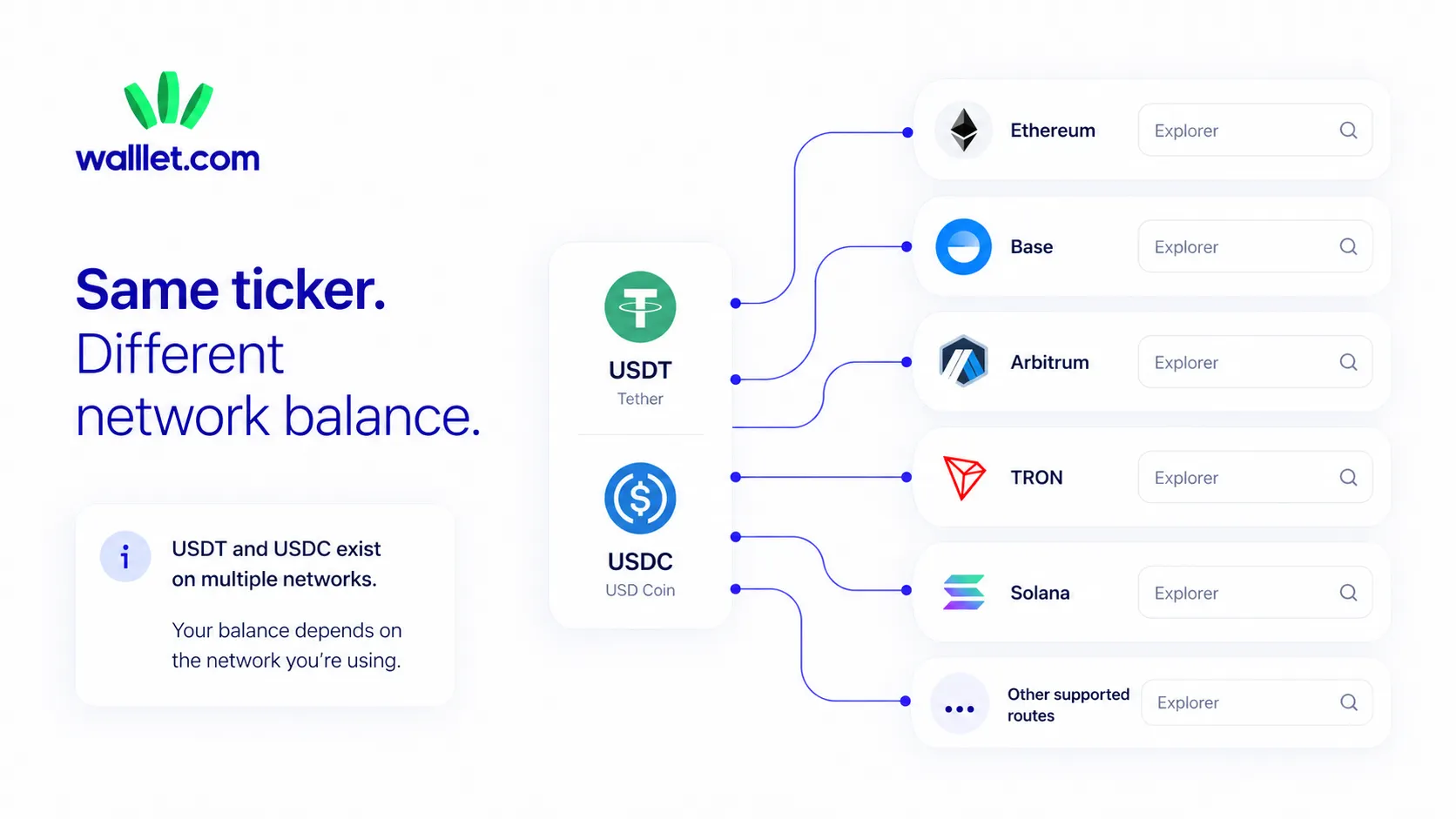
USDT, USDC, and many other tokens exist on more than one network. The network must match.
A successful transaction can exist onchain even when your wallet app does not show the token.
Never enter a seed phrase, private key, recovery code, or passkey just to view a balance.
Someone says they sent you 500 USDC. You open your wallet, refresh twice, switch tabs, and still see nothing.
The payment may be missing. It may also be sitting at your address on a different network, hidden from the wallet’s token list, or waiting for the app to update. Crypto has somehow turned “Did I get paid?” into a small investigation involving several nearly identical websites. Progress, apparently.
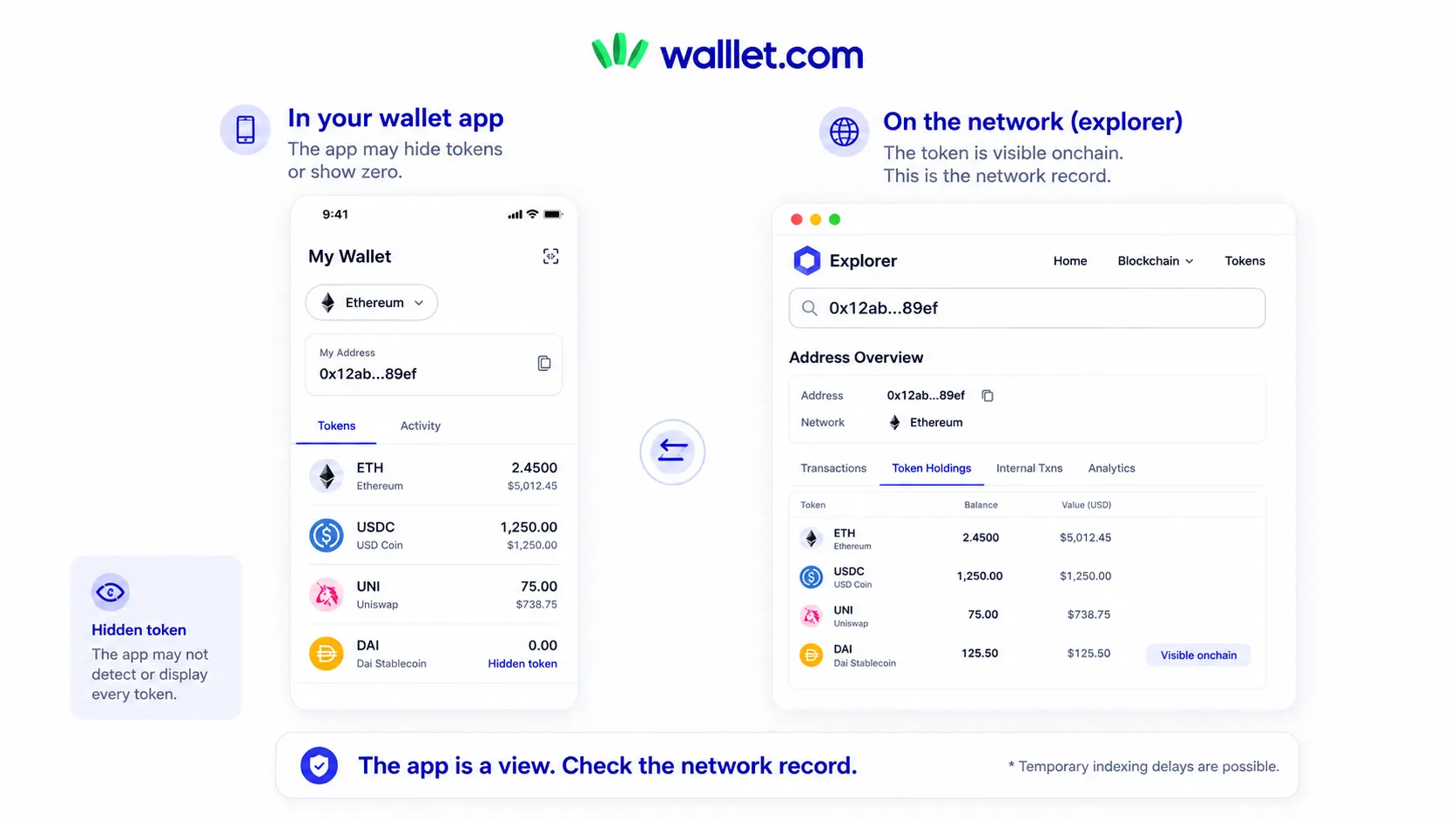
The safest way to settle the question is to separate two things:
What the wallet app displays.
What the blockchain records for that address on that network.
A wallet app gives you a convenient interface. A block explorer gives you a read-only view of public blockchain data. Ethereum’s guidance says you can check a transaction by searching a wallet address or transaction ID, also entering a public address into the relevant explorer can show the account’s native balance, ERC-20 holdings, and transaction activity.
What Do You Need to Check a Token Balance Safely?
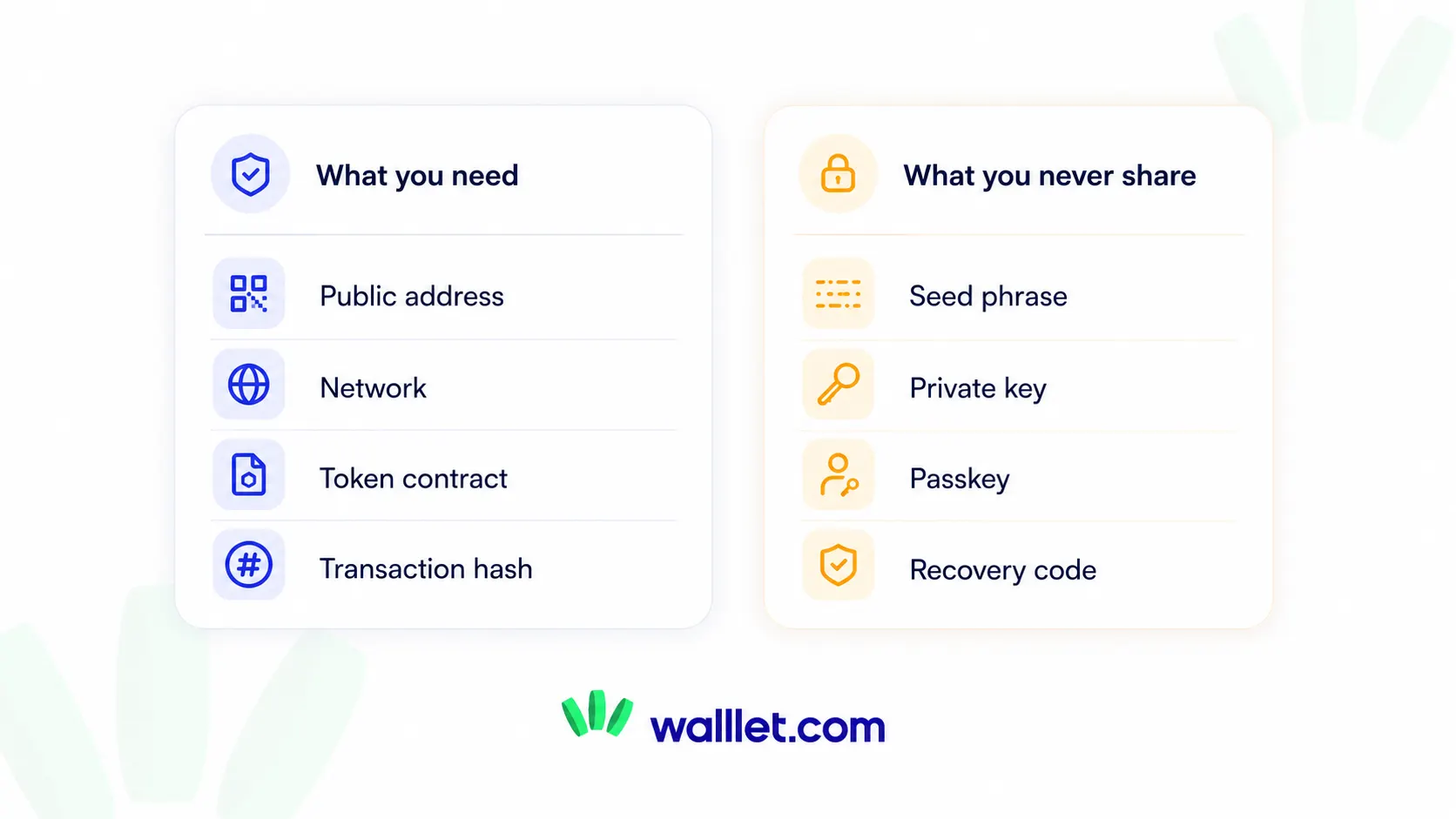
To check a token balance, you need the public wallet address, the network where the token exists, and a trusted wallet app or block explorer. A transaction hash is helpful when you are checking a recent payment. You never need the wallet’s seed phrase, private key, passkey, password, or recovery code.
You may need | You should never share |
Public wallet address | Seed phrase or Secret Recovery Phrase |
Exact blockchain network | Private key |
Token name and contract address | Passkey or recovery code |
Transaction hash for a recent payment | Wallet password |
Official block explorer | Remote access to your device |
Current receive-screen details | A payment to “unlock” the balance |
Checking a balance is a read-only action. You are asking a public blockchain or wallet app to show information associated with an address. You are not authorizing a transaction.
Never enter your seed phrase or private key just to check a token balance.
Anyone who has those credentials may be able to control and transfer the assets associated with the wallet. Never share a recovery phrase or private key, including with people claiming to provide support.
What Is a Token Balance?
A token balance is the amount of one specific token assigned to a wallet address on one blockchain. It is different from the total value displayed by a wallet app. For ERC-20 tokens, the token contract can report the balance associated with an address, while wallet apps and explorers turn that onchain data into a readable screen. For example, an address might hold:
0.04 ETH on Ethereum
250 USDC on Base
80 USDT on TRON
12,000 units of another token on Polygon
Each is a separate balance. Even when two EVM networks use the same 0x address, the balances do not merge.
The ERC-20 standard includes a standard way to retrieve the current token balance of an account. This common interface is one reason wallets, explorers, and other applications can display ERC-20 holdings consistently.
Solana organizes tokens differently, but the practical lesson is similar: token ownership and balances are recorded in blockchain accounts and can be inspected through the network or its explorers.
If you are unsure why the same address can show different assets across Ethereum-compatible networks, read what an EVM wallet means before moving funds.
Method 1: How Do You Check Token Balance in a Wallet App?
Open the wallet, confirm that you are viewing the correct account and network, then inspect its token list. If the token is missing, search the wallet’s token manager or import function using a verified contract address. When the wallet still shows zero, compare the same address on the correct block explorer before assuming that the funds are gone.
1. Open the correct wallet account
Many wallet apps support more than one account or address. Confirm that the address shown in the app matches the address that received the tokens.
Compare the beginning and end of the address. For a more important payment, compare the complete address rather than trusting a shortened version such as 0x12ab…90ef.
2. Select the network used for the transfer
The network is part of the balance.
USDC on Ethereum is recorded separately from USDC on Base, Arbitrum, Polygon, or another supported chain. An address may look identical across several EVM networks while holding different assets on each one. If a sender or client made the payment, ask them to confirm the exact network. Better still, ask for the transaction hash.
3. Search the wallet’s token list
Some wallets hide tokens that have not been enabled, recognized, or added to the visible asset list. Look for options such as:
Manage tokens
Import token
Add custom token
Search assets
Hidden assets
Token visibility
The labels vary because apparently a shared vocabulary would have made things too easy.
4. Import the token only with a verified contract address
A token symbol is not enough. Anyone can create another token with the same name, logo, or ticker.
Use the token issuer’s official documentation or a reputable block explorer to find the contract address. Check the network as well. A legitimate contract on Ethereum will not automatically be the correct contract on Base, Polygon, or BNB Smart Chain.
For a fuller safety process, use walllet.com’s guide to verifying a token contract address.
5. Compare the result with a block explorer
If the wallet app still shows zero, look up the same address on the explorer for that network.
If the explorer shows the token and your wallet does not, the problem is probably token visibility, account selection, network selection, wallet support, or a temporary display issue. The existing guide to why your wallet shows zero covers those display and troubleshooting cases in more detail.
Method 2: How Do You Check Token Balance With a Block Explorer?
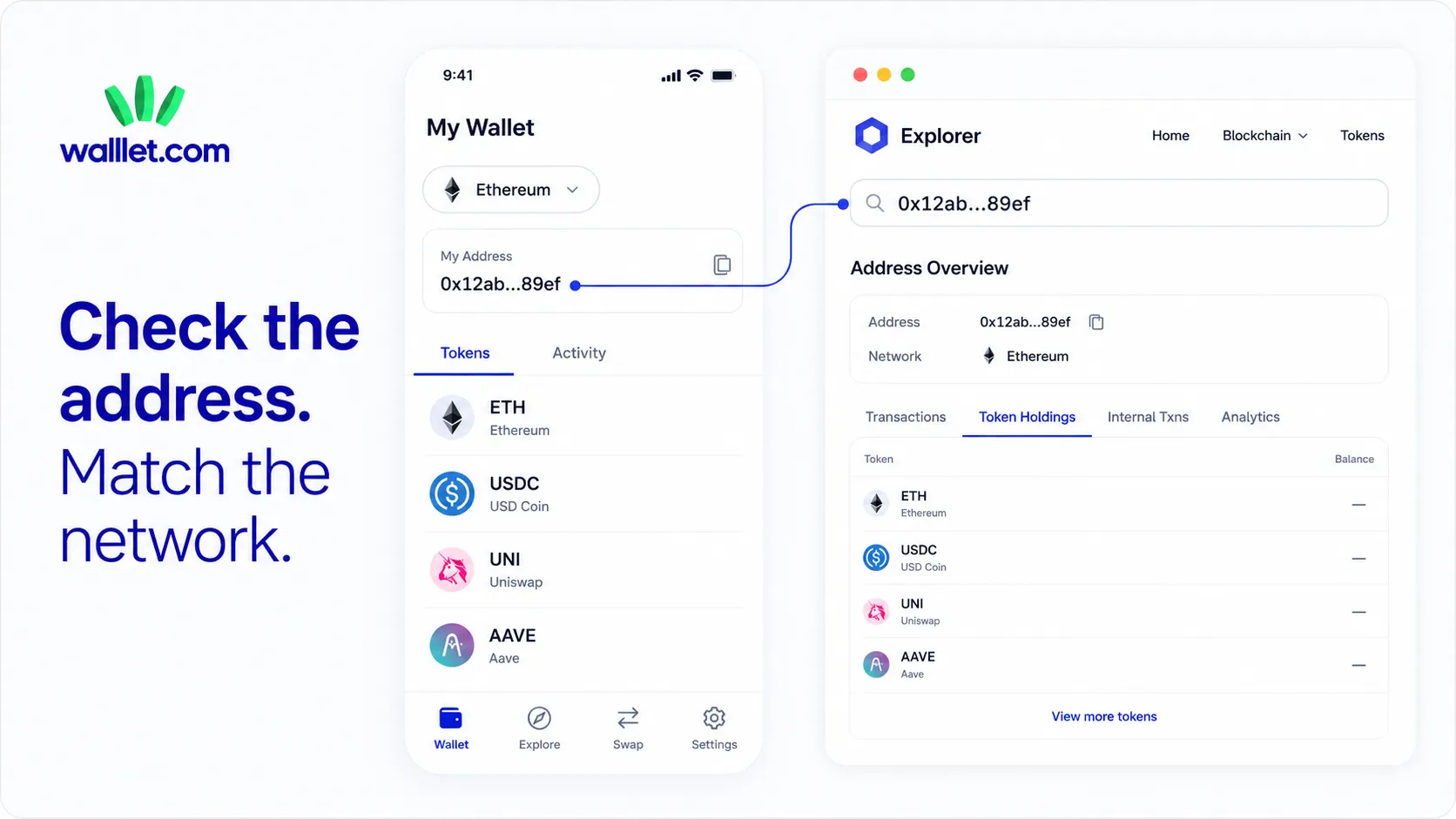
Copy the public wallet address, open the explorer for the network where the token was sent, and paste the address into the search bar. Open the token holdings or assets section, then match the token by its contract address. You do not need to connect the wallet or sign anything to perform this lookup.
1. Copy the public wallet address
Copy it from the current receive screen or account details in your wallet. Avoid copying an address from old transaction history. Lookalike addresses can appear in wallet histories through address-poisoning attempts, so an old entry is not always a reliable source for a receiving address.
2. Identify the blockchain network
Before opening an explorer, answer this question: Where does the token exist?
“USDT” is not a complete answer. You may need to know whether it is USDT on Ethereum, TRON, BNB Smart Chain, Solana, or another supported network. The same applies to USDC and many other tokens.
3. Open the explorer for that network
Do not search a Base balance on Etherscan or a TRON balance on BscScan. These explorers examine different ledgers. Ethereum.org describes block explorers as portals for viewing accounts, transactions, blocks, and other onchain activity.
4. Paste the address into the search bar
The address page may show:
Native asset balance
Token holdings
Token transfers
Recent transactions
Contract interactions
Estimated fiat values
NFT holdings
The exact layout varies by explorer.
5. Open the Tokens, Assets, or Portfolio section
On an Etherscan-style explorer, token holdings are often shown in a token dropdown or portfolio area.
On Solana Explorer or Solscan, token balances may appear in a separate Tokens or Portfolio tab.
On TRONSCAN, the address page includes token assets and transaction activity.
6. Verify the token contract or mint address
Do not rely only on the name. For an EVM token, compare the contract address with the issuer’s official contract information. On Solana, compare the token’s mint address. This protects you from confusing a real asset with a copied ticker or spam token.
7. Use the transaction hash for a recent payment
An address lookup tells you what the address currently holds. A transaction hash tells you what happened in one specific transfer. When confirming a client payment, check:
Transaction status
Network
Token
Amount
Receiving address
Token contract
Confirmation or finality status
Walllet’s guide to reading a crypto transaction on a block explorer explains those fields in detail. Want a self-custody experience built around passkeys and clearer crypto flows? See how walllet.com works.
Which Block Explorer Should You Use?
Use the explorer that matches the network where the token is recorded.
Network | Explorer | Assets you may see |
Ethereum | ETH and ERC-20 tokens | |
Base | ETH, USDC, and other ERC-20 tokens | |
Arbitrum One | ETH, USDC, and other ERC-20 tokens | |
Polygon PoS | POL, USDC, and other tokens | |
BNB Smart Chain | BNB and BEP-20 tokens | |
TRON | TRX and TRC-20 tokens such as supported USDT | |
Solana | SOL and SPL tokens |
Last checked: July 12, 2026.
The explorer homepages identify their respective networks and support address, token, and transaction searches. Base’s documentation also lists an Etherscan-powered explorer for Base, while Solana describes explorers as tools for inspecting payments, accounts, and token balances.
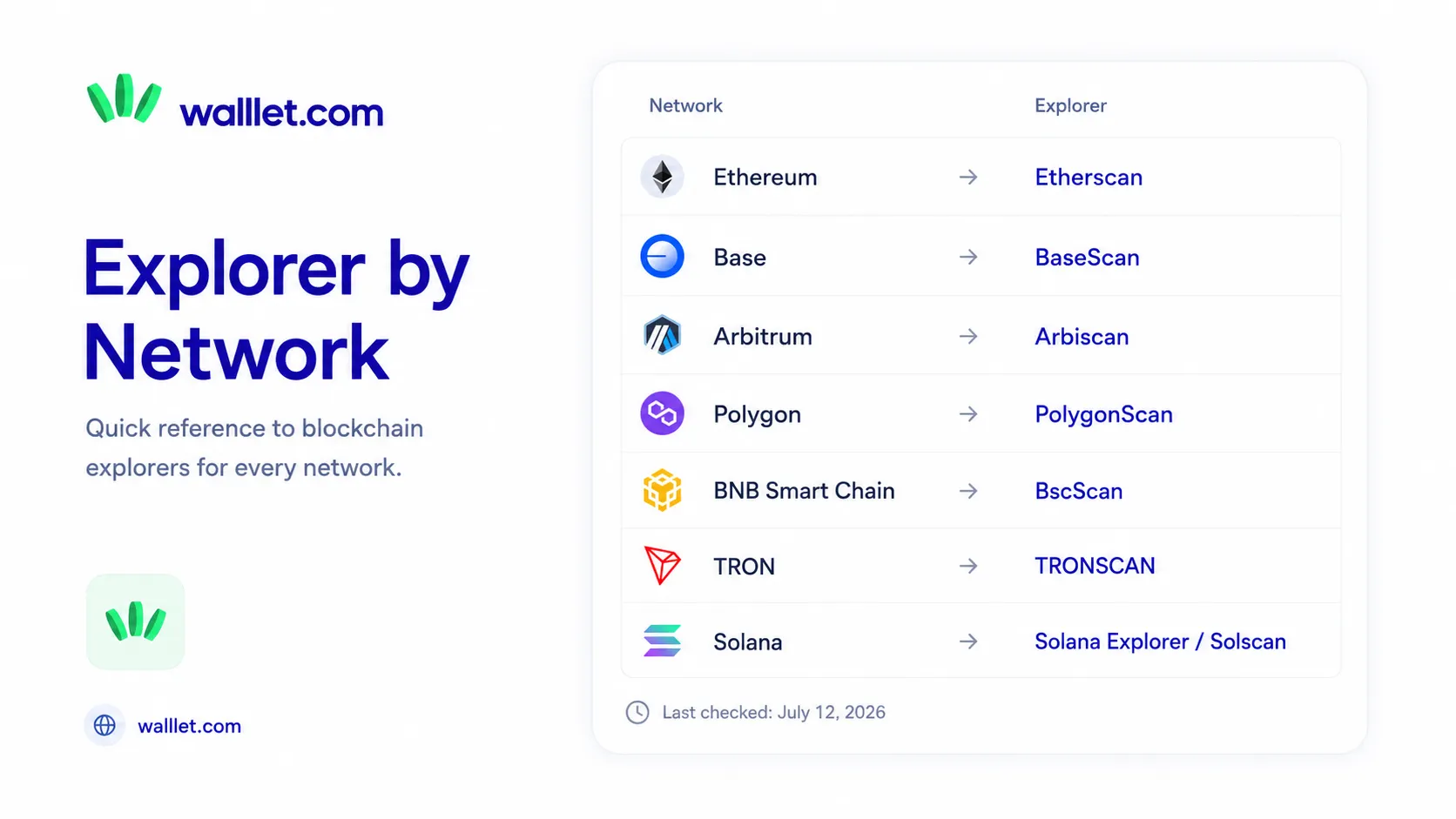
These are examples. Explorer interfaces, URLs, and network support can change. Recheck the official network documentation before publishing future updates to this table.
How Do You Check an ERC-20 Token Balance?
To check an ERC-20 token balance, search the wallet address on the block explorer for the EVM network where the token exists. Open the token holdings section and find the token by contract address. For a single known token, you can also open its verified contract page and inspect the balance associated with the wallet address. Here is the beginner-friendly process:
Confirm the network, such as Ethereum, Base, Arbitrum, or Polygon.
Open that network’s explorer.
Paste the public wallet address.
Open the token holdings area.
Find the token by contract address.
Check the token amount, not only its estimated dollar value.
A token may have a valid amount while showing no fiat value. Explorers and wallet apps rely on external price data, and smaller or less liquid tokens may not have a reliable price feed. If you are receiving or sending ERC-20 assets rather than simply checking them, read how to send and receive ERC-20 tokens safely.
How Do You Check a USDT or USDC Balance?
First identify the network used for the USDT or USDC transfer. Then search the public wallet address on that network’s explorer and verify the stablecoin by its official contract or mint address. A USDT or USDC balance on one network will not appear automatically when you inspect the same address on another network.
USDT and USDC both exist across multiple blockchain networks. Circle publishes separate USDC contract addresses for supported chains, and Tether publishes protocol and contract information for its supported versions of USDT. A few examples:
USDT sent through TRC-20 should be checked on TRONSCAN.
USDT sent through ERC-20 on Ethereum should be checked on Etherscan.
USDC sent on Base should be checked on BaseScan.
USDC sent on Arbitrum should be checked on Arbiscan.
USDC sent on Solana should be checked on Solana Explorer or Solscan.
The token ticker alone does not tell you where the balance is. When a client says, “I sent USDT,” ask for:
The network
The transaction hash
The amount
The sending platform
Confirmation of the receiving address
For route selection before a payment, read how to choose the best network for USDT or USDC.
Why Does Your Token Balance Show Zero?
The most common causes of a zero token balance are the wrong network, a hidden token, a different wallet address, a pending or failed transaction, an unrecognized token contract, or a wallet display problem. Check the address on the correct explorer before trying recovery tools, importing credentials, or sending another payment.
Problem | What it may mean | What to check |
Wrong network selected | The wallet is displaying another blockchain | Confirm the sender’s network and switch chains |
Token is hidden | The wallet does not display it by default | Search or import the verified token contract |
Wrong account selected | You are viewing another address | Compare the complete receiving address |
Transaction is pending | The transfer has not finalized | Check the transaction hash |
Transaction failed | No token transfer was completed | Review the status and token-transfer events |
Wrong receiving address | Funds went to another destination | Compare the address character by character |
Fake or copied token | The symbol matches, but the contract does not | Verify the official contract address |
Missing price data | The token amount exists, but fiat value shows zero | Check the token quantity separately |
Exchange deposit not credited | The transfer is onchain, but the platform has not credited it | Check network support, confirmations, and memo or tag requirements |
Wallet display issue | The explorer shows the balance, but the app does not | Refresh, update, or contact wallet support |
If a successful transaction reached your address on another network, the funds may still be accessible through a compatible wallet. Recovery depends on the address, network, wallet type, token, and destination. Do not move anything until you understand the route.
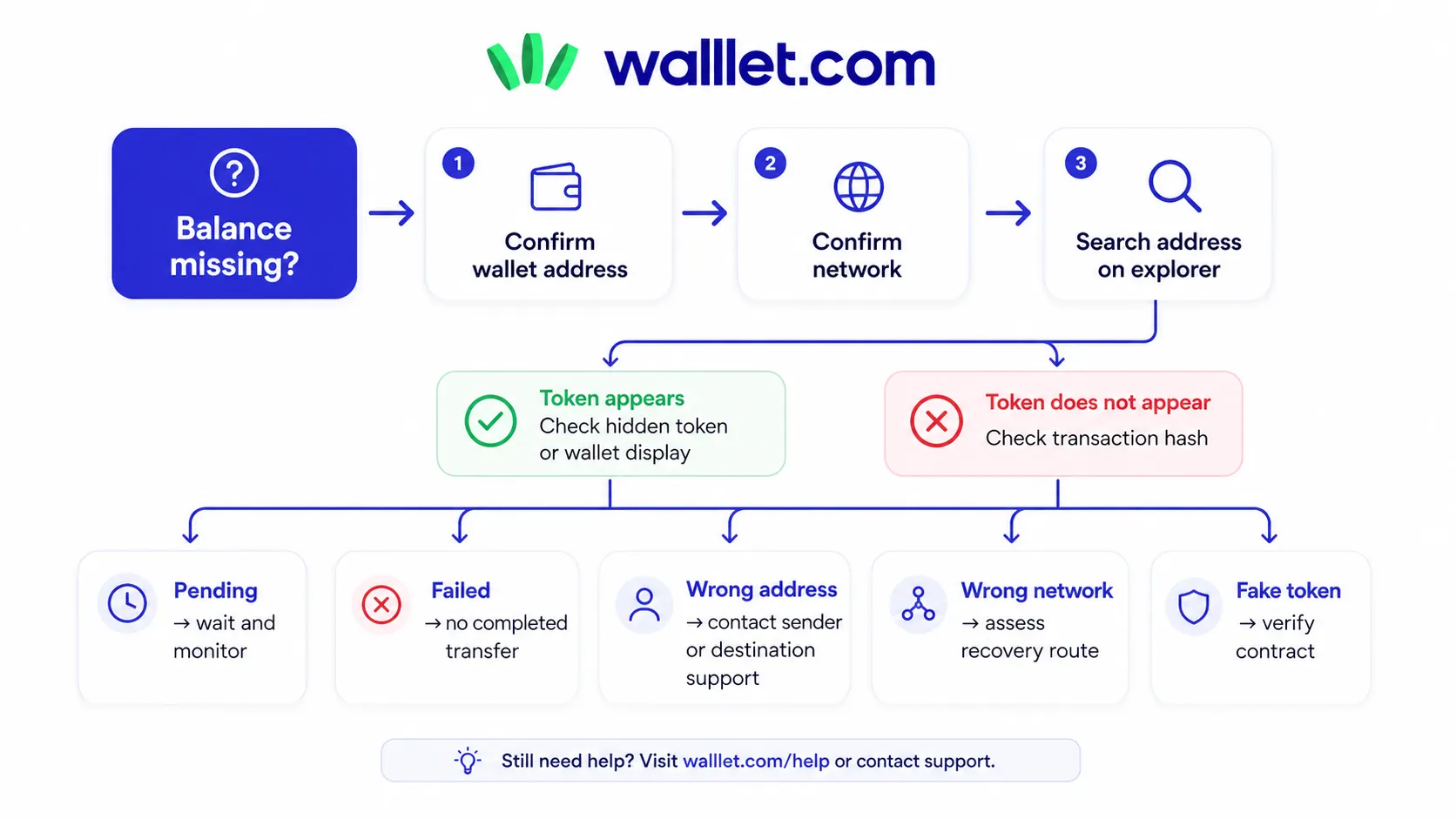
The guide to recovering crypto sent on the wrong network explains which situations may be recoverable and which ones depend on an exchange or receiving platform.
Do You Need to Connect Your Wallet to Check a Balance?
No. A block explorer only needs the public wallet address to show publicly recorded balances and activity. You do not need to connect the wallet, approve a request, sign a message, or enter recovery credentials. A site that demands a seed phrase or private key for a balance lookup should be treated as dangerous.
Some legitimate portfolio tools offer optional wallet connections. That does not mean a connection is necessary for a basic address lookup. For a simple balance check, use the read-only method:
Open the trusted explorer yourself.
Paste the public address.
Review the account and token data.
Close the page when finished.
Do not click a “verify,” “sync,” “restore,” or “rectify wallet” button from an unsolicited message. Those labels are common social-engineering bait because they sound technical enough to make panic feel responsible.
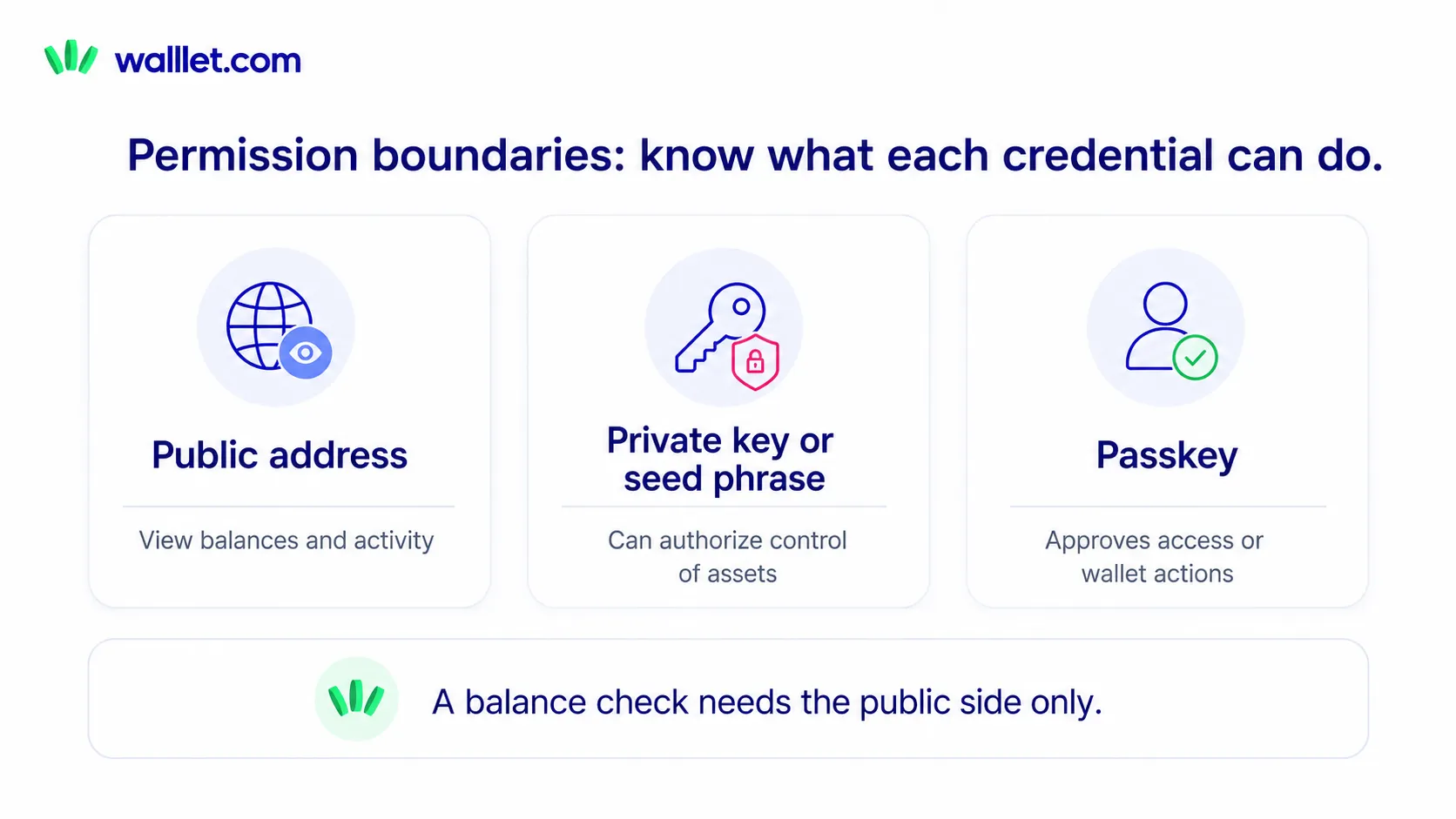
A public address cannot authorize a transfer by itself. Still, it can reveal balances, transaction history, and relationships with other addresses. Ethereum’s privacy guidance notes that repeated balance lookups may also expose metadata to the wallet provider, node provider, or explorer handling the request. Treat a wallet address as public financial information, not as a password.
Token Balance vs Wallet Balance vs Portfolio Value
These terms are often used as though they mean the same thing. They do not.
Term | Meaning | Example |
Token balance | Amount of one token on one network | 250 USDC on Base |
Native balance | Amount of the network’s native asset | 0.03 ETH on Base |
Wallet balance | Assets the wallet app currently displays | ETH, USDC, and two other visible tokens |
Address balance | Assets associated with one public address | Everything recorded for that address on the selected chain |
Portfolio value | Estimated fiat value of several assets | $1,420 across visible tokens and networks |
A token amount can be correct while its fiat value is missing or delayed.
A wallet balance can also omit assets that the address holds on unsupported or unselected networks. This is why a single large “portfolio value” number is convenient, but it is not the best tool for verifying whether one specific payment arrived.
How Should a Wallet Make Balance Checking Easier?
A useful wallet should make four things easy to see:
The active network
The complete wallet address
The token amount
The transaction or explorer details
It should also separate a real token balance from an estimated fiat price. Showing $0 beside a token with a non-zero quantity is a spectacular way to frighten someone who has just been paid.
Walllet.com is built around seedless self-custody, passkeys, biometrics, and clearer transaction flows. The aim is to reduce the amount of infrastructure knowledge users need for routine crypto actions while keeping the self-custody model. That does not remove the need for block explorers. Explorers remain useful when you want an independent, read-only check of a transaction or address.
A better wallet experience should make that verification route easier to understand rather than pretending users will never need it.
A Five-Minute Token Balance Check
When you need a quick answer, use this order:
Copy the public address from the current wallet or receive screen.
Confirm the network where the token was sent.
Open that network’s block explorer.
Search the address and open its token holdings.
Match the token’s contract or mint address.
Check the token quantity.
For a recent payment, verify the transaction hash.
If the explorer shows the token but the wallet does not, fix the wallet view.
If neither the explorer nor the wallet shows it, retrace the transaction.
Stop immediately if anyone asks for a seed phrase, private key, passkey, or recovery code.
You should now be able to answer the useful question: is the token recorded at the address on the network where it was supposed to arrive?
For a simpler way to manage everyday crypto without traditional seed phrase stress, create your walllet and start with a small test amount.
