
An ERC-20 token does not need its own personal wallet address. It needs the correct Ethereum-compatible address on the correct network.
An ERC-20 wallet address is usually an Ethereum-style public address that starts with 0x. You do not create a different address for every ERC-20 token. Instead, you open an Ethereum or EVM-compatible wallet, copy its public receive address, and use it only when the sender selects the matching token and network.
That distinction solves the main confusion around this topic:
ERC-20 is a token standard, not a separate type of blockchain wallet.
The Ethereum ERC-20 documentation describes ERC-20 as a standard for fungible tokens. The official EIP-20 specification defines the shared functions that let those tokens work with wallets, exchanges, and other Ethereum applications. Neither creates a special category of user address called an “ERC-20 address.” distinction before we go any further:
Term | What it means | What it is used for |
Wallet address | A public address controlled through your wallet | Receiving and holding tokens |
Token contract address | The smart contract that identifies a particular token | Identifying or adding the correct token |
Transaction hash | The identifier for one blockchain transaction | Checking whether a transfer succeeded |
Network | The blockchain where the transfer happens | Determining where the tokens actually arrive |
A wallet address, token contract, and transaction hash can all begin with 0x. That does not make them interchangeable. Crypto interfaces apparently decided one visual format was enough for several completely different objects.
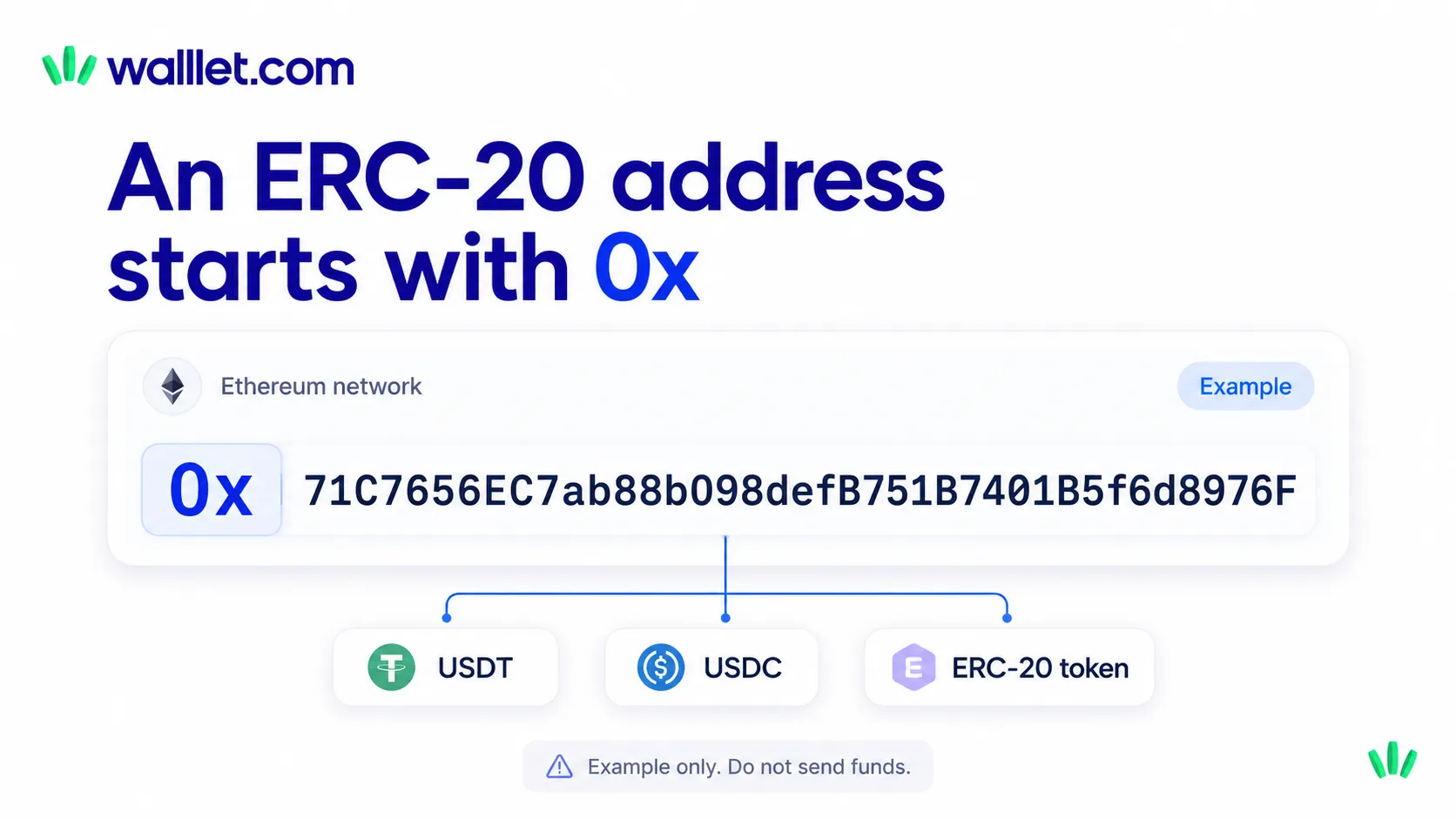
What does an ERC-20 wallet address look like?
An ERC-20 wallet address normally looks like an Ethereum address: 0x followed by 40 hexadecimal characters. The characters after 0x can include the numbers 0 to 9 and the letters a to f. The complete address is normally 42 characters long, including the 0x prefix.
Format-only example:
0x1234567890abcdef1234567890abcdef12345678
Do not send funds to this example. It is included only to show the format.
Etherscan describes an Ethereum address as a 42-character hexadecimal identifier beginning with 0x. Ethereum addresses can be used to send and receive assets on Ethereum, including ERC-20 tokens. ess may use lowercase letters:
0xde709f2102306220921060314715629080e2fb77
Or mixed uppercase and lowercase letters:
0x5aAeb6053F3E94C9b9A09f33669435E7Ef1BeAed
The mixed-case version may use an address checksum, which we will cover later. The shape of an address tells you that it may be compatible with Ethereum-style systems. It does not prove:
which network you should use
which token the receiver expects
whether the wallet supports that token
whether the address belongs to the intended person
whether it is a wallet address or contract address
whether an exchange accepts deposits through that route
A string beginning with 0x is not a complete payment instruction.
Is an ERC-20 wallet address the same as an Ethereum address?
In most everyday situations, yes. When someone asks for your ERC-20 wallet address, they usually mean the public Ethereum address you use to receive ERC-20 tokens on Ethereum.
You normally do not create one address for USDT, another for USDC, and another for every other ERC-20 token. One compatible Ethereum address can receive many ERC-20 tokens on the Ethereum network.
For example, suppose your wallet shows this Ethereum receive address:
0x1234567890abcdef1234567890abcdef12345678
That same public address could be used to receive supported ERC-20 versions of USDT, USDC, or other tokens on Ethereum. The sender still has to select:
the correct token
the Ethereum network
your correct public address
The network condition matters. Some EVM-compatible chains use the same 0x address format, and a wallet created from the same account may display the same address on Ethereum, Base, Arbitrum, Polygon, or another EVM network.
That does not merge those networks.
If a sender transfers a token on Base, the token exists in your account on Base. It does not arrive on Ethereum simply because the address text looks identical. Your wallet must support and display the token on the network that was actually used.
Smart-contract wallets, exchange deposit accounts, and provider-generated addresses can introduce additional differences. Always copy the address from the current receive screen for the exact route you intend to use.
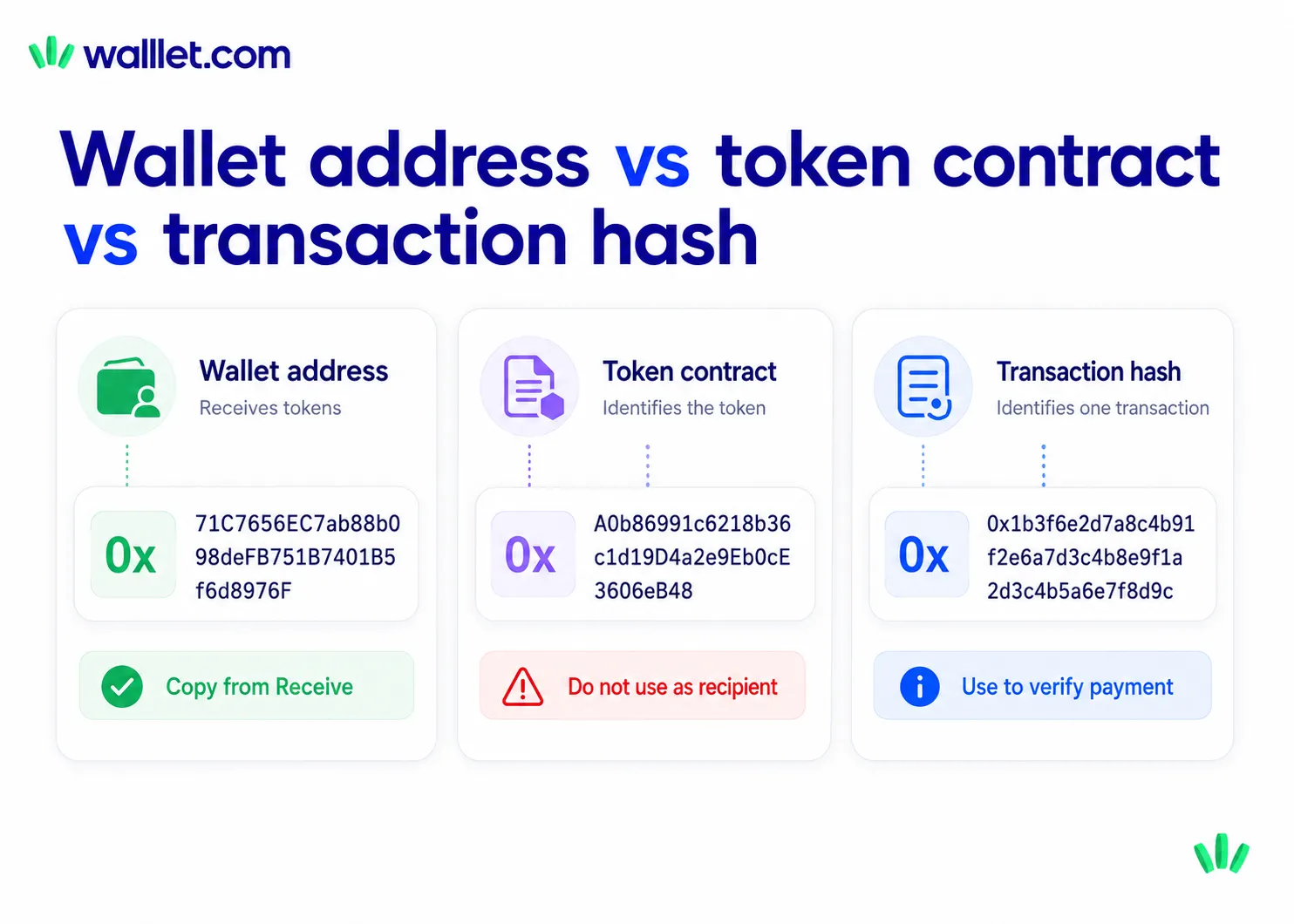
What is the difference between a wallet address, token contract address, and transaction hash?
A wallet address receives or holds assets. A token contract address identifies the smart contract for a token. A transaction hash identifies one transfer or blockchain action. They may all begin with 0x, so you need to check what the interface labels the value before copying it.
Item | What it identifies | Typical use | Should someone send tokens to it? |
Wallet address | Your receiving account | Receiving tokens | Yes, when the token and network are correct |
Token contract address | A token’s smart contract | Verifying or importing a token | No |
Transaction hash | One blockchain transaction | Checking payment status | No |
Network name | The blockchain used | Selecting the transfer route | Not an address |
Wallet address
Your wallet address is the public value you can share when receiving supported assets. It does not expose your private key. A public wallet address may look like:
0x1234567890abcdef1234567890abcdef12345678
Token contract address
An ERC-20 token is managed by a smart contract. That contract has its own address.
Wallets and block explorers use the contract address to distinguish one token from another. This is especially useful when several tokens have similar names or symbols.
Do not paste a token contract address into the recipient field of a normal transfer. The contract identifies the token itself. It is not your receiving address.
When adding an unfamiliar token manually, verify the contract through the token issuer’s official website or another authoritative source. Search results, forwarded messages, and random social replies are not authoritative sources, despite the confidence with which strangers type them.
Transaction hash
A transaction hash, also called a transaction ID, is created for a blockchain transaction. You use it to inspect the transaction on a block explorer.
A hash can help you confirm:
transaction status
sender
recipient
token
amount
network
block information
Etherscan allows users to search Ethereum transactions by transaction hash and inspect their details. by-step payment check, read how to read a crypto transaction on a block explorer.
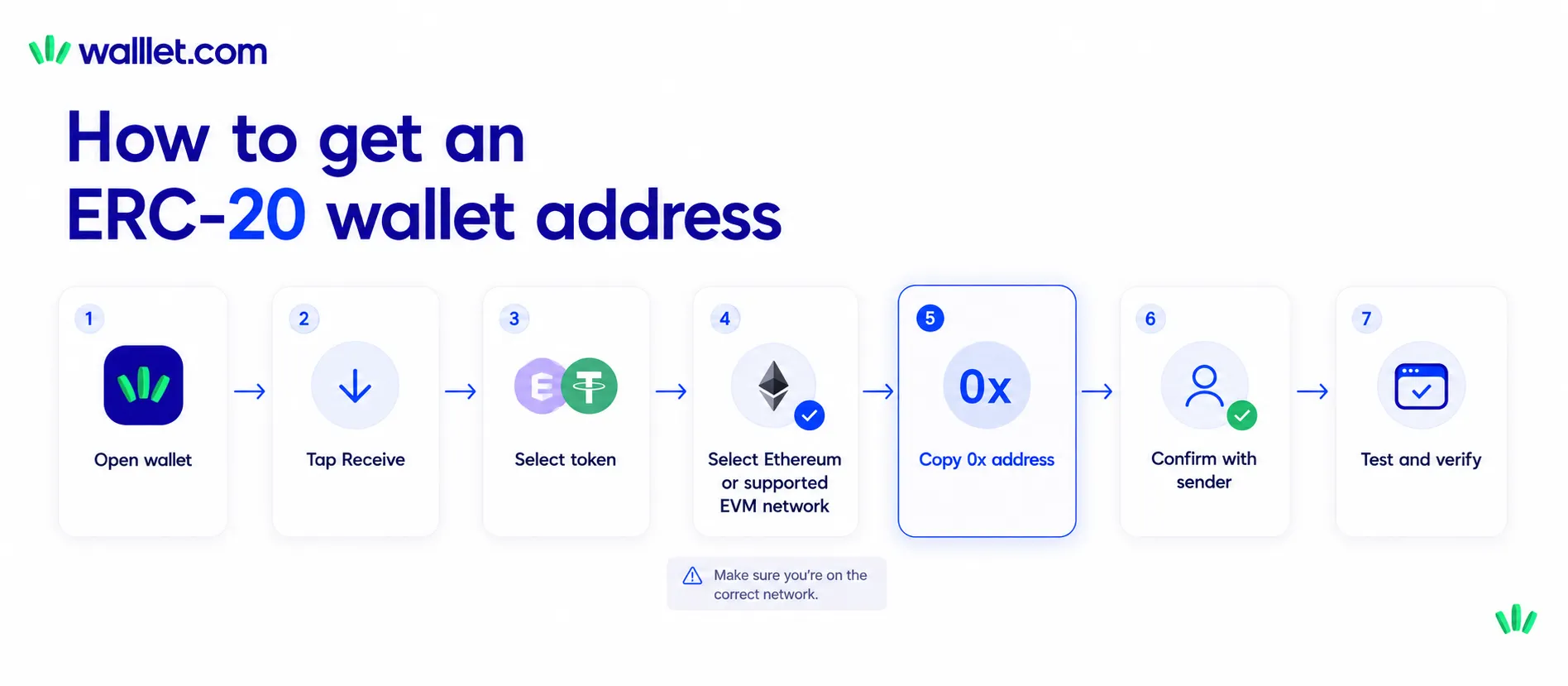
How do you get an ERC-20 wallet address?
To get an ERC-20 wallet address, create or open a wallet that supports Ethereum or the EVM network you need. Open its Receive screen, select the correct asset and network, copy the public address, and confirm the network with the sender before any transfer is made. Use this process:
1. Choose an Ethereum or EVM-compatible wallet
The wallet should support the exact token and network you plan to use. Do not choose a wallet only because it says “USDT supported.” USDT exists on several networks. “Supports USDT” is incomplete unless the wallet also shows which versions and networks it supports.
For a broader wallet decision, use this guide to choosing a crypto wallet for receiving USDT or USDC.
2. Create or open your wallet
Follow the wallet’s setup and recovery process. Depending on the wallet, access may rely on:
a seed phrase
a hardware device
a passkey
a recovery service
a smart-account recovery system
a combination of methods
Understand the recovery process before receiving a meaningful amount. Your public address is safe to share. Your seed phrase, private key, recovery code, and signing credentials are not.
3. Open the Receive screen
Do not copy an address from an old invoice, screenshot, chat, spreadsheet, or transaction history.
Open the wallet you currently control and use its current Receive screen.
4. Select the token or network
Depending on the wallet, you may select Ethereum first and then the token, or select a token and then choose the network.
Check both fields. For example:
Token: USDC
Network: Ethereum
is a different route from:
Token: USDC
Network: Base
even when the displayed receiving address is identical.
5. Copy your public address
Use the copy button rather than typing the address manually. Paste it into the final invoice, message, or withdrawal form. Then compare the pasted address with the address shown inside your wallet.
6. Confirm the route with the sender
Send a complete instruction:
Token: USDC
Network: Ethereum
Receiving address: 0x…
Do not use another network.
Please share the transaction hash after sending.
For client payments, use the full USDT and USDC payment checklist rather than sending an address with no context.
7. Use a small test transfer when appropriate
A test transfer is useful when:
this is the first payment from the sender
either person is unfamiliar with the wallet
you are using a new network
the receiving address has changed
the amount is meaningful
an exchange offers several similar withdrawal routes
The test must use the same token, network, and receiving address as the planned transfer.
8. Verify the transaction
After the sender says the payment was sent, ask for the transaction hash. Check it on the correct block explorer and confirm the recipient, token, amount, network, and status.
Open walllet and check the receive options currently available to your account.
How do you create an ERC-20 wallet address?
Technically, you do not create an address for the ERC-20 standard itself. You create or open an Ethereum or EVM-compatible wallet account. That account produces a public address that can receive supported ERC-20 tokens on the correct network.
The process usually looks like this: Create or open wallet
→ Select Ethereum or a supported EVM network
→ Open Receive
→ Copy public 0x address
→ Confirm token and network
→ Request a test transfer when needed
Suppose you create an Ethereum wallet and receive this public address:
0x1234567890abcdef1234567890abcdef12345678
You do not need to create a second address merely because someone wants to send an ERC-20 token instead of ETH.
The same Ethereum account can normally receive ETH and supported ERC-20 tokens. ETH is the native asset used for Ethereum transaction fees. ERC-20 tokens are smart-contract tokens that follow a shared interface. The address is shared. The assets are not.
Your wallet tracks ETH directly through the Ethereum account balance. It tracks each ERC-20 token through that token’s contract and balance records.
Can the same address receive USDT, USDC, and other ERC-20 tokens?
Yes. The same Ethereum public address can normally receive several ERC-20 tokens, including Ethereum versions of USDT and USDC. The sender must use the Ethereum network, the correct token contract, and a wallet or platform that supports the intended route.
One address could hold:
ETH
ERC-20 USDT
ERC-20 USDC
another supported ERC-20 token
You do not need a new Ethereum address for every token. The catch is that USDT and USDC exist on more than one blockchain.
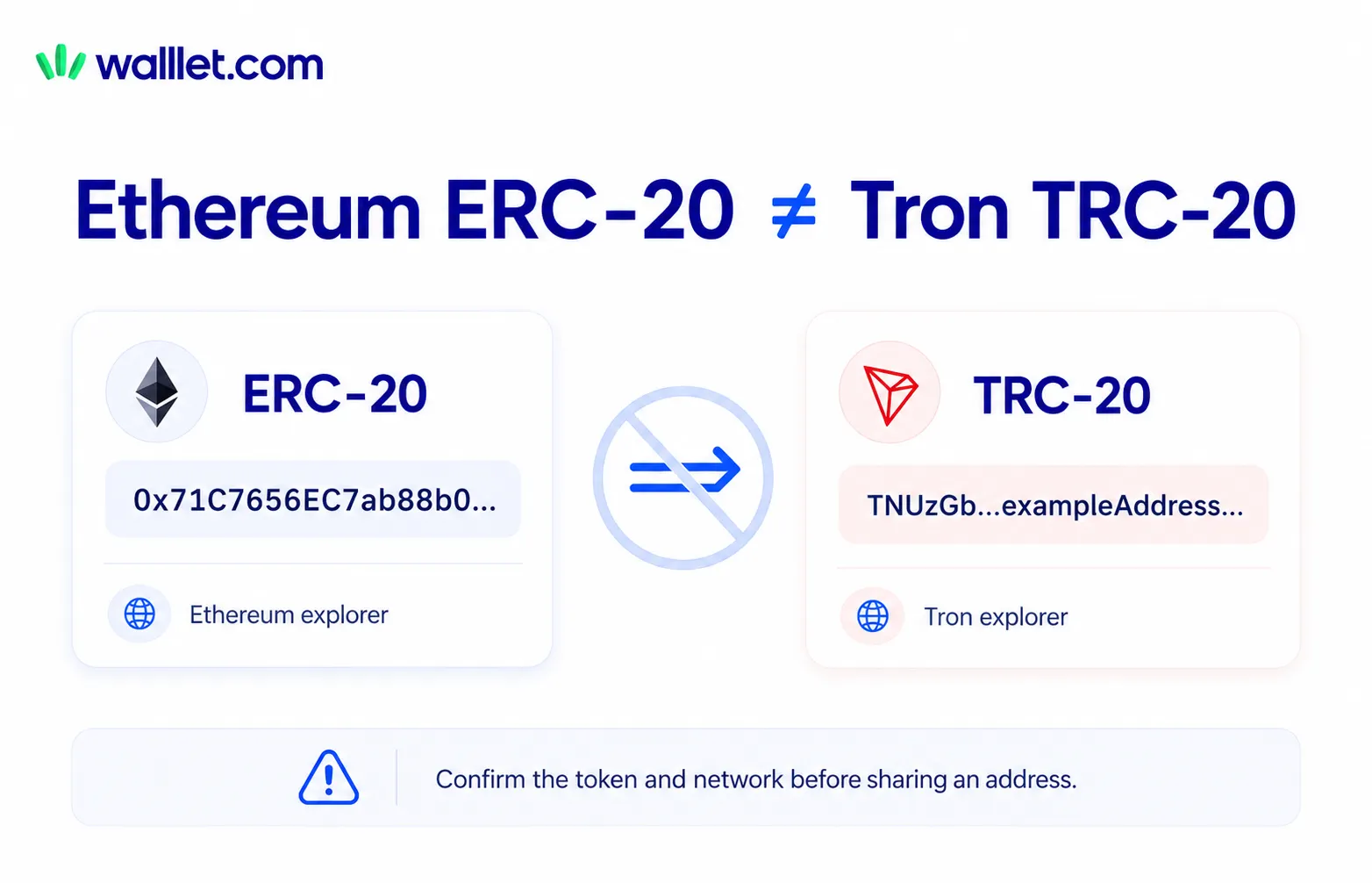
Circle publishes USDC contract information for several supported blockchains, while Tether lists separate supported protocols for ERC-20, TRC-20, Solana, TON, Aptos, and other environments. A token symbol does not identify the network by itself. If the sender chooses:
USDT
Ethereum / ERC-20
you need an Ethereum-compatible receiving address that supports USDT on Ethereum. If the sender chooses:
USDT
Tron / TRC-20
the route is different. A Tron address and an Ethereum address should not be treated as interchangeable.
Receiving USDC
USDC also operates on several blockchains. The sender may see Ethereum, Base, Arbitrum, Solana, or other options. Ask which network they can use. Then check which routes your wallet supports. Use the network selection guide for USDT and USDC before accepting a new payment route.
What is the difference between an ERC-20 address and an EVM wallet address?
An EVM wallet address is an address used on a blockchain compatible with the Ethereum Virtual Machine. “ERC-20 wallet address” is usually informal user language for an EVM-style public address used to receive a fungible token on Ethereum or another compatible network. The distinction is:
EVM describes the compatible blockchain environment.
ERC-20 describes a token interface used by smart contracts.
Wallet address describes the public account or smart-wallet address involved in a transaction.
Ethereum, Base, Arbitrum, Optimism, Polygon, Avalanche C-Chain, and BNB Smart Chain use EVM-compatible account formats. An account may show the same 0x address across several of those networks.
Still, “same address” does not mean “same balance.”
A USDC balance on Base is recorded on Base. A USDC balance on Ethereum is recorded on Ethereum. A wallet may display both balances under one account, but the tokens remain on separate networks until a supported cross-chain action moves them. This is why the safer question is:
Does this wallet support this token at this address on the network the sender will use?
What mistakes should you avoid with ERC-20 wallet addresses?
The most common ERC-20 address mistakes come from confusing similar-looking information, choosing the wrong network, copying an address from an unsafe source, or assuming that every token with the same symbol uses the same transfer route.
Mistake | Why it matters | Safer action |
Confusing a wallet address with a token contract | The contract identifies the token, not your account | Copy from the wallet’s Receive screen |
Selecting the wrong network | The asset may arrive on an unintended chain or fail to appear | Match the sender and receiver network |
Sending TRC-20 to an ERC-20 route | Tron and Ethereum are different networks | Confirm the exact protocol |
Trusting the token symbol alone | Fake or unrelated tokens can reuse a symbol | Verify the official contract |
Copying from transaction history | Address-poisoning entries may imitate a familiar address | Copy from the current Receive screen |
Typing the address manually | One wrong character changes the destination | Copy, paste, and compare |
Skipping a test transfer | A route error affects the full amount | Test new or important routes first |
Sharing a private key or seed phrase | Anyone with it may control the wallet | Share only the public address |
Assuming all | Tokens remain on the network used | Check the chain in the wallet or explorer |
Marking a payment complete from a screenshot | A screenshot does not prove onchain status | Verify the transaction hash |
Do not copy an address from transaction history
Address-poisoning attacks place similar-looking addresses into a wallet’s activity history. The attacker waits for the user to copy the fake address during a later transfer. Use the current Receive screen or a previously verified contact. Read how address-poisoning scams use fake wallet history before relying on shortened first-and-last-character checks.
Do not assume the cheapest network is acceptable
A sender may select the cheapest withdrawal network available on an exchange. That network may not be supported by your wallet or your next-step payment route. Agree on one token and one network before sending the address.
Do not send private information
Someone sending tokens needs your public address. They do not need:
your private key
your seed phrase
your passkey
a recovery code
a remote-access session
a screen-sharing call
permission to “validate” or “synchronize” your wallet
No legitimate sender needs wallet-control credentials to pay you.
Is an ERC-20 wallet address case-sensitive?
Ethereum addresses can be written entirely in lowercase, but mixed-case addresses can use the EIP-55 checksum format to help detect typing errors. The checksum uses capitalization as an error-detection signal. It does not create a different wallet or change who controls the address.
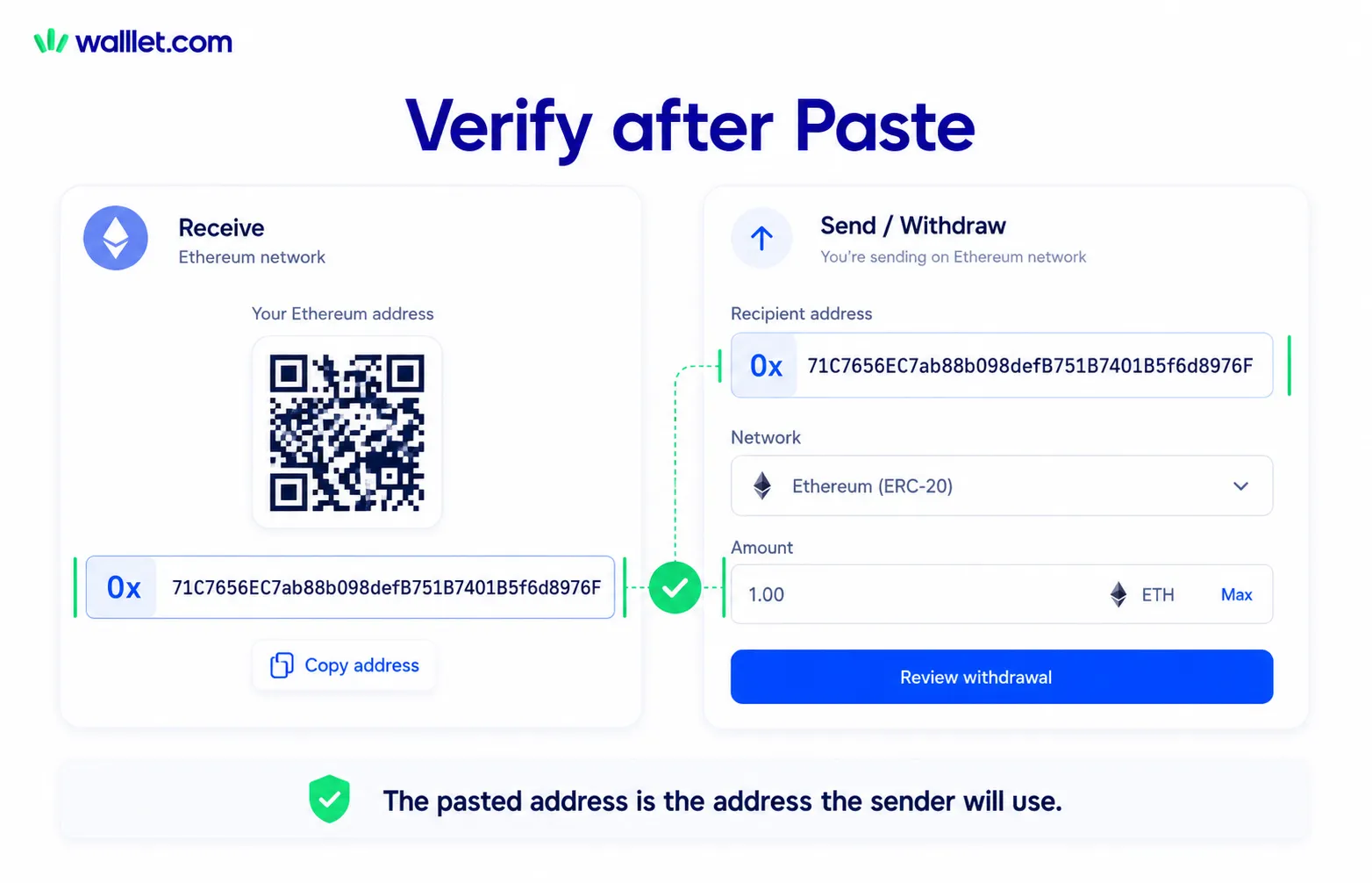
The official EIP-55 specification keeps the same 40 hexadecimal characters and uses mixed capitalization to add checksum information. ner, the practical rule is simpler:
Do not type an Ethereum address by hand. Copy it, paste it, and compare it with the source.
Some interfaces normalize addresses to lowercase. Others preserve checksum capitalization. A reliable wallet or withdrawal interface should validate the address format before submission, but you should still check the pasted destination yourself. For an important transfer:
Copy from the current Receive screen.
Paste into the actual payment form or message.
Expand any shortened address.
Compare the pasted value with the wallet.
Confirm the token and network beside it.
Send a test transfer when the amount justifies it.
How does walllet handle ERC-20 and EVM addresses?
walllet is publicly described as a non-custodial, seedless wallet for sending, receiving, and storing crypto across several major chains. Its current website lists Ethereum and several EVM-compatible networks among its supported chain environments and describes seedless access using passkeys and biometric protection.
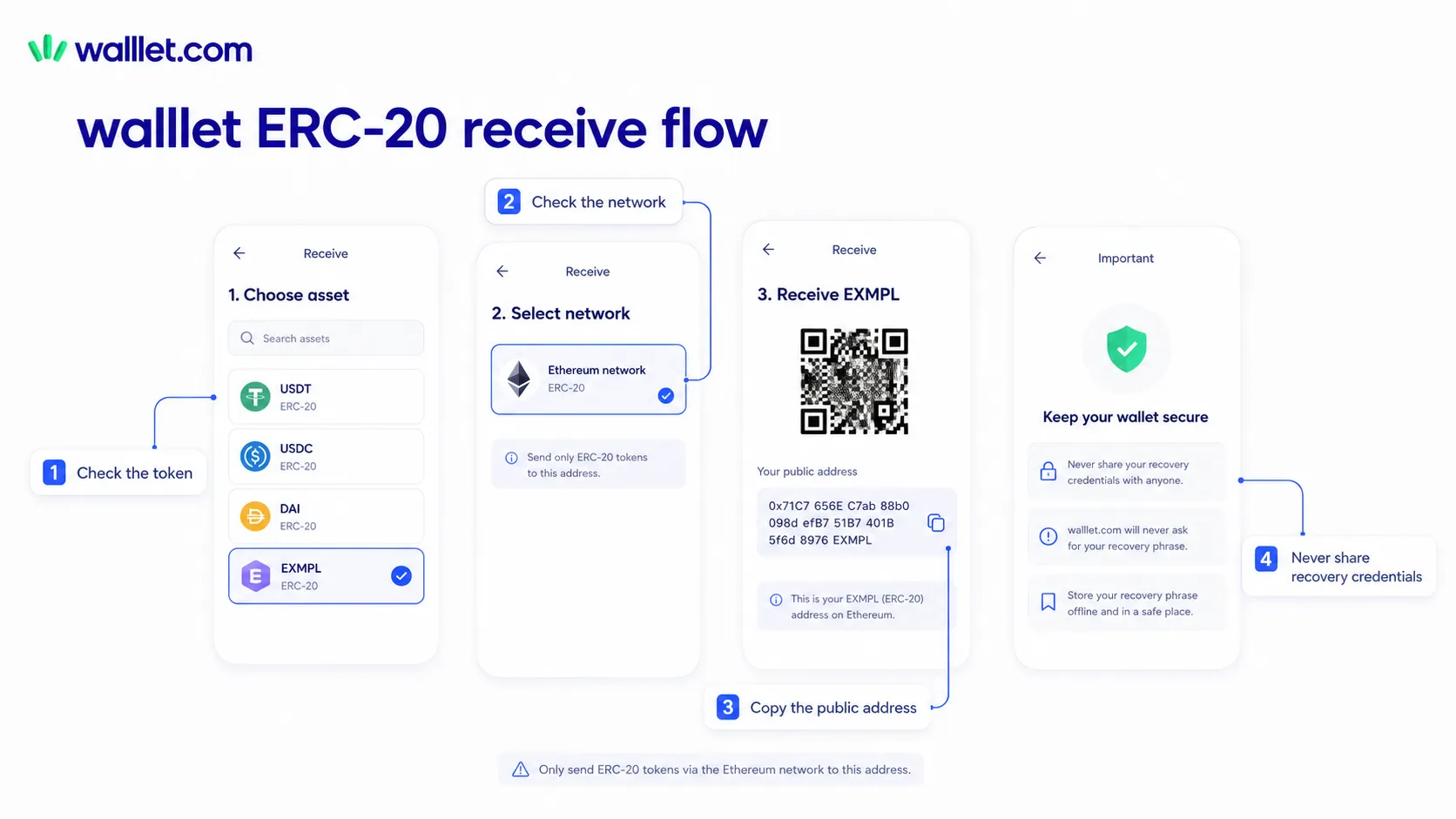
walllet for an ERC-20 or EVM transfer:
Open the current Receive flow.
Select the exact token.
Select the intended network.
Check that the route is currently supported.
Copy the public address shown in the app.
Give the sender the token, network, and address together.
Verify the transfer after it is sent.
Do not assume every token is supported on every network listed by the wallet. Asset and network availability can change. The current product screen should control the decision.
The seedless recovery model removes the need to begin with a traditional 12-word recovery phrase. It does not remove token, address, or network risk. A sender can still choose the wrong chain. A copied address can still be replaced by malware. An unsupported token can still fail to appear correctly. The useful product test is whether you can clearly answer:
Which token am I receiving?
Which network is being used?
Which address should I copy?
How will I recover access?
How will I verify the payment afterward?
For freelancers receiving stablecoins regularly, the complete USDT and USDC freelancer wallet guide covers the wider process from agreeing on a payment route to saving transaction proof.
ERC-20 wallet address checklist
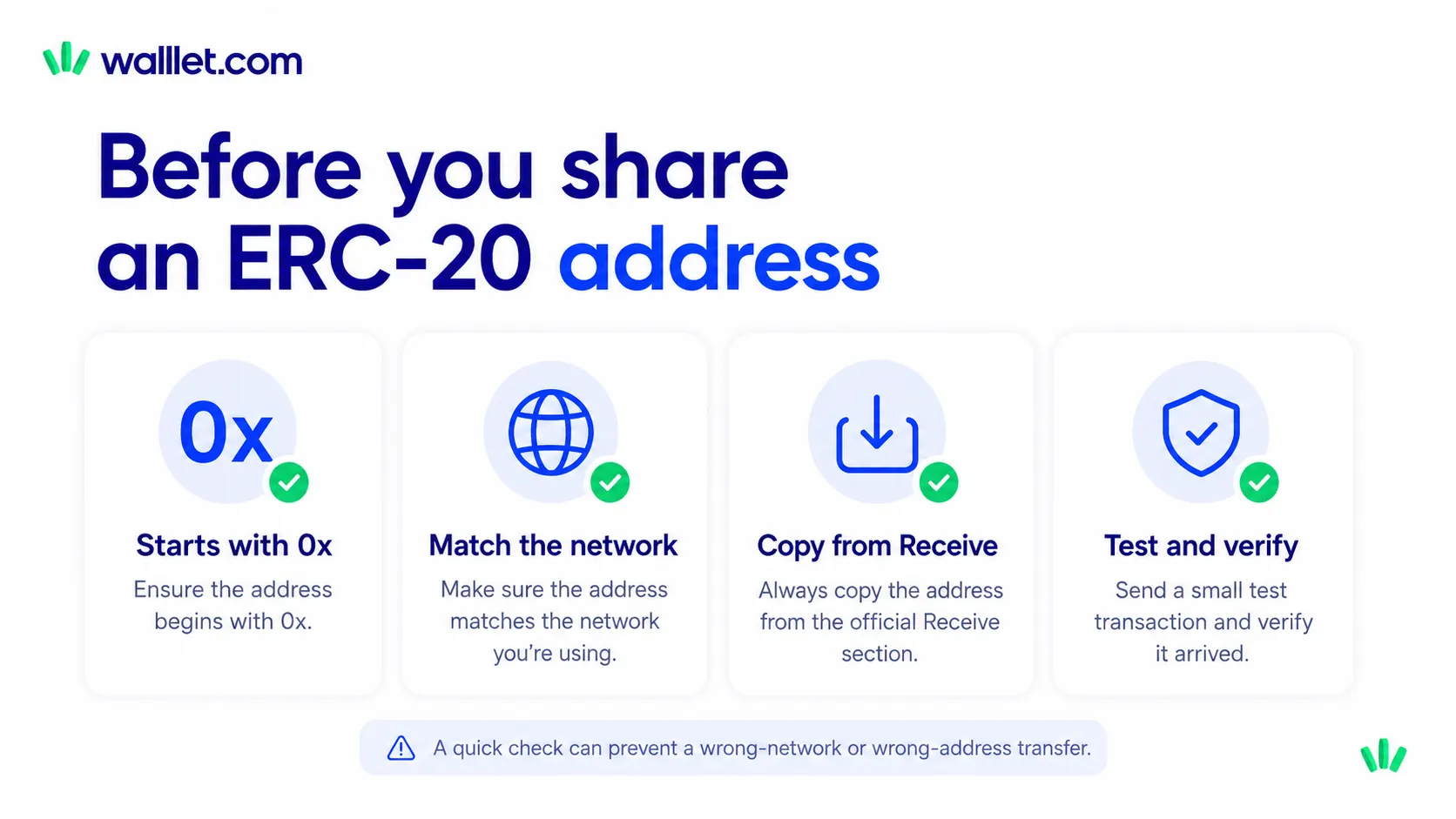
Before receiving an ERC-20 token, confirm every item below:
Before sharing the address
The sender has named the exact token.
Both sides have agreed on the network.
Your wallet supports that token on that network.
The address comes from your current Receive screen.
The pasted address matches the wallet.
The sender knows not to use another network.
You have agreed on a test-transfer rule.
You have not shared a private key or recovery credential.
After the sender pays
You have the transaction hash.
You are checking the correct block explorer.
The transaction status is successful or confirmed.
The recipient address matches your wallet.
The token and amount are correct.
The network matches the original instruction.
The payment record is saved with any relevant invoice or reference.
One address can receive many ERC-20 tokens. One careless network choice can still ruin the afternoon. Create or open your walllet before your next ERC-20 transfer and verify the token, network, and receive address.
