No crypto wallet is completely safe, and “self-custodial” does not mean “nothing can go wrong.”
walllet.com uses a non-custodial, passkey-based smart-wallet model. Its current Terms of Service say that users remain in control of their digital assets, private keys and wallet credentials, while walllet.com does not hold or custody those assets or keys. The Terms also say walllet.com uses ERC-4337 account abstraction and does not store users’ private keys, passkeys or recovery phrases on its servers.
That addresses one important risk: custody by the wallet provider.
It does not eliminate device compromise, failed recovery, malicious approvals, smart-contract bugs, wrong-network transfers, stablecoin issuer controls, blockchain failures or restrictions imposed by third-party financial providers.
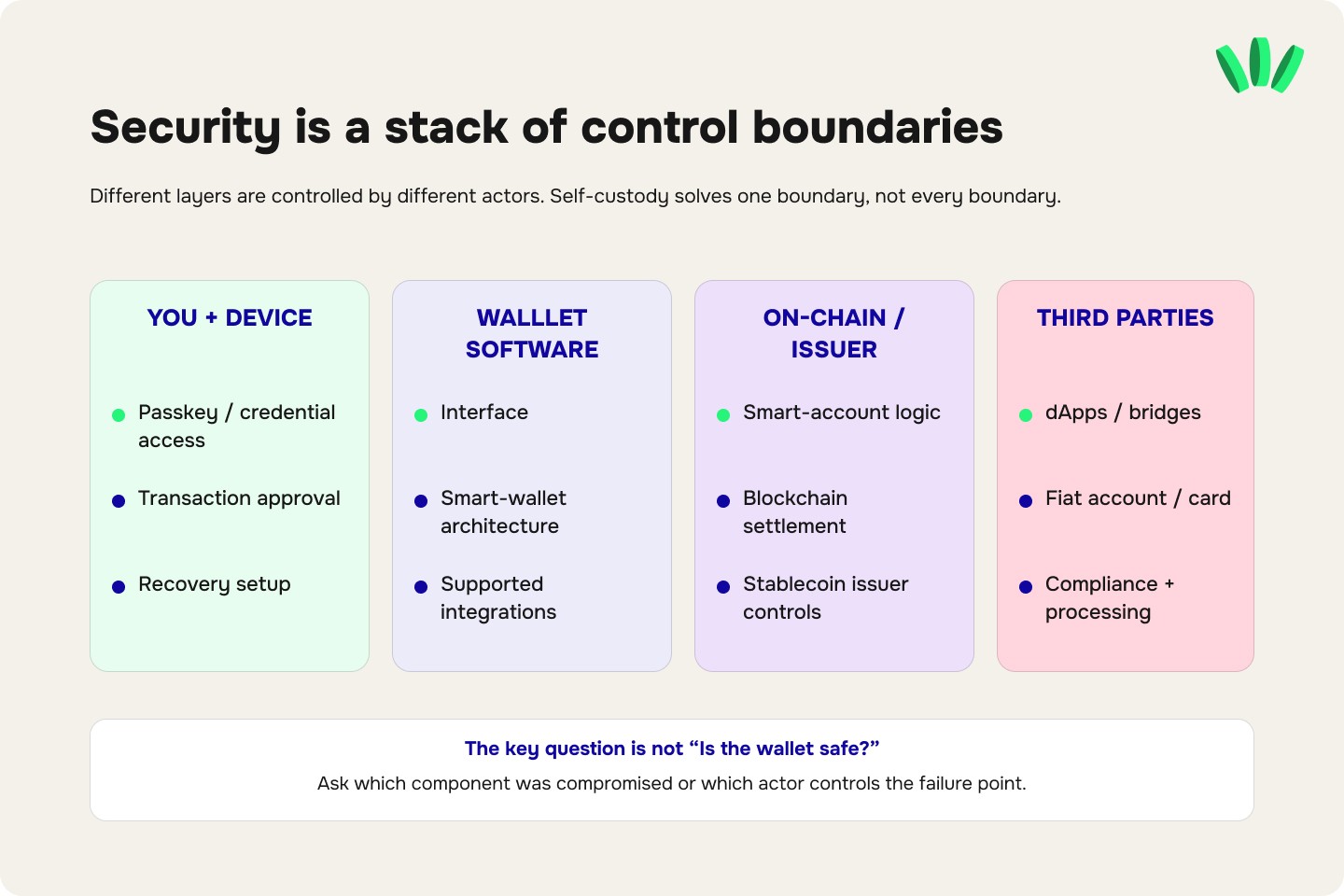
The useful question is therefore not simply “Is walllet.com safe?”
It is:
Which parts of the system does walllet.com control, which parts do you control, and which risks sit somewhere else entirely?
If you are still deciding what “safe” should mean for any crypto wallet, start with the broader crypto wallet safety checklist. For walllet specifically, the control boundaries below matter most.
walllet.com security at a glance
Security layer | Who mainly controls it? | What walllet says it can access/control | Main risk |
Wallet credentials | User + device/passkey environment | walllet.com says it does not store the private key, passkey or recovery phrase | Lost access, compromised device or credential account |
Smart account | User credentials + on-chain smart-account logic | walllet provides the interface and smart-wallet architecture | Contract bugs, modules, upgrade/admin design |
Transaction approval | User | User authorizes wallet transactions | Phishing, malicious approvals, wrong recipient |
Stablecoin token | Token issuer | walllet.com cannot override issuer-level controls | USDT/USDC blocklisting, depeg, issuer risk |
Blockchain network | Network/protocol | walllet does not control settlement | Congestion, failed transactions, chain-specific risks |
dApps / swaps / bridges | Third-party protocols | walllet.com may provide access or integration | Contract, routing, bridge, liquidity and approval risk |
Fiat account/card/off-ramp | Third-party financial provider | walllet.com provides an interface/integration layer | KYC, restrictions, provider outage, settlement and compliance risk |
walllet’s Terms explicitly distinguish the self-custodial crypto wallet from third-party virtual accounts, cards, fiat off-ramps and other financial services. Those third-party providers can have their own eligibility, compliance, processing and restriction rules.
What can walllet.com access?
The most important distinction is between access to your wallet interface and control of the credentials that authorize transactions.
According to walllet’s current Terms, walllet.com does not hold, custody or control users’ crypto assets or private keys. The Terms state that the smart wallet is controlled through the user’s keys and passkey-based authentication.
In practical terms, walllet.com can provide the software interface that displays balances, transaction history, supported assets and blockchain activity. Public blockchain data such as wallet addresses, balances and transactions is already visible on-chain.
What walllet.com says it does not keep on its own servers is more important:
your private key;
your passkey;
a traditional recovery phrase.
That model is explained in more detail in Understanding Private Keys on walllet.com.
This does not mean the entire product is invisible to walllet. A financial app can still process technical, usage, compliance or service data depending on which feature you use. It means something narrower and more important for crypto custody: walllet says it does not hold the signing secret that lets it independently move your self-custodied crypto.
Where do the signing credentials live?
walllet’s Terms describe passkey-based authentication through systems such as Apple iCloud Keychain, Google Password Manager or Samsung Pass. They say the relevant cryptographic credentials remain encrypted on the user’s personal device or credential manager rather than being stored on walllet servers.
Passkeys use public-key cryptography rather than a reusable password. The FIDO Alliance describes passkeys as phishing-resistant credentials that can be synced through a passkey provider or bound to a particular device. Biometric information used to unlock a passkey stays on the device rather than being sent to the remote service.
That is an important security improvement over asking users to type a reusable password or recovery phrase into websites.
But it changes the failure mode. It does not erase it.
With a seed phrase, the dangerous secret is usually the phrase itself.
With a passkey-based wallet, the security perimeter can include your phone, screen lock, Apple or Google account, credential manager, recovery configuration and any other mechanism involved in restoring access.
If you want the passkey model without the jargon, the walllet passkey wallet guide explains what changes when a wallet replaces a seed phrase with passkeys.
What happens if your phone is stolen?
A stolen phone does not automatically mean a stolen wallet.
A locked modern device, passkey protection and biometric or PIN authentication create barriers between possession of the phone and authorization of wallet activity. Passkeys themselves are designed to resist traditional credential phishing.
But a stolen device is still a security event. The relevant questions are:
Is the device strongly locked?
Can the attacker access your Apple, Google or Samsung account?
Is the passkey synced?
Do you have another trusted device?
Can you revoke or secure a compromised account?
Do you understand your wallet’s recovery route?
walllet’s own Terms make the downside explicit: if you lose access to both the device and the linked account that stores or synchronizes the credential, you may permanently lose access to the wallet. walllet.com says it cannot reset or recover the private key or passkey for you.
The detailed process is covered in the walllet.com lost-phone and new-phone recovery guide.
This is why recovery should be understood before the wallet contains an amount you would be afraid to lose.
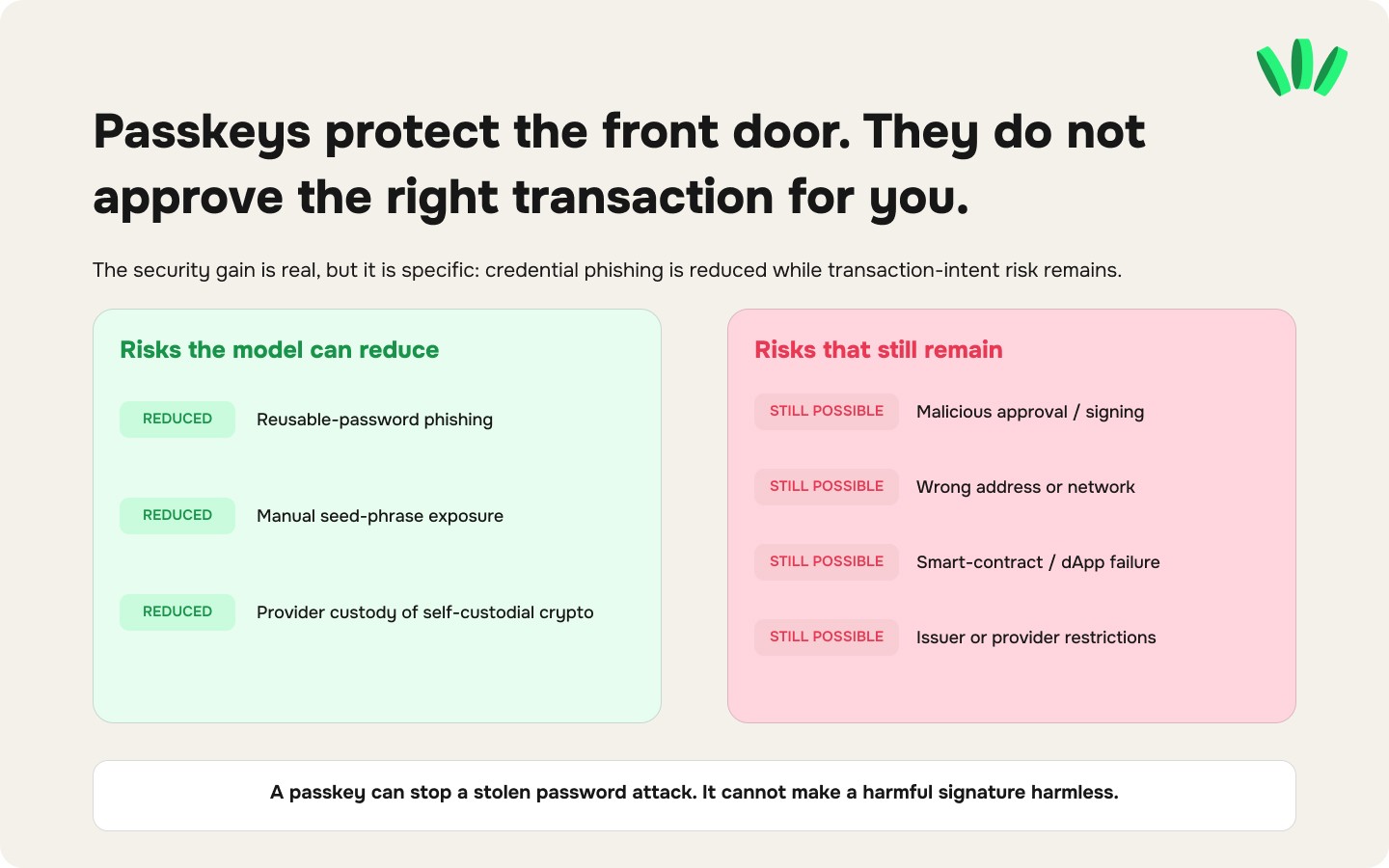
A passkey is safer against some attacks, not every attack
Passkeys are particularly useful against credential phishing because there is no reusable password or seed phrase to type into a fake login page. That does not protect you from every crypto scam. A wallet user can still:
approve a malicious token allowance;
sign a harmful smart-contract transaction;
send funds to the wrong address;
use the wrong blockchain network;
connect to a compromised dApp;
install a fake application;
approve a transaction without understanding what it does.
The existing guide to crypto phishing and fake walllet support covers one of the most common attack paths: someone pretending to help while trying to get access to secret credentials or convince you to sign or transfer something.
A passkey removes one very dangerous object from the scammer’s shopping list. It does not make a bad signature harmless.
Want to inspect the wallet model before putting serious funds into it? Start with the passkey and self-custody flow, understand recovery, then test it with an amount that lets you learn without making the first transaction expensive.
See how walllet’s passkey-based crypto wallet works

Can walllet.com be hacked?
That answer needs precision. “Wallet hacked” can describe completely different events:
What happened | What was actually compromised? |
Attacker unlocked the device or credential account | Device/account security |
User entered credentials into a fake page | Phishing |
User approved a malicious contract | Transaction authorization |
Wallet software contained a vulnerability | Wallet implementation |
Smart account contained a bug | Smart-contract layer |
Third-party dApp was compromised | External application |
Stablecoin was blocked | Token issuer control |
Fiat withdrawal was restricted | Financial provider/account layer |
The blockchain itself does not have to be “hacked” for a user to lose money. The Can Crypto Wallets Be Hacked? guide explains this distinction in more detail. The practical security question for walllet.com is narrower:
Could an attacker obtain enough control over your credentials, device, approved permissions or smart account to authorize an action you did not intend?
That is the threat model worth testing.
Does the ERC-4337 smart account create additional risk?
Yes. A smart-account wallet introduces software logic that a traditional externally owned account does not have.
walllet’s Terms state that it uses Ethereum Account Abstraction through ERC-4337 and that the wallet’s smart contract is controlled through the user’s keys.
Account abstraction can support useful features such as passkey authentication, more flexible transaction flows and alternative gas handling.
It also means smart-contract implementation matters. For serious due diligence, a user should be able to verify:
which contracts control the account;
the deployed contract addresses;
whether those contracts are proxies or upgradeable;
who, if anyone, has upgrade or administrative permissions;
which modules or plugins can affect signing or execution;
whether the contracts have received an independent security audit;
the scope and date of that audit;
unresolved findings;
what happens if an infrastructure dependency stops working.
ERC-4337 is an architecture. It is not a security certificate. A product can use a well-known standard and still implement part of the system poorly.
The broader mechanics are explained in walllet’s account abstraction and smart-contract wallet guide, while the smart-contract safety guide explains why admin powers, upgradeability and contract permissions matter.
Can USDT or USDC still be frozen in a self-custodial walllet?
Yes.
Self-custody determines who controls the wallet credentials. It does not remove controls built into a token.
Some centrally issued stablecoins have contract-level mechanisms that allow their issuer to restrict addresses under certain legal or compliance circumstances.
Circle’s current USDC terms explicitly reserve the ability to block certain addresses and restrict transfers of USDC in circumstances described in those terms. That means these two statements can both be true:
walllet cannot independently sign your transaction.
A stablecoin issuer may still restrict its own token.
The wallet and token are different layers.
walllet’s guide to USDT and USDC freezes explains the distinction between wallet control, exchange restrictions and stablecoin issuer controls.
This is one of the easiest security concepts to get wrong because people hear “self-custody” and mentally translate it into “nobody can ever restrict anything.”
That is not how centrally issued stablecoins work.
Network risk does not disappear because the wallet is self-custodial
Your wallet credentials can be perfectly secure while your transaction still goes wrong.
For example, you may select USDT correctly and select the wrong network.
Ethereum, Arbitrum, Base, BNB Smart Chain, Tron and other networks are separate routes. A familiar token symbol does not guarantee that the destination supports the same route.
walllet’s own supported-chain guide recommends checking the live receive flow before every transfer rather than assuming that support for a token means support for every network version of that token.
Use the walllet.com supported chains guide when choosing a transfer route. A first transfer should be boring.
Check the token.
Check the network.
Check the address.
Send a small test.
Then move the larger amount.
Bridges and dApps create another security boundary
When you connect walllet.com to an external dApp, DEX, bridge or DeFi protocol, walllet.com is no longer the only software involved.
walllet’s Terms explicitly state that external dApps and decentralized services are independent third parties. Transactions through them can introduce their own contracts, approvals, fees and failure modes.
A malicious or compromised dApp may not need your private key. It may only need you to approve the wrong thing. That is why transaction clarity matters at least as much as login security. Before interacting with an unfamiliar contract, check:
the domain;
the contract address;
what function you are calling;
which token is being approved;
the spender address;
whether the approval is limited or unlimited;
whether the protocol is upgradeable;
whether you actually need to make the transaction.
A secure front door does not make every room you enter safe.
Fiat accounts and cards have a completely different risk model
This distinction matters because walllet.com now includes services beyond self-custodial crypto.
walllet’s Terms say certain virtual-account, payment-card, fiat off-ramp and related services are provided through independent third-party financial providers. walllet.com supplies the interface and integration layer, while those providers may control eligibility, compliance checks, processing and service availability.
That means this question:
“Can walllet freeze my crypto?”
is different from:
“Can my virtual account or card access be restricted?”
For self-custodial crypto, the custody question is about signing credentials and the on-chain account.
For a fiat or card service, the relevant third-party provider may conduct KYC, source-of-funds checks, fraud screening, sanctions screening or other reviews. The Terms state that walllet cannot override a provider’s eligibility or compliance decision.
Do not use the security model of one layer as proof for another.
Can walllet recover your private key or passkey?
According to walllet’s Terms, no.
walllet.com says it does not know or store the user’s private key or passkey and therefore cannot reset those credentials on demand. The Disclaimer repeats that walllet cannot create a replacement passkey if the user loses access to the relevant device and credential ecosystem.
That has two sides.
It limits walllet’s ability to take unilateral control of your wallet.
It also limits walllet’s ability to rescue you from your own recovery failure.
This is the trade-off that self-custody slogans often skip.
If someone claiming to be walllet.com support says they can “restore” your wallet if you send them a secret credential, recovery code or payment, stop. A company that says it does not possess your signing credentials should not suddenly need you to hand those credentials to a support agent.
Can walllet.com reverse a crypto transaction?
No wallet can normally reverse a finalized blockchain transaction simply because the sender regrets it.
walllet’s Terms state that blockchain transactions are executed through decentralized networks rather than settled by PrimeUp LTD. Users are responsible for transactions they authorize.
If you send assets to:
the wrong address;
a scammer;
the wrong network;
a malicious smart contract;
the recovery options depend on what actually happened.
Sometimes a mistake can be corrected with cooperation from a recipient, exchange or provider. Sometimes it cannot. The absence of a chargeback mechanism is one reason transaction review matters so much in self-custody.
What is walllet.com protecting you from, and what is still your responsibility?
A useful way to assess walllet.com security is to separate reduced risks from remaining risks.
Risk | Does the walllet model reduce it? | Does it eliminate it? |
Seed phrase theft | Yes, by removing a traditional seed phrase from the user workflow | No, other credential/recovery risks remain |
Password phishing | Passkeys can materially reduce this attack path | No |
Provider custody of self-custodial crypto | walllet says it does not custody the assets | No, other layers still exist |
Lost-device risk | Synced credential recovery may help | No |
Malicious dApp approvals | Wallet UX may help users understand transactions | No |
Smart-contract bugs | No architecture can eliminate implementation bugs | No |
Wrong-network transfers | Clear UI and warnings can reduce mistakes | No |
Stablecoin issuer freeze | No | No |
Network failure/congestion | No | No |
Fiat-provider restrictions | No | No |
User sending to wrong address | No | No |
Security is strongest when the product and the user cover different failure modes instead of assuming one feature solves all of them.
Before moving a large balance, verify these 10 things
Do not make your first serious security test with your serious money. Before increasing the amount held or moved through the wallet:
Confirm you installed walllet from an official source.
Understand where your passkey is stored or synced.
Secure the Apple, Google or Samsung account behind that recovery path.
Know what happens if your current phone disappears.
Test recovery or device migration where practical before relying on it.
Verify the exact token and network before receiving funds.
Send a small transfer first.
Understand what you are signing before using dApps or swaps.
Check whether an independently verifiable audit, contract-address list and smart-account control documentation are available.
Keep amounts exposed to daily on-chain activity proportional to the risk you are willing to take.
If you hold an amount that would materially affect your finances if lost, separating everyday activity from long-term storage can reduce the damage from one compromised transaction or device.
The existing crypto wallet security setup guide covers that layered approach.
If the security model makes sense after you understand the failure modes, test it before you trust it with more. Set up the passkey-based wallet, secure the recovery path and use a small transaction to see how signing and self-custody work in practice.
Set up walllet and test the security flow yourself

