To read a smart contract, first check the contract address, then see whether the source code is verified. After that, look at the contract type, read functions, write functions, approvals, admin powers, upgradeability, and transfer restrictions. You are checking what the contract can do with your tokens before you approve anything.
TL;DR
Start with the contract address. Names, logos, tickers, and charts can be copied.
A verified contract is easier to inspect. Verified does not mean safe.
Read functions show information. Write functions can change balances, permissions, fees, or rules.
The most important functions for everyday users are usually
approve,allowance, andtransferFrom, because they decide who can move your tokens.Admin powers matter. Minting, pausing, blacklisting, fee changes, and upgrades can all change the risk after you sign.
Before approving anything, ask: what asset can move, who can move it, how much permission am I giving, and can this permission stay active later?
What are you actually reading in a smart contract?
A smart contract is code deployed at a blockchain address. On Ethereum and other EVM-compatible networks, users interact with contracts by sending transactions to that address. The Ethereum docs describe smart contracts as programs that live at a specific address and run when users interact with them.
For a normal wallet user, reading a smart contract does not mean reviewing every line of Solidity. Please, nobody needs to cosplay as an auditor at 1 a.m. before a swap.
It means checking the parts that affect your money: address, permissions, admin control, transfer rules, and upgrade paths.
If you are new to EVM networks, it helps to first understand what an EVM wallet is. Smart contracts, token approvals, dApps, bridges, and swaps mostly live in that world. Here is the basic map:
Area | What it means | What to check |
Contract address | The contract’s real onchain identity | Does it match the official source? |
Source code | Human-readable code if verified | Can users inspect what the contract does? |
Read functions | Information you can query | Owner, roles, supply, paused state, allowances |
Write functions | Actions that change something | Approvals, transfers, minting, fees, upgrades |
Events and logs | History of contract activity | Ownership transfers, mints, burns, pauses |
Proxy or implementation | Upgradeable contract structure | Who can change the logic later? |
The contract address is the identity. A token name is just text. A logo is just an image. A ticker is just a ticker. Very comforting. Also very copyable.
How do you read a smart contract step by step?
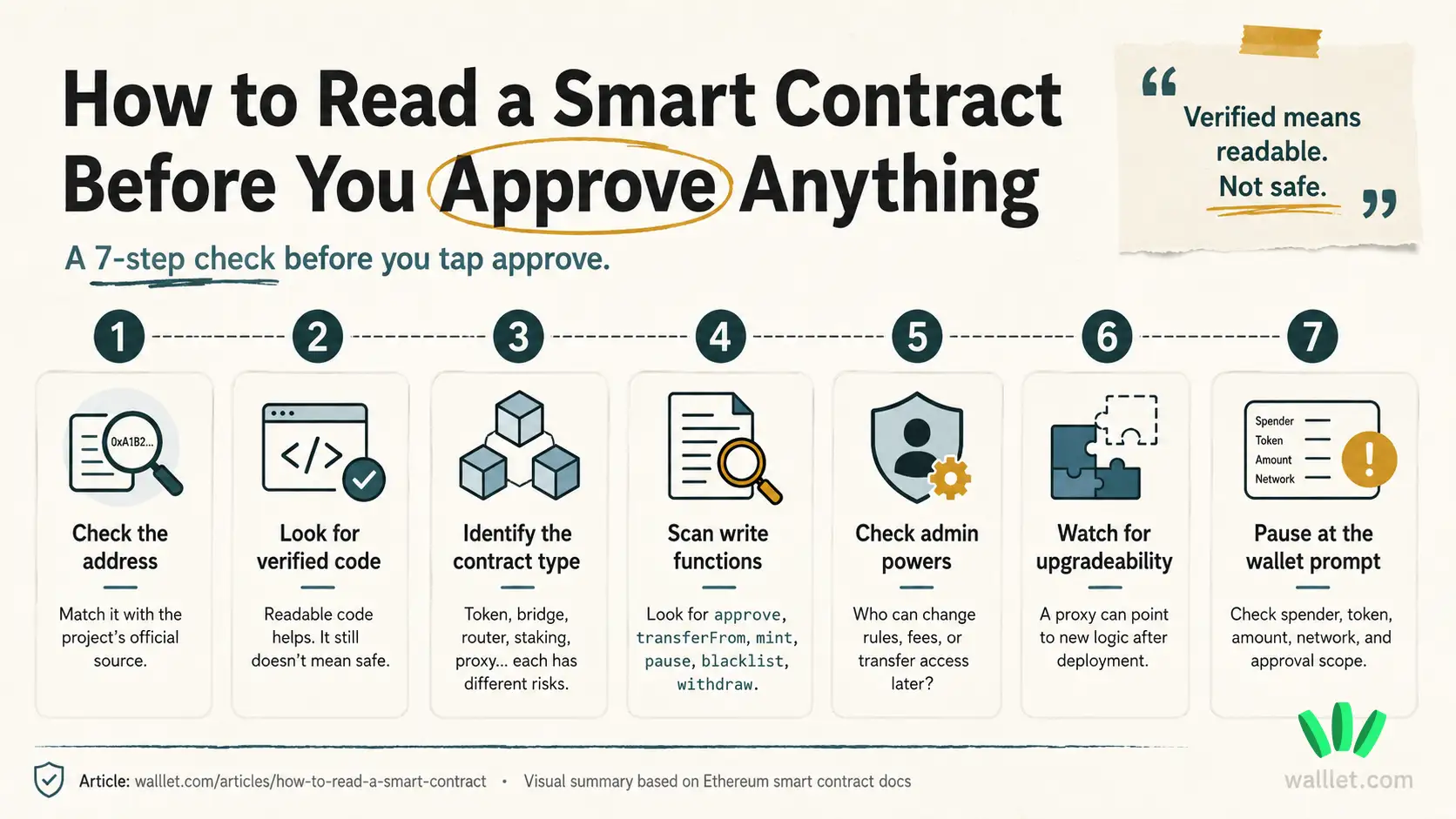
Read the contract in this order: address, verification, contract type, read functions, write functions, approvals, admin powers, upgradeability, transfer restrictions.
That order matters. If the address is fake, the rest is decoration.
1. Confirm the contract address
Start with the official contract address. Use the project website, docs, verified social account, dApp interface, CoinGecko, CoinMarketCap, or the relevant block explorer.
If you are checking USDT, USDC, WBTC, or any popular token, do not trust the symbol alone. A scam token can use the same name and logo. The address is what matters.
This is especially important before swaps or bridges. If you use crypto apps often, read this crypto swap and bridge guide before moving assets between networks. One wrong contract, one rushed approval, one expensive little lesson. Classic crypto UX.
2. Check whether the contract is verified
A verified contract has source code that users can inspect on a block explorer. Verification helps because you can see the code, functions, roles, and comments.
Still, verified means readable. It does not mean safe.
A verified contract can still have risky permissions, central admin control, upgradeable logic, high fees, or transfer restrictions. Verification gives you visibility. It does not give you a guarantee.
3. Identify the contract type
Different contracts have different risks. A token contract, staking contract, DEX router, bridge contract, NFT contract, proxy contract, and smart wallet contract should not be read the same way.
For token contracts, look for terms like ERC20, Ownable, Pausable, AccessControl, mint, burn, approve, and transferFrom.
For NFT contracts, look for ERC721, ERC1155, and setApprovalForAll.
For upgradeable contracts, look for proxy, implementation, upgradeTo, or TransparentUpgradeableProxy.
If the contract is a smart wallet or account abstraction contract, the risk model is different again. This is where it helps to understand account abstraction and smart contract wallets, because not every contract interaction is a token trade or a random DeFi click.
4. Separate read functions from write functions
Read functions usually show information. Write functions can change something.
Common read functions include name, symbol, decimals, totalSupply, balanceOf, owner, paused, allowance, hasRole, and implementation.
Common write functions include approve, transfer, transferFrom, mint, burn, pause, setFee, blacklist, upgradeTo, and withdraw.
A simple check: if your wallet asks you to confirm a transaction, treat it as a write action. It may be normal. It still deserves attention.
Reading shows you something. Signing gives something permission.
What does approve mean in a smart contract?
approve gives another address permission to move a specific token from your wallet, up to a set amount.
That spender can be a DEX router, staking contract, bridge, marketplace, or another dApp contract. Token approval is a permission for a dApp to access and move a specific type of token from your wallet. It also notes that approvals can often exceed the amount you currently hold. That part tends to surprise people, because apparently “approve” was not vague enough already.
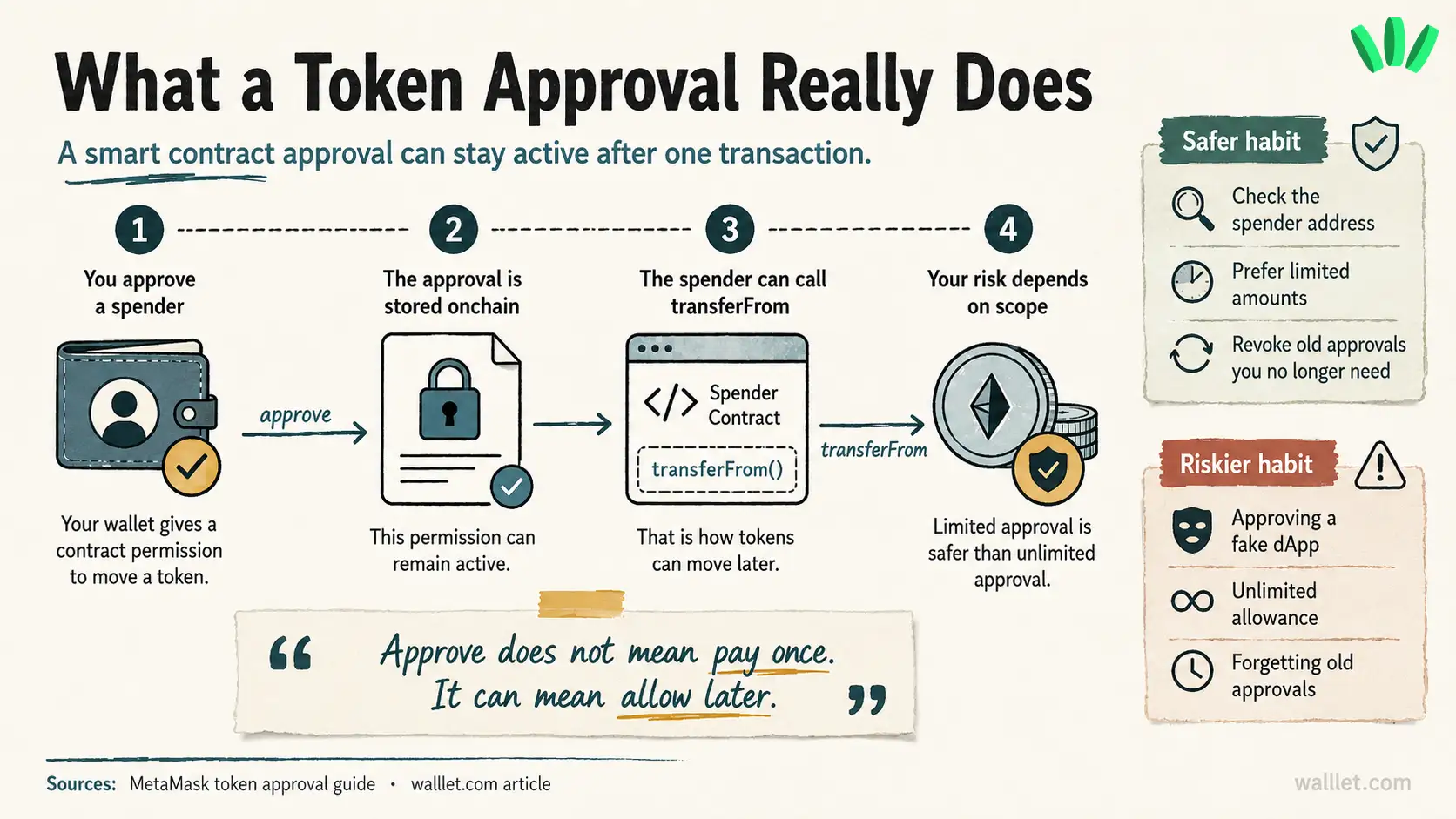
The risk is simple: if you approve the wrong spender, especially with a high or unlimited amount, that spender may be able to move tokens later.
This is one way users can lose funds even when they never share a seed phrase. If you want the broader safety context, this connects directly to whether a crypto wallet can be hacked. Sometimes the wallet is not “hacked” in the movie-scene sense. The user signed a permission they did not understand. Less cinematic. Still awful.
Before approving, check the token, spender address, amount, network, and whether the approval is limited or unlimited.
Which smart contract functions should you check first?
Some functions matter more for everyday users because they control movement, supply, permissions, or admin power.
Function or signal | What it may mean | Why users should care |
| Gives spending permission | A dApp may move tokens later |
| Shows existing permission | Old approvals can stay active |
| Moves tokens using approval | Common in swaps, staking, bridges |
| Shows who controls the contract | One wallet may hold major power |
| Creates new tokens | Supply can increase |
| Stops some activity | Transfers or withdrawals may halt |
| Blocks certain wallets | You may be unable to move or sell |
| Changes fees | Selling can become expensive |
| Changes contract logic | Today’s behavior may change later |
| Moves funds out | Admin withdrawal power needs context |
Do not panic every time you see one of these. Some are normal. Some are necessary. Some are dangerous in the wrong hands.
Messy. As usual.
Can a verified smart contract still be risky?
Yes. A verified contract can still be risky.
Verification tells you the source code is visible and can be inspected. Safety depends on what the contract allows, who controls it, whether the logic can change, and what permissions you are giving.

A verified contract can still include unlimited admin minting, blacklist controls, transfer freezes, upgradeability, changeable sell fees, risky withdrawal functions, or broad approvals.
So treat verification as the start of your check.
Not the finish line.
What admin powers should you look for?
Admin powers decide who can change the contract after users start interacting with it.
Check for owner, onlyOwner, admin, operator, controller, guardian, pauser, minter, blacklister, DEFAULT_ADMIN_ROLE, grantRole, and revokeRole.
The key question is: who can change the rules after I sign?
Some admin powers are expected. Stablecoins, bridges, early-stage protocols, and apps with compliance needs may include pause, blacklist, upgrade, or recovery controls. The risk depends on how those powers are managed.
A multisig, timelock, public documentation, clear role separation, and transparent history usually feel different from one unknown wallet controlling everything.
Still. You are trusting someone.
Can a smart contract stop you from selling?
Yes, some contracts can make selling difficult or impossible.
Look for words like blacklist, freeze, denylist, whitelist, pause, tradingEnabled, maxTx, maxWallet, cooldown, setTax, sellTax, setFee, setRouter, and setPair.
A honeypot token may let users buy, then block or punish selling. Sometimes the sell fails. Sometimes the tax jumps. Sometimes only certain wallets can trade. Charming little circus.
The safest move is to check the contract before buying, search the contract address, review holder activity, inspect trading history, and test with a very small amount if you still choose to continue.
What should you check before signing in your wallet?
Before signing, translate the transaction into plain language.
Ask yourself:
What contract am I interacting with? Which function am I calling? Which token can move? Who is the spender or recipient? How much permission am I giving? Can this approval stay active after today? Can the contract pause transfers, change fees, mint supply, blacklist wallets, or upgrade logic?
If your wallet only shows raw data, a hash, or a vague approval screen, you are being asked to trust more than you can understand.
That is a bad moment to rush.
Why readable wallet prompts matter before smart contract approvals
A smart contract check happens before you connect. A wallet prompt happens when you are about to sign. Both matter.

This is where walllet.com is relevant to the topic: users need clearer approval screens before they authorize risky contract interactions. A wallet should help explain the action, asset, amount, spender, recipient, network, and permission type in language normal people can actually read.
walllet.com is built around seedless self-custody, passkeys, clearer transaction prompts, and suspicious contract warnings. That does not make every contract safe. It helps reduce the chance that a user signs something without understanding what is being approved.
If you want the broader product context, this connects to the smart crypto wallet guide. The point is simple: wallet UX should make dangerous actions harder to misunderstand.
Especially approvals.
Especially unlimited approvals.
Especially when someone is moving income, stablecoins, or funds they actually need.
Common mistakes people make when reading contracts
The first mistake is trusting the token name. Anyone can copy a name.
The second is trusting verification too much. Verified means the code is visible. Risk can still be sitting right there in the visible code.
The third is ignoring approvals. Approval can feel like a setup step, then stay active long after the user forgets about it.
The fourth is missing upgradeability. If a proxy contract can point to new logic later, the current source code is only part of the picture.
The fifth is trusting “renounced ownership” too quickly. Renounced ownership may remove some owner powers. Other roles, proxy admins, external controllers, or transfer rules may still exist.
The sixth is confusing wallet access security with contract safety. A safer login method helps protect access to your wallet. It does not make every dApp safe. For that side of the picture, read the passkey wallet explanation. Different layer. Different risk.
Final checklist before you approve a smart contract
Before signing, buying, staking, swapping, bridging, or claiming, check the contract address, source verification, contract type, write function, approval amount, spender address, admin roles, upgradeability, and transfer restrictions.
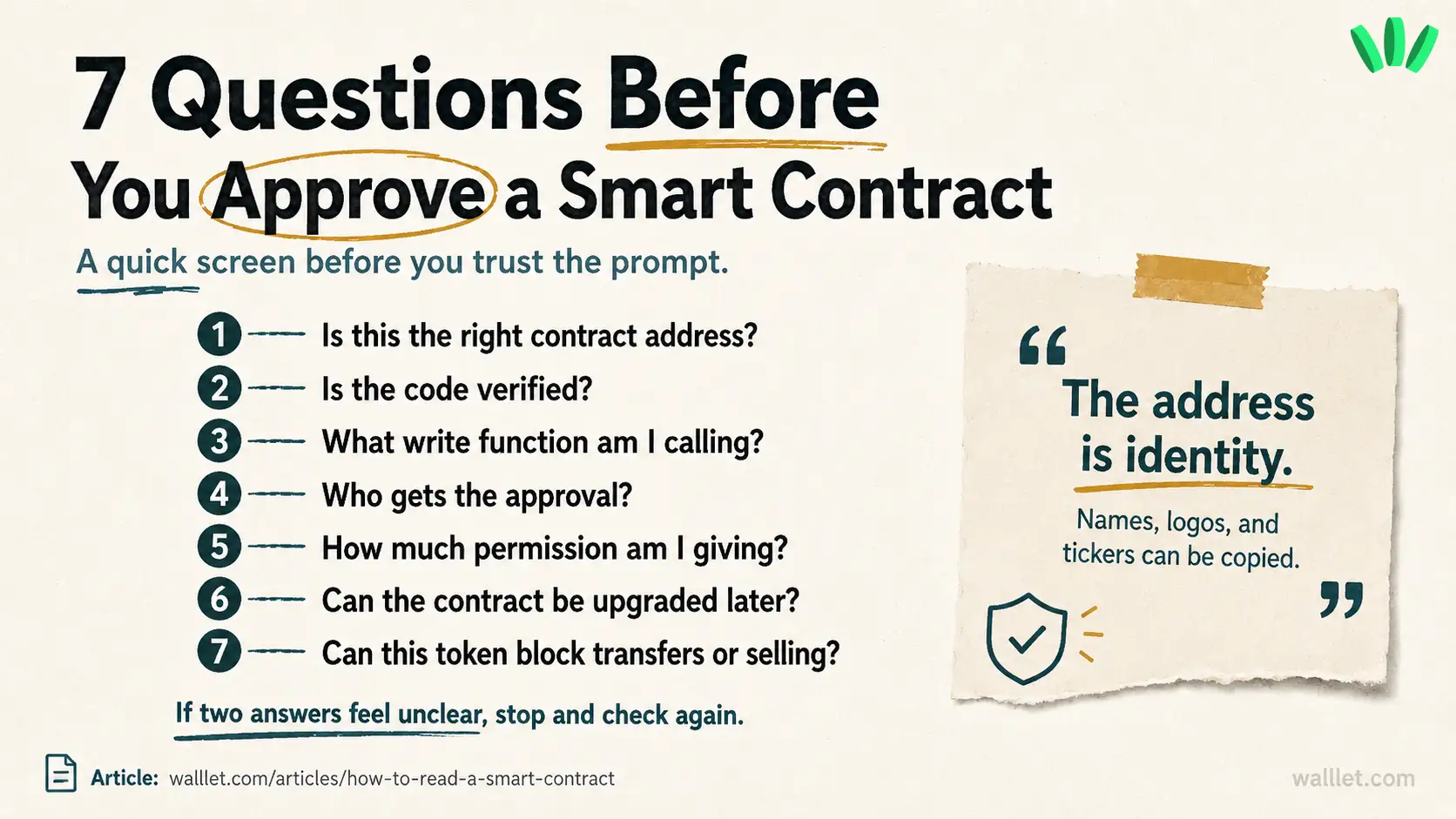
If anything feels unclear, slow down. Search the contract address. Compare sources. Test small. Use a separate wallet for risky interactions.
Then decide.
Still a little uncomfortable? Good. That discomfort is useful here. Before approving an unfamiliar contract, use a separate wallet for risky dApps, test with a small amount, and check what the approval actually allows.
If you want a wallet that makes signing and approvals easier to understand, create a walllet.com account and start with a small, low-risk transaction. Keep the first move boring. Boring is good when real funds are involved.
Related reading
Crypto and Web3: Wallets, Networks and Security Explained
Account Abstraction and Smart Contract Wallets: A Beginner-Friendly Deep Dive
Crypto Flash Crash vs Price Glitch: What Wallet Users Should Know
WalletConnect Safety Guide: Connect to DEXs Without Blind Signing
