The most expensive wallet mistake often starts with choosing the right token on the wrong network.
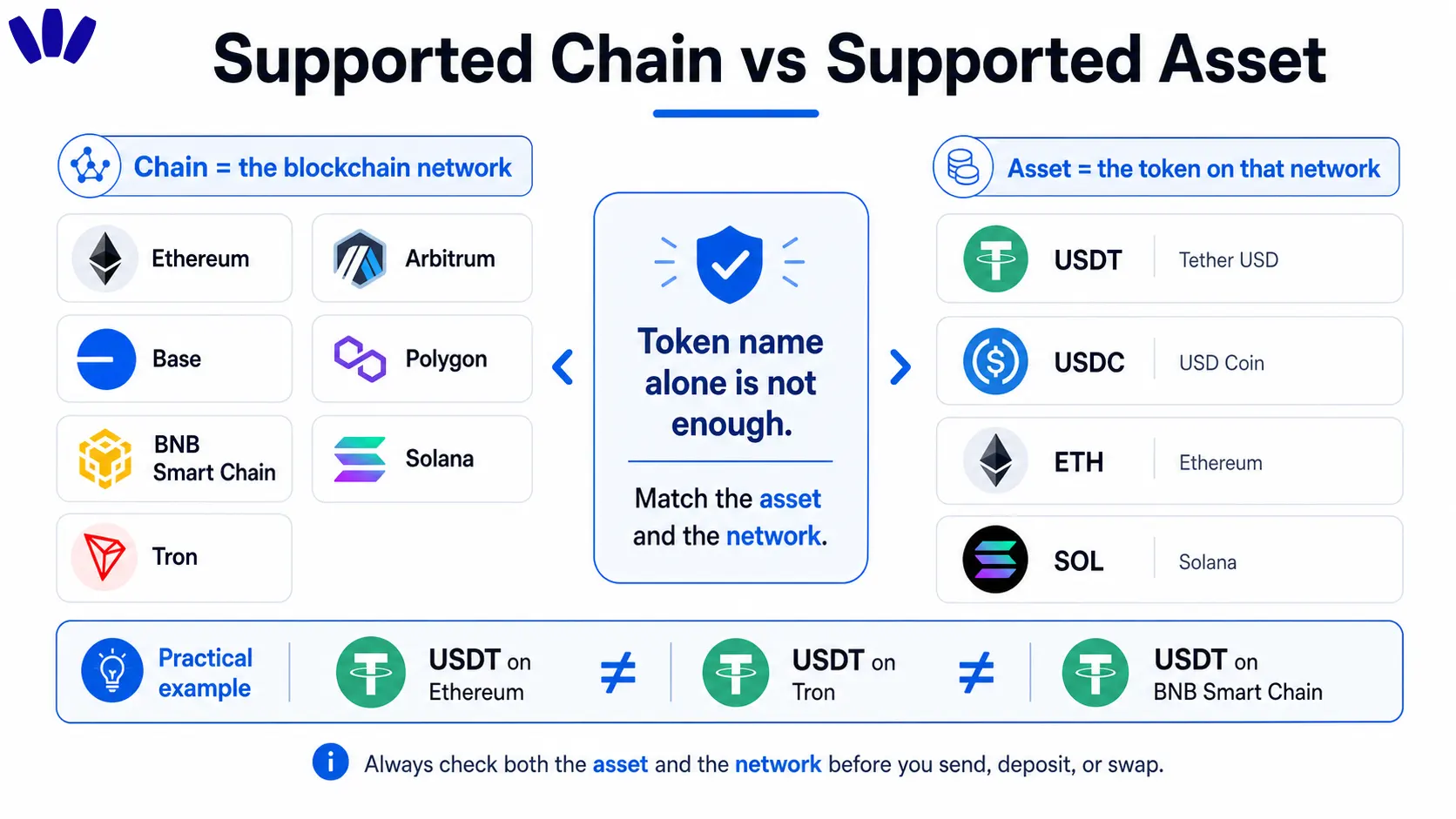
Supported chains are the blockchain networks a wallet can safely display, receive, send, and use for a given asset. Token names alone are not enough. USDT on Ethereum, USDT on BNB Smart Chain, and USDT on Tron are separate transfer routes, with different fees, address behavior, risks, and recovery paths.
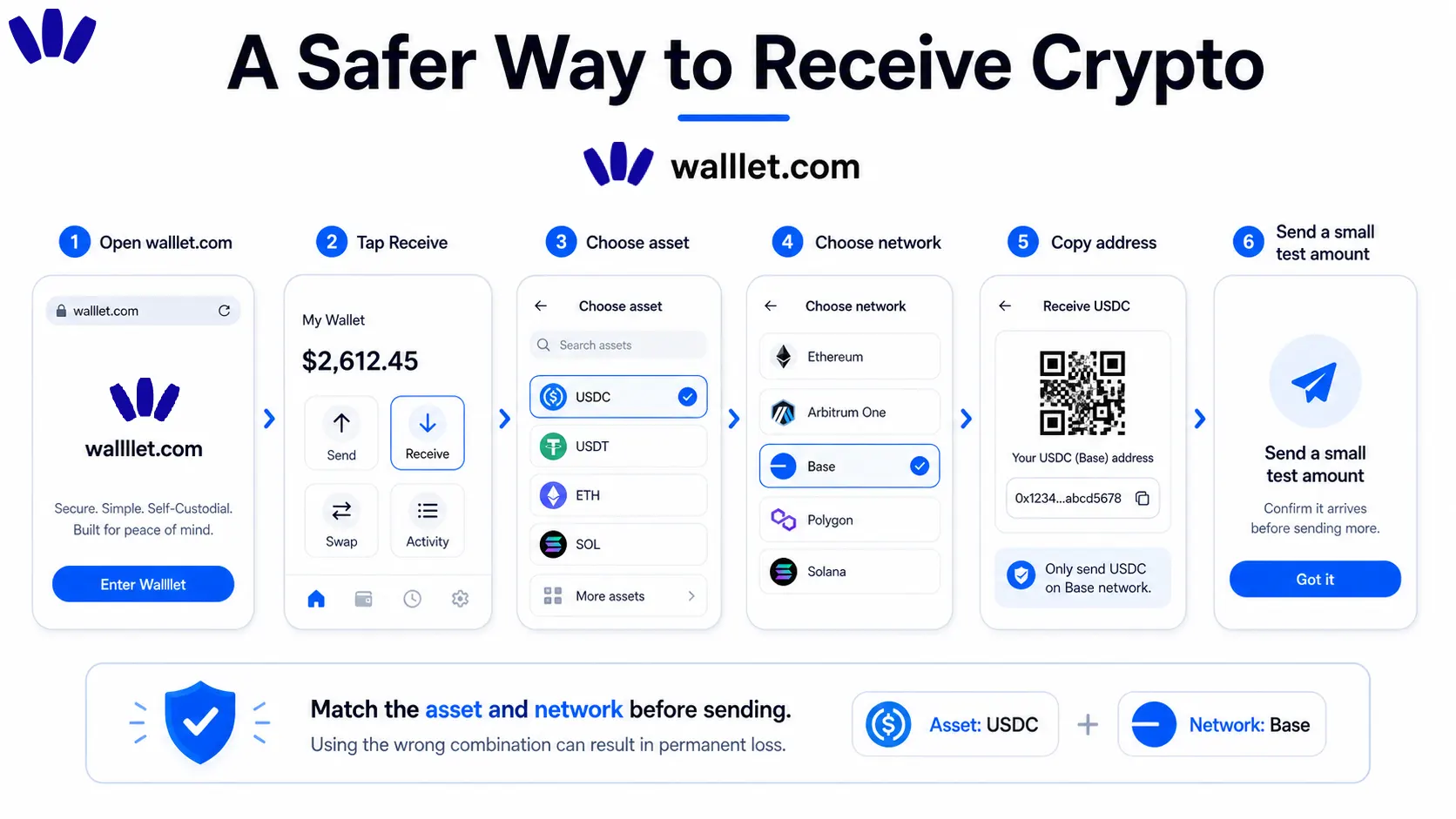
walllet.com is designed for major-chain crypto use, but the safest source of truth is the receive screen inside the app. Before sending funds, select the asset and network in walllet.com, then match that network on the sending platform. Token names like USDT or USDC are not enough because each network route is separate.
TL;DR
A supported chain means the wallet can work with that blockchain network, not just recognize a token name.
Always match the sending network and receiving network before moving funds.
EVM-compatible chains may use the same 0x-style address, but balances still live separately on each chain.
For first transfers, send a small test amount before moving a larger balance.
If you are still choosing a wallet, this crypto wallet checklist helps you think beyond popularity and check recovery, fees, signing clarity, and real use case.
Why supported chains matter before you send crypto
You open an exchange, choose USDT, tap withdraw, and suddenly the screen asks for a network. Ethereum. BNB Smart Chain. Tron. Arbitrum. Base. Polygon. Same token name, different rails. It feels like the app is asking a trick question with your money sitting inside the answer box.
That is why supported chains are not a boring product detail. They are a safety question.
Before you send funds to any wallet, you need to know three things: which asset you are receiving, which network it is on, and whether the wallet supports that exact route. If one of those is wrong, the transfer may not show up the way you expect.
What chains does walllet.com support?
The safest answer is: check the live receive flow inside walllet.com before every transfer. Public product pages describe walllet.com as a self-custodial, seedless smart wallet built for managing, sending, receiving, and using crypto across major chains. But a public page should not guess a live chain matrix unless the product team has verified it.
For a transfer-safe supported-chain page, walllet.com should use a product-verified table like this:
Network route users commonly check | Address type | What to confirm in walllet.com | Why it matters |
Ethereum Mainnet | 0x EVM address | Receive, send, swap, gas handling | Broad compatibility, often higher fees |
Arbitrum | 0x EVM address | Exact Arbitrum support for the asset | Ethereum Layer 2 route, separate from Ethereum Mainnet |
Base | 0x EVM address | Exact Base support for the asset | Popular for consumer apps and USDC activity |
Polygon | 0x EVM address | Asset support and gas token requirements | Low-cost EVM transfers, separate network state |
BNB Smart Chain | 0x EVM address | BEP-20 support for the asset | Common low-cost route for USDT transfers |
Optimism | 0x EVM address | Exact Optimism support for the asset | Ethereum Layer 2 route |
Avalanche C-Chain | 0x EVM address | C-Chain support, not other Avalanche routes | EVM-compatible Avalanche environment |
Solana | Solana address | SPL token support | Non-EVM network with different address format |
Tron | Tron address | TRC-20 support | Common USDT route, but only safe if clearly supported |
Do not assume a network is supported because the token name looks familiar. USDT supported and USDT on Tron supported are different claims. USDC supported and USDC on Base supported are also different claims.
For Ethereum-style networks, this simple EVM wallet guide is a useful companion because it explains why many chains use the same 0x-style address while keeping assets separate.
What is the difference between a supported chain and a supported asset?
A chain is the blockchain network. A token is the asset that lives on that network. A wallet may support Ethereum as a chain, but that does not automatically mean every Ethereum token is visible, swappable, or supported in every feature.
Stablecoins make this confusing because the names look the same across many apps. Circle explains that USDC works across multiple blockchain networks, including EVM and non-EVM environments. Tether also lists multiple supported USDT protocol routes, including Ethereum, Tron, Solana, BNB Smart Chain, Avalanche, Aptos, TON, and others.
That means the real question is not “Does this wallet support USDT?” The better question is: Does this wallet support USDT on the exact network I am using?
Which network should you choose for USDT or USDC?
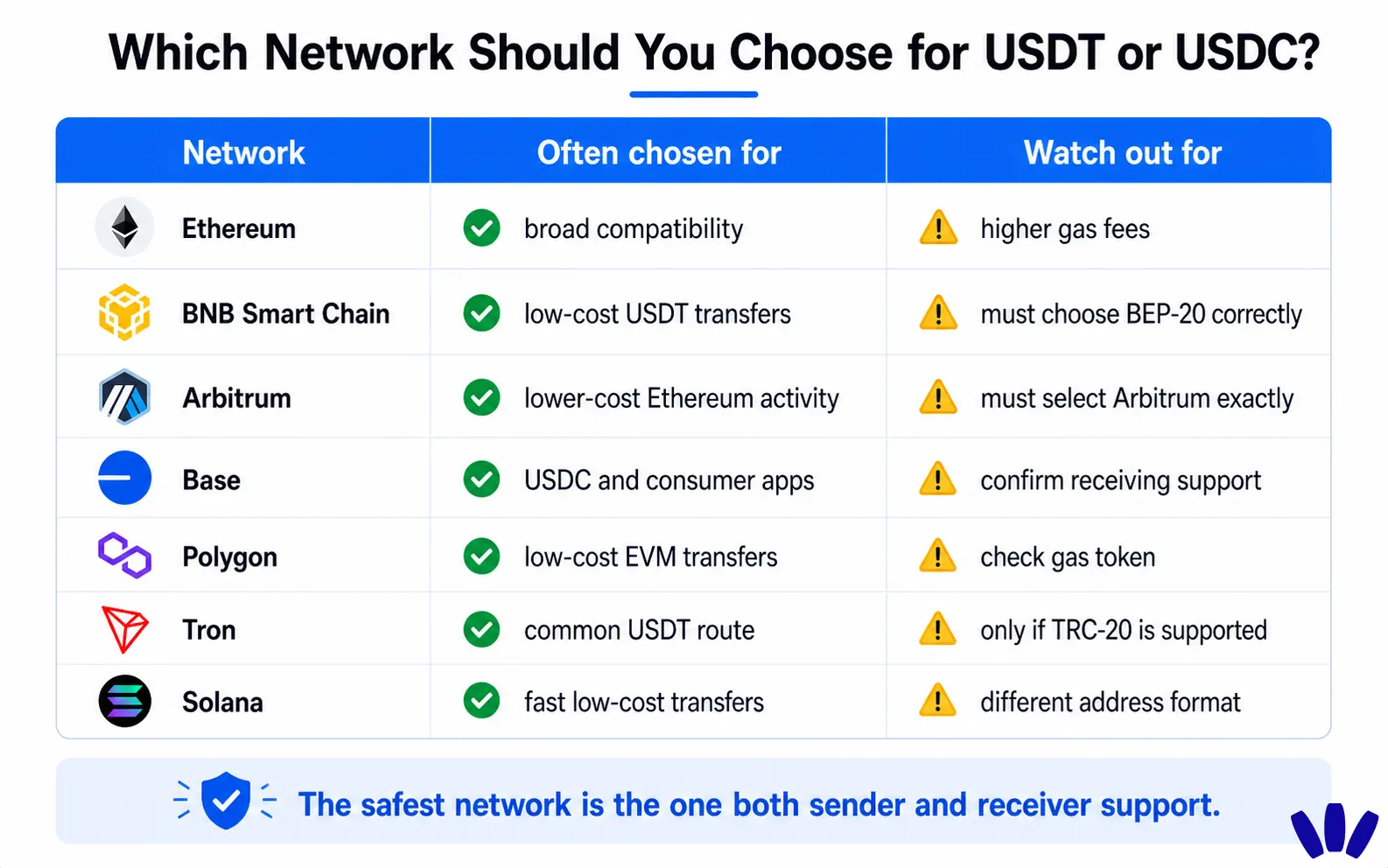
Choose the network that both sides support: the sending exchange or wallet and the receiving wallet. The cheapest network is not safe if the receiving wallet cannot support it.
Network | Often chosen for | Watch out for |
Ethereum | Broad token and app compatibility | Higher gas fees |
BNB Smart Chain | Lower-cost USDT transfers | Must select BSC or BEP-20 correctly |
Arbitrum | Lower-cost Ethereum-style activity | Must choose Arbitrum, not Ethereum Mainnet |
Base | Consumer apps and USDC activity | Must confirm Base receive support |
Polygon | Low-cost EVM transfers | Gas token and token versions may vary |
Tron | Common USDT transfer route | Only safe if TRC-20 is clearly supported |
Solana | Fast, low-cost transfers on Solana apps | Different address format and token standard |
Here is the normal user scenario. You bought USDT on an exchange and want to move it into self-custody. The exchange may offer several withdrawal networks. If you choose BNB Smart Chain because the fee is low, walllet.com must support that exact USDT route. If the receive screen only supports another route, the transfer can become difficult or impossible to use.
The rule is simple: the best network is the one both sender and receiver clearly support.
Can you use the same wallet address across chains?
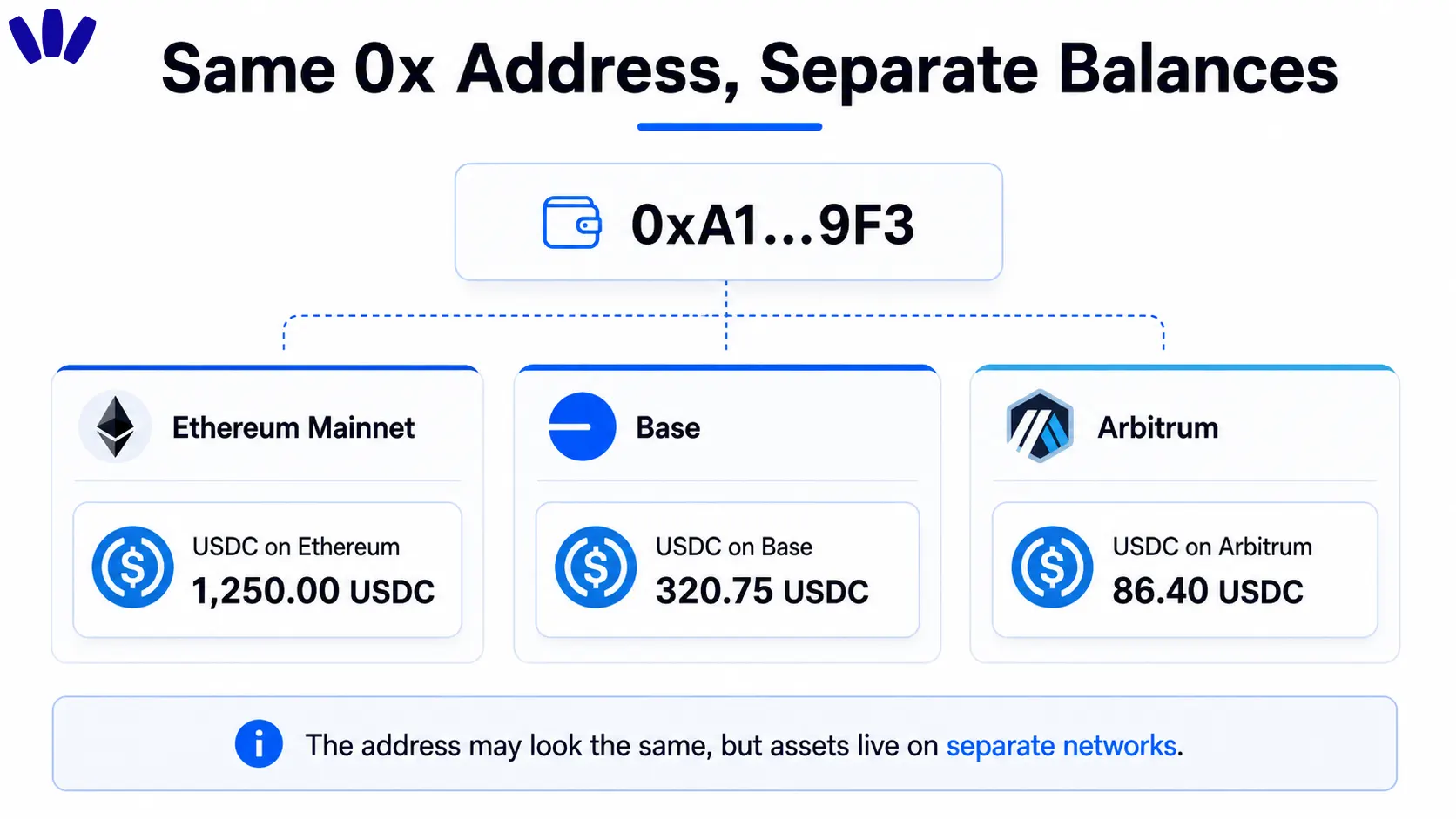
For EVM-compatible chains, often yes. Ethereum, Arbitrum, Base, Polygon, Optimism, BNB Smart Chain, and Avalanche C-Chain can use the same 0x-style address.
But this is where many users get burned. Same-looking address does not mean same balance. Your USDC on Base does not automatically become USDC on Ethereum. It stays on Base unless you bridge it, swap it through a supported route, or send it somewhere else on the same network.
Think of it like the same apartment number in different cities. The number matches, but the buildings are not connected.
Non-EVM networks are different. Solana and Tron use different address formats, so you should not treat them like Ethereum-style addresses. For a deeper breakdown of address, account, and signing logic, read Web3 Account vs Wallet Address vs Private Key.
How do you receive crypto safely in walllet.com?
Use the app’s own receive flow. Do not guess the network from memory, an old screenshot, a Telegram message, or what a friend used last month.
Open walllet.com and choose Receive. Select the exact asset. Then select the exact network shown inside the app. Copy the address or scan the QR code from that screen only.
Next, open the sending exchange or wallet. Choose the same asset and the same network. Before sending the full balance, send a small test amount first and wait until it arrives correctly.
A test transfer may feel slow, especially when the fee is annoying. It is still cheaper than sending your full balance into the wrong-network fog.
How do you avoid wrong-network mistakes?
Wrong-network mistakes usually happen when the token name looks right and the network name gets ignored. The confirmation screen says USDT, so the brain relaxes. That is the tiny UX cliff. Before every transfer, check this:
Check | What to confirm |
Token name | USDT, USDC, ETH, BNB, SOL, TRX, etc. |
Network name | Ethereum, Arbitrum, Base, Polygon, BNB Smart Chain, Tron, Solana, etc. |
Address format | 0x address for EVM, separate formats for Solana and Tron |
Gas token | ETH, BNB, POL, AVAX, SOL, TRX, depending on network |
Withdrawal route | The exchange must use the same network |
Minimum deposit | Some platforms reject small or unsupported transfers |
App confirmation | walllet.com must show the exact receive route |
The main habit is simple: do not let a familiar token name hide an unfamiliar network.
Does walllet.com support Layer 2 networks?
Layer 2 networks such as Arbitrum, Base, Optimism, and Polygon matter because they can make Ethereum-style activity cheaper and faster for everyday users. But Layer 2 support still needs precision. Ethereum Mainnet and Arbitrum may both use ETH for gas, and both may show 0x addresses, but they are not the same network.
If you are exploring L2 wallets and want the broader context, this guide to Ethereum Layer 2 wallets explains how users should think about Arbitrum, Base, Optimism, and other Ethereum scaling networks.
Inside walllet.com, always check the live asset and network screen before sending. Showing an address, receiving an asset, swapping an asset, and handling gas are related but separate product capabilities.
How walllet.com helps prevent wrong-network transfer mistakes
The real problem is not that users are careless. The real problem is that crypto asks normal people to make infrastructure decisions before every transfer.
walllet.com is built around a simpler self-custody experience: seedless access, passkeys, biometrics, and clearer transaction prompts. That matters because network mistakes often happen in the nervous moment before signing or withdrawing.
A wallet cannot erase blockchain rules. A passkey cannot turn a Tron transfer into an Ethereum transfer. But a better wallet experience can help users see what they are doing before they approve it. Clear network labels, human-readable prompts, and safer receive flows are not cosmetic details. They are guardrails.
If you want the recovery and access model behind this approach, read What Is a Passkey Wallet?.
What should walllet.com show on a supported chains page?
A strong supported chains page should not only list logos. It should answer the questions users actually have before sending money.
The page should show which networks are supported, which assets are supported on each network, whether receive and send are both available, whether swaps are available, and what gas token is needed. It should also warn users when a token exists on multiple networks.
The most useful version would include a live or frequently updated table with columns like:
Field | Why users need it |
Network | To choose the right withdrawal route |
Asset | To avoid assuming every token exists everywhere |
Address type | To understand EVM vs non-EVM behavior |
Receive support | To know if funds can arrive safely |
Send support | To know if funds can move out later |
Swap support | To know if the asset is usable inside the app |
Gas token | To avoid being stuck without fees |
Notes | To explain network-specific warnings |
That table should be product-owned, not guessed by marketing. A wrong support table is worse than no table because it creates false confidence.
Conclusion
Supported chains are not a badge collection. They are the map that tells your funds where they can safely travel.
Before you send crypto, check three things: the asset, the network, and the receive route inside the wallet. When those match, self-custody feels calm. When they do not, even a familiar token can become an expensive lesson.
Create your walllet.com, open the receive screen, and start with a small test transfer before moving a larger balance.
