Learn how to use WalletConnect safely with DEXs, read token approvals, avoid blind signing, and connect your wallet with more confidence.
WalletConnect lets a crypto wallet connect to DEXs and other dApps through a QR code or mobile deep link. To use it safely, verify the dApp URL, check the network, read every signature or token approval, avoid unclear permissions, and disconnect unused sessions when you are done.
TL;DR
WalletConnect is a connection protocol, not a safety guarantee.
Connecting your wallet is different from signing a message, approving token spending, or confirming a swap.
A “gasless” signature can still be risky if you do not understand what it authorizes.
Before using a DEX, check the URL, network, token, amount, spender, slippage, and recipient.
You open a DEX. You click Connect Wallet. A WalletConnect QR code appears. Your wallet asks you to approve the connection. So far, nothing feels dangerous.
The risky part usually comes next: a token approval, a signature request, a swap confirmation, or a message that looks harmless because there is no gas fee. That small moment is where many users stop reading and start guessing.
WalletConnect can help your wallet talk to a dApp, but it cannot make every dApp trustworthy. Your job is to know the difference between connecting, signing, approving, and swapping before your wallet asks for a yes.
If you are still learning what a wallet actually controls, start with this guide on what a crypto wallet is. It explains why your crypto is not “inside” the wallet, and why approvals matter so much.
What is WalletConnect?
WalletConnect is a protocol that lets crypto wallets connect to decentralized apps, often called dApps. A DEX, or decentralized exchange, is one type of dApp.
In simple terms, WalletConnect works like a secure communication bridge between your wallet and the app you want to use. On desktop, you usually scan a QR code. On mobile, you may tap a deep link that opens your wallet app.

WalletConnect’s official documentation says its relay service is designed to be end-to-end encrypted, and that the relay does not have insight into wallet addresses, transaction hashes, KYC information, or other information passed between the wallet and dApp. You can read the technical explanation in the WalletConnect Network docs.
That is good protocol design. But it does not mean every site you connect to is safe. WalletConnect protects the connection. It does not verify every intention behind every request.
If you are new to DeFi itself, this broader guide on how wallets connect to swaps, lending, staking, and dApps is useful before you start connecting to DEXs.
Is WalletConnect safe?
WalletConnect itself is not the same thing as a wallet drainer. The bigger risk is usually the site, smart contract, token approval, or signature request you approve after connecting. Here is the clean distinction:
Action | What it means | Main risk | What to check |
Connect wallet | Lets the dApp see your wallet address and request actions | Fake site or wrong app | URL, app name, network |
Sign message | Uses your wallet to approve or prove something | Signing something unclear | Domain, purpose, message content |
Approve token | Lets a contract spend a token amount | Excessive or malicious permission | Token, spender, amount |
Swap | Executes a trade | Wrong token, bad route, high slippage | Asset, amount, rate, recipient, network |
Disconnect | Ends the active session | Thinking cleanup is complete | Also review token approvals |
The most important idea is simple: connecting is usually not the dangerous part by itself. Approving something you do not understand is the dangerous part.
This is also why seedless access and wallet security should not be confused with dApp safety. A seedless wallet can reduce seed phrase risk, but it cannot make every contract safe. For that distinction, read Are Seedless Wallets Safe? The Real Risks Explained.
Before you connect: run a 30-second DEX safety check
Before scanning a WalletConnect QR code or tapping a deep link, check the basics. This is the crypto version of checking the street name before walking into a building with your money. Ask yourself:
Are you on the official DEX website? Did you type the URL yourself or use a saved bookmark? Does the domain look exactly right, not almost right? Are you avoiding links from Telegram, Discord DMs, X replies, search ads, or “support” accounts? Are you using the network you intended, such as Ethereum, Arbitrum, Base, Polygon, or BNB Chain?
A useful rule: if the link came to you instead of you going to it, inspect it harder.
Network confusion also matters. USDC on Ethereum, USDC on Base, and USDC on Arbitrum can look similar to a user, but they are not the same wallet action. If network choice still feels confusing, this guide on how to pick the right network for USDT or USDC can help.
How to connect walllet.com to a DEX with WalletConnect
The exact button names may change by app version or DEX interface, but the safe flow is usually the same.
First, open the official DEX website from a trusted source. A saved bookmark is better than a search result or social link. Then choose Connect Wallet and select WalletConnect from the wallet options.
On desktop, the DEX will usually show a QR code. On mobile, it may open a deep link. Open walllet.com and use the WalletConnect flow available in your app version, either by scanning the QR code or approving the mobile connection request.
Before approving the connection, check the dApp name, domain, wallet address, network, and permissions being requested. A basic connection request should not ask you to move funds. If the first prompt already looks like a token transfer, spending approval, or unreadable signature, stop and inspect.
After connecting, the DEX may ask you to approve a token before swapping. That approval is separate from the wallet connection.
For example, if you want to swap 50 USDC for ETH, the DEX may first ask permission for its smart contract to use your USDC. Then it may ask you to confirm the actual swap. Those are two different moments. Treat them separately.
Connecting is not signing: the difference most users miss
A lot of wallet-draining stories become easier to understand once you separate four actions.
A connection request lets the dApp see your wallet address and send requests to your wallet. A signature request is different. A signature is your wallet proving or approving something. Some signatures are harmless, such as logging in to a dApp. Others can authorize actions that matter. The tricky part is that a signature may not require a gas fee, so users may treat it as harmless.
That is a mistake. No gas fee does not automatically mean no risk.
A token approval gives a smart contract permission to move a certain token amount from your wallet. This is common in DeFi. A DEX often needs approval before it can swap a token for you. But the token, spender, and amount matter.
A transaction confirmation is the moment you actually send an onchain action. That could be a swap, bridge, transfer, mint, deposit, or withdrawal.
Before confirming anything, check the action, asset, amount, network, fee, recipient, and expected result. A good wallet prompt should help you answer one simple question: what will happen if I approve this?
How can walllet.com help you avoid blind signing on DEXs?
walllet.com is built as a seedless, passkey-based, self-custodial wallet. That means it is designed to remove seed phrase friction while keeping the user in control. If you want the broader product context, read What Is walllet?.
For DEX users, the most relevant part is transaction clarity. When a wallet helps you see the asset, amount, network, permission, and possible warning signs more clearly, you are less likely to approve something by habit. That does not mean any wallet can remove all DeFi risk. It cannot. But clearer prompts can reduce the “I have no idea what I’m signing” moment.
If you want to understand the passkey side of this experience, this explainer on what a passkey wallet is connects the dots between seedless access, device security, and everyday wallet use.
How to avoid blind signing on a DEX
Blind signing means approving something you cannot clearly understand. Sometimes it looks like a wall of code. Sometimes it looks like vague wording. Sometimes it appears as a rushed pop-up that says the action is required to continue.

Do not treat unreadable prompts as normal background noise.
Reject the request if you do not recognize the domain, the message does not explain what it does, the token or amount is not what you expected, the spender contract looks unrelated to the DEX, the network is wrong, or the request asks for unlimited approval when you planned one small swap.
Also be careful with words like “verify,” “sync,” “validate,” or “secure your wallet.” These words can sound safe while hiding a risky request.
A real DEX flow can be restarted. A bad approval may not be so forgiving.
Before approving, you should understand what action is being requested, which asset is involved, how much is involved, which contract or spender gets permission, which network is being used, and whether this is a signature, approval, or transaction.
If the request involves a contract you do not recognize, this guide on how to read a smart contract before you trust it is a helpful next step.
Token approvals: the quiet permission users often miss
Token approvals are normal in DeFi, but they are also one of the most misunderstood wallet actions.
Imagine you want to swap 50 USDC for ETH. The DEX’s smart contract may need permission to move your USDC. That is the approval. After that, the swap can happen.

The approval should match your intention.
Some dApps ask for unlimited approval because it makes future transactions smoother. You approve once, then you do not need to approve every new swap. That can be convenient, but it also increases exposure if the contract is malicious, compromised, or simply not the one you thought you were using.
The key point is this: approving USDC does not mean you already swapped USDC. It means you allowed a contract to move USDC under the rules of that approval.
That is why a DEX flow may show two wallet prompts. One approves token spending. The next confirms the swap. Read both.
Disconnecting WalletConnect is not the same as revoking approvals
Ending a WalletConnect session stops the active connection between your wallet and the dApp. It does not automatically remove token allowances you already granted to smart contracts. The clean mental model is:
Disconnecting is session hygiene. Revoking is permission cleanup.
You may need both.
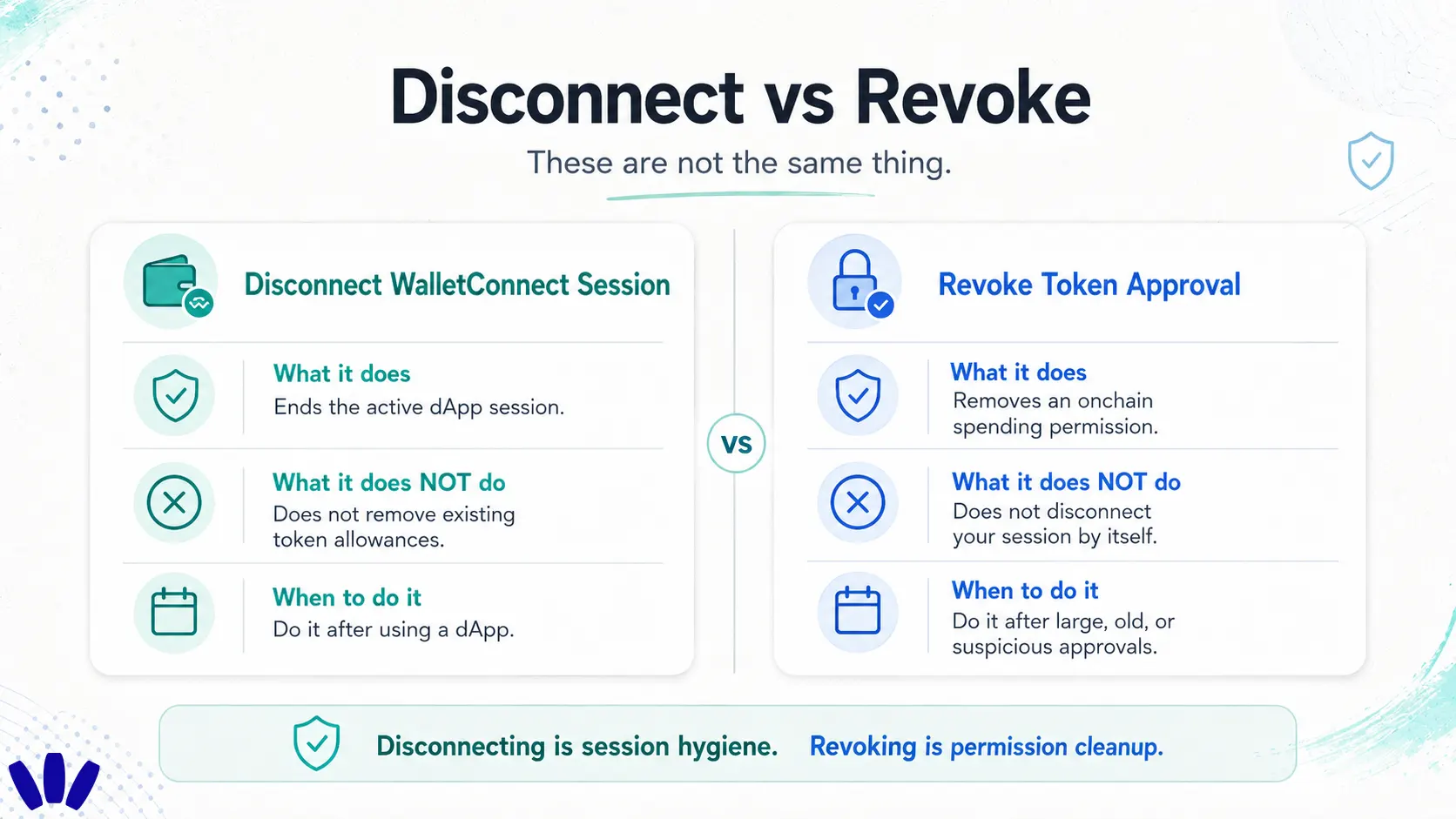
When you finish using a DEX, do not just close the browser tab and mentally walk away. Check the transaction result, disconnect the wallet from the DEX, review active WalletConnect sessions if your wallet shows them, and review token approvals if you used a new contract, approved a large amount, or interacted with an unfamiliar dApp. Revoking approvals usually requires an onchain transaction and may cost gas. That is normal because you are changing an onchain permission.
Common WalletConnect mistakes to avoid
The most common mistake is trusting the QR code more than the URL. A QR code only starts the connection. It does not prove the site is real. Another mistake is signing because the request is gasless. Some important signatures cost nothing at the moment you sign. That does not make them harmless.
Users also approve unlimited token access by default. Unlimited approvals can be useful for frequent DeFi users, but they are not automatically wise. For one-time swaps, smaller approvals usually fit the action better.
Network confusion is another quiet trap. The token symbol may look familiar while the network is wrong. Always check the network before approving.
The final mistake is thinking that better wallet security removes dApp risk. It does not. A wallet can protect your key model and make prompts clearer, but you still decide what gets approved.
What should I do if WalletConnect is not working?

Most WalletConnect issues are simple.
If the QR code will not scan, refresh the DEX page and generate a new one. QR codes can expire. Also check camera permissions and screen brightness.
If a mobile deep link opens the wrong wallet, your phone may be routing WalletConnect links to another installed wallet. Try scanning manually from the wallet you want to use.
If the wallet connects but the DEX shows no balance, check the network. You may be connected on Ethereum while the asset is on Base, Arbitrum, Polygon, or another chain.
If the transaction request does not appear, the session may have timed out, the DEX may be waiting for a network switch, or the wallet app may need to be reopened.
But if the DEX asks for something unexpected, do not treat that as a technical bug. Unexpected prompts are inspection moments.
A safer DEX routine for everyday users
Before connecting, check the official URL, avoid links from DMs or ads, confirm the network, and avoid using your main long-term wallet for every new DeFi experiment.
Before signing, read the action, asset, amount, spender, recipient, and network. If the request is unclear, reject it. After using the DEX, disconnect the session, review approvals, and revoke permissions you no longer need.
The best crypto habit is never approve what you cannot explain.
Ready to connect to Web3 with less guessing? Download walllet.com and use a seedless, self-custodial wallet built to make crypto actions easier to read before you approve them.
Conclusion
WalletConnect makes it easier to connect your wallet to a DEX, but connection is only the first step. The real safety work happens when your wallet asks you to sign, approve, or confirm. Use WalletConnect like a doorway. Check the domain. Read the request. Understand the approval. Disconnect what you do not use. Review old permissions when needed.
A few calm seconds before approval can save you from a very loud afternoon.
Related reading
Crypto and Web3: Wallets, Networks and Security Explained
Swap Crypto Without a CEX: The Safer Wallet-Based Way
How to Read a Smart Contract: A Safety Guide for Crypto Users
How to Create a walllet.com Passkey on iPhone Without Apple 2FA
