Most crypto losses start with one rushed click, one confusing signature, or one recovery phrase stored in the wrong place.
The best cryptocurrency security practices are to use a wallet setup you understand, protect access with strong device security, never share seed phrases or private keys, separate daily-use funds from long-term holdings, verify every transaction before signing, avoid urgent crypto messages, and regularly review token approvals.
TL;DR
Most crypto losses start with something small: a fake link, a rushed signature, an exposed seed phrase, or an old token approval nobody remembered.
Protect access, protect recovery, read every wallet prompt, separate daily funds from long-term holdings, and review permissions regularly.
A safer wallet setup should make dangerous moments easier to notice before you click.
Crypto security sounds technical until something goes wrong. Then it becomes very simple. One wrong page. One bad approval. One seed phrase saved in the wrong place.
The best crypto security practices in 2026 are to use a wallet setup you understand, protect your device, never share seed phrases or private keys, verify every transaction before signing, avoid urgent crypto messages, separate daily-use funds from long-term holdings, and regularly review token approvals.
If you want a more hands-on setup checklist, start with this guide on how to protect your crypto wallet. If you are still choosing a wallet, this guide on how to tell if a crypto wallet is safe is the better first stop.
What does crypto security actually mean?
Crypto security means protecting two things at the same time: your funds and your access to those funds.
That second part matters more than people admit. In crypto, losing access can hurt almost as much as being attacked. If someone gets your private key or recovery phrase, they may be able to move your funds. If you lose your own recovery path, you may lock yourself out.
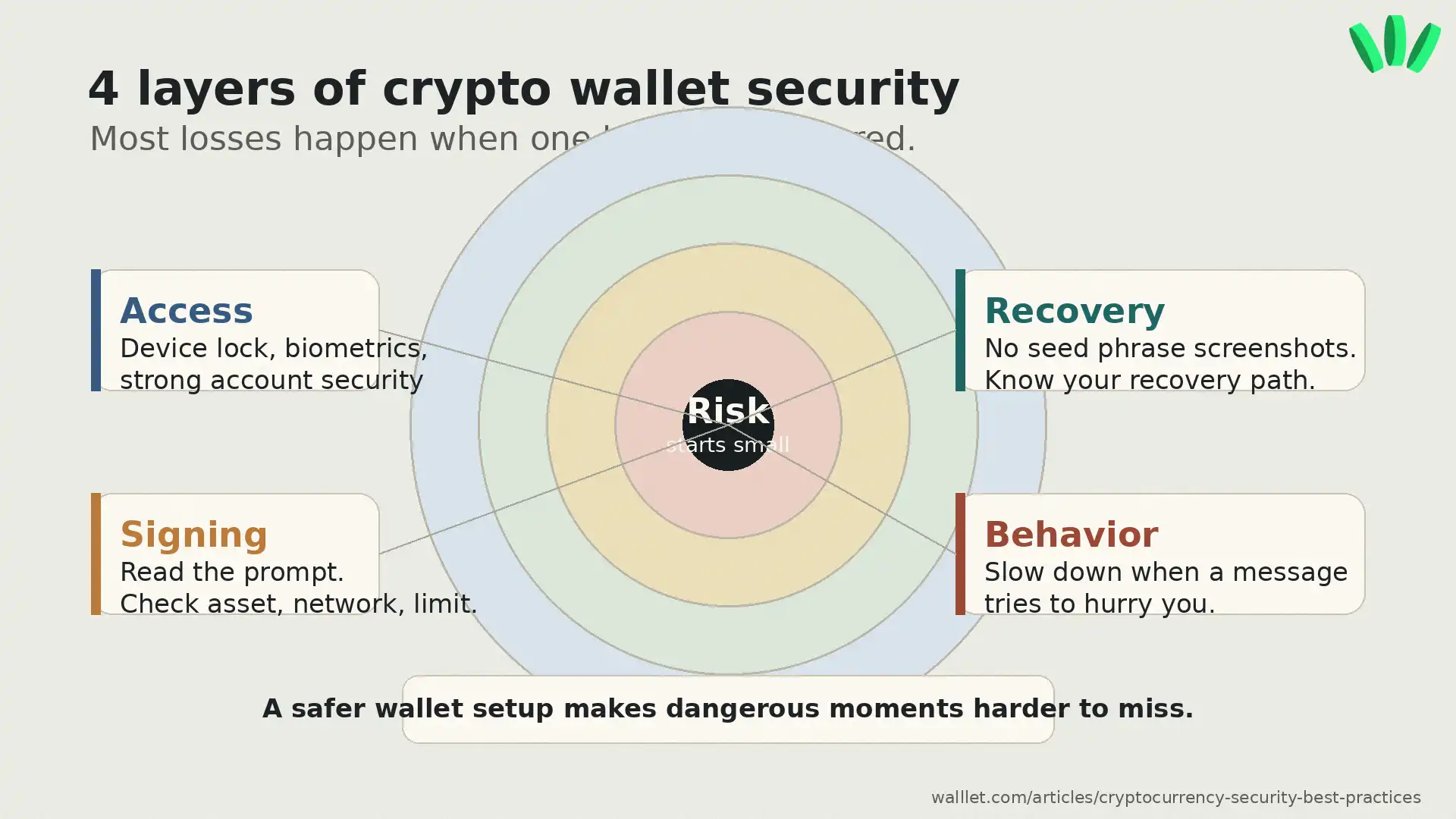
So the real job is simple enough: reduce the moments where one mistake can become permanent. A secure wallet setup usually protects four layers:
Security layer | What it protects | Common failure |
Access | Who can open or use the wallet | Stolen device, weak password, fake login |
Recovery | How you regain access | Lost seed phrase, exposed backup, unclear recovery |
Signing | What you approve onchain | Blind signing, malicious approvals, wallet drainers |
Behavior | How you react under pressure | Scam links, fake support, rushed transfers |
If you are wondering whether wallets can actually be hacked, the useful answer is more specific. Sometimes the wallet is attacked. Sometimes the user signs the wrong thing. Sometimes the recovery phrase leaks. This article on whether crypto wallets can be hacked explains that difference.
What are the most important crypto security best practices?
Start with the habits that prevent common losses. Not the dramatic movie-hacker version. The boring stuff that saves real money.
Use a wallet setup you can explain. Before moving serious funds, you should know what happens if you lose your phone, what happens if your device is compromised, what recovery means, and what information should never be shared.
Keep daily-use funds separate from long-term holdings. One wallet for everything is convenient until one risky app touches it. Keep smaller amounts in a daily wallet, keep larger funds in a more protected setup, and use a separate wallet for risky mints, unfamiliar dapps, or experiments.
Never share a seed phrase, private key, or recovery credential. Your seed phrase is not a support code. It is not a verification code. It is not something a real support person needs. Ethereum’s wallet security guidance also recommends never sharing recovery phrases, avoiding screenshots of seed phrases or private keys, and checking transactions carefully before signing. You can read the external source here: Ethereum wallet security guidance.
Treat urgent crypto messages as suspicious. Scammers love pressure because pressure makes people skip checks. “Act now.” “Verify your wallet.” “Claim before it expires.” “Your account is at risk.” All the usual little traps, wearing a new costume.
If you are unsure about a wallet message, giveaway, fake support account, or suspicious link, use this guide on how to avoid crypto phishing.
What should you check before signing a crypto transaction?
Before signing, check the website, network, asset, amount, recipient, contract, spending limit, and action type.
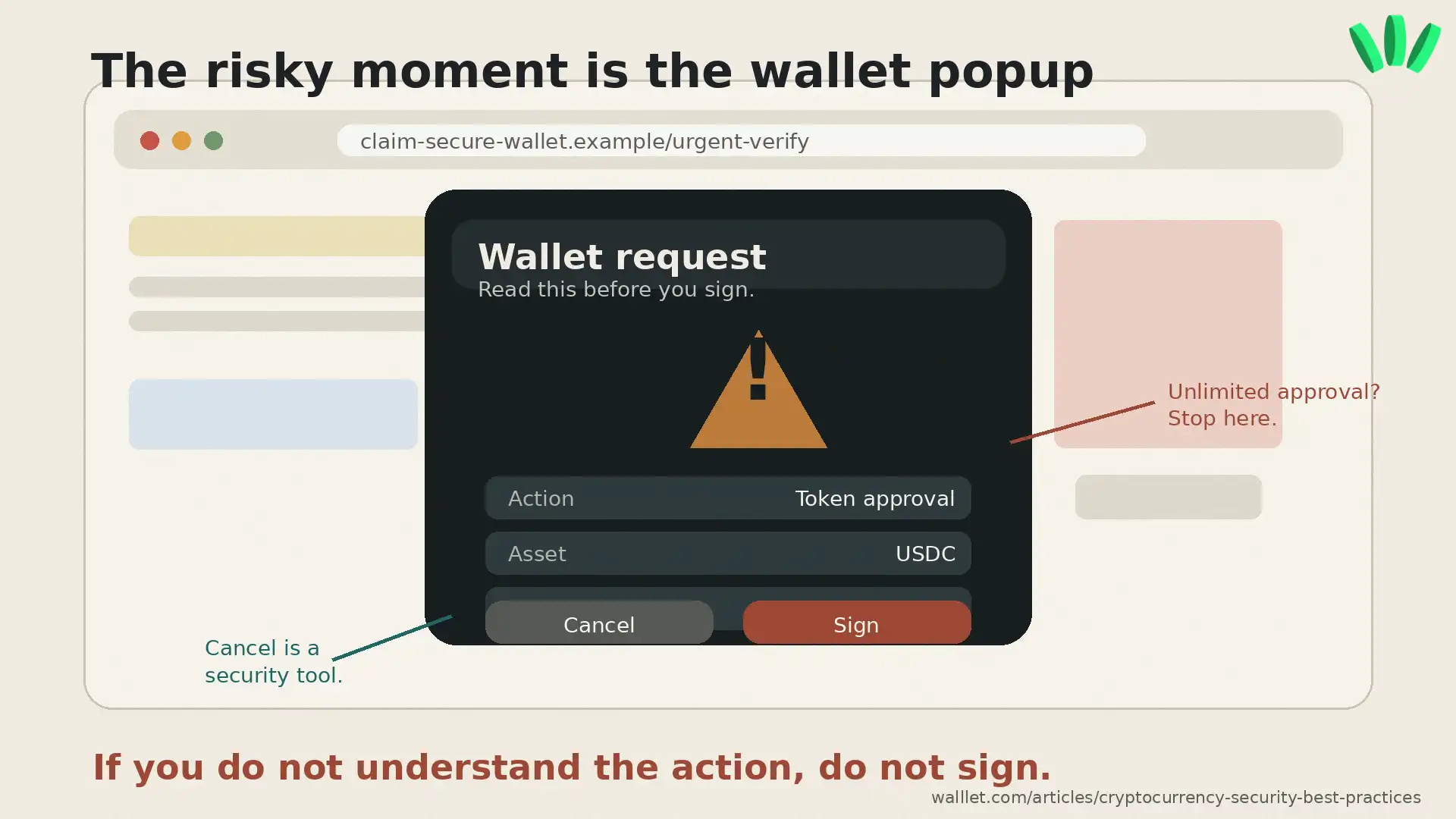
A scam does not always need your seed phrase. Sometimes it only needs you to approve the wrong transaction. Or grant token access. Or sign a message that gives a contract more power than you realized. Lovely little nightmare machine, Web3. Very efficient.
Before you sign, slow down and ask:
Is this the official URL?
Which asset is affected?
Is this a transfer, approval, swap, bridge, listing, permit, or message signature?
Is the spending limit small or unlimited?
Does the wallet prompt clearly explain what will happen?
If you do not understand what the prompt approves, do not sign it. A polished website does not make a bad transaction safe. Wallet drainers often work this way. They do not need to break the blockchain. They trick you into authorizing something harmful. This guide explains how wallet drainer attacks work.
Why are seed phrases still such a big risk?
Seed phrases are powerful because they can restore wallet access. They are risky because they put a lot of pressure on the user.
Store them badly, and someone else may find them. Lose them, and you may lose access. Type them into a fake site, and your funds may disappear. Take a screenshot, and that screenshot may end up in cloud sync, device backup, or some future mess you did not plan for.
Bad places to store a seed phrase include phone screenshots, email drafts, notes apps, chat apps, cloud docs, and photos. Also documents named “wallet backup,” because apparently attackers also know how words work.
A better setup is offline, private, durable, and understood by you. No mystery. No “I’ll figure it out later.” Later is usually when the panic starts.
This is also why seedless wallets exist. They try to remove the traditional user-facing recovery phrase from the normal setup flow. The responsibility changes though. You still need to understand the wallet’s device, passkey, account, and recovery model. For a deeper look, read this article on seedless wallet safety and risks.
Can passkeys make crypto wallet access safer?
Passkeys can reduce password-related risks like phishing, reuse, leaks, and weak passwords. They use cryptographic credentials and are usually unlocked through a device method such as biometrics, PIN, or pattern.
The FIDO Alliance describes passkeys as phishing-resistant sign-ins designed to replace passwords. You can read the external source here: FIDO Alliance passkeys.
For crypto wallets, passkeys can make access feel less fragile than a password plus seed phrase setup. Helpful. Cleaner. Less terrifying for normal users who did not wake up wanting to manage secret words like a medieval oath.
Still, passkeys protect access. They do not make every transaction safe. A user can still approve a malicious dapp, sign a bad message, or send funds to the wrong address. For more context, read this guide on what a passkey wallet is.
What are token approvals, and why should you revoke them?
A token approval lets a smart contract spend certain tokens from your wallet. This is common in DeFi, swaps, bridges, and other Web3 apps. The risky part is old or unlimited approvals. You may stop using a site, but the approval can remain active onchain. Quietly sitting there. Like a door you forgot you left open.
Disconnecting your wallet from a dapp is not the same as revoking token approvals. Disconnecting removes a site connection from the wallet interface. Revoking approval changes the actual permission onchain.
Review approvals after using DeFi apps, bridges, NFT marketplaces, airdrop claims, or unfamiliar tools. Revoke what you no longer need. Especially unlimited approvals connected to apps you do not fully trust.
Hardware wallet, hot wallet, seedless wallet, or multisig: which is safer?
There is no one safest wallet for every situation. Annoying, but true. The safer setup depends on what you are doing.
Setup | Best for | Main risk |
Exchange account | Buying, selling, fiat access | You do not fully control the keys |
Hot wallet | Daily use and dapps | More exposure to risky sites |
Hardware wallet | Larger long-term holdings | Still vulnerable to phishing and bad approvals |
Seedless or passkey wallet | Everyday self-custody with less recovery stress | You must understand device and recovery setup |
Multisig wallet | Teams, treasuries, advanced users | More setup complexity |
Burner wallet | Risky experiments | Easy to overfund by mistake |
Most users are safer with a simple split: one wallet for daily activity, one stronger setup for long-term funds, and one disposable wallet for risky experiments.
The wallet that explores should not be the wallet that stores everything.
Can a wallet reduce the riskiest parts of crypto security?
A wallet can reduce some of the risky moments that users commonly miss: seed phrase handling, unclear transaction prompts, confusing recovery, suspicious approvals, and everyday signing pressure.
That matters because many crypto losses happen in the interface layer. The user is looking at a prompt, a website, a warning, a permission request. Something is unclear. Something feels urgent. They click.
walllet.com is built for that exact problem: self-custody without traditional seed phrase friction, passkey-based access, biometrics, and clearer transaction prompts. The point is to make everyday wallet use easier to understand before the dangerous click happens.
This does not remove every risk. It does not make every dapp safe. It does not reverse final blockchain transactions. It does not replace judgment. Still, a wallet that makes access, recovery, and signing clearer can reduce the number of bad moments users walk into half-blind.
Curious what that feels like in practice? Try the walllet.com flow with a small amount and see how seedless access and clearer prompts change the experience.
How should freelancers and remote workers secure crypto income?
If you receive crypto for work, keep your income wallet boring.
Use one wallet for receiving payments. Use a different wallet for DeFi, mints, or experiments. Confirm the token and network before sharing your address. For larger payments, ask for a small test transfer first when possible.
This matters for freelancers and remote workers who receive USDT, USDC, or other crypto payments across borders. A payment mistake can affect rent, invoices, business cash flow, or family support. Not some abstract “portfolio.” Actual money.
Keep records too: client name, date, token, network, wallet address, and transaction hash. Future you may be tired, busy, or dealing with taxes. Give that poor creature a chance.
What should you do if you think your wallet is compromised?
Act quickly, but do not start clicking random “rescue” tools. That is how people get robbed twice. A brutal business model, somehow still thriving.
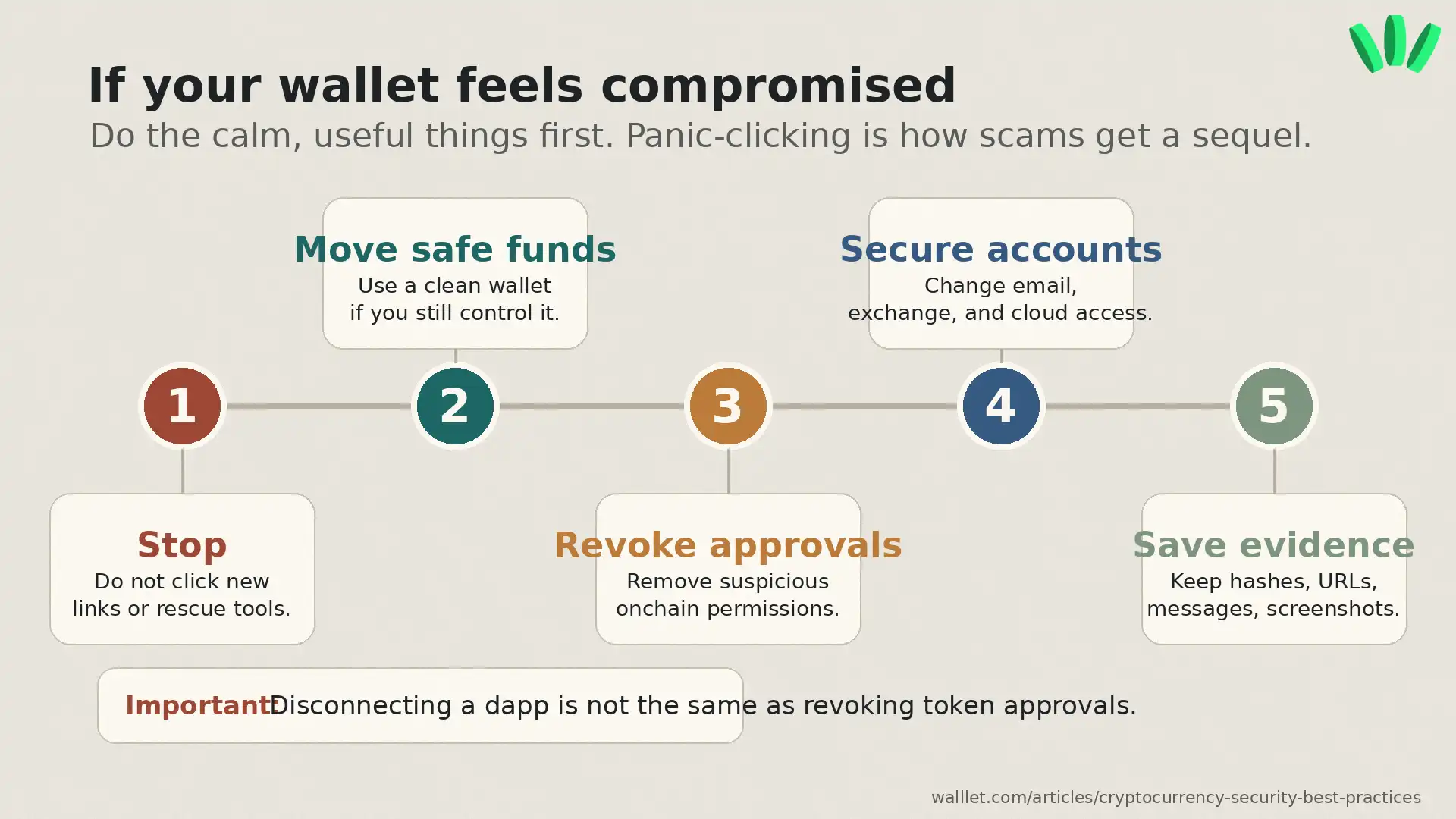
If you still control the wallet, move remaining funds to a clean wallet using a trusted device and verified wallet flow. Revoke suspicious approvals. Disconnect suspicious sites, while remembering that disconnecting does not revoke token permissions. Change passwords on related email, exchange, and cloud accounts. Save transaction hashes, wallet addresses, suspicious URLs, screenshots, and messages.
Be careful with “recovery experts.” Many recovery scams target people right after a loss. Fresh panic, fresh prey. Charming species, scammers.
Crypto security checklist for 2026
Use this before moving serious funds or trusting a wallet as your main setup.
Security check | Status |
I know who controls wallet access | ☐ |
I know what happens if I lose my device | ☐ |
I never store seed phrases in screenshots, notes, or chats | ☐ |
I keep daily-use funds separate from long-term holdings | ☐ |
I test new wallets and networks with small amounts first | ☐ |
I verify URLs before connecting my wallet | ☐ |
I read transaction prompts before signing | ☐ |
I review and revoke unnecessary token approvals | ☐ |
I understand the difference between disconnecting and revoking approval | ☐ |
Final thought before you move funds
No wallet can protect you from every scam, fake site, malicious contract, or rushed decision. Still, your setup can make bad moments harder to miss.
Start small. Test recovery. Read prompts. Separate funds. Review approvals. Use a wallet experience you can actually understand when you are tired, distracted, or under pressure. If your current wallet makes seed phrases, signing, recovery, or daily self-custody feel too fragile,create a walllet.com wallet and test the flow before your next serious crypto move.
