Most wallet drainer attacks do not steal your seed phrase. They trick you into signing your own exit ticket.
A wallet drainer is a malicious Web3 scam flow that tricks you into approving a transaction, permission, or signature that lets an attacker move your tokens or NFTs. It usually does not need your seed phrase. It needs your trust, your hurry, or your confusion for one dangerous click. In this article you’ll learn what a wallet drainer is, how drainer scams use approvals and signatures, what to do after an attack, and how clearer wallet UX can reduce risk.
TL;DR
A wallet drainer is usually a permission scam, not a blockchain hack. The attacker wins by getting you to authorize something harmful.
Common bait includes fake mint pages, fake airdrops, clone dApps, fake support, and urgent countdown language.
The most dangerous prompts often involve token approvals, NFT operator approvals, permit-style signatures, or Permit2 flows that are easy to misunderstand when the wallet UI is vague.
If you think you signed something bad, speed matters: stop interacting, review and revoke recent approvals, and move remaining assets if the risk still feels active.
walllet.com’s seedless design removes routine seed phrase exposure, and its product positioning emphasizes clearer transaction prompts, but no wallet can make a malicious approval safe after you confirm it.
What is a wallet drainer?
A wallet drainer is a malicious site, script, or contract flow built to empty a crypto wallet after the victim approves something that looks harmless. The key detail is easy to miss: the attacker often does not break the wallet, crack the blockchain, or steal the seed phrase first. The attacker gets the user to authorize a permission or signature that does the damage.
That is why “my wallet got hacked” is often an incomplete diagnosis. Sometimes the wallet was not hacked in the classic sense at all. Sometimes the user connected to a fake mint site, signed a malicious Permit or Permit2 message, approved an unlimited token allowance, or granted setApprovalForAll on an NFT collection without realizing what the prompt really meant.
If you want the simplest mental model, use this:
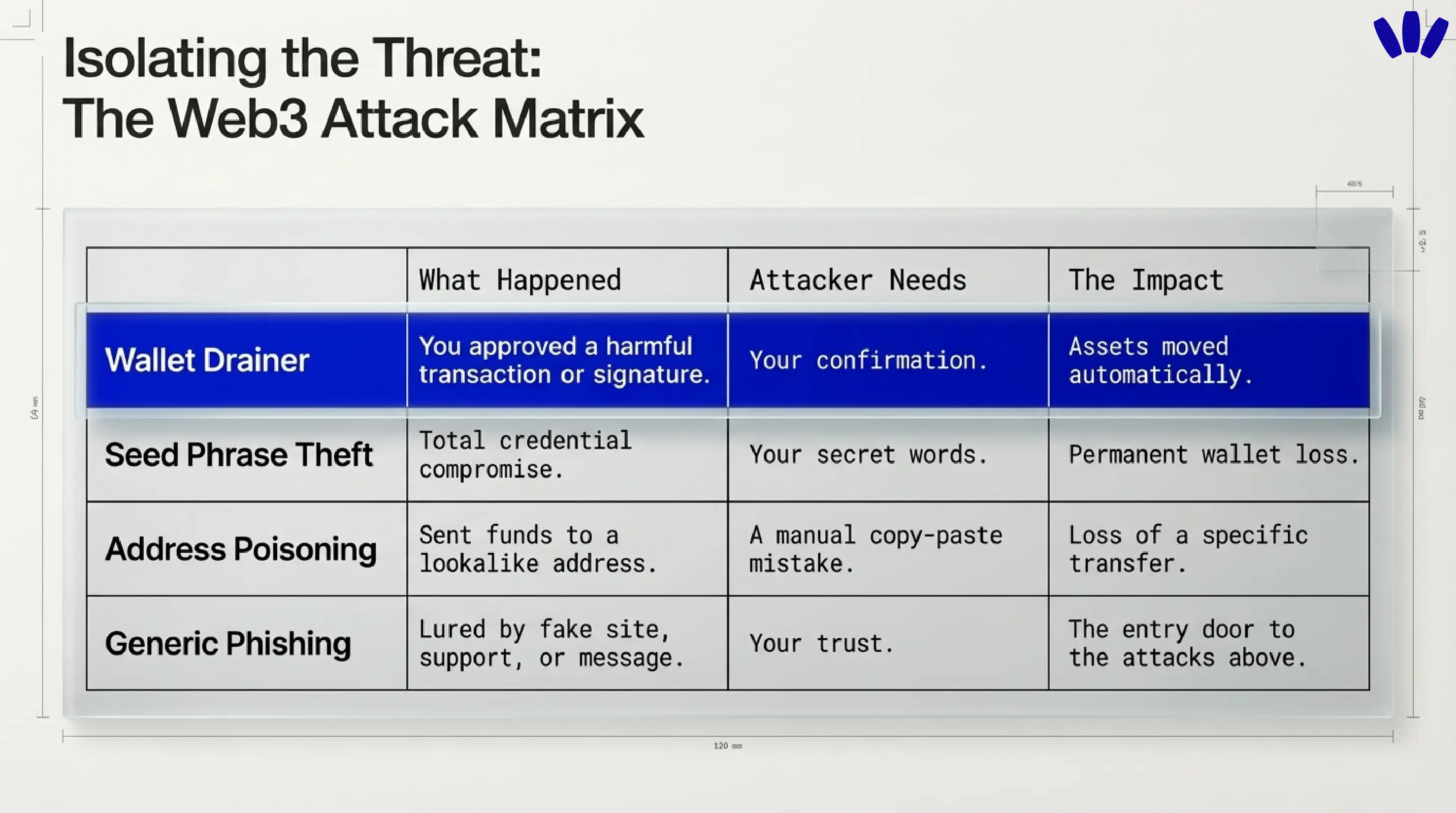
Situation | What actually happened | What the attacker needed | Why it matters |
Wallet drainer attack | You approved a harmful transaction, approval, or signature | Your confirmation | Assets can be moved quickly and often automatically |
Seed phrase or private key theft | The attacker got full credential-level access | Your secret | The whole wallet may be permanently compromised |
Address poisoning | You sent funds to a lookalike address | Your copy-paste mistake | The wallet was not “drained,” but the loss still feels the same |
Generic phishing | You were lured by a fake message, site, or support contact | Your trust | Phishing is often the entry door to a drainer attack |
This distinction matters because the fix depends on the failure mode. A drainer incident is often about approvals and permissions. Seed phrase theft is about total credential compromise. Address poisoning is a send-to-the-wrong-place problem. They overlap, but they are not the same.
Why wallet drainers are so effective
Drainers work because crypto has a brutal design truth: the blockchain treats valid-looking authorizations as valid authorizations. If you approve the wrong thing, the chain does not stop to ask whether you felt rushed, confused, or fooled. walllet’s terms make this point clearly. When you approve a blockchain transaction, you are giving an irreversible instruction, and malicious dApps or smart contracts can cause serious loss.
The psychological side is just as important as the technical side. Security guidance from CISA warns that urgency, emotional pressure, suspicious links, and trusted-looking impersonation are classic phishing ingredients. Drainer pages use exactly that recipe, just dressed in Web3 costume. The page tells you an airdrop is expiring, a mint is almost sold out, your wallet needs “verification,” or support needs you to “prove ownership.” The technical trick rides in on a very human moment.
How wallet drainers usually trick users
The most common drainer path is not glamorous. It is a fake site that looks real enough for thirty seconds.
Fake mint sites and fake airdrop claims
A fake mint page, fake token claim, or clone of a familiar dApp is still one of the easiest ways to get a signature out of a user. Kaspersky describe drainers as malicious dApps or phishing pages that imitate legitimate crypto experiences and then ask for approvals or signatures that let funds move out afterward.
Fake support and fake verification
Another popular move is fake support. A message claims your wallet is at risk, asks you to reconnect, verify, sync, or sign to prove ownership. walllet.com says the core wallet does not require your name, username, email, or phone number to use basic wallet features, and it says walllet does not collect seed phrases, private keys, or passkey credentials. That means surprise “verification” flows should immediately feel suspicious.
Urgency, countdowns, and rewards that smell too sweet
Drainers love compressed thinking. A fake countdown, a “last chance” mint, a support warning, a reward you can only claim now. CISA’s phishing guidance specifically flags urgent language and emotionally manipulative framing as a core warning sign. In Web3, that urgency often sits right next to a Connect Wallet button.
Why drainers often rely on approvals or signatures
This is the part most users actually need. A wallet drainer often works by getting one of three things:
A token approval that lets a contract spend ERC-20 tokens on your behalf
An NFT approval, often
setApprovalForAll, that gives a contract operator-level control over a collectionA signed message that can later be turned into an approval or transfer flow through permit-style mechanisms

Unlimited approvals vs malicious signatures
A traditional approval is onchain. You approve a spender. That spender can later pull tokens according to the allowance you granted. A malicious version of that flow is obvious in hindsight and invisible in the wrong UI: the page says “claim reward,” but the approval actually hands over spending rights. That’s why lingering approvals are dangerous and why revoking suspicious ones quickly matters.
A malicious signature is trickier because users often assume “it’s just a message, not a transaction.” Sometimes that is true. Sometimes it is very much not true. EIP-2612 introduced permit, which allows token allowances to be created from signed typed data instead of a separate approval transaction. Uniswap’s Permit2 system extends that idea across more tokens and flows. That is great for UX when used honestly, and a gift-wrapped trap when used dishonestly.
Can signing a message drain your wallet?
Yes, sometimes.
A basic login signature is not the same thing as a token transfer. But some signatures are not “just login.” Permit-style signatures can authorize spending rights, and Permit2 can be used to grant time-bound or shared approval flows without the old two-step approval pattern. Revoke.cash explicitly warns that Permit and Permit2 increase phishing risk when users do not understand what they are signing.
That is why the real safety question is not “Is this a transaction or a message?” The real question is “What power does this prompt give away if I confirm it?”
What a wallet drainer attack usually looks like, step by step
First, the attacker puts bait in front of you. It might be a fake mint, a fake support message, a fake giveaway, or a clone of a real site. Then you connect your wallet. Then the site requests a signature or approval that does not match the story it is telling. After you confirm, the drainer script or malicious contract uses the granted permission to move assets out, often fast enough that you notice only after the wallet looks thinner than it did a minute ago.
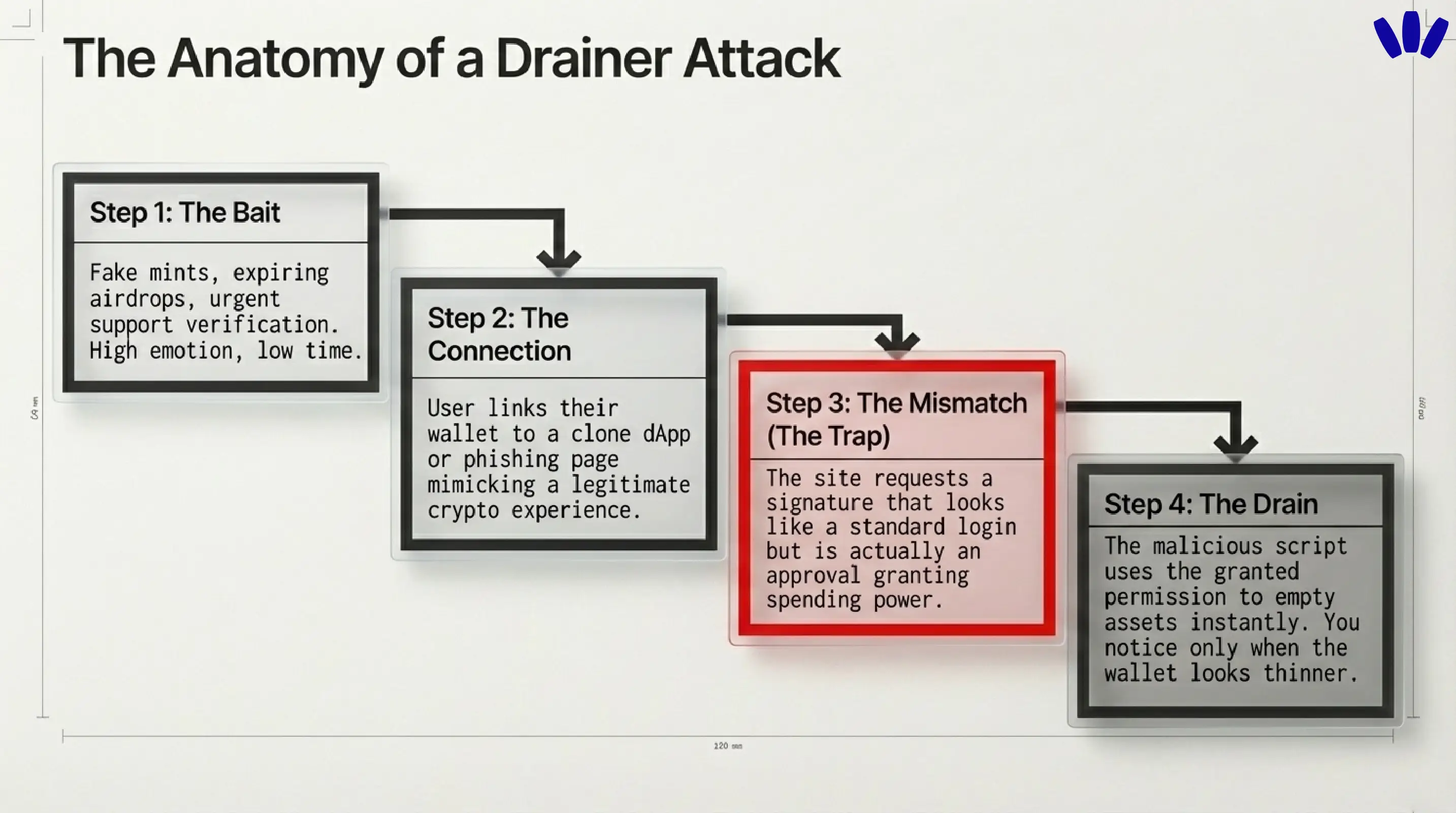
The scary part is not just the theft. It is the mismatch between what users think they approved and what they actually approved. That mismatch is where wallet UX stops being decoration and starts being security.
What to do if you think your wallet was drained
This is the section to read slowly and use quickly.
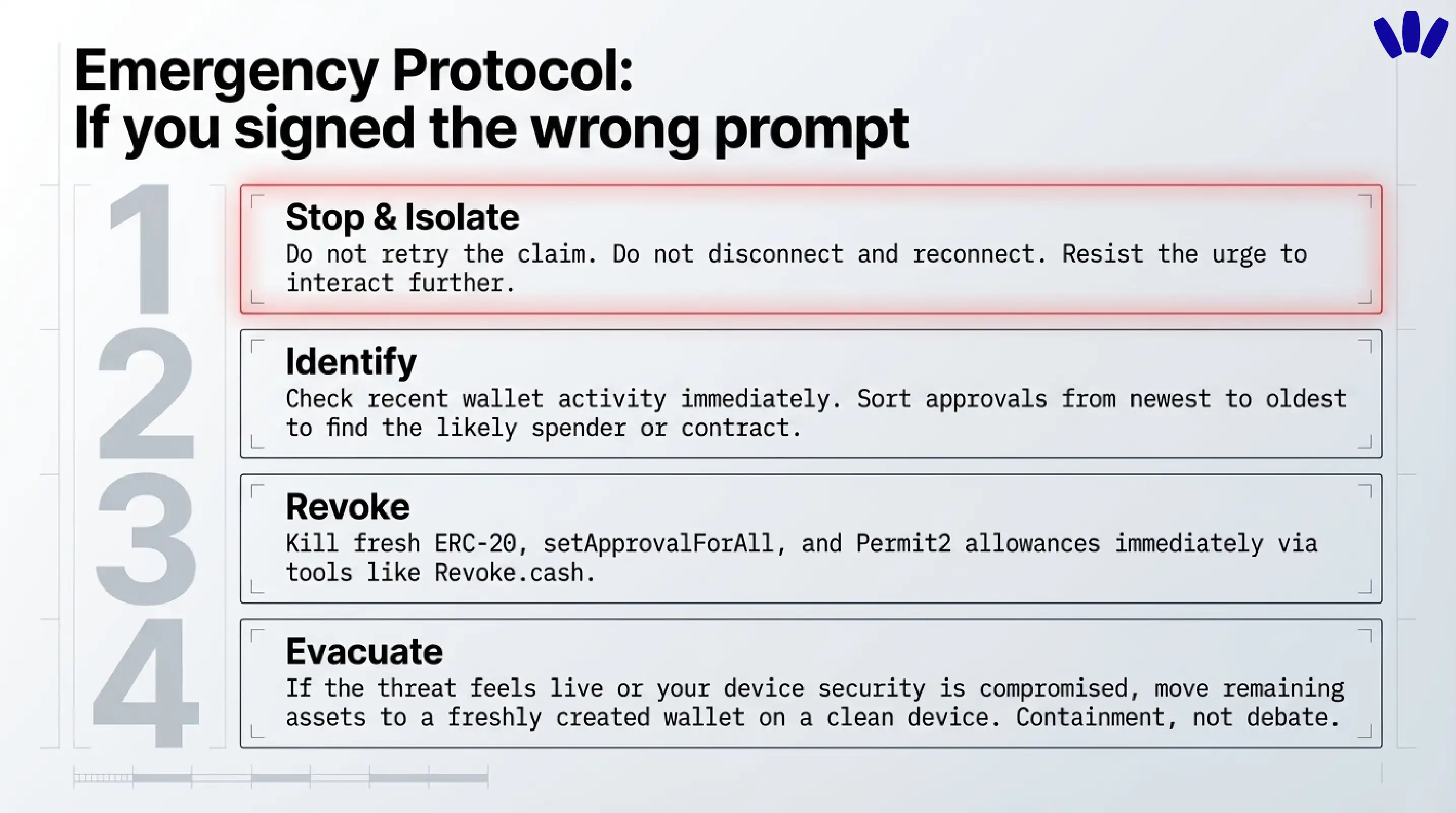
1) Stop interacting with the suspicious site
Do not retry the claim. Do not click “disconnect and reconnect.” Do not download anything the site offers. If the message or site looks suspicious, resist the urge to click through and verify through known official channels instead.
2) Figure out what you actually signed
Look at the most recent wallet activity and identify the likely spender, contract, or permission involved. In drainer incidents, the newest approvals are often the most relevant place to start. Sorting approvals newest to oldest when you suspect a malicious approval is recommended.
3) Revoke the risky approvals first
Start with the permissions most likely to keep the door open: fresh ERC-20 approvals, NFT setApprovalForAll permissions, and any Permit2-related allowances or approvals tied to the suspicious site. If you used Permit2, remember there can be both the broad Permit2 approval and the downstream spender approval flow.
4) Move remaining assets if the threat still feels live
If you suspect the wallet still has dangerous permissions, or if credentials or device security may also be compromised, move remaining assets to a freshly created wallet you control using a verified setup flow on a clean device. walllet’s anti-phishing guidance says that when secret recovery information is exposed, the response is containment, not debate. That logic also applies when you believe an active drainer still has room to operate.
5) Save evidence before the trail goes cold
Keep the suspicious domain, wallet address, transaction hash, screenshots, and any fake support messages. If an exchange or centralized service touched the flow, report it quickly. The more breadcrumbs you keep, the better your odds of useful reporting and analysis later.
6) Watch out for the second scam
After a theft, victims often get targeted again by “recovery” scammers. walllet warns about this pattern, and it is one of the ugliest little plot twists in crypto. A drainer takes your assets, then a fake rescuer tries to take what is left of your hope.
Should you keep using the same wallet after a drainer incident?
Sometimes yes, often no.
If the issue was a narrow approval and you revoked it fast, you may not need to abandon the wallet forever. But if you are unsure what was signed, if multiple approvals were involved, if the device may be compromised, or if any secret credential was exposed, moving to a clean wallet is usually the safer call. The point is not drama. The point is reducing uncertainty.
How walllet.com’s clarity-first approach matters here
This is where walllet.com fits naturally into the topic.
walllet is not trying to solve drainer risk by pretending users never make mistakes. It tries to remove some of the worst mistakes from the normal crypto routine. Its product and help content emphasize seedless self-custody, passkeys, biometrics, hardware-backed key protection, and transaction clarity. That matters because many wallet losses start at the human interface layer, not the blockchain layer.
The seedless part matters first. walllet says private keys are generated and protected through device secure hardware and passkey systems, and that the core wallet does not collect your seed phrase, private key, or passkey credentials. That reduces a huge class of old-school wallet compromise built around secret phrase exposure, screenshots, fake restore forms, and “support” asking for credentials.
The clarity part matters next. walllet explicitly frames human-readable transaction prompts and suspicious-contract warnings as part of security, not just nicer design. That is the right framing. A wallet drainer thrives when the user cannot tell the difference between “connect,” “sign,” “approve,” and “give this contract the keys to the pantry.” The more clearly a wallet explains intent, spender, asset, and cost before approval, the fewer shadows a scammer gets to hide in.
walllet is non-custodial. It cannot reverse final blockchain transactions, cannot recover your keys for you, and cannot guarantee that every third-party dApp prompt is safe. Better wallet UX improves the odds. It does not repeal reality.
That combination is what makes walllet relevant to this topic without forcing the brand into the room. Seedless self-custody reduces seed phrase risk. Passkeys and biometrics reduce routine credential exposure. Clearer prompts reduce blind signing risk. And the product still respects the adult truth of self-custody: you are in control, which is powerful right up until the moment you confirm the wrong thing.
The practical rule to remember
A wallet drainer only needs to feel normal for one click too long. If a page cannot clearly explain what you are approving, who gets permission, which asset is affected, and why the action is necessary, that is not a speed bump. That is the warning sign.
Create a seedless wallet with walllet.com and get self-custody that feels clearer from the first prompt, with passkeys, biometrics, and less room for blind signing.
Related reading
Crypto and Web3: Wallets, Networks and Security Explained
What are Smart Contracts? How They Work? and How to Use Them Safely?
Liquidation in Crypto Explained for Beginners: DeFi, Futures, Health Factor, and How to Avoid It
How to Avoid Crypto Phishing: What walllet.com Will Never Ask You to Do
