The best crypto wallet in 2026 depends on what you need the wallet to do. MetaMask and Rabby are strong options for EVM and DeFi users. Phantom is a better fit for people who spend most of their time on Solana and its supported networks. Trust Wallet suits users who want broad multi-chain access from a mobile wallet. Ledger and Trezor make more sense for larger holdings that do not need to move every day.
If you want self-custody without starting with a traditional seed phrase, seedless wallets such as walllet.com and Zengo take a different approach to recovery.
Before choosing any wallet, compare five things: custody, recovery, supported networks, transaction-signing clarity and your actual use case. The wallet with the longest asset list is not automatically the safest or most useful one.
A crypto wallet app helps you control and use crypto onchain. If that difference still feels blurry, read walllet.com’s guide to custodial vs non-custodial wallets before choosing anything. Tiny bit of homework. Tragic, but useful.
What is a crypto wallet app?
A crypto wallet app is mobile software that lets you access blockchain assets, approve transactions, connect to Web3 apps, and manage tokens, NFTs, or stablecoins.
The key question is simple: who controls access to the wallet?
Some wallets are custodial, which means a company manages access for you. Some are self-custodial, which means you control access yourself. Some are seedless or smart wallets, which try to keep self-custody while making recovery less stressful.
If you are choosing your first wallet, walllet.com’s best crypto wallet for beginners guide is worth reading early. Beginner wallet choice is mostly about avoiding the dumb mistakes that cost real money. Wrong network. Lost recovery phrase. Fake app. Signing something weird because the screen looked official. Lovely little traps everywhere.
How we compared the best crypto wallets
We compared wallets by the decisions that change a user’s risk and day-to-day experience, not by coin count alone.
For this August 2026 update, we reviewed each wallet’s current official documentation and product information across six criteria:
Custody model: Who controls access to the assets?
Recovery: What happens if you lose your phone, reset a device or lose your usual login method?
Network support: Does the wallet support the chains you actually use?
Transaction clarity: How much useful information do you get before approving a transaction?
Everyday usability: How practical is the wallet for sending, receiving, stablecoins, mobile use and regular transactions?
Best-fit use case: Is the wallet better suited to beginners, DeFi, multi-chain activity, stablecoin payments or long-term storage?
We do not give every wallet a single overall score. A wallet can be excellent for DeFi and still be a poor choice for long-term storage. A hardware wallet can offer stronger isolation for larger holdings while being unnecessarily cumbersome for daily payments.
Wallet features change quickly, so product-specific claims in this guide are checked against official wallet documentation and updated when a material change affects the recommendation.
Best crypto wallet apps in 2026: quick comparison
There is no single wallet app that is best for everyone. Very inconvenient for list articles, which is probably why the internet keeps pretending otherwise.
Wallet | Best for | Custody / recovery model | Main advantage | Main tradeoff |
|---|---|---|---|---|
walllet.com | Seedless self-custody and regular stablecoin use | Self-custodial smart wallet with passkey-based access | No traditional seed phrase required at onboarding | Recovery works differently from a traditional seed-phrase wallet and should be understood first |
MetaMask | EVM dApps and DeFi | Self-custody | Broad EVM and dApp compatibility | More complexity for first-time users |
Trust Wallet | Mobile multi-chain use | Self-custody | Broad network coverage | More networks and assets also mean more details to verify |
Phantom | Solana-first and supported multi-chain use | Self-custody | Strong mobile and browser experience | Does not support every major EVM network |
Base App | Base ecosystem and simpler onchain onboarding | Smart-wallet and legacy wallet flows | Easier onboarding into the Base ecosystem | The product has changed significantly from the old Coinbase Wallet experience |
Rabby | Advanced EVM users | Self-custody | Strong transaction context for EVM activity | Less beginner-oriented |
Ledger | Larger long-term holdings | Hardware self-custody | Hardware-backed signing | Requires a separate device and setup |
Trezor | Long-term hardware storage | Hardware self-custody | Offline hardware-wallet model | Less convenient for frequent transactions |
Zengo | Seedless MPC users | Non-custodial MPC model | No traditional seed phrase | Different recovery and trust assumptions |
MetaMask describes its wallet as a self-custodial crypto wallet app for blockchain applications, available as both mobile app and browser extension. Coinbase describes Coinbase Wallet as a self-custody wallet where users control crypto, keys, and data. Those details matter because wallet apps are not just “apps.” They are access systems for money. Weirdly important.
Which crypto wallet is best for your use case?
There is no useful “best wallet” without a use case.
If you mainly need... | Start by comparing... | Why |
|---|---|---|
EVM and DeFi access | MetaMask, Rabby | Both are built around active EVM use and dApp interactions |
Mobile multi-chain access | Trust Wallet | Broad network coverage from a mobile-first wallet |
Solana and supported multi-chain activity | Phantom | Strong Solana roots with expanding network support |
Larger long-term holdings | Ledger, Trezor | Hardware signing separates long-term storage from everyday online activity |
Self-custody without starting with a traditional seed phrase | walllet.com, Zengo | Both use alternatives to conventional seed-phrase-first onboarding |
Regular stablecoin receiving and sending | A wallet that supports your exact token and network | Network compatibility and recovery matter more than the number of listed assets |
The practical rule is simple: choose for the activity you do most often, then check how the wallet behaves when something goes wrong.
For a deeper explanation, read what a passkey wallet is. Passkeys can make crypto feel more like a normal app login, but recovery still matters. Always. Annoyingly.
If you want the full risk breakdown, read Are Seedless Wallets Safe?.
Curious what self-custody feels like without the old seed phrase panic? You can explore walllet.com here and see the difference for yourself: Explore walllet.com
Read walllet.com’s wallet security best practices if you want a practical setup for separating funds, checking approvals, and avoiding rushed mistakes.
walllet.com
Best fit for seedless self-custody and everyday stablecoin use
walllet.com takes a different approach from wallets that begin with a traditional recovery phrase. It is a self-custodial smart wallet built around passkey-based access, with users approving transactions from their own device.
That makes it relevant to people who want control over their crypto without making a 12-word phrase the first thing they need to secure. The tradeoff is not that recovery disappears. It changes. Before moving meaningful funds into any seedless wallet, understand what happens if you lose your phone, replace a device or lose access to your usual credentials.
For people who regularly receive USDT or USDC, this can be more practical than treating a wallet as an investment vault: the wallet becomes part of the flow for receiving, holding and moving dollar-linked assets.
MetaMask
Best fit for EVM and DeFi users
MetaMask remains a natural comparison for users who spend most of their time across Ethereum-compatible networks and dApps. Its main advantage is ecosystem compatibility: many DeFi products are designed with MetaMask-style wallet connections in mind.
That flexibility also creates complexity. A new user may need to understand networks, token approvals, gas, contract interactions and recovery before the wallet feels straightforward. MetaMask makes more sense when Web3 access is the priority than when the user only needs a simple wallet for receiving stablecoins.
Trust Wallet
Best fit for mobile multi-chain users
Trust Wallet is a practical option for users who want one mobile wallet across many networks rather than a wallet centered on one ecosystem.
Breadth is useful, but it creates its own failure mode: the more tokens and networks a wallet exposes, the more important it becomes to verify the exact asset, chain and receiving address before moving funds. Trust Wallet is strongest when broad network support matters more than keeping the interface narrowly focused.
Phantom
Best fit for Solana-first users
Phantom started with a strong Solana focus and now supports several additional networks, including Ethereum, Base, Polygon, Sui and Bitcoin. Its current support still does not cover every major chain, so users should check the official network list before choosing it as their only wallet.
Phantom makes the most sense when Solana remains central to your activity but you also want selected multi-chain access from the same app.
Base App
Best fit for users entering the Base ecosystem
Older comparison articles may still call this product Coinbase Wallet, but Coinbase is now moving users toward Base App. Its current documentation distinguishes the newer Base experience from the legacy wallet experience, so older feature comparisons can become stale quickly.
Base App is most relevant to users who want a simpler route into the Base ecosystem. Users migrating from Coinbase Wallet should check which mode and recovery setup they are actually using rather than assuming every old Coinbase Wallet instruction still applies.
Rabby
Best fit for experienced EVM users
Rabby is aimed more squarely at users who interact frequently with EVM networks and want additional transaction context before signing.
That makes it particularly relevant for active DeFi users, where the dangerous part of a transaction is often not opening the wallet but approving the wrong contract or permission. Its more technical orientation is useful for experienced users but can be unnecessary for someone who mainly receives and sends stablecoins.
Ledger
Best fit for larger long-term holdings
Ledger belongs in a different category from everyday mobile wallets. A hardware wallet keeps signing tied to a separate physical device, which can reduce exposure to some online attack paths.
The cost is friction. You need another device, another recovery process and more deliberate transaction handling. That tradeoff makes sense for assets you intend to hold more than assets you need to move several times a week.
Trezor
Another strong hardware-wallet option
Trezor is also designed around hardware-based self-custody rather than everyday mobile convenience. It belongs in this comparison because someone asking for the “safest crypto wallet” may actually need a cold-storage device rather than another phone app.
For frequent payments, hardware-wallet friction can become annoying. For funds that rarely move, the same friction can be useful.
Zengo
Best fit for users comparing seedless recovery models
Zengo is relevant because it solves the seed-phrase problem differently from both traditional wallets and passkey-based smart wallets. Its MPC-based recovery model removes the standard single seed phrase from the user experience.
That does not make it directly interchangeable with every other seedless wallet. Users should compare what recovery depends on, who participates in the recovery process and what happens when a device or account becomes unavailable.
Can you use a self-custody wallet without a traditional seed phrase?
Yes. Seedless wallets can use passkeys, MPC, smart-account recovery or combinations of these approaches.
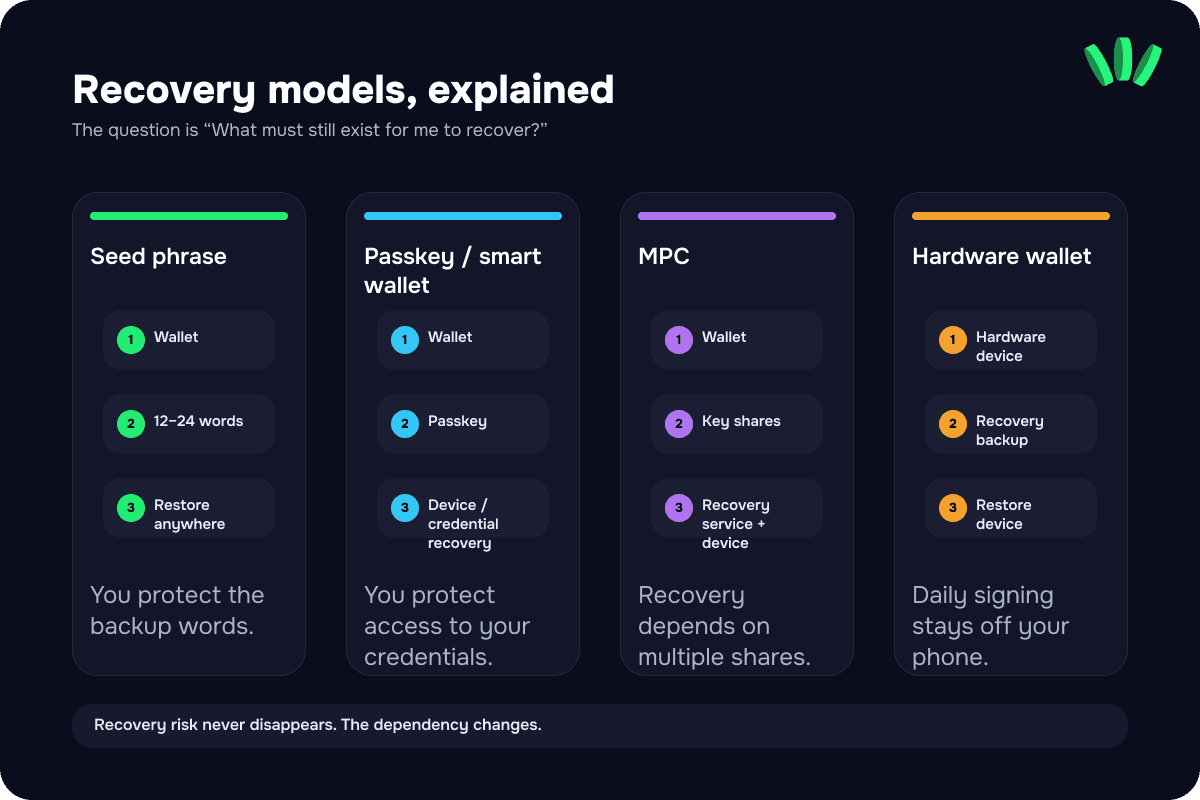
The important distinction is that recovery risk does not disappear. It moves. Instead of protecting one written recovery phrase, you need to understand the wallet’s specific recovery system and what it depends on.
walllet.com uses a passkey-based self-custody model, so users do not have to begin by writing down a traditional 12-word recovery phrase. That can remove one source of onboarding friction, but it does not make recovery automatic or risk-free.
Before funding any seedless wallet, check four scenarios: losing your phone, changing devices, losing access to your credential manager and restoring the wallet after a long period of inactivity.
If avoiding traditional seed-phrase management matters to you, walllet.com and Zengo are useful examples of two different seedless approaches worth comparing.
What is the best crypto wallet for freelancers paid in USDT or USDC?
If clients pay you in stablecoins, your wallet is part of your payment setup, not just a place to hold crypto.
Start with the exact token and network your clients use. “USDT supported” is not enough if the wallet does not support the same network the sender plans to use. Then check recovery, transaction history, address verification and the fees involved when you eventually move the funds.
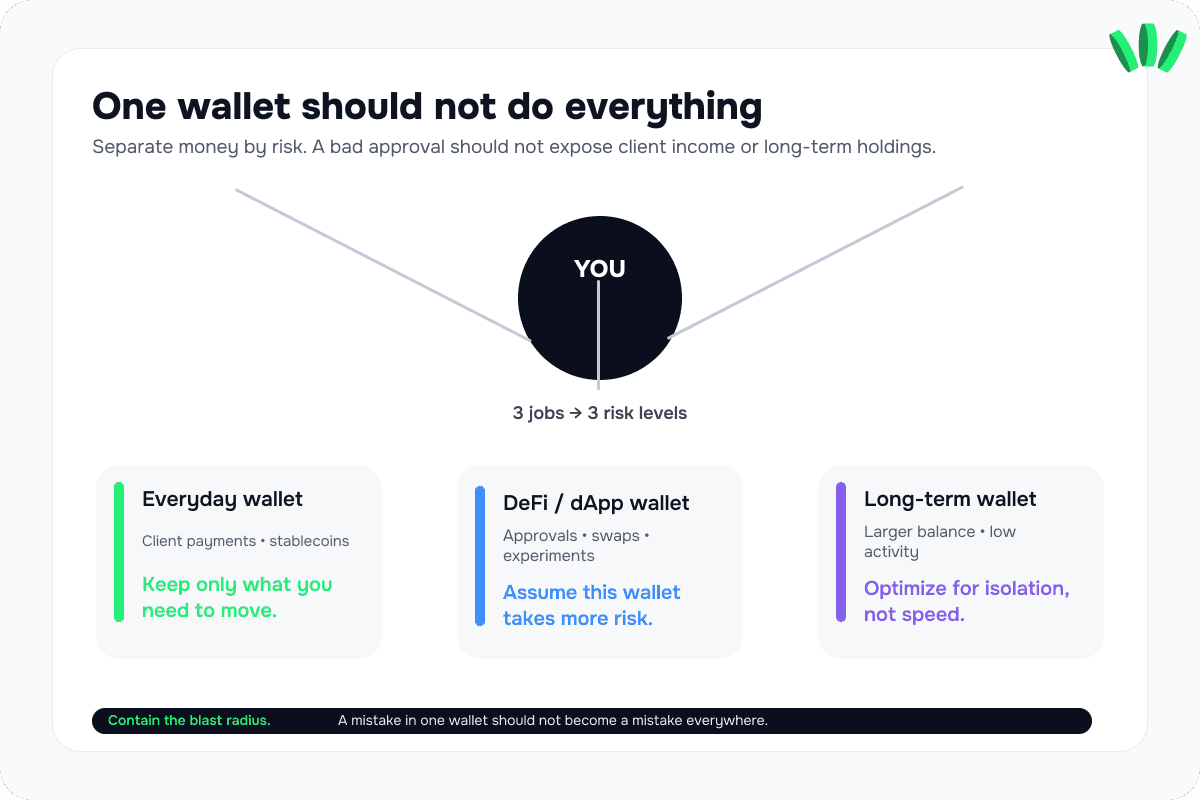
Freelancers should also separate payment funds from experimental DeFi activity. A wallet used to receive client income does not need to be the same wallet you connect to unfamiliar dApps.

For users who prefer seedless self-custody, walllet.com is designed around passkey-based access and is one option to compare for receiving and managing supported stablecoins. The deciding factor should still be whether its supported networks match the way you get paid.
Choose a wallet by what could go wrong
Security features matter, but a more useful question is: what failure are you actually trying to protect against?
Scenario | What matters most | What to prioritize |
|---|---|---|
You lose your phone | Recovery you understand before the loss happens | A clearly documented seed, passkey or MPC recovery process |
A client sends USDT or USDC | Exact token and network compatibility | Network support, address verification and a small test transfer |
You connect to many dApps | Knowing what you are approving | Clear signing information and separation of DeFi funds |
You hold a larger amount for months | Reducing everyday online exposure | Hardware-wallet storage |
You hate managing recovery phrases | Alternative recovery without giving up control blindly | Seedless options with a recovery model you can explain |
A wallet is not “safe” because it has the longest security feature list. It is safer when its recovery and signing model match the mistakes you are most likely to make.

Which crypto wallet should you choose in 2026?
Choose for the job, not the ranking.
If you regularly use EVM dApps and DeFi, start with MetaMask or Rabby. If you want broad mobile multi-chain access, compare Trust Wallet. If Solana is central to how you use crypto, Phantom is a natural candidate. If your priority is storing a larger balance for the long term, compare Ledger and Trezor.
If your main concern is self-custody without starting with a traditional seed phrase, compare seedless approaches such as walllet.com and Zengo and pay close attention to how their recovery models differ.
walllet.com is strongest in this comparison for users who value passkey-based self-custody and regularly receive or move supported stablecoins. It is not a replacement for a hardware cold-storage device, nor is it trying to be the most advanced DeFi interface.
The useful wallet is the one whose custody, recovery and failure modes you understand before real money depends on them. Want a simpler self-custody wallet without the old seed phrase stress? Start small, test the experience, and see if walllet.com fits the way you actually use crypto. Try walllet.com
