walllet.com and Trust Wallet are both self-custodial wallets, but they fit different users. Trust Wallet is better for broad multi-chain support, browser-extension use, and mature Web3 workflows. walllet.com is better for users who want seedless, mobile-first self-custody with passkeys, biometrics, and clearer transaction prompts.
TL;DR
walllet.com and Trust Wallet are both self-custodial wallets, but they solve self-custody in different ways.
Trust Wallet is stronger if you want broad multi-chain coverage, browser-extension access, dApp flexibility, and support for a large number of assets and networks.
walllet.com is stronger if you want self-custody to feel simpler, seedless, mobile-first, and less dependent on manually protecting a recovery phrase.
Trust Wallet’s classic wallet still uses a traditional 12-word recovery phrase, while Trust Wallet SWIFT offers a passkey-based smart wallet option.
walllet.com starts from the seedless passkey model as the core product experience, not as a separate wallet type inside a broader ecosystem.
For beginners and everyday users, walllet.com is easier to recommend. For power users, extension-heavy workflows, and maximum network coverage, Trust Wallet still has the advantage.
walllet.com vs Trust Wallet: what are users actually comparing?
Which wallet gives you real control without turning every important step into a small panic attack? That is the right question, because both walllet.com and Trust Wallet are self-custodial, but the experience of using them is very different.
If your main concern is avoiding recovery phrase stress, start with our guide to the best seedless wallets in 2026 before choosing between walllet.com and Trust Wallet.
Trust Wallet is a self-custody platform with mobile apps, a browser extension, and support for millions of assets across 100+ blockchains. walllet.com is much more opinionated. It is built around seedless self-custody, passkeys, biometric-friendly access, hardware-backed on-device key protection, and a calmer, more human Web3 UX.
One wallet is trying to be broad and flexible. The other is trying to make self-custody feel less brittle in real life.
walllet.com vs Trust Wallet at a glance
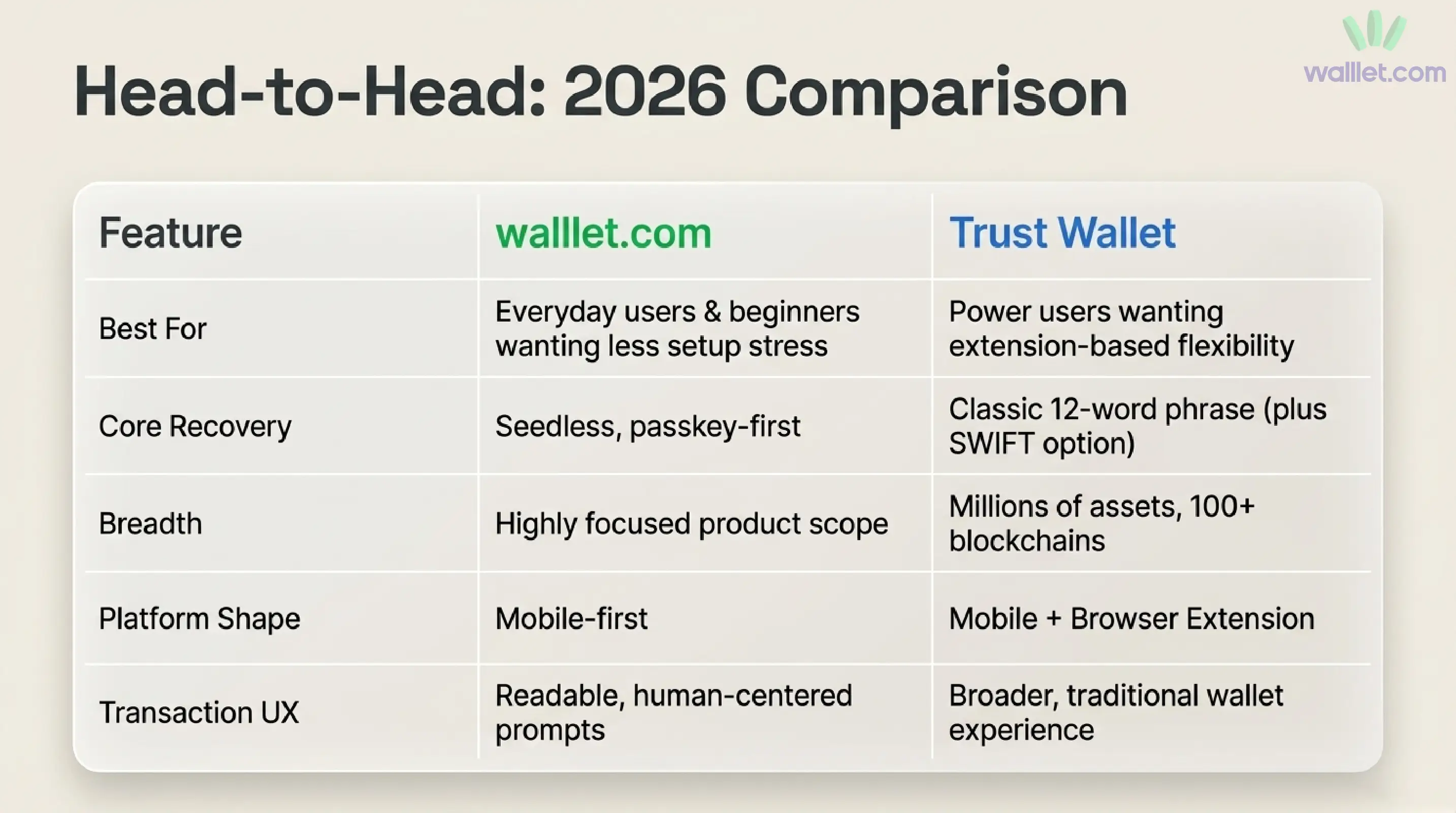
Category | walllet.com | Trust Wallet |
|---|---|---|
Best for | Beginners and everyday users who want seedless, mobile-first self-custody | Users who want broad multi-chain coverage, browser extension access, and mature Web3 flexibility |
Core model | Seedless, passkey-first self-custody | Classic wallet with 12-word recovery phrase, plus SWIFT smart wallet with passkeys |
Recovery experience | Passkey-based recovery and sync through Google or Apple account setup | Classic wallet uses recovery phrase; SWIFT uses device passkeys linked to cloud account setup |
Platform | Mobile-first | Mobile app + browser extension |
Chain and asset coverage | More focused product scope | Millions of assets across 100+ blockchains |
dApp access | More focused on simpler wallet use | Stronger for extension-heavy dApp workflows |
Security UX | Focuses on reducing seed phrase exposure and making transactions easier to understand | Mature security tooling, broad ecosystem, and newer protections such as scanner/warning features |
Best choice if… | You want calmer self-custody without seed phrase anxiety | You want maximum coverage, extensions, and advanced Web3 flexibility |
Main tradeoff | Less broad than Trust Wallet | More complexity for beginners, especially in classic-wallet flows |
In walllet.com there is no 12-word seed, that keys stay protected in the device’s hardware security environment, and that recovery happens through passkey sync. Trust Wallet offers a browser extension, and includes both its classic wallet model and the passkey-based SWIFT wallet inside the same ecosystem.
Are walllet.com and Trust Wallet both really self-custodial?
Yes. Both wallets sit on the self-custody side of the line. Trust Wallet calls itself a leading self-custody multi-chain platform. walllet.com is a non-custodial wallet that users remain in full control of their digital assets, private keys, and wallet credentials.
But “self-custodial” is only the beginning of the comparison. Two wallets can both be self-custodial and still feel radically different once you set them up, recover them, sign transactions, or try to avoid a scam at the wrong moment. That is where walllet.com starts to pull away for everyday users.
Related: walllet vs MetaMask: Which Wallet Is Better for Real Self-Custody in 2026?
Which wallet is easier to set up and recover?
Trust Wallet’s classic wallet still uses a 12-word recovery phrase. Its own support documentation says that phrase is the master key to restore the wallet, and its import guide makes clear that secret-phrase portability across mobile and browser environments is part of the traditional Trust Wallet model.
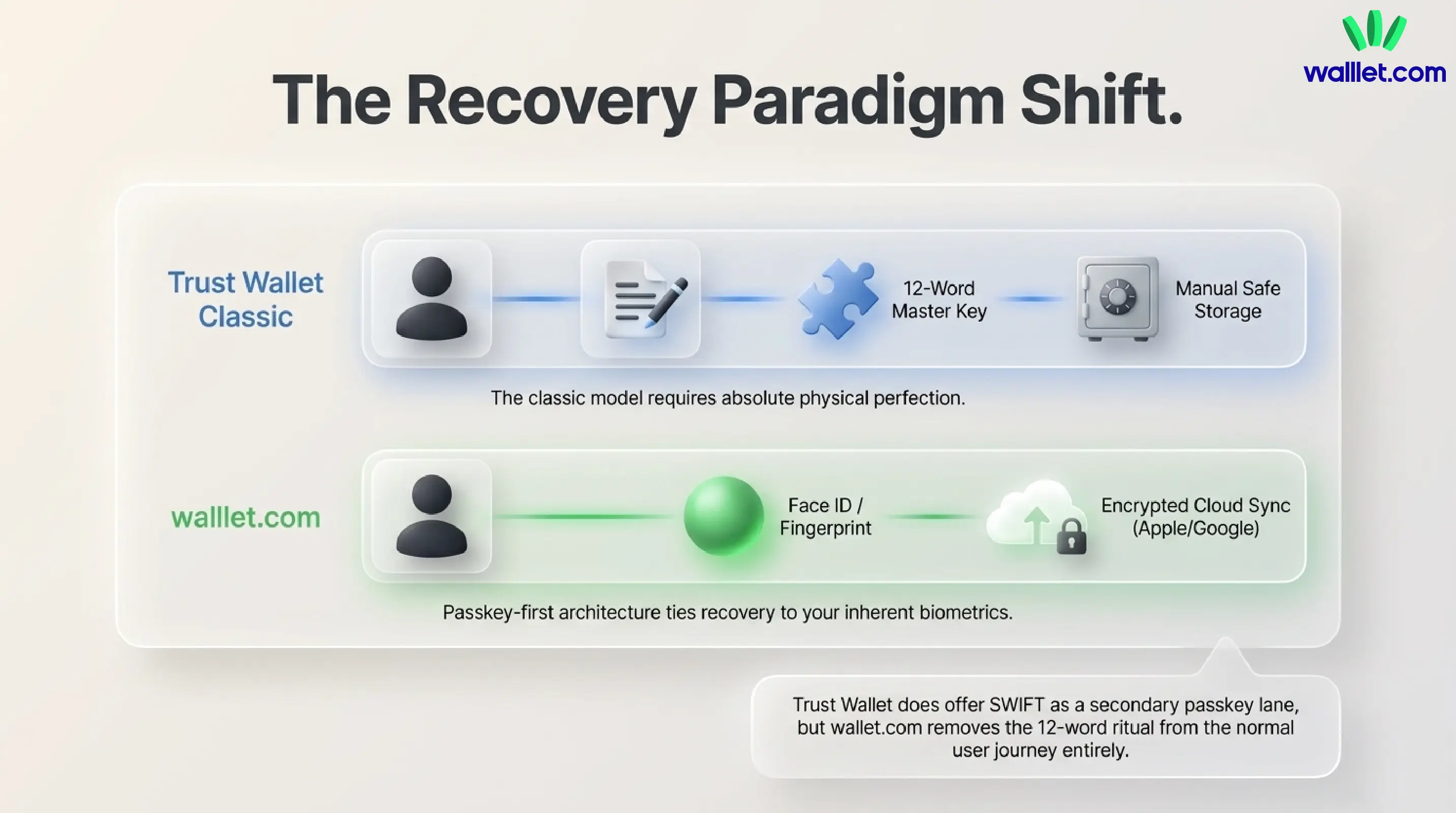
Trust Wallet also offers Trust Wallet SWIFT, which uses a passkey instead of a 12-word secret phrase and ties recoverability to iCloud or Google account infrastructure. Trust Wallet says the classic wallet and SWIFT can coexist inside the app.
Related: How to Migrate to walllet.com Without Losing Funds or Your Mind
walllet.com starts from that future instead of adding it as a second lane. Its homepage, app listing, and help content all point in the same direction: no recovery phrases, passkey-based access, Face ID or fingerprint-style onboarding, and keys that never leave the device. In practice, that means walllet.com is built to remove the seed phrase ritual from the normal user journey, not just soften it.
For most real people, that is a serious advantage. A seed phrase is portable, but it also creates one of crypto’s most failure-prone habits: write down 12 words, protect them perfectly forever, never expose them, never lose them, and never get tricked into sharing them. walllet.com’s passkey-first model reduces that entire class of friction from the start.
Does Trust Wallet SWIFT make the comparison closer?
Yes. Trust Wallet SWIFT makes the comparison more nuanced because it also uses passkeys instead of a traditional 12-word secret phrase. That means Trust Wallet is no longer only a classic seed phrase wallet. It now offers two different paths: the classic wallet for users who want traditional recovery phrase control, and SWIFT for users who want a passkey-based smart wallet experience.
The difference is that walllet.com starts from the seedless passkey model as the main product experience. In Trust Wallet, passkeys are part of the SWIFT wallet option inside a broader multi-wallet ecosystem. That makes Trust Wallet more flexible, but it also gives beginners more choices to understand before they know what they actually need.
Which wallet feels safer in actual day-to-day use?
Trust Wallet has added meaningful protection layers. Its security page highlights a built-in Security Scanner that checks destination addresses before sending and warns users when something looks wrong. That is useful, modern wallet security work.
But walllet.com has a different security philosophy, and for many users it is the more compelling one. Crypto losses often happen because users sign something confusing, trust a fake token page, or approve a malicious permission while moving too fast. walllet’s articles emphasize clearer prompts, suspicious-contract warnings, scam-token detection, and reducing seed phrase exposure in the first place.
That is why walllet.com feels safer, even if Trust Wallet is bigger and has more visible protective tooling. Trust Wallet adds stronger defenses around a broad wallet. walllet.com is trying to make the dangerous moment itself easier to understand. For beginners and everyday users, that difference matters a lot.
What are the tradeoffs before choosing walllet.com?
walllet.com is the better fit if your main priority is simpler, seedless, mobile-first self-custody. But it is not the better fit for every possible crypto workflow.
If you need the widest possible chain coverage, browser-extension access, custom RPC workflows, NFT-heavy activity, or constant interaction with many DeFi apps, Trust Wallet may still be the more practical choice. Its ecosystem is broader and more mature for power users.
The tradeoff is simple: Trust Wallet gives you more range. walllet.com gives you a calmer self-custody experience with fewer beginner-facing recovery and signing frictions.
What about gas, smart-wallet features, and modern UX?
This part of the comparison is more interesting than it looks at first glance.
Trust Wallet has been actively modernizing. Its FlexGas feature lets users pay gas fees with selected tokens like TWT, USDT, and USDC in supported flows, and its own explanation frames that feature as a smoother, more flexible wallet experience built on EIP-7702 smart-account behavior.
walllet.com, though, makes this kind of experience feel more native to the product. It is a smart-contract wallet using account abstraction, including rules like paying gas with any token, automation, and biometric-friendly recovery. It also has lower-friction fees and clearer prompts as part of the product’s core identity rather than a separate upgrade path.
That is why walllet.com has the cleaner product story. Trust Wallet is evolving from the classic-wallet world into a smarter one. walllet.com already starts there.
Which wallet is better for chain support, dApps, and extension-heavy use?
Trust Wallet emphasizes that millions of assets, 100+ blockchains, and browser-based access to thousands of Web3 dApps. If your workflow is broad, multi-chain, extension-heavy, and already shaped by older DeFi habits, Trust Wallet is easier to recommend. It is built for scale and range.
walllet is more focused on simple, seedless, self-custodial Web3 access, mobile-first ease, privacy-friendly setup, and power-user actions without traditional setup drama. That makes it the better product for many people, but not necessarily the broader one.
So if your top priority is coverage, extension usage, and familiar wallet portability, Trust Wallet keeps a real advantage. If your top priority is making self-custody easier to live with every day, walllet.com is the stronger answer.
Which wallet should beginners actually choose?
For most beginners, walllet.com is easier to understand because it removes the most stressful part of traditional self-custody: manually protecting a recovery phrase. Instead of asking users to write down 12 words and guard them forever, walllet.com uses passkeys and biometrics to make wallet access feel closer to the security patterns people already use on their phones.
Trust Wallet can still work well for beginners, especially if they choose the SWIFT wallet path. But the broader Trust Wallet ecosystem also means more options, more networks, more dApp access, and more decisions. That flexibility is useful for experienced users, but it can create extra room for confusion when someone is just learning how self-custody works.
So the beginner answer is not “Trust Wallet is bad.” It is: Trust Wallet is broader, while walllet.com is easier to start with if your main concern is recovery stress, signing clarity, and everyday self-custody.
Final verdict
Trust Wallet is the stronger choice if you want breadth: more chains, more assets, browser-extension access, mature dApp workflows, and a wallet ecosystem built for many different types of crypto users.
walllet.com is the stronger choice if you want self-custody to feel simpler from the beginning. Its seedless, passkey-first approach is better matched to users who do not want to manage a recovery phrase, worry about losing access, or sign confusing transactions without enough context.
The practical answer is this: choose Trust Wallet if your priority is maximum Web3 coverage. Choose walllet.com if your priority is calmer, mobile-first self-custody with fewer beginner-facing risks.
Try walllet.com. Create a seedless, self-custodial wallet, check how passkey access works, and see whether clearer transaction prompts make crypto easier to manage before moving larger amounts.
