A smart wallet can feel easy during setup and still feel confusing the first time you approve a real transaction.
walllet.com may be a better fit if you want a seedless self-custody wallet for everyday crypto use, with clearer signing and less seed phrase stress. Coinbase Smart Wallet makes more sense if you mainly use Base, Coinbase-connected apps, or app-native onchain flows.
TL;DR
Choose walllet.com if you want a daily self-custody wallet that feels easier after setup too.
Choose Coinbase Smart Wallet if most of your crypto activity happens inside Base or Coinbase-connected apps.
Both wallets reduce seed phrase friction. The bigger question is what happens later: approvals, gas, recovery, and real transactions.
Test with a small amount first. Always.
Choosing a wallet feels simple when there is no money inside it.
Then comes the first real moment. Sending USDC. Approving a swap. Connecting to an app. Moving crypto off an exchange. Suddenly the question changes from “Is this wallet modern?” to “Do I understand what I’m about to do?”
That is where this comparison matters.
Coinbase Smart Wallet and walllet.com both try to make crypto easier than the old seed phrase wallet experience. If you are still comparing wallet types, start with this guide to passkey wallets, because passkeys are a big part of the story here.
The short version: Coinbase Smart Wallet is strongest for Base and Coinbase-connected app flows. walllet.com is built more around everyday self-custody, seedless access, clearer prompts, and fewer scary wallet moments.
If you are comparing more seedless options beyond these two, this best seedless wallets guide gives you the wider category view.
Quick verdict: which wallet fits you?
Choose walllet.com if you want a wallet that feels closer to a normal app, removes traditional seed phrase stress, and helps you understand approvals, transactions, and gas more clearly.
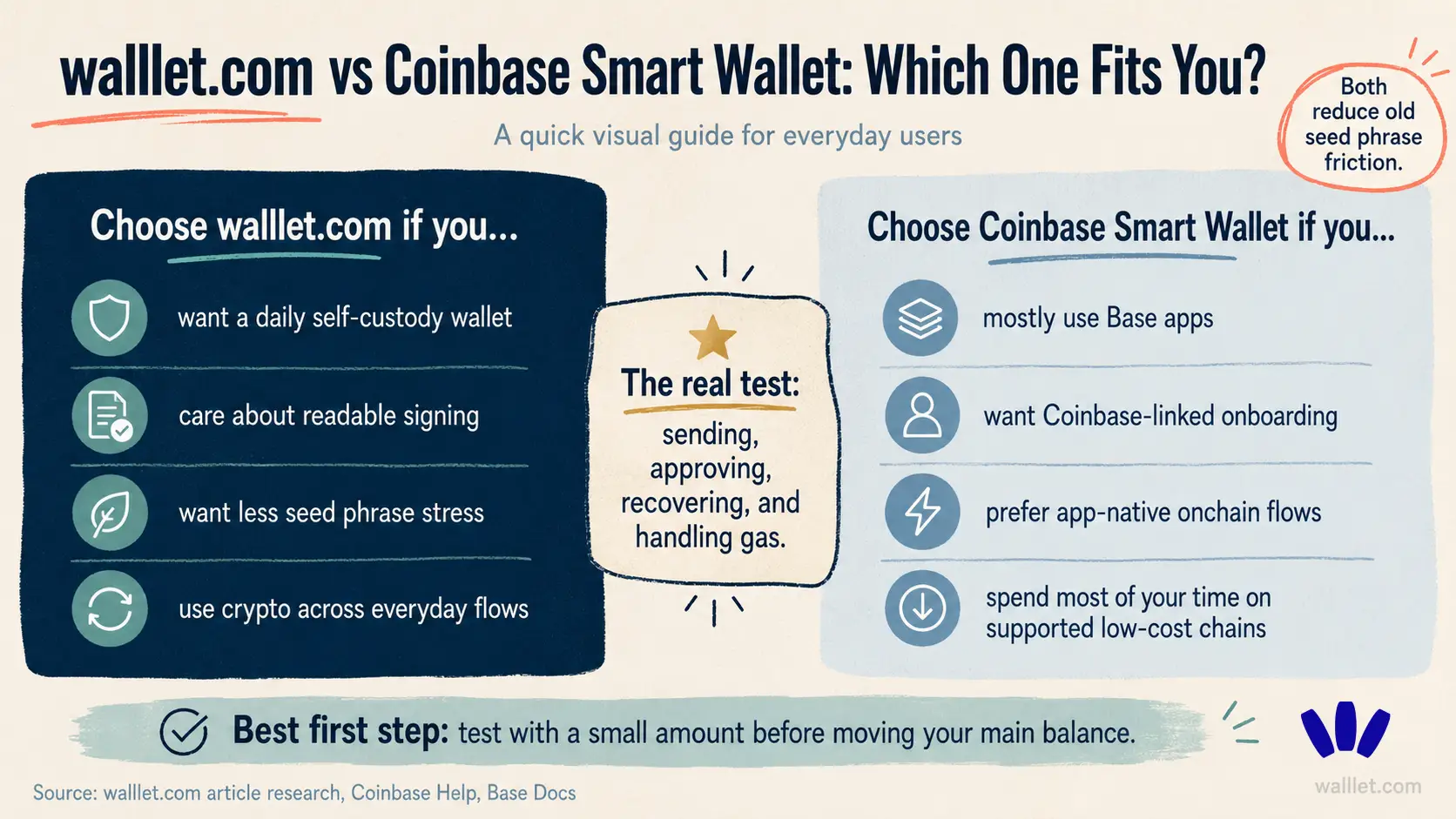
Choose Coinbase Smart Wallet if you mostly use Base-enabled apps, want Coinbase-linked onboarding, and like the idea of a wallet that appears inside supported app flows.
The decision is pretty practical. Where do you actually use crypto? If the answer is “mostly Base apps,” Coinbase Smart Wallet has a strong case. If the answer is “I want one simple self-custody wallet for daily crypto use,” walllet.com starts to look more relevant.
walllet.com vs Coinbase Smart Wallet at a glance
Category | walllet.com | Coinbase Smart Wallet |
Best for | Everyday self-custody users who want less wallet anxiety | Users active in Base and Coinbase-connected app flows |
Wallet type | Seedless, non-custodial smart wallet | Smart wallet with passkey-based access |
Seed phrase | No traditional seed phrase setup | Uses passkeys instead of asking users to memorize a recovery phrase |
Access | Passkeys and biometric-friendly access | Passkeys managed through device or passkey provider settings |
Main strength | Clearer daily self-custody experience | App-native onboarding, especially around Base |
Gas experience | Built around gas flexibility on supported flows | Coinbase says Base smart wallet gas fees are sponsored; Ethereum smart wallet fees can be higher |
Best user question | “Can I use crypto without feeling lost?” | “Do I mostly use Base and Coinbase-linked apps?” |
Main caution | Newer product than Coinbase | Can feel more tied to Coinbase/Base flows |
Still deciding? Do not move everything at once. Create the wallet, send a small amount, try one real action, then judge the experience.
What both wallets are trying to fix
Old crypto wallets often ask normal users to act like security engineers.
Write down 12 or 24 words. Never lose them. Never expose them. Understand networks. Hold the right gas token. Read technical prompts. Spot risky approvals. Know what a dapp is asking for.
A lot. Too much, honestly.
Smart wallets try to reduce that mess. Ethereum explains account abstraction as a path toward smart contract wallets that can support things like batched transactions and more flexible gas handling, including cases where an app pays gas or lets users pay fees with tokens other than ETH.
For a user, that means one simple thing: fewer moments where crypto stops because of some tiny technical trap.
Not zero risk. Not magic. Just fewer dead ends.
Where Coinbase Smart Wallet is strong
Coinbase Smart Wallet has a clear strength: Base and app-native onboarding.
Coinbase says users can onboard from apps without installing a separate app or extension, use passkeys instead of memorizing a recovery phrase, and access the wallet across devices with cloud-based or hardware passkeys. Coinbase also says Smart Wallet supports app-paid network fees and transaction batching in supported contexts through wallet call APIs.
That is useful if you mostly live inside Base apps.
For example, if you use USDC in Base-enabled apps and want a wallet that feels close to that ecosystem, Coinbase Smart Wallet can feel natural. Familiar brand, fast setup, fewer old-wallet rituals.
There is also the Coinbase trust factor. A lot of users first entered crypto through Coinbase. That familiarity matters, especially when someone is nervous about leaving an exchange wallet setup.
Where Coinbase Smart Wallet can feel confusing
The confusing part is scope.
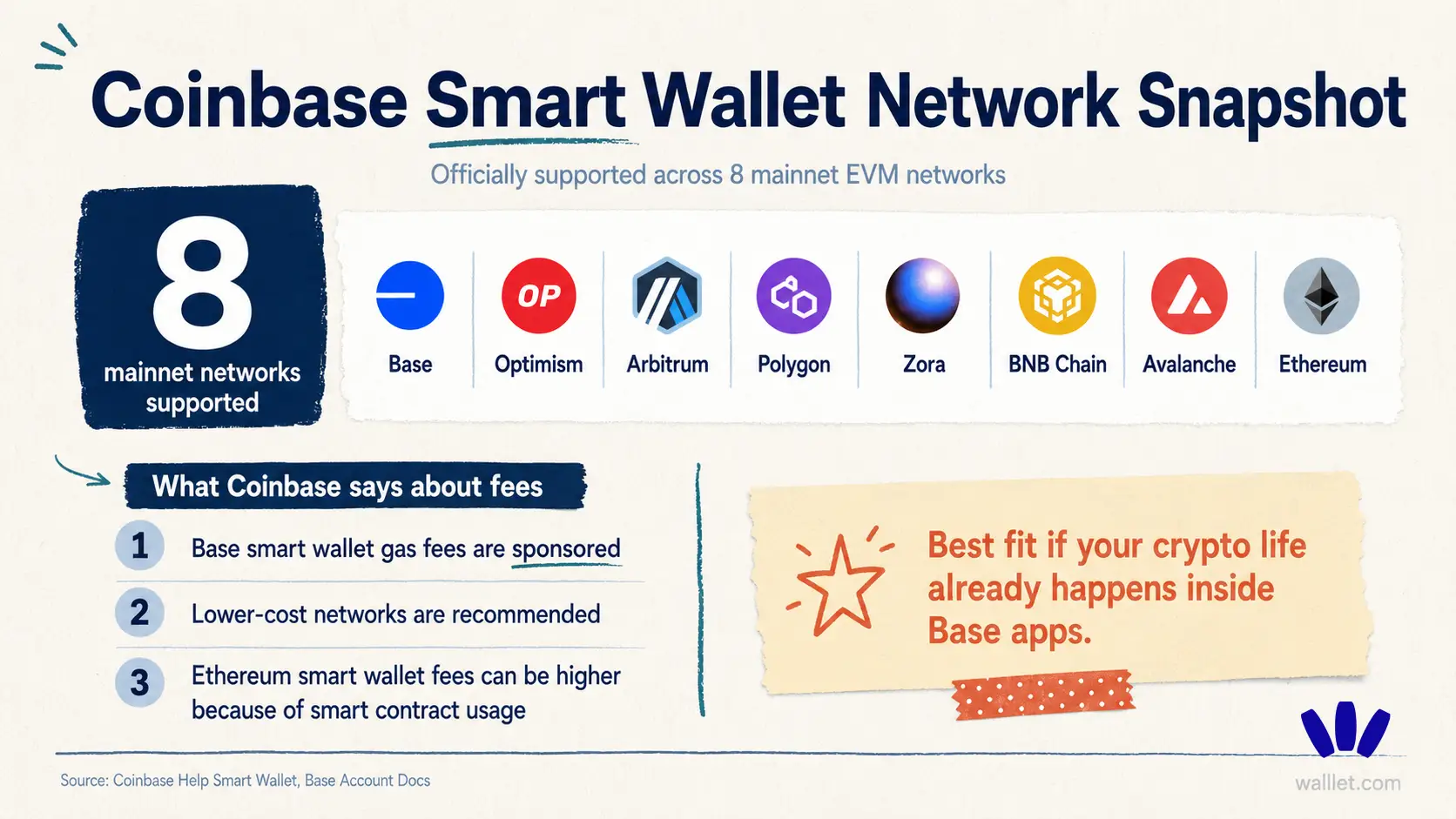
Coinbase’s own help page says Smart Wallet supports low-cost chains including Base, Optimism, Arbitrum, Polygon, Zora, BNB, Avalanche C-Chain, and Ethereum Mainnet. It also recommends using lower-cost networks like Base because Ethereum smart wallet transactions can cost more due to smart contract usage.
So yes, it supports more than Base. Still, the product story is very Base-shaped.
There is also naming clutter. Coinbase Wallet. Base app. Base Account. Smart Wallet. Base extension. Legacy Base app. A user can run into all of these and wonder whether they are looking at the same thing.
For someone deep in the ecosystem, fine.
For a normal user trying to choose one wallet? A bit foggy.
Is walllet.com better for everyday self-custody?
This is the cleaner walllet.com angle: daily crypto use, with fewer intimidating moments.
walllet.com is a seedless, self-custodial smart wallet built around passkeys, biometrics, clearer transaction prompts, and simpler onchain use. If you want the fuller product explanation, read What Is walllet?.
The important bit is this: walllet.com is not only trying to make wallet creation easier. The bigger job is what happens after that.
Approving a transaction. Reading what you are signing. Sending stablecoins. Avoiding suspicious approvals. Dealing with gas. Using crypto without feeling like the interface is waiting for you to mess up.
That is where walllet.com feels more aligned with everyday users.
Because for many people, the problem is not “I need more wallet features.” The problem is: “I want control, and I don’t want every action to feel dangerous.”
The real comparison: what happens when you use the wallet?
A wallet can look great during onboarding. The real test comes later. Here is what to check before choosing:
Real moment | What to ask yourself |
Creating the wallet | Did setup feel clear, or did it make you nervous? |
Recovering access | Do you know what happens if you lose your phone? |
Sending crypto | Do you understand the network, amount, fee, and recipient? |
Connecting to apps | Does the wallet explain what the app wants? |
Approving a transaction | Can you read what you are approving? |
Handling gas | Can you complete the action without hunting for the right native gas token? |
Moving from an exchange | Can you test slowly before relying on the wallet? |
That last one matters. A lot of people compare wallets like they are comparing phone specs. Wrong lens. Compare the moments where mistakes cost money.
Which wallet is better for beginners?
Coinbase Smart Wallet may be easier for beginners who already use Coinbase and mostly want to try Base apps.
walllet.com may suit beginners who want a broader self-custody wallet that feels less technical in daily use. Especially users who worry about seed phrases, gas tokens, suspicious approvals, or signing something they do not understand.
If this is your first serious wallet decision, this guide to the best crypto wallet for beginners is a useful next read. The simple check:
If you want an entry point into Coinbase/Base app flows, Coinbase Smart Wallet makes sense.
If you want a daily wallet for holding, sending, receiving, and using crypto with less anxiety, walllet.com is probably the more natural test.
Probably. Test it.
Which wallet is better for Base, USDC, and app-native flows?
Coinbase Smart Wallet has a stronger case here.
If your main use case is Base apps, one-tap USDC-style flows, and Coinbase-connected experiences, Coinbase Smart Wallet is well placed. That is its lane.
walllet.com becomes more interesting when your use case is broader. Holding crypto. Sending stablecoins. Swapping. Checking transaction meaning. Avoiding scary approvals. Moving slowly from exchange dependence into self-custody.
Different job.
Different wallet feel.
Safety and recovery: what you should check first
Seedless does not mean riskless.
That point is worth saying clearly. A seedless wallet removes the old seed phrase burden, but the responsibility shifts somewhere else: your device security, passkey setup, account recovery path, and the way transactions are approved.
Before moving meaningful funds, ask:
Can I recover access if I lose this device?
Do I understand where my passkey is stored?
Does the wallet explain what I am signing?
Can I test with a small amount first?
For more detail, read Are Seedless Wallets Safe?. It covers the real risks: device loss, recovery failure, hidden custody, and bad approvals.
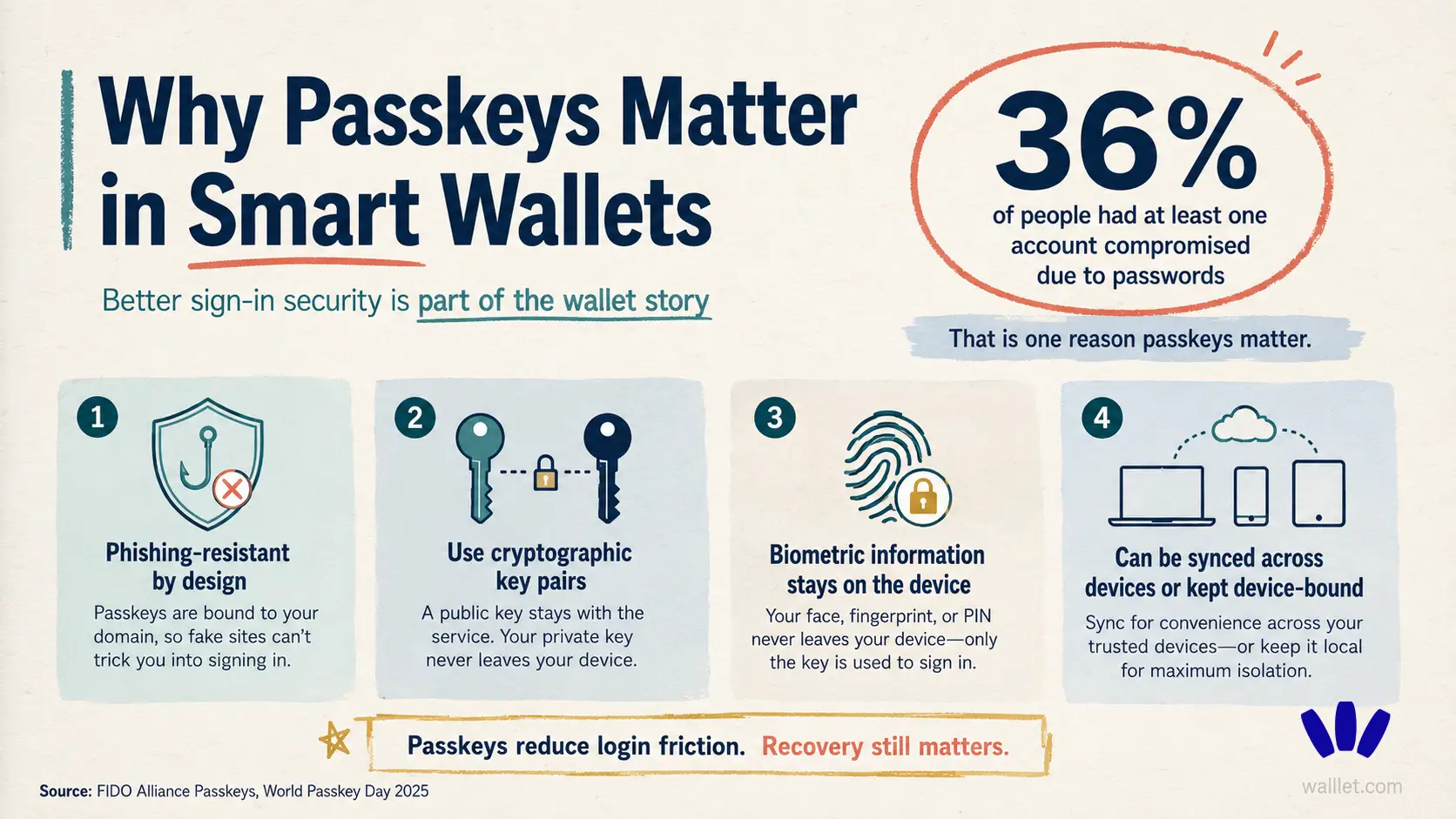
And yes, passkeys are safer than passwords in important ways. They use cryptographic credentials and are designed for phishing-resistant sign-in. Still, a passkey does not protect you from every bad transaction. A wallet can help you understand more. You still have to look.
The main tradeoff
Coinbase Smart Wallet has the ecosystem advantage. Bigger brand. Strong Base connection. Familiar surface for many users.
walllet.com has the everyday self-custody angle. Less seed phrase stress, clearer prompts, and a wallet experience built around people who want control without crypto feeling like a technical test.
The tradeoff is obvious enough.
Coinbase feels familiar. walllet.com feels more focused.
That may matter more than the feature table.
Try this before choosing
Use Coinbase Smart Wallet if your crypto life mostly happens inside Coinbase, Base, and Base-enabled app flows.
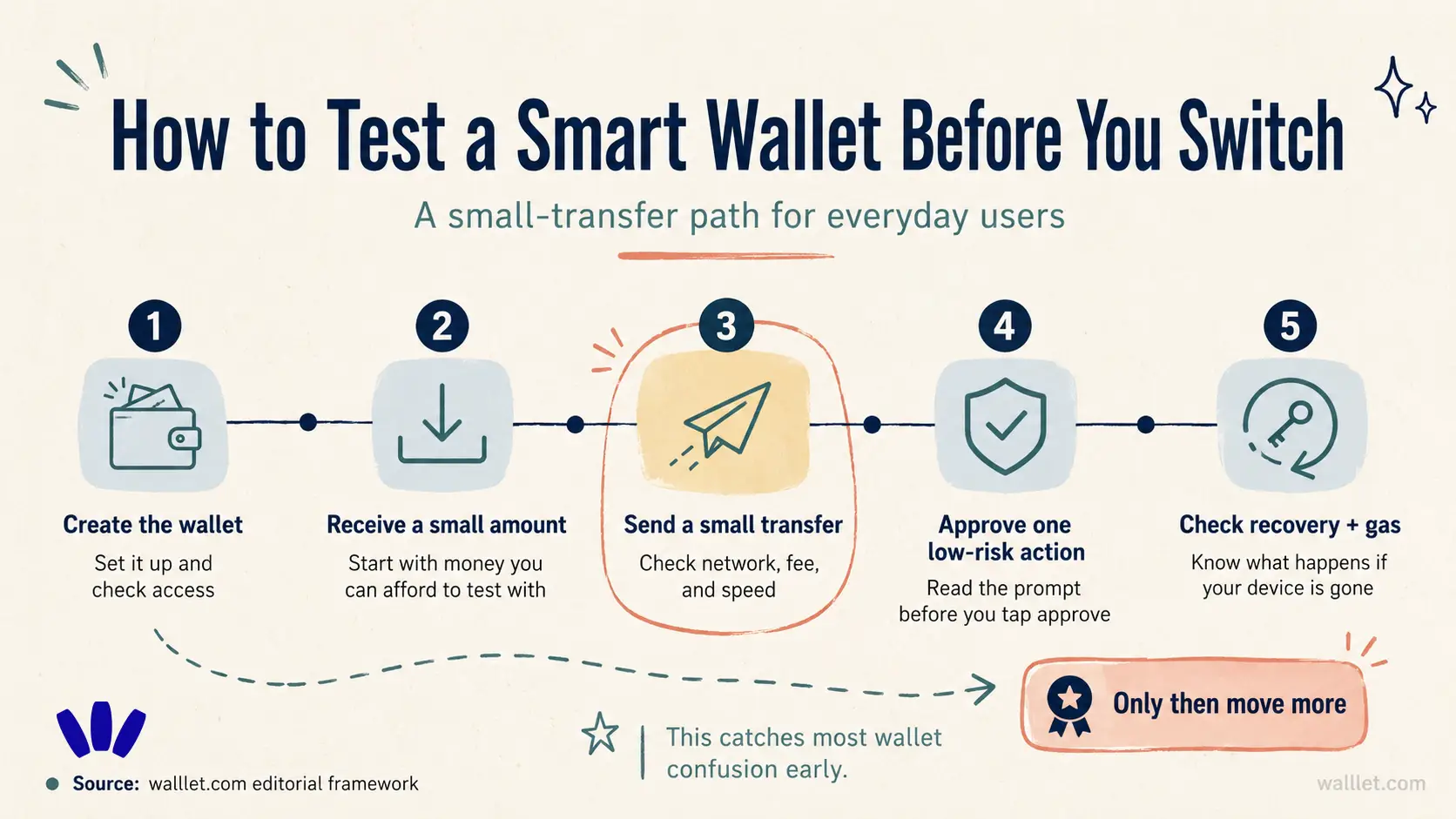
Try walllet.com if you want a seedless self-custody wallet for daily crypto use. Start small. Send a little. Read the prompts. Try the gas experience. See how it feels when the wallet is no longer empty.
That is the real comparison. Not the landing page. The first real transaction.
Want a seedless wallet built for clearer everyday self-custody?
Create your walllet.com wallet, transfer a small amount, and test one real transaction before moving larger funds.
