A simple mental model for understanding what lives onchain, what your wallet actually protects, and why deleting an app is not the same as losing your funds.
Your crypto is not sitting inside an app. Your crypto wallet is what lets you prove it is yours. Well if you confused about where your crypto actually lives, here in this article you can learn what the blockchain stores, what a wallet really stores, and what happens if you delete the app or lose your phone.
TL;DR
Your crypto is not stored inside your wallet app. It lives on the blockchain, which is the shared ledger that records who controls what.
Your wallet mainly manages the credentials needed to view balances, receive assets, and approve transactions.
If you delete the app or lose your phone, your assets do not disappear from the blockchain. What matters is whether you still have a valid way to recover access.
That is why wallet design matters so much, especially for beginners.
One of the most common beginner questions in crypto sounds almost childlike, in a good way: “If I bought crypto in a wallet app, where is it actually sitting?”
It is a smart question, because the word wallet quietly creates the wrong mental picture. In everyday life, a wallet holds cash. In crypto, a wallet does not work like a leather pocket for coins. It works more like a secure control panel plus the credentials that let you interact with assets recorded on a blockchain.
Related: Best Crypto Wallet for Beginners: What to Look for Before You Download Anything
If you understand that one idea, a lot of crypto starts making more sense. You stop panicking when an app is deleted. You stop imagining that your coins live inside your phone. And you get a much clearer picture of what “self-custody” really means.
What people mean when they say “my crypto is in my wallet”
When most people say “my crypto is in my wallet,” they usually mean one of two things.
Sometimes they mean, “This is the app I use to see my balance.”
Other times they mean, “This is the tool I use to control my crypto.”
Both are understandable. Neither is technically exact.
Your wallet is the interface you use to check balances, receive assets, and approve transactions. But the asset itself is not sitting inside the app like a file in a folder. The blockchain is the system that keeps the authoritative record of ownership and transaction history. That shared ledger is the source of truth, not the app icon on your home screen.
Where crypto actually lives
The simplest answer is this: your crypto lives on the blockchain.
A blockchain is a distributed ledger maintained by a network of computers. It records addresses, balances, and transactions according to the rules of that network. When people talk about “owning” BTC, ETH, or a token, what they really mean is that the blockchain recognizes that a certain address has control over those assets according to valid cryptographic rules.
That is why your coins do not vanish just because you changed phones, deleted an app, or stopped using one wallet interface. The blockchain does not care which app you prefer. It only cares whether a valid transaction is signed by the right credentials.
The blockchain is the source of truth
Think of the blockchain as the ledger, not the wallet. Your wallet does not rewrite the ledger. It reads from it and interacts with it.
When you open a wallet app and see a balance, the app is showing you what the blockchain says about addresses you control. If the app glitches, loads the wrong network, or fails to display a token properly, that can be annoying, but it does not automatically mean the funds are gone. The blockchain record still matters most.
What a crypto wallet really stores
So if the wallet is not storing the crypto itself, what is it storing?
At the heart of it, a wallet manages the keys or credentials that let you access and control your assets. In classic crypto wallets, that usually means a private key or a seed phrase that can regenerate private keys. Wallet software may also store helpful supporting data, such as transaction-related information, labels, or settings, but the critical piece is access control.
If that sounds abstract, here is the cleaner mental model:
The blockchain is the vault record.
Your public address is where assets can be sent.
Your private key is what proves you are allowed to move them.
Your wallet is the tool that manages that proof safely enough for a human to use.
Public address vs private key
A public address is meant to be shared. It is the destination people use to send you assets.
A private key is meant to stay secret. It is the credential used to authorize transactions. If someone gets your private key, they can usually control the assets linked to it. If you lose the private key and have no valid recovery method, you can lose access yourself.
This is why crypto ownership feels different from logging into a normal bank app. In banking, the institution maintains the system of record and can often help recover access. In self-custody, control is tied much more directly to cryptographic credentials.
What the wallet app adds on top
Wallet apps exist because raw cryptography would be unbearable for normal people.
A good wallet turns confusing blockchain mechanics into something a human can actually use. It shows balances, formats addresses, builds transactions, asks for confirmation, and helps you interact with networks and apps without needing to think like a protocol engineer. Bitcoin’s own developer documentation describes wallet programs as creating public keys, using private keys to spend, and interacting with the network to gather blockchain information and broadcast transactions.
In other words, the wallet is not the treasure chest. It is the cockpit.
What happens if you lose your phone or delete the app
This is where the right mental model pays rent.
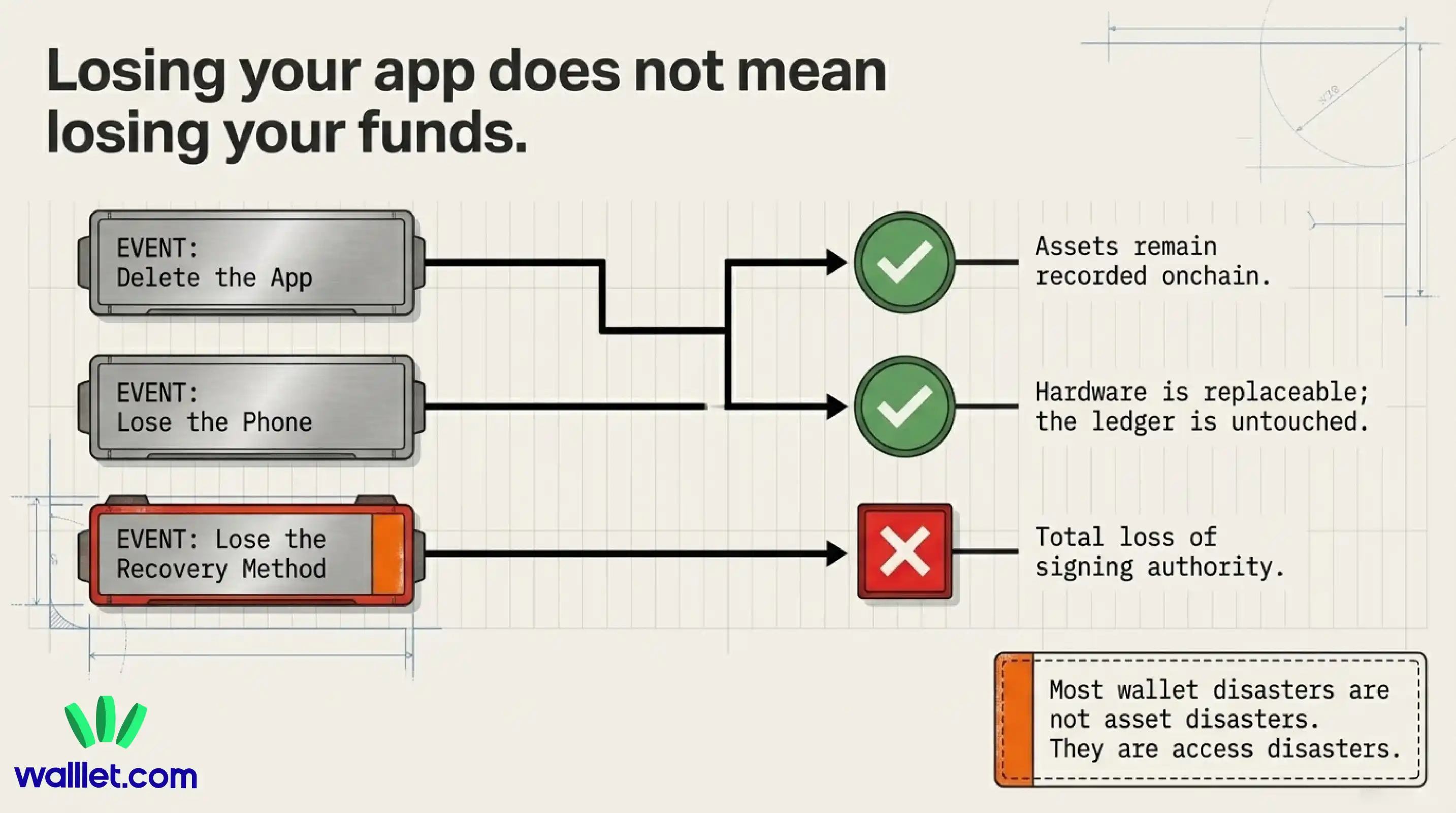
If you delete a wallet app, you are deleting the interface on that device. You are not deleting the blockchain. Your assets remain recorded onchain. The real question is whether you can still prove control and restore access.
If you lose your phone, the same principle applies. The phone was one place from which you accessed your wallet. It was not the place where your crypto physically lived. The outcome depends on your recovery method. In a traditional wallet, that usually means your seed phrase. In a seedless or passkey-based design, recovery may depend on your device security model and trusted account setup.
Losing the app is not the same as losing your funds
People often blur together three different events:
Deleting an app
Losing a device
Losing the only valid recovery method
Only the third one is truly dangerous.
You can reinstall an app. You can replace a phone. What matters is whether you still have a legitimate path back to signing authority. Once you see that distinction, crypto feels less haunted and more logical.
Losing access vs losing crypto
This is the sentence beginners need to hear clearly:
Most wallet disasters are really access disasters.
The asset may still be onchain exactly where it was before. What is lost is the ability to prove ownership and authorize movement. That is why wallet setup is not just a convenience choice. It is an access design choice.
How walllet.com helps you access crypto safely
This is where walllet.com can naturally fit into the story.
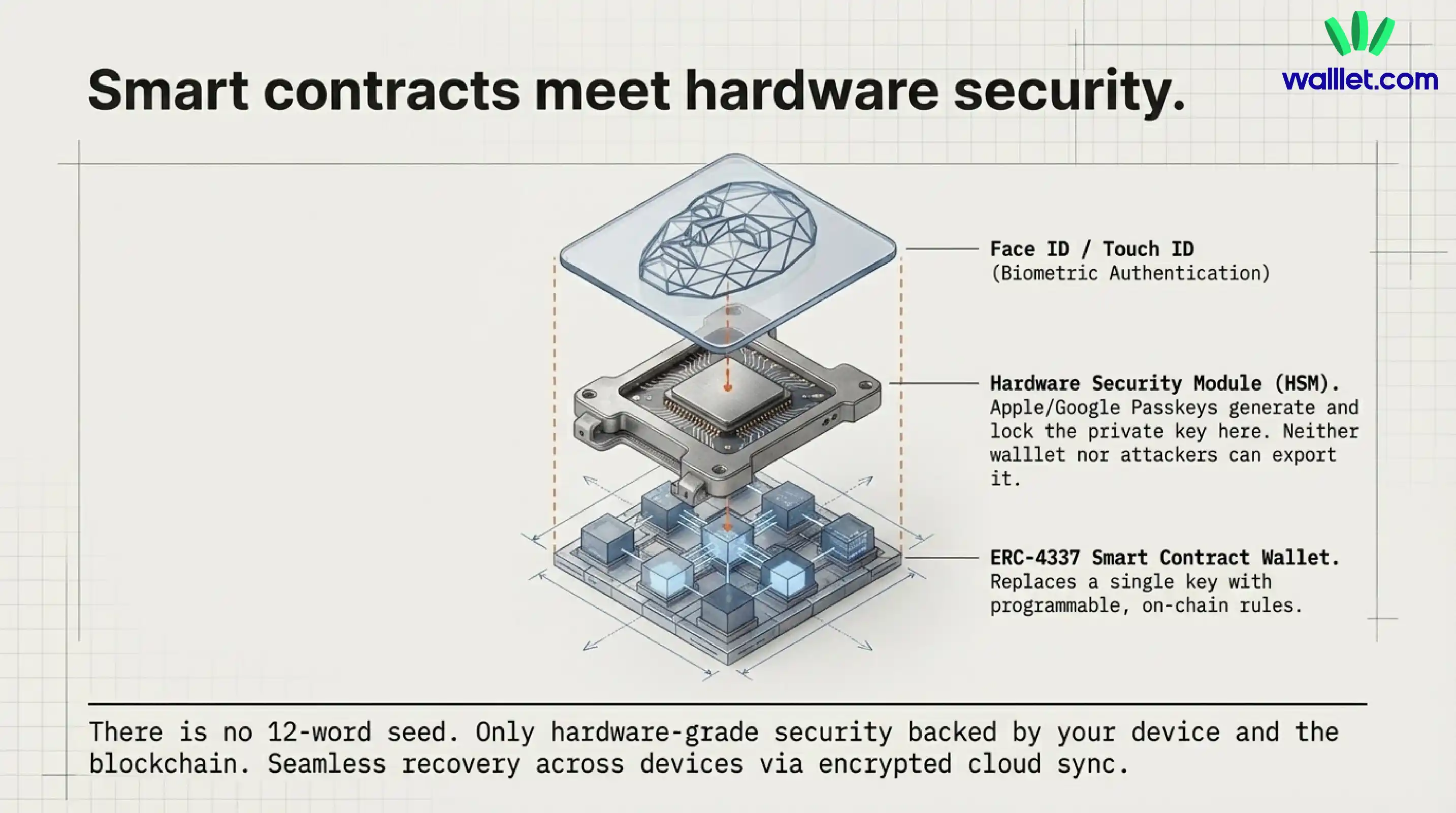
walllet.com positions itself as a non-custodial smart wallet with hardware-level security, passkey-based setup, biometric authentication, and a seedless experience designed to remove a lot of beginner friction. Instead of making new users start with a 12-word recovery ritual, walllet.com is built around a more familiar device-security model and clearer transaction UX.
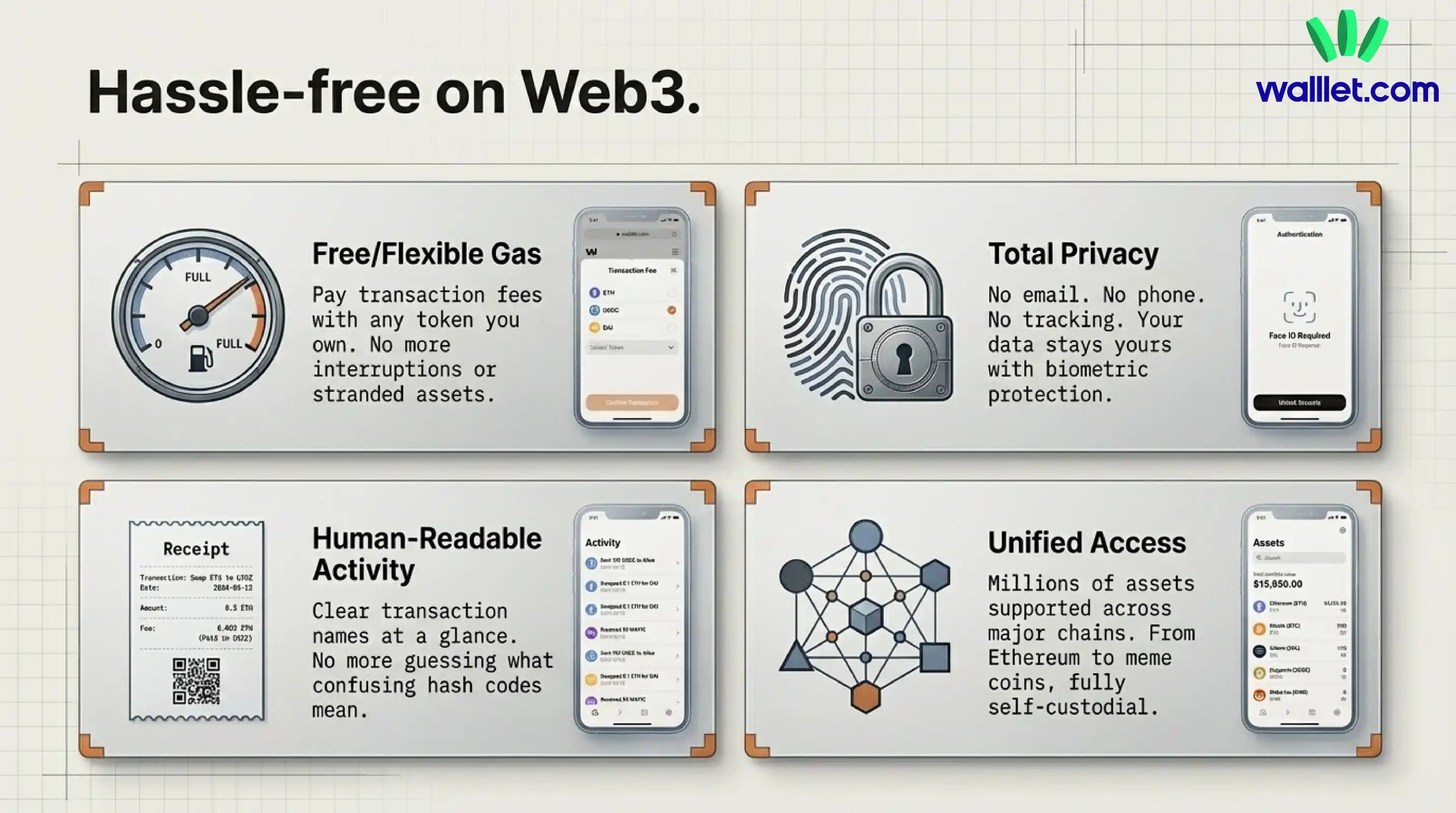
That matters because the hardest part for many beginners is not understanding the blockchain in theory. It is carrying the burden of old-school key management in practice.
Apple explains that passkeys use public-key cryptography, keep the private component off the server, can be authorized with Face ID or Touch ID, and sync through iCloud Keychain with end-to-end encryption. Google similarly documents that passkeys are managed by password managers, can sync across devices, and in Google Password Manager are synchronized end-to-end encrypted. walllet’s seedless model leans into this newer pattern of access, which can make self-custody feel less like handling loose plutonium and more like using a modern secure app.
How seedless access changes the beginner experience
For a beginner, the difference is not just technical. It is emotional.
The old mental model says:
Here is your secret phrase. Do not lose it, do not photograph it, do not mistype it, do not let anyone see it.
The newer mental model says:
Use the secure device habits you already understand, such as biometrics, trusted accounts, and platform-backed credential systems.
That changes where responsibility sits. And for many people, that is exactly what makes self-custody finally feel usable.
What this means for self-custody users
If you remember only three things, make them these:
Your crypto is recorded on the blockchain.
Your wallet manages access, not storage.
Your biggest risk is usually losing or exposing the credentials that control that access.
That is the whole machine in miniature.
Once you grasp that, a lot of beginner confusion disappears. You understand why a wallet can be replaced but assets can remain. You understand why private keys matter so much. And you understand why products like walllet.com focus so heavily on safer access design instead of just prettier screens.
Crypto becomes less like magic and more like infrastructure. Strange at first, then suddenly obvious. See crypto the simpler way with walllet.com: a seedless smart wallet built to help you access your assets with less confusion and more confidence.
